



AnomalyDetection
AnomalyDetection[{example1,example2,…}]
generates an AnomalyDetectorFunction[…] based on the examples given.
AnomalyDetection[LearnedDistribution[…]]
generates an anomaly detector based on the given distribution.
AnomalyDetection[True{example11,example12,…},False{example21,…}]
can be used to indicate which examples should be considered anomalous.
Details and Options
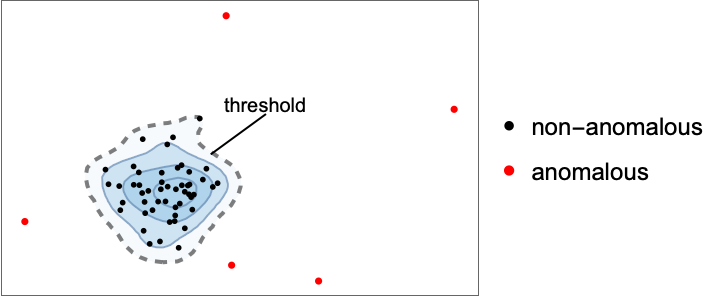
- AnomalyDetection attempts to model the distribution of non-anomalous data in order to detect anomalies (i.e. "out-of-distribution" examples).
- Examples are considered anomalous when their RarerProbability value is below the value specified for AcceptanceThreshold.
- AnomalyDetection can be used on many types of data, including numerical, nominal and images.
- Each examplei can be a single data element, a list of data elements or an association of data elements. Examples can also be given as a Dataset or a Tabular object.
- Anomalous data can also be specified using the following syntax:
-
True{e11,e12,…},False{e21,…} association of anomalous (True) and non-anomalous data {e1,e2,…}{True,False,…} rule between examples and anomaly specifications {e1True,e2False,…} list of anomaly specification rules {e1,e2,…}{i,j,…} anomalies at position i, j, … {e1,e2,…}None no anomalous examples - AnomalyDetection[examples] yields an AnomalyDetectorFunction[…] that can detect anomalies, given new examples.
- FindAnomalies[AnomalyDetectorFunction[…],data,…] can be used to find anomalies in data according to the given detector.
- When test data comes from the same distribution as training data, AcceptanceThreshold corresponds to the anomaly detection false-positive rate.
- AnomalyDetection can be used with or without indicating which examples are anomalous (and which are not). Indicating which examples are anomalous helps with training the anomaly detector and allows it to determine a value for AcceptanceThreshold automatically.
- In AnomalyDetection[True{example11,example12,…},False{example21,…}], True indicates that the corresponding examples are anomalous, and False that they are not. These labels can also be specified by AnomalyDetection[{example1,example2,…}{True,False,…}] and AnomalyDetection[{example1True,example2False,…}].
- AnomalyDetection[{example1,example2,…}{i,j,…}] can be used to specify that examplei, examplej, etc. should be considered anomalous, and that others should be considered as non-anomalous.
- AnomalyDetection[{example1,example2,…}None] specifies that none of the examples are anomalous.
- The following options can be given:
-
AcceptanceThreshold 0.001 RarerProbability threshold to consider an example anomalous FeatureExtractor Identity how to extract features from which to learn FeatureNames Automatic feature names to assign for input data FeatureTypes Automatic feature types to assume for input data Method Automatic which modeling algorithm to use PerformanceGoal Automatic aspects of performance to optimize RandomSeeding 1234 what seeding of pseudorandom generators should be done internally TimeGoal Automatic how long to spend training the detector TrainingProgressReporting Automatic how to report progress during training ValidationSet Automatic the set of data on which to evaluate the model during training Weights Automatic weights for data elements - Possible settings for PerformanceGoal include:
-
"Memory" minimize storage requirements of the detector "Quality" maximize the modeling quality of the detector "Speed" maximize speed for detecting new anomalies "TrainingSpeed" minimize time spent producing the detector Automatic automatic tradeoff among speed, quality and memory {goal1,goal2,…} automatically combine goal1, goal2, etc. - Possible settings for Method are as given in LearnDistribution[…].
- The following settings for TrainingProgressReporting can be used:
-
"Panel" show a dynamically updating graphical panel "Print" periodically report information using Print "ProgressIndicator" show a simple ProgressIndicator "SimplePanel" dynamically updating panel without learning curves None do not report any information - Possible settings for RandomSeeding include:
-
Automatic automatically reseed every time the function is called Inherited use externally seeded random numbers seed use an explicit integer or strings as a seed - AnomalyDetection[…,FeatureExtractor"Minimal"] indicates that the internal preprocessing should be as simple as possible.
Examples
open all close allBasic Examples (2)
Train a detector function on a numeric dataset:
ad = AnomalyDetection[{1.2, 2.5, 3.2, 4.6, 5.6, 7, 8, 9, 8.3}]Use the trained detector to find examples that are considered anomalous:
ad[{5, 6, 11, 100}]Train an AnomalyDetectorFunction on a list of colors:
ad = AnomalyDetection[{RGBColor[0.34423361016735393, 0.9949706023751553, 0.9913428099254031], RGBColor[0.974441953220345, 0.5882988960563109, 1.0068782254084538], RGBColor[0.6919394636833026, 0.9725016422639512, 1.0005784902145627], RGBColor[0.6609415139121996, 0.5317017233919189, 0.9984727629540214], RGBColor[1.030082196239495, 0.15562868152451315, 1.0135215761762417], RGBColor[0.7139636743692107, 0.5910083012886909, 0.9948556194109465], RGBColor[0.6236652587743242, 0.6870661704360941, 1.0022299478695442], RGBColor[0.39687500809516707, 0.5108643112778942, 0.9952467598808223], RGBColor[0.7443884965650738, 0.4349634688965386, 1.0003462995235857], RGBColor[0.6288110830431992, 0.5724921773022011, 1.0022472231639297], RGBColor[0.5632946778321253, 0.7631572865298704, 1.00798403643781], RGBColor[0.6773040387676239, 0.6976386941501098, 1.0022055898686073], RGBColor[0.8457795253477449, 0.7398849813050531, 1.005573228966982], RGBColor[1.0205520113446505, 0.690968271602499, 1.0035737791209818], RGBColor[0.7549242858326427, 0.6235127402960372, 0.9944743070141697], RGBColor[0.6834128429576036, 0.39958492739867546, 1.0026226416576371], RGBColor[0.5501400976778553, 0.7625174064725535, 0.9977464842503022], RGBColor[0.2615551876290124, 0.765008680557518, 0.9942818885148523], RGBColor[0.6189412061989856, 0.6852860381116407, 0.9997035911561294], RGBColor[0.7138254755324788, 0.6853604572170703, 1.0029509153000369], RGBColor[0.4043093843454192, 0.6125541754696873, 0.9999118021859527], RGBColor[0.8205010700454642, 0.7806771392383814, 1.00562852909626], RGBColor[0.812290231487381, 0.5331790321181455, 1.0009593659644767], RGBColor[0.8437915419001423, 0.24940229677216713, 1.006288621546154], RGBColor[0.7195507678442272, 0.8579676385844572, 1.0076774216805127], RGBColor[0.7235256726749637, 0.04660266162004301, 1.002355100767978], RGBColor[0.5049286226975376, 0.5589372943296006, 0.9995003905321003], RGBColor[0.7902098896284458, 0.6116626144639822, 0.9990427737864], RGBColor[0.6442706429715445, 0.9072560478512116, 1.000385767571579], RGBColor[0.567894775541235, 0.5752444998384344, 1.001663707952634], RGBColor[0.7090487279645562, 0.5421179945569079, 1.001712577867206], RGBColor[0.5354836215932339, 0.6106357574940795, 0.993204356795479], RGBColor[0.5030637654134358, 0.4669355559078886, 0.9963828836620333], RGBColor[0.7415981367902569, 0.277727705996566, 0.9989098811714942], RGBColor[0.8203464087906245, 1.0704830725870433, 0.9977753741130557], RGBColor[0.757424602054376, 0.8870888154019599, 1.0026308777744768], RGBColor[1.044681726621579, 0.43148260079970435, 1.0000554098379415], RGBColor[0.7123234424159927, 0.7660133438966698, 0.9939497163541979], RGBColor[0.8613007435666715, 0.6948619856745523, 1.001530354102207], RGBColor[0.41181251755343673, 0.9672315750613055, 0.9944842976740979], RGBColor[0.5453938214145515, 0.5240998539872904, 0.9988752883080638], RGBColor[0.41015258996245973, 0.6605139315627333, 0.9963386834508943], RGBColor[0.6381328222903362, 0.6263605273048086, 0.9986231684853986], RGBColor[0.7175060009642432, 0.4181868220413135, 0.9952981757098316], RGBColor[0.6561208785194351, 0.8052553301188847, 1.0044150292740501], RGBColor[0.6801324193509629, 0.6860611673374102, 1.0063709449623603], RGBColor[0.48439775318648953, 1.0445503544672912, 0.995164617560423], RGBColor[0.7504260932976325, 1.2526284300521322, 0.9974906868890978], RGBColor[0.758986473236708, 0.6980863906805845, 0.9905624502205769], RGBColor[0.68653014676303, 0.3987433510251484, 1.0101914043475726], RGBColor[0.7258934369166311, 0.839312286794006, 1.0017190709090071], RGBColor[0.6767174761974676, 0.5887816929279261, 0.9967239999218663], RGBColor[0.495023238613132, 0.7849304242049479, 1.0003358461174956], RGBColor[0.6211007158802914, 0.7092442266431815, 0.9969717261106543], RGBColor[0.47474787148341835, 0.8183897812391591, 0.9894645947886548], RGBColor[1.1455719220773122, 0.5517697342804933, 1.0097752283765262], RGBColor[0.7345871487081479, 0.6663797125171111, 0.9939592574893115], RGBColor[0.2759607351913042, 0.20891869281293557, 0.9987113275242301], RGBColor[0.5249977054607774, 0.8776246823905124, 0.9998731789999219], RGBColor[0.7234140693542443, 0.6648642463332401, 0.9925799746288244], RGBColor[0.4508787001289919, 0.8402095981476847, 0.9904182728404552], RGBColor[0.7240651441388569, 0.9354306986341794, 1.0003509407564144], RGBColor[0.49381361328171114, 0.8466232420511408, 0.9950118848626659], RGBColor[0.5732848248526256, 0.6045762183258268, 0.9987556290351441], RGBColor[0.4916601726869988, 0.46374455643463786, 1.0041987233871592], RGBColor[0.9058580136974359, 0.6931994481820869, 1.0015707887617427], RGBColor[0.8208441638435511, 0.3148647305027396, 1.000675398083302], RGBColor[0.8480087279269137, 0.48876093804105386, 1.0048303602991822], RGBColor[0.6235206218788477, 0.6964248242748691, 1.0022249395243656], RGBColor[0.5005490046162244, 0.7286296126977386, 0.9979758094120281], RGBColor[0.956882935321649, 0.6333171909243984, 1.0023047047916631], RGBColor[0.82864340742 ... 345947, 1.0050529949272649], RGBColor[0.8627518311306448, 0.0794264949802388, 1.0002723544629901], RGBColor[0.6914563210496609, 0.9597900303860196, 1.0027003789563933], RGBColor[0.47151759679847793, 0.6703810557168081, 0.9936579983346822], RGBColor[0.28644198136082055, 0.8084736876073915, 0.994779633532951], RGBColor[1.247808497378954, 0.20814656783371066, 1.005363642300721], RGBColor[0.8910488167137816, 0.29066194421125463, 1.0071152523979605], RGBColor[0.4108215503422852, 0.6763153894909187, 1.0022850061898758], RGBColor[0.6032059481765558, 0.851239218329519, 1.0032178496930786], RGBColor[0.5624507815658685, 0.5929363506963986, 1.0021290242411665], RGBColor[0.3905583278155051, 0.5915402428465296, 0.9925865664945029], RGBColor[0.2951000915320075, 0.9352243432386041, 0.9955043799002488], RGBColor[0.8891141436712875, 0.6447199381306787, 1.0068159967304242], RGBColor[0.28950245718518364, 0.5700444001184012, 0.999261094342013], RGBColor[0.44758759117758345, 0.5686921520482265, 0.9958695857484522], RGBColor[0.7591965541685731, 0.8568508974291336, 1.0028092759699814], RGBColor[0.6236344925090667, 0.4824053762946353, 1.0002773461009513], RGBColor[0.7408545254024963, 0.4528899451570373, 1.0019655567961037], RGBColor[0.7830147685728901, 0.9200780202949879, 0.9998502105724043], RGBColor[0.37916507157886625, 0.7498847335479669, 0.9923470080089104], RGBColor[0.7872647806451795, 0.38484116213136405, 0.9981402312625489], RGBColor[0.7316779335859452, 0.6261357916619933, 0.9959633386629378], RGBColor[0.564873609889761, 0.5380472260782597, 1.0039101521302316], RGBColor[0.8463209258052469, 0.2960669667189687, 0.9979044114987232], RGBColor[0.6665145129050796, 0.7172754114784181, 0.9955123897280956], RGBColor[0.7763623320333368, 0.5625495927644992, 1.0019204423891395], RGBColor[0.6352480964210127, 0.32527126925838057, 1.0035008637074296], RGBColor[0.9020136283955144, 0.6090213717980114, 1.0009101044133322], RGBColor[0.35179616385345197, 0.8873458187461462, 0.9943398446119561], RGBColor[0.6892481471309895, 0.7744224337307276, 0.9968957963300527], RGBColor[0.881777607028809, 0.28361895706387896, 1.0018137618822816], RGBColor[1.157450430970441, 0.1612042870171504, 1.0073340454635225], RGBColor[0.58833725060706, 0.8449924253878058, 0.9983715783218108], RGBColor[0.6191109730835055, 0.6775103986947937, 0.9949238484663862], RGBColor[0.7686934120958153, 0.7217689419082524, 0.996245549712363], RGBColor[1.0707153454415779, 0.38934552676857115, 1.0061105031044426], RGBColor[0.4257513272330986, 1.0566489722356325, 0.9924773502391904], RGBColor[0.7242224636275749, 0.6570073428675383, 0.9986005675093127], RGBColor[0.7438174356063888, 0.617198235612156, 0.9995822700402942], RGBColor[0.8630763450328225, 0.19018510514491999, 1.0072262681987556], RGBColor[0.5498309264384517, 0.5759523884599071, 0.9984433057481402], RGBColor[0.5580772280281927, 0.7827387076975386, 0.9921445191296031], RGBColor[0.5388185556361564, 0.6315463683002376, 0.9945446192822313], RGBColor[0.9092345217986617, 0.8178777007876094, 1.0082161475701457], RGBColor[0.6798268948534387, 0.9206455250817887, 0.9960592452202999], RGBColor[0.35817470590500133, 1.0319804703876905, 0.9962531895534059], RGBColor[0.4243082504253557, 0.8629909259478613, 0.9893894707275183], RGBColor[0.6893625455483994, 0.7282867546233841, 0.9995391420394324], RGBColor[0.8492549370744441, 0.4293920924003687, 1.001183247096189], RGBColor[0.9228050292581644, 0.5846748916660687, 1.0073887470371234], RGBColor[0.7710987660489688, 0.5139598451199441, 1.0045375564342613], RGBColor[0.26446220648498037, 1.3857675896295196, 0.9847082217180225], RGBColor[0.5977361225294263, 0.6855863458138487, 0.9985978114138284], RGBColor[0.6556661278732271, 0.8158702771438023, 0.993322923260324], RGBColor[0.5515829348142409, 0.6299540702384048, 0.9961627823888869], RGBColor[0.9113690850189474, 0.7229386146592239, 1.009840553585347], RGBColor[0.8105097994612612, 0.365932931712455, 1.0043040292006629], RGBColor[0.6802336267354607, 0.638936773009825, 1.0004422669075017], RGBColor[0.6466466017372586, 0.34063068295261795, 1.001895695310875], RGBColor[0.34202256370318235, 0.26768956801319244, 1.0015339776108454], RGBColor[0.5849023017175482, 0.5707330850816604, 0.9965948391799168], RGBColor[0.5923501432235162, 0.780365029033844, 0.9923633927991188], RGBColor[0.6020893847553299, 0.8955500346685753, 0.9900602565416496], RGBColor[0.4014655775892002, 0.7530375151576032, 1.0023764444423535], RGBColor[0.6948987347321366, 0.3798050222617043, 1.010216846343959], RGBColor[0.7053547826953562, 1.10911275911845, 1.0009824591202139], RGBColor[0.6532425293189801, 0.8514070086152319, 0.9999438607498327], RGBColor[0.7628789845612727, 0.5511297681637599, 0.9928137690353301], RGBColor[0.7779887292228563, 0.5377213936445591, 1.0007558812680644], RGBColor[0.47108617035959904, 1.2887392515479092, 0.9910866448506571], RGBColor[0.6030534147511111, 0.8340466905076884, 0.9881370811088525], RGBColor[0.38958968973612385, 0.9823046094943719, 0.9881878339326584]}]Attempt to find outliers in a list of colors using the trained anomaly detector:
ad[{RGBColor[1, 0, 0], RGBColor[0, 0, 1], RGBColor[0, 1, 0], RGBColor[0.6489069067250937, 0.5755756573803703, 1.003672353132791], RGBColor[0.7057443474984795, 0.8378739475634039, 0.994666604840032], RGBColor[0.8514932374154848, 0.6577551436509919, 1.0040492460246024], RGBColor[0.7659083378262406, 0.3515834404371405, 1.0034001669125583], RGBColor[0.6507402669657356, 0.755721701773461, 1.0021331605458152], RGBColor[0.7423441703196316, 0.7817619172473703, 1.0057619503122168], RGBColor[0.6266268813681602, 0.6297653726914617, 0.9997898817416094], RGBColor[0.7569527399301882, 0.6816489606911452, 0.9947672162483416], RGBColor[0.6554483765238713, 0.40057368425245776, 1.004481079970983], RGBColor[0.4768853043963855, 0.5927113842554544, 0.9989095211404951], RGBColor[0.7092377211322144, 0.9854091931950826, 1.0036363899562788], RGBColor[0.6695176003467702, 0.5477660604245632, 0.9988405619087125], RGBColor[0.3929643278490828, 0.6511568040964537, 0.9912589973644573], RGBColor[0.770688916213984, 0.8810088927042221, 1.0054877076630708], RGBColor[0.7649991624963735, 0.44806190154436465, 1.000062718345653], RGBColor[0.6498745893581738, 0.6377533151410597, 0.9942373350867331], RGBColor[0.684671816883397, 0.6450952259271742, 0.9996307705130395], RGBColor[0.8217993634264111, 0.5548900766689218, 1.0027475551791536], RGBColor[0.5011391747697476, 0.9551810292863081, 1.0012714675653138], RGBColor[0.7115065630502229, 0.5749466239018227, 0.9981767404305243], RGBColor[0.5126966915311191, 0.5878379904677047, 1.0042594359046022], RGBColor[0.7046967873331059, 0.5293353682933218, 0.9999334590140067], RGBColor[0.4926331760416396, 0.7530695229780565, 1.0001829034222909], RGBColor[0.8555058768935649, 0.5640049330472888, 1.0069230058887315], RGBColor[0.4910760147881812, 0.5804793980307775, 1.0058540115102932], RGBColor[0.5454883994263123, 0.6650926223195235, 1.0053286971713007], RGBColor[0.8532886060980814, 0.8021650005975375, 0.9953950569168204], RGBColor[0.7070746291172416, 0.7765272968960811, 0.9985966093273773], RGBColor[0.7015106973990245, 0.8211871735201386, 0.9963153787588797], RGBColor[0.44569478954203, 0.7419787584255451, 0.9898981710789684], RGBColor[0.7411728831330745, 0.7847098598680122, 0.9928200648120465], RGBColor[0.6764805255850147, 0.7432648958454903, 1.001277370463186], RGBColor[0.7045562925666643, 0.9483563196436429, 0.9958421147410664], RGBColor[0.8147038799415312, 0.6344891142586896, 1.0038814001490544], RGBColor[0.6813372654360339, 0.8198472586918514, 0.9963925120493498], RGBColor[0.6708813434747505, 0.33411265499158055, 0.9994792518245261], RGBColor[0.5455185452371998, 0.8472373302374782, 0.9952777829391884], RGBColor[0.8368811132992047, 0.9231368436930435, 1.0003466469891626]}]Scope (8)
Train an AnomalyDetectorFunction by labeling the anomalous examples with True, and False for the others:
ad = AnomalyDetection[<|True -> {-100, 200},
	False -> {3.3, 4, 5.2, 6, 7, 8, 9, 10, 12}|> ]
Specify the anomalies in an explicit list:
AnomalyDetection[{-100, 200, 3.3, 4, 5.2, 6, 7, 8, 9, 10, 12} -> {True, True, False, False, False, False, False, False, False, False, False} ]Specify the anomalies with a list of rules:
AnomalyDetection[{-100 -> True, 200 -> True, 3.3 -> False, 4 -> False, 5.2 -> False, 6 -> False, 7 -> False, 8 -> False, 9 -> False, 10 -> False, 12 -> False} ]Specify only the position of anomalous examples:
AnomalyDetection[{-100, 200, 3.3, 4, 5.2, 6, 7, 8, 9, 10, 12} -> {1, 2} ]Train an AnomalyDetectorFunction by specifying that none of the examples are anomalous:
ad = AnomalyDetection[{3.3, 4, 5.2, 6, 7, 8, 9, 10, 12} -> None]Use the trained AnomalyDetectorFunction to find anomalies:
ad[{150, 1, 2, 12, -50}]Train an AnomalyDetectorFunction on tabular data:
ad = AnomalyDetection[Tabular[Association["RawSchema" -> Association["ColumnProperties" ->
     Association["Value" -> Association["ElementType" -> "NumberExpression"]],
    "KeyColumns" -> None, "Backend" -> "WolframKernel"], "Options" -> {},
  "BackendData" -> Association["ColumnData" -> DataStructure["ColumnTable",
      {{TabularColumn[Association["Data" -> {{-0.7381498640269486, -0.3288040202205629,
             -0.5152387024806573, -0.6675243566986415, -0.17429727352303326, 0.4959818162388929,
             100}, {}, None}, "ElementType" -> "NumberExpression"]]}}]]]] -> {7}]
Apply the detector on a new table:
ad[Tabular[Association["RawSchema" -> Association["ColumnProperties" ->
     Association["Value" -> Association["ElementType" -> "Integer64"]], "KeyColumns" -> None,
    "Backend" -> "WolframKernel"], "Options" -> {},
  "BackendData" -> Association["ColumnData" -> DataStructure["ColumnTable",
      {{TabularColumn[Association["Data" -> {{0, 1, 1000}, {}, None}, "ElementType" ->
           "Integer64"]]}}]]]]]
Train an AnomalyDetectorFunction on a two-dimensional array of pseudorandom real numbers:
ad = AnomalyDetection[RandomReal[1, {20, 2}]]Use the trained AnomalyDetectorFunction to find anomalies in new examples with FindAnomalies:
FindAnomalies[ad, {{5, 0.6}, {0.3, 0.5}, {0.1, 0.2}}]Use the trained AnomalyDetectorFunction to find anomalies and their corresponding positions:
FindAnomalies[ad, {{0.8, 0.7}, {5, 0.6}, {0.3, 0.5}, {0.1, 0.2}}, {"Anomalies", "AnomalyPositions"}]Train a LearnedDistribution on colors:
ld = LearnDistribution[{RGBColor[0.34423361016735393, 0.9949706023751553, 0.9913428099254031], RGBColor[0.974441953220345, 0.5882988960563109, 1.0068782254084538], RGBColor[0.6919394636833026, 0.9725016422639512, 1.0005784902145627], RGBColor[0.6609415139121996, 0.5317017233919189, 0.9984727629540214], RGBColor[1.030082196239495, 0.15562868152451315, 1.0135215761762417], RGBColor[0.7139636743692107, 0.5910083012886909, 0.9948556194109465], RGBColor[0.6236652587743242, 0.6870661704360941, 1.0022299478695442], RGBColor[0.39687500809516707, 0.5108643112778942, 0.9952467598808223], RGBColor[0.7443884965650738, 0.4349634688965386, 1.0003462995235857], RGBColor[0.6288110830431992, 0.5724921773022011, 1.0022472231639297], RGBColor[0.5632946778321253, 0.7631572865298704, 1.00798403643781], RGBColor[0.6773040387676239, 0.6976386941501098, 1.0022055898686073], RGBColor[0.8457795253477449, 0.7398849813050531, 1.005573228966982], RGBColor[1.0205520113446505, 0.690968271602499, 1.0035737791209818], RGBColor[0.7549242858326427, 0.6235127402960372, 0.9944743070141697], RGBColor[0.6834128429576036, 0.39958492739867546, 1.0026226416576371], RGBColor[0.5501400976778553, 0.7625174064725535, 0.9977464842503022], RGBColor[0.2615551876290124, 0.765008680557518, 0.9942818885148523], RGBColor[0.6189412061989856, 0.6852860381116407, 0.9997035911561294], RGBColor[0.7138254755324788, 0.6853604572170703, 1.0029509153000369], RGBColor[0.4043093843454192, 0.6125541754696873, 0.9999118021859527], RGBColor[0.8205010700454642, 0.7806771392383814, 1.00562852909626], RGBColor[0.812290231487381, 0.5331790321181455, 1.0009593659644767], RGBColor[0.8437915419001423, 0.24940229677216713, 1.006288621546154], RGBColor[0.7195507678442272, 0.8579676385844572, 1.0076774216805127], RGBColor[0.7235256726749637, 0.04660266162004301, 1.002355100767978], RGBColor[0.5049286226975376, 0.5589372943296006, 0.9995003905321003], RGBColor[0.7902098896284458, 0.6116626144639822, 0.9990427737864], RGBColor[0.6442706429715445, 0.9072560478512116, 1.000385767571579], RGBColor[0.567894775541235, 0.5752444998384344, 1.001663707952634], RGBColor[0.7090487279645562, 0.5421179945569079, 1.001712577867206], RGBColor[0.5354836215932339, 0.6106357574940795, 0.993204356795479], RGBColor[0.5030637654134358, 0.4669355559078886, 0.9963828836620333], RGBColor[0.7415981367902569, 0.277727705996566, 0.9989098811714942], RGBColor[0.8203464087906245, 1.0704830725870433, 0.9977753741130557], RGBColor[0.757424602054376, 0.8870888154019599, 1.0026308777744768], RGBColor[1.044681726621579, 0.43148260079970435, 1.0000554098379415], RGBColor[0.7123234424159927, 0.7660133438966698, 0.9939497163541979], RGBColor[0.8613007435666715, 0.6948619856745523, 1.001530354102207], RGBColor[0.41181251755343673, 0.9672315750613055, 0.9944842976740979], RGBColor[0.5453938214145515, 0.5240998539872904, 0.9988752883080638], RGBColor[0.41015258996245973, 0.6605139315627333, 0.9963386834508943], RGBColor[0.6381328222903362, 0.6263605273048086, 0.9986231684853986], RGBColor[0.7175060009642432, 0.4181868220413135, 0.9952981757098316], RGBColor[0.6561208785194351, 0.8052553301188847, 1.0044150292740501], RGBColor[0.6801324193509629, 0.6860611673374102, 1.0063709449623603], RGBColor[0.48439775318648953, 1.0445503544672912, 0.995164617560423], RGBColor[0.7504260932976325, 1.2526284300521322, 0.9974906868890978], RGBColor[0.758986473236708, 0.6980863906805845, 0.9905624502205769], RGBColor[0.68653014676303, 0.3987433510251484, 1.0101914043475726], RGBColor[0.7258934369166311, 0.839312286794006, 1.0017190709090071], RGBColor[0.6767174761974676, 0.5887816929279261, 0.9967239999218663], RGBColor[0.495023238613132, 0.7849304242049479, 1.0003358461174956], RGBColor[0.6211007158802914, 0.7092442266431815, 0.9969717261106543], RGBColor[0.47474787148341835, 0.8183897812391591, 0.9894645947886548], RGBColor[1.1455719220773122, 0.5517697342804933, 1.0097752283765262], RGBColor[0.7345871487081479, 0.6663797125171111, 0.9939592574893115], RGBColor[0.2759607351913042, 0.20891869281293557, 0.9987113275242301], RGBColor[0.5249977054607774, 0.8776246823905124, 0.9998731789999219], RGBColor[0.7234140693542443, 0.6648642463332401, 0.9925799746288244], RGBColor[0.4508787001289919, 0.8402095981476847, 0.9904182728404552], RGBColor[0.7240651441388569, 0.9354306986341794, 1.0003509407564144], RGBColor[0.49381361328171114, 0.8466232420511408, 0.9950118848626659], RGBColor[0.5732848248526256, 0.6045762183258268, 0.9987556290351441], RGBColor[0.4916601726869988, 0.46374455643463786, 1.0041987233871592], RGBColor[0.9058580136974359, 0.6931994481820869, 1.0015707887617427], RGBColor[0.8208441638435511, 0.3148647305027396, 1.000675398083302], RGBColor[0.8480087279269137, 0.48876093804105386, 1.0048303602991822], RGBColor[0.6235206218788477, 0.6964248242748691, 1.0022249395243656], RGBColor[0.5005490046162244, 0.7286296126977386, 0.9979758094120281], RGBColor[0.956882935321649, 0.6333171909243984, 1.0023047047916631], RGBColor[0.8286434074 ... 345947, 1.0050529949272649], RGBColor[0.8627518311306448, 0.0794264949802388, 1.0002723544629901], RGBColor[0.6914563210496609, 0.9597900303860196, 1.0027003789563933], RGBColor[0.47151759679847793, 0.6703810557168081, 0.9936579983346822], RGBColor[0.28644198136082055, 0.8084736876073915, 0.994779633532951], RGBColor[1.247808497378954, 0.20814656783371066, 1.005363642300721], RGBColor[0.8910488167137816, 0.29066194421125463, 1.0071152523979605], RGBColor[0.4108215503422852, 0.6763153894909187, 1.0022850061898758], RGBColor[0.6032059481765558, 0.851239218329519, 1.0032178496930786], RGBColor[0.5624507815658685, 0.5929363506963986, 1.0021290242411665], RGBColor[0.3905583278155051, 0.5915402428465296, 0.9925865664945029], RGBColor[0.2951000915320075, 0.9352243432386041, 0.9955043799002488], RGBColor[0.8891141436712875, 0.6447199381306787, 1.0068159967304242], RGBColor[0.28950245718518364, 0.5700444001184012, 0.999261094342013], RGBColor[0.44758759117758345, 0.5686921520482265, 0.9958695857484522], RGBColor[0.7591965541685731, 0.8568508974291336, 1.0028092759699814], RGBColor[0.6236344925090667, 0.4824053762946353, 1.0002773461009513], RGBColor[0.7408545254024963, 0.4528899451570373, 1.0019655567961037], RGBColor[0.7830147685728901, 0.9200780202949879, 0.9998502105724043], RGBColor[0.37916507157886625, 0.7498847335479669, 0.9923470080089104], RGBColor[0.7872647806451795, 0.38484116213136405, 0.9981402312625489], RGBColor[0.7316779335859452, 0.6261357916619933, 0.9959633386629378], RGBColor[0.564873609889761, 0.5380472260782597, 1.0039101521302316], RGBColor[0.8463209258052469, 0.2960669667189687, 0.9979044114987232], RGBColor[0.6665145129050796, 0.7172754114784181, 0.9955123897280956], RGBColor[0.7763623320333368, 0.5625495927644992, 1.0019204423891395], RGBColor[0.6352480964210127, 0.32527126925838057, 1.0035008637074296], RGBColor[0.9020136283955144, 0.6090213717980114, 1.0009101044133322], RGBColor[0.35179616385345197, 0.8873458187461462, 0.9943398446119561], RGBColor[0.6892481471309895, 0.7744224337307276, 0.9968957963300527], RGBColor[0.881777607028809, 0.28361895706387896, 1.0018137618822816], RGBColor[1.157450430970441, 0.1612042870171504, 1.0073340454635225], RGBColor[0.58833725060706, 0.8449924253878058, 0.9983715783218108], RGBColor[0.6191109730835055, 0.6775103986947937, 0.9949238484663862], RGBColor[0.7686934120958153, 0.7217689419082524, 0.996245549712363], RGBColor[1.0707153454415779, 0.38934552676857115, 1.0061105031044426], RGBColor[0.4257513272330986, 1.0566489722356325, 0.9924773502391904], RGBColor[0.7242224636275749, 0.6570073428675383, 0.9986005675093127], RGBColor[0.7438174356063888, 0.617198235612156, 0.9995822700402942], RGBColor[0.8630763450328225, 0.19018510514491999, 1.0072262681987556], RGBColor[0.5498309264384517, 0.5759523884599071, 0.9984433057481402], RGBColor[0.5580772280281927, 0.7827387076975386, 0.9921445191296031], RGBColor[0.5388185556361564, 0.6315463683002376, 0.9945446192822313], RGBColor[0.9092345217986617, 0.8178777007876094, 1.0082161475701457], RGBColor[0.6798268948534387, 0.9206455250817887, 0.9960592452202999], RGBColor[0.35817470590500133, 1.0319804703876905, 0.9962531895534059], RGBColor[0.4243082504253557, 0.8629909259478613, 0.9893894707275183], RGBColor[0.6893625455483994, 0.7282867546233841, 0.9995391420394324], RGBColor[0.8492549370744441, 0.4293920924003687, 1.001183247096189], RGBColor[0.9228050292581644, 0.5846748916660687, 1.0073887470371234], RGBColor[0.7710987660489688, 0.5139598451199441, 1.0045375564342613], RGBColor[0.26446220648498037, 1.3857675896295196, 0.9847082217180225], RGBColor[0.5977361225294263, 0.6855863458138487, 0.9985978114138284], RGBColor[0.6556661278732271, 0.8158702771438023, 0.993322923260324], RGBColor[0.5515829348142409, 0.6299540702384048, 0.9961627823888869], RGBColor[0.9113690850189474, 0.7229386146592239, 1.009840553585347], RGBColor[0.8105097994612612, 0.365932931712455, 1.0043040292006629], RGBColor[0.6802336267354607, 0.638936773009825, 1.0004422669075017], RGBColor[0.6466466017372586, 0.34063068295261795, 1.001895695310875], RGBColor[0.34202256370318235, 0.26768956801319244, 1.0015339776108454], RGBColor[0.5849023017175482, 0.5707330850816604, 0.9965948391799168], RGBColor[0.5923501432235162, 0.780365029033844, 0.9923633927991188], RGBColor[0.6020893847553299, 0.8955500346685753, 0.9900602565416496], RGBColor[0.4014655775892002, 0.7530375151576032, 1.0023764444423535], RGBColor[0.6948987347321366, 0.3798050222617043, 1.010216846343959], RGBColor[0.7053547826953562, 1.10911275911845, 1.0009824591202139], RGBColor[0.6532425293189801, 0.8514070086152319, 0.9999438607498327], RGBColor[0.7628789845612727, 0.5511297681637599, 0.9928137690353301], RGBColor[0.7779887292228563, 0.5377213936445591, 1.0007558812680644], RGBColor[0.47108617035959904, 1.2887392515479092, 0.9910866448506571], RGBColor[0.6030534147511111, 0.8340466905076884, 0.9881370811088525], RGBColor[0.38958968973612385, 0.9823046094943719, 0.9881878339326584]}]Generate an AnomalyDetectorFunction based on the trained distribution:
ad = AnomalyDetection[ld]Use the detector function to find out-of-distribution colors:
ad[{RGBColor[1, 0, 0], RGBColor[0, 1, 0], RGBColor[0.5977361225294263, 0.6855863458138487, 0.9985978114138284], RGBColor[0.6556661278732271, 0.8158702771438023, 0.993322923260324]}]Options (12)
AcceptanceThreshold (1)
Create and visualize random 3D vectors with anomalies:
ntrain = RandomReal[1, {1000, 3}];
atrain = RandomReal[{-2, -0.5}, {5, 3}];
train = Join[ntrain, atrain];ListPointPlot3D[{ntrain, atrain}, ...]Train an anomaly detector function on the training set:
ad = AnomalyDetection[train]Use the anomaly detector function to find and visualize the anomalous examples in the test set:
ntest = RandomReal[1, {1000, 3}];
atest = RandomReal[{-2, -0.5}, {5, 3}];
test = Join[ntest, atest];ListPointPlot3D[{ntest, FindAnomalies[ad, test]}, Sequence[...]]Change the anomaly detection false-positive rate by specifying the AcceptanceThreshold:
ListPointPlot3D[{ntest, FindAnomalies[ad, test, AcceptanceThreshold -> 0.2]}, Sequence[...]]FeatureExtractor (1)
Train an anomaly detector on cat images using an image features FeatureExtractor:
SeedRandom[1234];
cats = RandomSample[Keys@Select[
	ResourceData["CIFAR-10", "TrainingData"], MatchQ[_ -> "cat"]], 500];
ad = AnomalyDetection[cats, FeatureExtractor -> "ImageFeatures"]
Use the anomaly detector on cat and aircraft pictures:
ad[{[image], [image], [image], [image]}]This is equivalent to manually training your own FeatureExtractorFunction and using it as a preprocessor:
fe = FeatureExtraction[cats, "ImageFeatures"];
AnomalyDetection[cats, FeatureExtractor -> fe]@{[image], [image], [image], [image]}
FeatureNames (1)
Train an anomaly detector and give each column a name:
ad = AnomalyDetection[{{0., "a"}, {2., "b"}, {10., "b"}, {0., "a"}, {7., "a"}, {0., "a"}}, FeatureNames -> {"number", "letter"},
	PerformanceGoal -> "Quality"]
Use the trained function on an association with the same keys:
ad[{<|"number" -> 1, "letter" -> "a"|>, <|"number" -> -5, "letter" -> "a"|>, <|"number" -> 5, "letter" -> "zz"|>}]FeatureTypes (1)
Method (1)
Obtain training and test datasets of images:
train = RandomSample[ResourceData["CIFAR-10", "TrainingData"][[All, 1]], 10000];
test = RandomSample[ResourceData["CIFAR-10", "TestData"][[All, 1]], 100];
RandomSample[train, 10]
Add "out-of-distribution" examples to the test set:
anomalies = {RandomImage[1, {32, 32}, ColorSpace -> "RGB"], RandomImage[1, {32, 32}]}
antest = Join[anomalies, test];
Train the anomaly detector using the "Multinormal" method:
ad = AnomalyDetection[train, Method -> "Multinormal"]Find anomalous examples in the test set:
FindAnomalies[ad, antest]Train the anomaly detector using the "KernelDensityEstimation" method and attempt to find anomalies:
ad = AnomalyDetection[train, Method -> "KernelDensityEstimation"]
FindAnomalies[ad, antest]
PerformanceGoal (1)
Load the Fisher's Irises dataset with its numerical attributes:
data = ResourceData["Sample Data: Fisher's Irises"][[All, {"PetalLength", "SepalWidth", "SepalLength"}]];Train an anomaly detector function by specifying the PerformanceGoal:
ad = AnomalyDetection[data, PerformanceGoal -> "Quality", TrainingProgressReporting -> None]adsp = AnomalyDetection[data, PerformanceGoal -> "Speed", TrainingProgressReporting -> None]Compare the training time for anomaly detector functions with different performance goals:
Information[#, "TrainingTime"]& /@ {ad, adsp}RandomSeeding (1)
Specify the random seed that is used during training for repeatable results:
an = AnomalyDetection[{1.2, 2.5, 3.2, 4.6, 5.6, 7, 8, 9, 8.3}, RandomSeeding -> 1234]Test the trained anomaly detector on a range of values:
testVals = Table[i, {i, -5, 0, 0.25}];
an[testVals]
Check that you get the same result after training a new detector using the same RandomSeeding:
% === AnomalyDetection[{1.2, 2.5, 3.2, 4.6, 5.6, 7, 8, 9, 8.3}, RandomSeeding -> 1234]@testValsTargetDevice (1)
TimeGoal (1)
Obtain a dataset of images and train an anomaly detector function by specifying the time goal:
data = RandomSample[ResourceData["CIFAR-10", "TrainingData"][[All, 1]], 1000];
ad = AnomalyDetection[data, TimeGoal -> 10]
Obtain the training time of the anomaly detection:
Information[ad, "TrainingTime"]TrainingProgressReporting (1)
data = RandomSample[ResourceData["CIFAR-10", "TrainingData"][[All, 1]], 5000];
RandomSample[data, 10]
Show training progress interactively without the plots:
AnomalyDetection[data, TrainingProgressReporting -> "SimplePanel"];[image]Print the training progress periodically during training:
AnomalyDetection[data, TrainingProgressReporting -> "Print"]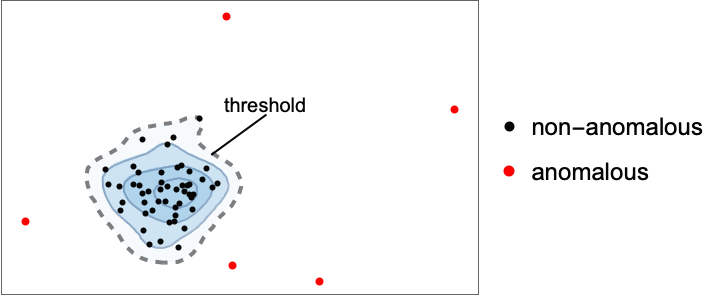







Show a simple progress indicator:
AnomalyDetection[data, TrainingProgressReporting -> "ProgressIndicator"]ValidationSet (1)
Specify a test dataset to validate the anomaly detector against during training:
train = Keys@ExampleData[{"MachineLearning", "FisherIris"}, "TrainingData"];
test = Keys@ExampleData[{"MachineLearning", "FisherIris"}, "TestData"];
an = AnomalyDetection[train, ValidationSet -> test]
The ValidationSet influences the trained distribution used to detect anomalies:
Information[an, "MethodOption"]Information[AnomalyDetection[train], "MethodOption"]Applications (3)
Obtain the Fisher's Iris dataset:
data = ResourceData["Sample Tabular Data: Fisher Iris"]Train an anomaly detector assuming no out-of-distribution examples:
detector = AnomalyDetection[data -> None]Use the detector on a new, unlabeled and partial measurement:
detector[<|"SepalLength" -> Quantity[18.2, "Centimeters"], "SepalWidth" -> Quantity[4.5, "Centimeters"]|>]Obtain training and test datasets of images:
train = RandomSample[ResourceData["MNIST", "TrainingData"][[All, 1]], 30000];
test = RandomSample[ResourceData["MNIST", "TestData"][[All, 1]], 40];RandomSample[train, 10]Add anomalous examples to the test set:
antest = Join[{[image], [image]}, test]Train an anomaly detector on the training set:
ad = AnomalyDetection[train, Method -> "Multinormal"]Find anomalous examples in the test set:
FindAnomalies[ad, antest]Obtain a random sample of training and test datasets of images:
SeedRandom[123];
cifarsample = RandomSample[ResourceData["CIFAR-10"], 1000][[All, 1]];
{test, train} = TakeDrop[cifarsample, 100];
RandomSample[train, 10]
Add anomalous examples to corrupt the datasets:
traincorup = Flatten[Join[Table[RandomImage[1, {12, 12}], 4], train ], 1];
testcorup = Flatten[Join[Table[RandomImage[1, {12, 12}], 4], test], 1]
Train a "supervised" anomaly detector by specifying the position of the known anomalies in the training set:
ad = AnomalyDetection[traincorup -> {1, 2, 3, 4}, PerformanceGoal -> "Quality"]Use the trained anomaly detector on the test set:
ad[testcorup]
 An Elementary Introduction to the Wolfram Language
Text
Wolfram Research (2019), AnomalyDetection, Wolfram Language function, https://reference.wolfram.com/language/ref/AnomalyDetection.html (updated 2025).
CMS
Wolfram Language. 2019. "AnomalyDetection." Wolfram Language & System Documentation Center. Wolfram Research. Last Modified 2025. https://reference.wolfram.com/language/ref/AnomalyDetection.html.
APA
Wolfram Language. (2019). AnomalyDetection. Wolfram Language & System Documentation Center. Retrieved from https://reference.wolfram.com/language/ref/AnomalyDetection.html