

Blurring
Blurring[r]
is a two‐dimensional directive specifying that graphics objects are to be drawn with a blur effect of radius r.
Details
- Blurring is also know as blur and Gaussian blur.
- Blurring is typically used to soften images of graphics objects and to hide object features.
- Blurring[r] specifies that r printer's points should be blended into each other.
- The radius r is measured in units of printer's points, equal before magnification to
 of an inch.
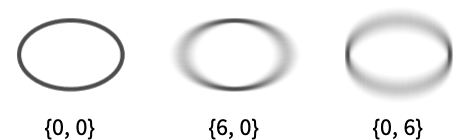
 - Blurring[{r1,r2}] uses radius r1 in width and radius r2 in height.
- Blurring[r] is effectively equivalent to Blurring[{r,r}].
- Blurring[] is effectively equivalent to Blurring[3].
- ImageScaled can be used to specify the radius and is taken to be fractions of the default image size.

Examples
open all close allBasic Examples (3)
Graphics[{Blurring[], Text[Style["Wolfram", 32]]}]Plot[{Sin[Sqrt[2] x] + Sin[x], Style[Sin[x], Blurring[3]]}, {x, 0, 10}]Highlight a region around Paris:
GeoGraphics[{Gray, Blurring[5], GeoDisk[Entity["City", {"Paris", "IleDeFrance", "France"}]]}]Scope (12)
Basic Uses (8)
Apply blurring to graphics primitives:
Graphics[{Blurring[], #}]& /@ {Point[{{6, 3}, {0, 4}, {2, 0}, {3, 2}, {9, 5}}], BSplineCurve[{{3, 3}, {3, 4}, {2, 3}, {3, 2}, {4, 3}}], Polygon[{{3, 1}, {9, 8}, {0, 5}, {9, 3}, {4, 9}}]}Apply blur to Text:
Graphics[{Blurring[], Text[Style["Blurring", 24]]}]Plot[{3Sin[x] + x, 3Cos[x] + x}, {x, 0, 15}, PlotStyle -> Blurring /@ {3, 0}]BarChart[{1, 2, 3, 4}, ChartStyle -> Blurring /@ {6, 6, 0, 6}]Region[Style[ImplicitRegion[y ^ 2 < x (-1 + x ^ 3), {x, y}], Blurring[]]]Apply blur to an Image:
Graphics[{Blurring[], [image]}]Show a blurred schematic outline map:
GeoGraphics[{GeoStyling["OutlineMap", Directive[Opacity[0.5, Red], Blurring[20]]], Polygon[["austria"]]}]Blurring[]Specifications (4)
Blurring[] applies a slight uniform blur:
Graphics[{Blurring[], Annulus[]}]Graphics[{Blurring[#], Annulus[]}, PlotRangePadding -> 1 / 2]& /@ {0, 5, 20}Specify separate blur radii for the horizontal and vertical directions:
Graphics[{Blurring[#], Annulus[]}, PlotRangePadding -> 1 / 2]& /@ {{20, 20}, {0, 20}, {20, 0}}The blur radius is specified in printer's points by default:
Graphics[{Blurring[5], Annulus[]}, PlotRangePadding -> Scaled[.2], ImageSize -> #]& /@ {50, 100, 150}Use an ImageScaled radius:
Graphics[{Blurring[ImageScaled[0.05]], Annulus[]}, PlotRangePadding -> Scaled[.2], ImageSize -> #]& /@ {50, 100, 150}Applications (9)
Basic Applications (3)
blur[{x_, y_}] := Graphics[{{Blurring[{x, y}], RGBColor[1., 3/4, 0.], Disk[{0, 0}, Offset[30]]}, {Thick, Dashed, RGBColor[0., 2/3, 1.], Circle[{0, 0}, Offset[30 + {x, y}]]}}]Table[blur[{r, r}], {r, {0, 10, 16}}]Use separate blur radii for the horizontal and vertical directions:
GraphicsGrid[Table[blur[{rx, ry}], {rx, {0, 16, 24}}, {ry, {0, 16, 24}}]]Blur objects with an EdgeForm:
Graphics[{Blurring[6], EdgeForm[{RGBColor[0., 2/3, 1.], Thickness[0.05]}], RGBColor[1., 3/4, 0.], RegularPolygon[6]}, PlotRangePadding -> 0.2]Blur object with Opacity:
Graphics[{Blurring[6], Opacity[1 / 2], RGBColor[1., 3/4, 0.], RegularPolygon[6]}, PlotRangePadding -> 0.2]Blur Effects (4)
Simulate a depth-of-field effect with images:
{a, b, c} = {[image], [image], [image]};Graphics[{Blurring[10], a, Blurring[4], b, Blurring[None], c}]Simulate a depth-of-field effect with graphics primitives:
tree = Polygon[{{-0.037585066407075374, -0.027697338275686434},
  {-0.006255347454498406, -0.027847216854752332}, {-0.0061146007618049225, -0.04742416119182735},
  {-0.0056195913354599725, -0.04841418004446041}, {-0.005015991050584034, -0.04898745733328 ... 03842425336586075, -0.02735820075878337}},
 {1, 2, 3, 4, 5, 6, 7, 8, 9, 10, 11, 12, 13, 14, 15, 16, 17, 18, 19, 20, 21, 22, 23, 24, 25, 26,
  27, 28, 29, 30, 31, 32, 33, 34, 35, 36, 37, 38, 39, 40, 41, 42, 43, 44, 45, 46, 47, 48, 49, 50,
  51}];
positions = Join@@Table[{(x + y / 2)3, y}, {y, 1, 0, -1 / 5}, {x, 0, 1, 1 / 5}];Graphics[{RGBColor[0., 2/3, 0], EdgeForm[Black], Table[{Blurring[6 * p[[2]]], Translate[Scale[tree, 3 * (1 - p[[2]]) + 5], p]}, {p, positions}]}]shape = Annulus[];
Graphics[{{Blurring[10], GrayLevel[0, 1/3], Translate[shape, {-0.2, -0.2}]}, shape}]Use DropShadowing to get the same effect:
Graphics[{DropShadowing[{-12, -12}, 10], shape}]Emphasize part of a visualization:
cloud = WordCloud[EntityValue[CountryData["Europe"], {"Name", "LandArea"}]]Blur all country names except "Sweden":
cloud /. x : Inset[Style[Except["Sweden"], __], __] :> {Blurring[5], x}Properties & Relations (2)
Blur gives a blurred version of an Image:
img = [image];Blur[img, 6]The equivalent effect using Blurring:
Graphics[{Blurring[6], ImageMesh[ColorNegate[img]]}, PlotRangePadding -> Scaled[.06]]Blurring applies a Gaussian blur:
text = Text[Style["G", 80, FontFamily -> "Times"]]Graphics[{Blurring[8], text}]GaussianFilter[Rasterize[Graphics[{text}], RasterSize -> 100, ImageSize -> 100], 8]Interactive Examples (2)
Simulate a depth-of-field effect:
Manipulate[
	DynamicModule[{ts = Range[0, 1, 1 / 20], disks, blurs, opt = PlotRange -> 4},
	disks = Table[Disk[{3t Sin[4Pi Sqrt[ t]], 2 - 4t}, t * 0.8 + 0.2], {t, ts}];
	blurs = Table[Blurring[10 * Abs[1 - t - focus]], {t, ts}];
	Graphics[{EdgeForm[Black], LightGray, Transpose[{blurs, disks}]}, opt]
	], {focus, 0, 1}
	]
Emphasize the country being moused over:
EntityValue[CountryData[], {"Name", "LandArea"}]//ShortWordCloud[%, MaxItems -> 50] /. x_Inset :> Mouseover[{Blurring[5], x}, x]Text
Wolfram Research (2022), Blurring, Wolfram Language function, https://reference.wolfram.com/language/ref/Blurring.html.
CMS
Wolfram Language. 2022. "Blurring." Wolfram Language & System Documentation Center. Wolfram Research. https://reference.wolfram.com/language/ref/Blurring.html.
APA
Wolfram Language. (2022). Blurring. Wolfram Language & System Documentation Center. Retrieved from https://reference.wolfram.com/language/ref/Blurring.html