

Haloing
Details
- Haloing is also known as halo effect.
- Haloing is typically used to make graphics objects stand out from backgrounds.
- Haloing[col] specifies that the halo should be drawn in col color.
- Colors can be defined by RGBColor, Hue or any other color specification.
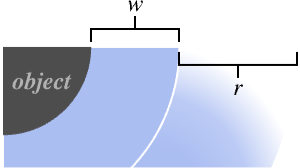
- Haloing[col,w] uses the width w for the halo.
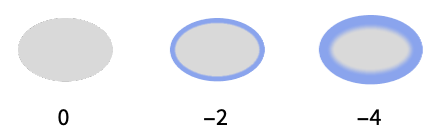
- For negative width w, the halo is drawn inward.
- Haloing[col,w,r] specifies that additional r printer's points should be blended into each other for a blur effect.
- The radius r is measured in units of printer's points, equal before magnification to
 of an inch.
 - Haloing[] is effectively equivalent to Haloing[White,2,0].




Examples
open all close allBasic Examples (3)
Graphics[{Haloing[Red], White, Text[Style["Haloing", 40]]}]Plot[{Sin[Sqrt[2] x] + Sin[x], -Sin[Sqrt[2] x] + Sin[x]}, {x, 0, 15}, PlotTheme -> "Marketing", PlotStyle -> Haloing[White, 1, 4]]Show a map of the US with a halo:
GeoGraphics[{GeoStyling["OutlineMap",
Haloing[{Hue[0.26950361308113985, 0.2155963274060958, 0.63], White}, 1, 10], RGBColor[0.7411765055418048, 0.8549020847953749, 0.6705883350216774]],
Polygon[["US"]]}]Scope (14)
Basic Uses (7)
Apply halo to graphics primitives:
Graphics[{Haloing[Gray, 1, 3], White, #}]& /@ {Point[{{6, 3}, {0, 4}, {2, 0}, {3, 2}, {9, 5}}], BSplineCurve[{{3, 3}, {3, 4}, {2, 3}, {3, 2}, {4, 3}}], Polygon[{{3, 1}, {9, 8}, {0, 5}, {9, 3}, {4, 9}}]}Apply halo to Text:
Graphics[{Haloing[Gray, 2, 2], White, Text[Style["Haloing", 24]]}]Plot[{3Sin[x] + x, 3Cos[x] + x}, {x, 0, 15}, PlotStyle -> Haloing[Gray]]BarChart[{1, 2, 3, 4}, ChartStyle -> Haloing[GrayLevel[0.3, 0.42], -1, 6]]Region[Style[ImplicitRegion[y ^ 2 < x (-1 + x ^ 3), {x, y}], Haloing[GrayLevel[0.4, 0.5], -1, 8]]]GeoGraphics[{GeoStyling["OutlineMap",
Haloing[GrayLevel[0.31, 0.24], -1, 6], RGBColor[0.7411765055418048, 0.8549020847953749, 0.6705883350216774]],
Polygon[["austria"]]}]Haloing[Red]Specifications (7)
Haloing with no arguments draws a small white halo with no blur around the object:
Graphics[{Haloing[], Annulus[]}, PlotRangePadding -> 0.4, Background -> Gray]Specify the base width of the halo:
Graphics[{Haloing[White, #], Annulus[]}, PlotRangePadding -> 0.4, Background -> Gray]& /@ {0, 2, 4}Specify the blur radius of the halo:
Graphics[{Haloing[White, 0, #], Annulus[]}, PlotRangePadding -> 0.4, Background -> Gray]& /@ {0, 4, 12}Specify a halo with a width and blur radius:
Graphics[{Haloing[White, 2, 10], Annulus[]}, PlotRangePadding -> 0.4, Background -> Gray]The halo color is set to White by default:
Graphics[{Haloing[], Annulus[]}, PlotRangePadding -> 0.4, Background -> Gray]Set the halo color explicitly:
Graphics[{Haloing[RGBColor[0., 2/3, 1.]], Annulus[]}, PlotRangePadding -> 0.4, Background -> Gray]Use separate colors for the width and blur portions of the halo:
Graphics[{Haloing[{RGBColor[0., 2/3, 1.], RGBColor[1., 3/4, 0.]}, 4, 8], Annulus[]}, PlotRangePadding -> 0.4, Background -> Gray]Specify a negative width to draw the halo inside the object:
Graphics[{Haloing[White, -2, 8], Annulus[]}, PlotRangePadding -> 0.4, Background -> Gray]Haloing accepts colors with Opacity:
Graphics[{Haloing[Hue[1 / 8, 1, 1, #], 6], Annulus[]}, PlotRangePadding -> 0.4, Background -> Gray]& /@ {1 / 10, 1 / 2, 1}Use LightDarkSwitched to specify different colors for light and dark modes:
graphic = Graphics[{Haloing[LightDarkSwitched[RGBColor[1., 3/4, 0.], RGBColor[0., 2/3, 1.]], 6], Annulus[]}, PlotRangePadding -> 0.4, Background -> Gray];{LightModePane[graphic], DarkModePane[graphic]}The halo width and blur radius are specified in printer's points by default:
Graphics[{Haloing[White, 2, 10], Annulus[]}, PlotRangePadding -> 0.4, Background -> Gray, ImageSize -> #]& /@ {50, 100, 150}Use an ImageScaled width and blur radius:
Graphics[{Haloing[White, ImageScaled[0.04], ImageScaled[0.2]], Annulus[]}, PlotRangePadding -> 0.4, Background -> Gray, ImageSize -> #]& /@ {50, 100, 150}Applications (13)
Basic Applications (1)
Show the halo effect with the halo width in yellow and blur radius in red:
halo[width_, blur_] := Framed[Graphics[{{Haloing[{RGBColor[1., 3/4, 0., 0.8], RGBColor[1., 1/3, 0., 0.8]}, width, blur], Disk[{0, 0}, Offset[50]]}}, PlotRange -> {{0, 5}, {-1, 1}}], FrameMargins -> None]Table[halo[w, 0], {w, {0, 15, 30}}]Table[halo[0, b], {b, {0, 15, 30}}]Adjust both the halo width and blur radius:
Table[halo[x, x], {x, {4, 12, 24}}]Table[halo[w, 10], {w, {-1, -10, -20}}]Halo Effects (3)
Create a glow effect by using a large blur radius:
Graphics[{Haloing[Magenta, 0, 12], Text[Style["Glow", 64, FontFamily -> "Brush Script MT", White]]}, Background -> Gray, AspectRatio -> 1 / 2]Graphics[{Haloing[Gray, 6], Text[Style["Outline", 32, White]]}, AspectRatio -> 1 / 2]Approximate a drop shadow effect with no offset:
Graphics[{Haloing[GrayLevel[0, 0.7], 0, 6], Text[Style["Shadow", 32, White]]}, AspectRatio -> 1 / 2]Graphics (3)
Apply halo to graphics primitives:
Graphics[{Haloing[White, 2, 4], #}, Background -> Gray]& /@ {Point[{{6, 3}, {0, 4}, {2, 0}, {3, 2}, {9, 5}}], BSplineCurve[{{3, 3}, {3, 4}, {2, 3}, {3, 2}, {4, 3}}], Polygon[{{3, 1}, {9, 8}, {0, 5}, {9, 3}, {4, 9}}]}Apply halo to Text:
Graphics[{Haloing[White, 2, 4], Text[Style["Haloing", 52, FontFamily -> "Brush Script MT"]]}, Background -> Gray]Apply halo to a GraphicsComplex:
gc = GraphicsComplex[{...}, Polygon[...]];
Graphics[{Haloing[White, 2, 4], gc}, PlotRangePadding -> 30, Background -> Gray]
Visualization (3)
Plot[{Sin[Sqrt[2] x] + Sin[x], Sin[x], Cos[x]}, {x, 0, 10}, PlotStyle -> Haloing[White, 0, 4], PlotTheme -> "Marketing"]BarChart[{1, 2, 3, 4, 5}, ChartStyle -> Haloing[{Gray, Hue[0.10581836524332743, 0.6680444089924954, 0.53, 0.8]}, -1, 6]]ParametricPlot[r ^ 2 {Sqrt[t] Cos[t], Sin[t]}, {t, 0, 3 Pi / 2}, {r, 1, 2}, PlotStyle -> Directive[Haloing[Hue[0.576923076923077, 0.23, 0.84, 0.74], -1, 16], LightBlue, Opacity[1]]]Cartography (2)
GeoGraphics[{Haloing[{RGBColor[0.46784, 0.5294848, 0.688], Hue[0.62, 0.32, 0.86]}, -1, 15], Hue[0.62, 0.32, 0.86, 0.03], Polygon[Entity["Country", "India"]]}, GeoProjection -> "Equirectangular", GeoBackground -> {...}]countryPolygons = EntityValue[GeoVariant[EntityList["Country"], "PrincipalArea"], "Polygon"];GeoGraphics[Table[With[{c = ColorData["BalancedHue", RandomReal[]]}, {Haloing[{c, Lighter[c, 0.3]}, -2, -8], GeoStyling[Lighter[c, 0.6]], poly}], {poly, countryPolygons}], GeoBackground -> GrayLevel[0.2], GeoProjection -> "Robinson"]Astronomical Charts (1)
Style the horizon line in AstroGraphics:
AstroGraphics[AstroReferenceFrame -> "Horizon", AstroBackground -> "GalacticSky", Epilog -> {White, Annulus[{0, 0}, {2, 4}], {Haloing[Hue[0.11, 0.51, 0.85, 0.72], -2, 20], Hue[0.11, 0.51, 0.85, 0.06], Disk[{0, 0}, 2]}}]Possible Issues (1)
Halos are drawn in the order in which their corresponding objects are defined in Graphics:
regs = {Disk[], Disk[{1, 0}]};
Graphics[{Haloing[StandardGray, 2], LightGray, regs}]
Use GraphicsGroup to draw the halo around a group of objects:
Graphics[{Haloing[StandardGray, 2], LightGray, GraphicsGroup[regs]}]Text
Wolfram Research (2023), Haloing, Wolfram Language function, https://reference.wolfram.com/language/ref/Haloing.html.
CMS
Wolfram Language. 2023. "Haloing." Wolfram Language & System Documentation Center. Wolfram Research. https://reference.wolfram.com/language/ref/Haloing.html.
APA
Wolfram Language. (2023). Haloing. Wolfram Language & System Documentation Center. Retrieved from https://reference.wolfram.com/language/ref/Haloing.html