

HatchFilling
is a two-dimensional graphics directive that specifies that faces of polygons and other filled graphics objects are to be drawn using closely spaced parallel lines.
HatchFilling["name"]
uses the specified line hatching "name".
HatchFilling[θ]
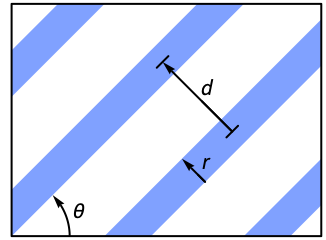
draws parallel lines with an angle θ.
HatchFilling[θ,r]
draws parallel lines with absolute thickness r.
HatchFilling[θ,r,d]
draws parallel lines with gaps of absolute thickness d.
Details
- HatchFilling is also known as hatch or striped pattern.
- HatchFilling is typically used to fill two‐dimensional polygons and areas with stripes.
- Possible line hatching includes:
-

"Diagonal" diagonal lines 
"Horizontal" horizontal lines 
"Vertical" vertical lines - HatchFilling[θ,r,d] specifies that faces of filled graphics objects are to be drawn using parallel lines with an angle θ from the horizontal, a thickness r and distance d.
- HatchFilling[] is effectively equivalent to HatchFilling[Pi/4].
Examples
open all close allBasic Examples (3)
Apply a hatch filling to a disk:
Graphics[{HatchFilling[], Disk[]}]Fill from a curve to the axis:
Plot[Sin[x], {x, 0, 2Pi}, Filling -> Axis, FillingStyle -> HatchFilling[]]Plot the US with hatch filling:
GeoGraphics[{GeoStyling["OutlineMap", HatchFilling[]], Polygon[["United States"]]}]Scope (13)
Basic Uses (7)
Apply hatch filling to graphics primitives:
Graphics[{HatchFilling[], #}]& /@ {Triangle[], Disk[], Polygon[{{3, 1}, {9, 8}, {0, 5}, {9, 3}, {4, 9}}]}Apply hatch filling to a plot:
Plot[2Sin[x] + x, {x, 0, 15}, Filling -> Bottom, FillingStyle -> HatchFilling[Pi / 2]]Apply hatch filling to a chart:
BarChart[{1, 2, 3, 4}, ChartStyle -> (HatchFilling /@ RandomReal[{0, Pi / 2}, 4])]Region[Style[ImplicitRegion[y^2 < x (-1 + x^3), {x, y}], HatchFilling[]]]Apply hatch filling to an Image:
Graphics[{HatchFilling[Pi / 4, 2], [image]}]GeoGraphics[{GeoStyling["OutlineMap", HatchFilling[]], Polygon[["austria"]]}]HatchFilling[0]Specification (6)
HatchFilling with no arguments draws parallel lines in a  angle:
Graphics[{HatchFilling[], Rectangle[]}]Draw parallel lines at an angle θ in radians:
Graphics[{HatchFilling[Pi / 2], Rectangle[]}]Graphics[{HatchFilling[90 Degree], Rectangle[]}]Draw parallel lines with varying thickness:
Table[Graphics[{HatchFilling[Pi / 4, r], Rectangle[]}], {r, 0.4, 4, 1}]Draw parallel lines with varying spacing:
Table[Graphics[{HatchFilling[Pi / 2, 0, d], EdgeForm[StandardGray], Rectangle[]}], {d, 10, 40, 10}]Graphics[{Red, HatchFilling[], Rectangle[]}]Use predefined horizontal lines:
Graphics[{HatchFilling["Horizontal"], Rectangle[]}]Graphics[{HatchFilling["Diagonal"], Rectangle[]}]Graphics[{HatchFilling["Vertical"], Rectangle[]}]Applications (6)
Technical Drawing (3)
Row[Table[Graphics[{HatchFilling[Pi / 4, .35, d], EdgeForm[{StandardGray, Thick}], Rectangle[{0, 0}, RoundingRadius -> .1]}], {d, 5, 20, 3}], Spacer[20]]Row[Table[Graphics[{HatchFilling[-Pi / 4, .35, d], EdgeForm[{StandardGray, Thick}], Rectangle[{0, 0}, RoundingRadius -> .1]}], {d, 5, 20, 3}], Spacer[20]]Row[Table[Graphics[{HatchFilling[Pi / 4, .3, d], EdgeForm[{StandardGray, Thick}], Rectangle[{0, 0}, RoundingRadius -> .1], HatchFilling[-Pi / 4, .3, d], Rectangle[{0, 0}, RoundingRadius -> .1]}], {d, 5, 20, 3}], Spacer[20]]Graphics[{EdgeForm[{StandardGray, Thick}], {HatchFilling[], Rectangle[]}, {FaceForm[StandardOrange], Rectangle[{1, 0}]}, {HatchFilling[], Rectangle[{2, 0}]}, ...}]Design Patterns (2)
Graphics[{Blue, HatchFilling["Diagonal", 2, 7], Rectangle[{-12, -12}, {12, 7}], Red, HatchFilling["Diagonal", 5, 7], GraphicsComplex[...]}]stripes[shape_, parms__] := {HatchFilling[Pi / 4, Sequence @@ #], shape} & /@ {parms}Graphics[stripes[Disk[], {1.5}]]Graphics[stripes[Disk[], {30, 40}]]Graphics[{stripes[Disk[], {1.5, 20}, {2, 30}]}]Graphics[stripes[Disk[], {1.5, 20}, {2, 30}, {4, 50}]]Neat Examples (1)
Use hatch filling to draw African countries:
countries = EntityValue[["Africa"], "Entity"];styles = Directive[StandardGray, HatchFilling[#]] & /@ RandomReal[{0, Pi / 2}, Length[countries]];GeoGraphics[{GeoStyling[None], #2, EdgeForm[{Thin, StandardGray}], Polygon[#1]}&@@@ Thread[{countries, styles}], GeoBackground -> None]GeoGraphics[{GeoStyling[None], #2, EdgeForm[None], Polygon[#1]}&@@@Thread[{countries, styles}], GeoBackground -> None]Text
Wolfram Research (2020), HatchFilling, Wolfram Language function, https://reference.wolfram.com/language/ref/HatchFilling.html.
CMS
Wolfram Language. 2020. "HatchFilling." Wolfram Language & System Documentation Center. Wolfram Research. https://reference.wolfram.com/language/ref/HatchFilling.html.
APA
Wolfram Language. (2020). HatchFilling. Wolfram Language & System Documentation Center. Retrieved from https://reference.wolfram.com/language/ref/HatchFilling.html