CantorMesh[n]
gives a mesh region representing the n -step Cantor set.
CantorMesh[n,d]
gives the n -step Cantor set in dimension d.




CantorMesh
CantorMesh[n]
gives a mesh region representing the n -step Cantor set.
CantorMesh[n,d]
gives the n -step Cantor set in dimension d.
Details and Options
- CantorMesh is also known as Cantor dust.
- CantorMesh[n] is generated from the unit interval by repeatedly removing the middle third of the subsequent cells. »
- CantorMesh[n] is equivalent to CantorMesh[n,1].
- CantorMesh has the same options as MeshRegion, with the following additions:
-
DataRange Automatic the range of mesh coordinates to generate
Examples
open all close allBasic Examples (2)
Scope (4)

 approximation to the Cantor set:
Options (13)
DataRange (1)
DataRange allows you to specify the range of mesh coordinates to generate:
CantorMesh[1, 2]RegionBounds[%]CantorMesh[1, 2, DataRange -> {{0, 1}, {0, 2}}]RegionBounds[%]MeshCellHighlight (2)
MeshCellHighlight allows you to specify highlighting for parts of a CantorMesh:
CantorMesh[0, 2, MeshCellHighlight -> {{1, All} -> Red, {0, All} -> Black}]Individual cells can be highlighted using their cell index:
CantorMesh[0, 2, MeshCellHighlight -> {{1, 2} -> {Thick, Red}, {1, 3} -> {Dashed, Black}}]CantorMesh[0, 2, MeshCellHighlight -> {Line[{3, 4}] -> {Thick, Red}, Line[{2, 4}] -> {Dashed, Black}}]MeshCellLabel (2)
MeshCellLabel can be used to label parts of a CantorMesh:
CantorMesh[0, 2, MeshCellLabel -> {0 -> "Index"}]Individual cells can be labeled using their cell index:
CantorMesh[0, 2, MeshCellLabel -> {{1, 1} -> "x", {1, 2} -> "y"}]CantorMesh[0, 2, MeshCellLabel -> {Line[{1, 3}] -> "x", Line[{3, 4}] -> "y"}]MeshCellMarker (1)
MeshCellMarker can be used to assign values to parts of a CantorMesh:
CantorMesh[0, 2, MeshCellMarker -> {{0, 1} -> 1, {0, 2} -> 2, {0, 3} -> 3, {0, 4} -> 4}]Use MeshCellLabel to show the markers:
CantorMesh[0, 2, MeshCellMarker -> {{0, 1} -> 1, {0, 2} -> 2, {0, 3} -> 3, {0, 4} -> 4}, MeshCellLabel -> {0 -> "Marker"}]MeshCellShapeFunction (2)
MeshCellShapeFunction can be used to assign values to parts of a CantorMesh:
CantorMesh[0, 3, MeshCellShapeFunction -> {1 -> (Tube[#1, .1]&)}]Individual cells can be drawn using their cell index:
CantorMesh[0, 3, MeshCellShapeFunction -> {{1, 2} -> (Tube[#1, .1]&)}]CantorMesh[0, 3, MeshCellShapeFunction -> {Line[{5, 7}] -> (Tube[#1, .1]&)}]MeshCellStyle (3)
MeshCellStyle allows you to specify styling for parts of a CantorMesh:
CantorMesh[0, 2, MeshCellStyle -> {{1, All} -> Red, {0, All} -> Black}]Individual cells can be highlighted using their cell index:
CantorMesh[0, 2, MeshCellStyle -> {{1, 1} -> {Thick, Red}, {1, 2} -> {Dashed, Black}}]CantorMesh[0, 2, MeshCellStyle -> {Line[{1, 3}] -> {Thick, Red}, Line[{3, 4}] -> {Dashed, Black}}]Give explicit color directives to specify colors for individual cells:
CantorMesh[1, 2, MeshCellStyle -> {{2, All} -> Black, {2, 1} -> Red, {2, {2, 3}} -> Pink}]Applications (4)
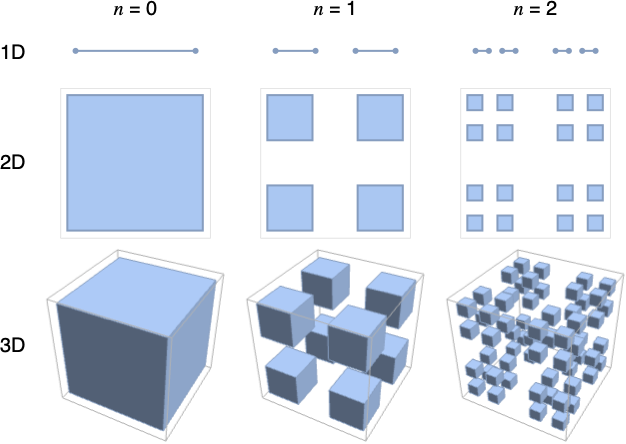
The Cantor set is generated from the unit interval by repeatedly removing the middle third of the cells:
Column[{CantorMesh[0], CantorMesh[1], CantorMesh[2], CantorMesh[3]}]Row[{CantorMesh[0, 2], CantorMesh[1, 2], CantorMesh[2, 2]}, Spacer[60]]Row[{CantorMesh[0, 3], CantorMesh[1, 3], CantorMesh[2, 3]}, Spacer[60]]Find the length of the Cantor mesh:
Table[RegionMeasure[CantorMesh[k]], {k, 5}]//RationalizeFindSequenceFunction[%, n]Find the measure of the 2D Cantor mesh:
Table[RegionMeasure[CantorMesh[k, 2]], {k, 5}]//RationalizeFindSequenceFunction[%, n]Find the measure of the 3D Cantor mesh:
Table[{k, RegionMeasure[CantorMesh[k, 3]]}, {k, 0, 3}]//RationalizeFindSequenceFunction[%, n]Properties & Relations (4)
The output of CantorMesh is always a full-dimensional MeshRegion:
CantorMesh[3, 2]{MeshRegionQ[%], RegionDimension[%]}CantorMesh consists of intervals in 1D:
CantorMesh[2]MeshCells[%, RegionDimension[%]]CantorMesh[1, 2]MeshCells[%, RegionDimension[%]]CantorMesh[0, 3]MeshCells[%, RegionDimension[%]]The total length removed of the Cantor set is 1:
Table[RegionMeasure[CantorMesh[n]] / 2, {n, 5}]//RationalizeFindSequenceFunction[%, i]Limit[Sum[%, {i, 1, n}], n -> Infinity]DataRange->range is equivalent to using RescalingTransform[{…},range]:
CantorMesh[1, 2, DataRange -> {{1, 2}, {1, 3}}, Frame -> True]Use RescalingTransform:
box = TransformedRegion[CantorMesh[1, 2], RescalingTransform[{{0, 1}, {0, 1}}, {{1, 2}, {1, 3}}]];MeshRegion[box, Frame -> True]Possible Issues (1)

Text
Wolfram Research (2017), CantorMesh, Wolfram Language function, https://reference.wolfram.com/language/ref/CantorMesh.html.
CMS
Wolfram Language. 2017. "CantorMesh." Wolfram Language & System Documentation Center. Wolfram Research. https://reference.wolfram.com/language/ref/CantorMesh.html.
APA
Wolfram Language. (2017). CantorMesh. Wolfram Language & System Documentation Center. Retrieved from https://reference.wolfram.com/language/ref/CantorMesh.html