
 dimension in data.

EntropyFilter
EntropyFilter[data,r]
filters data by replacing every value by the entropy value in its range-r neighborhood.
EntropyFilter[data,{r1,r2,…}]
uses ri for filtering the 
 dimension in data.
Details
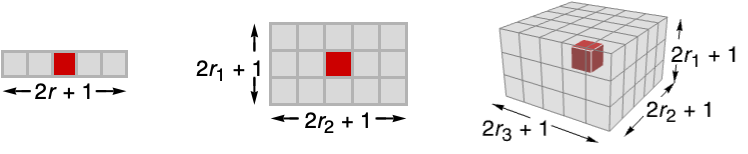
- EntropyFilter returns the local randomness of a signal, commonly used to measure textures in an image. The size of the neighborhood is dependent on the value of r.
- The function applied to each range-r neighborhood is Entropy.
- The data can be any of the following:
-
list arbitrary-rank numerical array tseries temporal data such as TimeSeries, TemporalData, … image arbitrary Image or Image3D object audio an Audio object video a Video object - EntropyFilter[data,{r1,r2,…}] computes the entropy value in
 blocks centered on each sample.
 - EntropyFilter assumes the index coordinate system for lists and images.
- At the data boundaries, EntropyFilter uses smaller neighborhoods.

Examples
open all close allBasic Examples (3)
Apply an entropy filter to a vector of numbers:
EntropyFilter[{0, 0, 0, 1, 1, 1, 1, 0, 0, 0}, 1] // NFilter a TimeSeries:
ts = TemporalData[TimeSeries, {{{-5.284299554283819, 2.5633277538370023, 6.579100030714124,
    -1.968961681799072, -0.4139386346612976, -1.9026234920486018, -0.6119551311215429,
    6.658489816525363, -1.1389707331791818, 2.125399040092273, -2.100657 ...    -1.0208703378550394, 4.53291764229072, 0.8063886166734048, -0.556998456633081,
    5.892989731928727}}, {{0, 100, 1}}, 1, {"Continuous", 1}, {"Discrete", 1}, 1,
{ResamplingMethod -> {"Interpolation", InterpolationOrder -> 1}}}, False, 11.1];filter = EntropyFilter[ts, 5]ListLinePlot[{ts, filter}, PlotLegends -> {"original data", "filter"}]Entropy filtering of random disks:
EntropyFilter[[image], 1]Scope (11)
Data (7)
Apply a moving entropy filter to a vector:
EntropyFilter[{1, 2, 3, 3, 3, 3, 3}, 1]Entropy filtering of a 2D array:
EntropyFilter[(| | | | |
| - | - | - | - |
| 1 | 1 | 1 | 0 |
| 1 | 1 | 1 | 0 |
| 1 | 1 | 0 | 0 |
| 0 | 0 | 0 | 0 |), 1]//N//MatrixFormdata = {Quantity[2, "Meters"], Quantity[1, "Meters"], Quantity[0, "Meters"], Quantity[3, "Meters"], Quantity[0, "Meters"], Quantity[1, "Meters"], Quantity[3, "Meters"], Quantity[1, "Meters"], Quantity[1, "Meters"], Quantity[3, "Meters"], Quantity[3, "Meters"], Quantity[1, "Meters"]};filtered = EntropyFilter[data, 1]//NFilter an Audio signal:
a = Import["ExampleData/rule30.wav"];b = EntropyFilter[a, 15]AudioPlot[{a, b}]Filtering a 2D grayscale image:
EntropyFilter[[image], 3]//ImageAdjustEntropy filtering of a 3D image:
EntropyFilter[[image], 1]EntropyFilter[{a, a, a, b, b, b}, 1]Parameters (4)
Specify one radius to be used in all directions:
EntropyFilter[[image], 5]Increasing the radius will result in smoother images:
Table[Labeled[EntropyFilter[[image], r], Text["*r* = " <> ToString@r]], {r, {1, 3, 5}}]Harmonic filtering just in the first direction:
EntropyFilter[[image], {5, 0}]EntropyFilter[[image], {0, 5}]Entropy filtering of a 3D image in the vertical direction only:
EntropyFilter[[image], {1, 0, 0}]Filtering of the horizontal planes only:
EntropyFilter[[image], {0, 1, 1}]Applications (3)
Apply entropy filtering to show areas of higher information content with higher intensities:
EntropyFilter[[image], 5]// ImageAdjustEntropy filtering can reveal JPEG compression artifacts:
EntropyFilter[[image], 1]This reveals the presence of padding in an image:
EntropyFilter[[image], 1]// ImageAdjustProperties & Relations (2)
Entropy filtering is the same as ArrayFilter with function Entropy:
r = 1;
x = {1, 2, -1, 1, 2, 3, 1, -1, 3, 1};
ArrayFilter[Entropy[Flatten[#]]&, x, r, Padding -> None] == EntropyFilter[x, r][[r + 1 ;; -r - 1]]
Entropy filtering is the same as ImageFilter with function Entropy:
ImageCrop[EntropyFilter[[image], 1], 3] == ImageCrop[ImageFilter[Entropy[Flatten[#]]&, [image], 1], 3]Possible Issues (1)
The discrete entropy measure does not apply to real-valued images, since distinct pixel values are unlikely to occur more than once:
EntropyFilter[[image], 3]//ImageAdjustUse ColorQuantize to limit the number of possible pixel values:
EntropyFilter[ColorQuantize[[image], 16], 3]//ImageAdjustText
Wolfram Research (2008), EntropyFilter, Wolfram Language function, https://reference.wolfram.com/language/ref/EntropyFilter.html (updated 2025).
CMS
Wolfram Language. 2008. "EntropyFilter." Wolfram Language & System Documentation Center. Wolfram Research. Last Modified 2025. https://reference.wolfram.com/language/ref/EntropyFilter.html.
APA
Wolfram Language. (2008). EntropyFilter. Wolfram Language & System Documentation Center. Retrieved from https://reference.wolfram.com/language/ref/EntropyFilter.html