

GridVideo
Details and Options
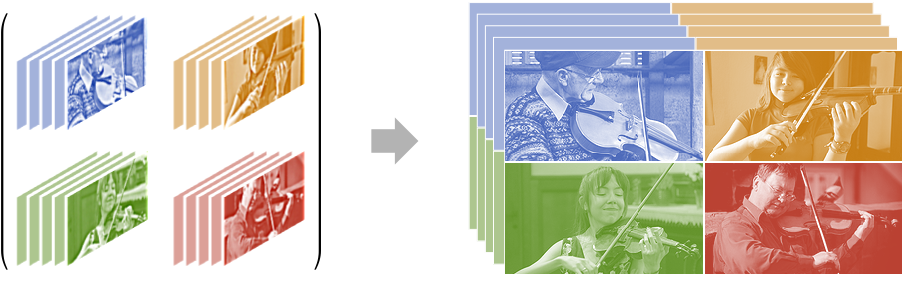
- GridVideo is also known as video collage.
- GridVideo can be used to show multiple videos at the same time. Creating video grids is very common when showing multiple people in a meeting, playing instruments or showing a scene from different viewpoints.
- Any of the grid elements vij can be any of the following:
-
video a Video object image an Image or Graphics func an arbitrary function returning an image or graphics Missing[…] introduces open space filled with the background color - Options to control assembly of frames are:
-
Background GrayLevel[0.2] background color ConformationMethod Automatic how to conform frames of different sizes PaddingSize Automatic padding size around the output frame Spacings Automatic spacing between input frames VideoPadding Automatic video track padding scheme for shorter videos - Settings for Spacings can have the following forms:
-
n use n pixels for spacing between frames Scaled[s] use a fraction s of the image size for spacing {specx,specy} use specific spacing for each dimension - By default, GridVideo places the new video under the "Video" directory in $WolframDocumentsDirectory.
- Options to control properties of the output video are:
-
CompressionLevel Automatic compression level to use FrameRate Automatic the frame rate to use GeneratedAssetFormat Automatic the format of the result GeneratedAssetLocation $GeneratedAssetLocation the location of the result OverwriteTarget False whether to overwrite an existing file RasterSize Automatic raster size of the output video VideoEncoding Automatic video encoding to use VideoTransparency False whether the output video should have a transparency channel
Examples
open all close allBasic Examples (1)
Scope (4)
Create a grid video from a list of videos:
ResourceData["Tooth Brushing Video Samples"]GridVideo[ResourceData["Tooth Brushing Video Samples"]]Create a grid video from a 2D array of videos to enforce the position of each video in the grid:
Transpose[Partition[ResourceData["Tooth Brushing Video Samples"], 2]]GridVideo[%]Create a grid video from a list of an odd number of videos:
GridVideo[Join[ResourceData["Tooth Brushing Video Samples"], {ResourceData["Sample Video: Reading a Book"]}]]Use Missing to specify where the empty space should be:
GridVideo[Join[ResourceData["Tooth Brushing Video Samples"], {Missing[], ResourceData["Sample Video: Reading a Book"]}]]Options (5)
Background (1)
ConformationMethod (1)
By default, videos with different frame sizes are conformed using the "Fit" method:
videos = {
	Video["ExampleData/rule30.mp4"],
Video["ExampleData/fish.mp4"], ResourceData["Sample Video: Blowing Glitter"], ResourceData["Sample Video: Skating (Noisy)"]};GridVideo[videos]Use the ConformationMethod option to specify how videos should be conformed:
Labeled[GridVideo[videos, ConformationMethod -> #], Text[#]]& /@ {"Stretch", "Fill"}PaddingSize (1)
Use the PaddingSize option to control the padding size around the output frame:
GridVideo[ResourceData["Tooth Brushing Video Samples"], PaddingSize -> 10]Spacings (1)
Use the Spacings option to control the spacings between the input frames:
GridVideo[ResourceData["Tooth Brushing Video Samples"], Spacings -> 10]Use both Spacings and PaddingSize to add spaces between and around images:
GridVideo[ResourceData["Tooth Brushing Video Samples"], Spacings -> 10, PaddingSize -> 10]VideoPadding (1)
Create a list of videos of different durations:
list = VideoTrim[#, RandomReal[5]]& /@ ResourceData["Cheerleading Video Samples"];Duration[list]By default, shorter videos are padded using black frames:
GridVideo[list]//VideoFrameList[#, 3]&Specify a different color padding:
GridVideo[list, VideoPadding -> Orange]//VideoFrameList[#, 3]&Use "Fixed" padding to repeat the last available frame:
GridVideo[list, VideoPadding -> "Fixed"]//VideoFrameList[#, 3]&Text
Wolfram Research (2021), GridVideo, Wolfram Language function, https://reference.wolfram.com/language/ref/GridVideo.html (updated 2022).
CMS
Wolfram Language. 2021. "GridVideo." Wolfram Language & System Documentation Center. Wolfram Research. Last Modified 2022. https://reference.wolfram.com/language/ref/GridVideo.html.
APA
Wolfram Language. (2021). GridVideo. Wolfram Language & System Documentation Center. Retrieved from https://reference.wolfram.com/language/ref/GridVideo.html