HistogramTransformInterpolation[{x1,x2,…}]
finds a function  so that the transformed values
  are distributed nearly uniformly.
HistogramTransformInterpolation[{x1,x2,…},ref]
finds  so that
  are distributed with distribution ref.


HistogramTransformInterpolation
HistogramTransformInterpolation[{x1,x2,…}]
finds a function  so that the transformed values
  are distributed nearly uniformly.
HistogramTransformInterpolation[{x1,x2,…},ref]
finds  so that
  are distributed with distribution ref.
HistogramTransformInterpolation[{x1,x2,…},ref,n]
finds a function with n equally spaced quantiles.
HistogramTransformInterpolation[image,…]
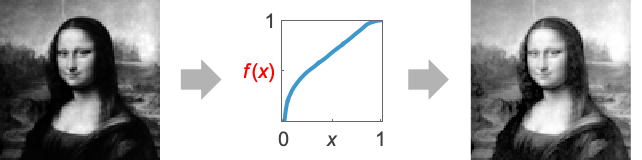
finds a function that reshapes the histogram of image.
Details
- HistogramTransformInterpolation returns a function to perform a histogram transformation by changing the shape of the image histogram, typically used for histogram equalization or matching.
- HistogramTransformInterpolation returns a function f or a list of functions for each channel, each represented with an InterpolatingFunction.
- Use HistogramTransform to perform histogram transformation using the corresponding functions.
- HistogramTransformInterpolation[image] is effectively the cumulative distribution (CDF) of the pixel values. When applied to pixel values, it creates an image with a nearly flat histogram.
- HistogramTransformInterpolation[image,ref] finds a function such that the transformed pixel values would have nearly the same distribution as ref.
- Reference ref can be another image, a dataset or a distribution.
- HistogramTransformInterpolation works with 2D and 3D images, and also with lists of arbitrary rank datasets.
- HistogramTransformInterpolation[{data1,data2,…},…] gives a list of functions that correspond to each dataset.
- With HistogramTransformInterpolation[image,ref], 256 quantiles are used.
- With HistogramTransformInterpolation[data,ref,Automatic], the number of quantiles is the same as the number of bins used in Histogram[data].
Examples
open all close allBasic Examples (4)
Find a function that distributes samples in a given dataset uniformly:
data = RandomVariate[RayleighDistribution[1], 2000];
func = HistogramTransformInterpolation[data]Histogram /@ {data, func[data]}Reshape the histogram of a dataset to match the PDF of a normal distribution:
data = RandomVariate[RayleighDistribution[1], 2000];
Histogram[data]dist = NormalDistribution[0, .2];
func = HistogramTransformInterpolation[data, dist]Histogram[func[data], Automatic, "PDF"]Find a function that equalizes the histogram of an image:
HistogramTransformInterpolation[img = [image]]ImageApply[%, img]Find a function that equalizes the histogram of a 3D image:
img = [image];HistogramTransformInterpolation[img]ImageApply[%, img]Scope (3)
Find equalizing functions for a list of datasets:
HistogramTransformInterpolation[
Table[RandomVariate[dist, 1000], {dist, {NormalDistribution[.5, .2], UniformDistribution[{0, 1}]}}]]Plot[Quiet[#[t]]& /@ %, {t, 0, 1}]Find histogram reshaping functions for each color channel:
funs = HistogramTransformInterpolation[img = [image]]Apply the functions channel by channel:
MapThread[ImageApply, {funs, ColorSeparate@img}]//ColorCombineUse a different number of quantiles when finding the transformation function:
data = RandomVariate[NormalDistribution[], 1000];
funs = Table[HistogramTransformInterpolation[data, UniformDistribution[{0, 1}], n], {n, {4, 8, 16, 32}}];Histogram[#[data]]& /@ funsApplications (1)
Locally Adaptive Histogram Equalization (1)
A full locally adaptive histogram equalization may give more appealing results for images with a variety of intensity levels, but takes much more time:
img = [image];
radius = 10;center = radius + 1;
(full = ImageFilter[
HistogramTransformInterpolation[Flatten@#][#[[center, center]]]&, img, radius])//AbsoluteTiming{full, ImageApply[HistogramTransformInterpolation[img], img]}Bilinear interpolation between the equalization functions computed for non-overlapping blocks is a faster approximation:
HistogramTransformationWeightedLocalAdaptive[img_, radius_] :=
	Module[{funs, nodes, w, h, fun, fi},
	funs = Map[HistogramTransformInterpolation, ImagePartition[img, {2 * radius + 1}], {2}];
	{w, h} = ImageDimensions@img;
	nodes = Map[
	Mean@Flatten[N@ImageData[#, Automatic], 1]&,
	ImagePartition[
	Image[Array[{#1, #2}&, {h, w}], "Bit16"],
	{2 * radius + 1}],
	{2}];
	nodes = ArrayPad[nodes, {{1, 1}, {1, 1}}, "Fixed"];
	nodes[[All, {1, -1}, 2]] = {1, w};
	nodes[[{1, -1}, All, 1]] = {1, h};
	funs = ArrayPad[funs, 1, "Fixed"];
	fi = Interpolation[Thread[{Round@Flatten[nodes, 1], Table[f[#], {f, Flatten@funs}]}], InterpolationOrder -> 1];
	fun[v_, {r_, c_}] := Evaluate[fi[r, c]]&[v];
	Quiet@ImageApplyIndexed[fun, img]
];(partial = HistogramTransformationWeightedLocalAdaptive[img, radius])//AbsoluteTimingProperties & Relations (2)
HistogramTransformInterpolation can be used to get the transformation function used in HistogramTransform:
i = [image];
f = HistogramTransformInterpolation[i]ImageApply[f, i] == HistogramTransform[i]The result of HistogramTransformInterpolation approximates the closed-form solution when it exists:
dist1 = TruncatedDistribution[{0, 1}, NormalDistribution[.5, .2]];
dist2 = WeibullDistribution[1.5, 1];
exact = Composition[InverseCDF[dist2], CDF[dist1]];fun = HistogramTransformInterpolation[RandomVariate[dist1, 10000], dist2];Plot[exact[x] - Quiet@fun[x], {x, 0, 1}]Text
Wolfram Research (2012), HistogramTransformInterpolation, Wolfram Language function, https://reference.wolfram.com/language/ref/HistogramTransformInterpolation.html (updated 2014).
CMS
Wolfram Language. 2012. "HistogramTransformInterpolation." Wolfram Language & System Documentation Center. Wolfram Research. Last Modified 2014. https://reference.wolfram.com/language/ref/HistogramTransformInterpolation.html.
APA
Wolfram Language. (2012). HistogramTransformInterpolation. Wolfram Language & System Documentation Center. Retrieved from https://reference.wolfram.com/language/ref/HistogramTransformInterpolation.html