 quantile




Quantile
 quantile
Details
- Quantile is also known as value at risk (VaR) or fractile.
- When VectorQ data
 is sorted as
 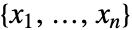 , the quantile estimate
 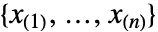 is given by
  .
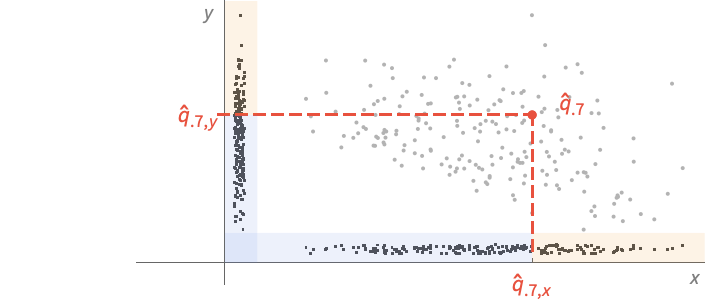
. - For MatrixQ data, the quantile is computed for each column vector with Quantile[{{x1,y1,…},{x2,y2,…},…},p] equivalent to {Quantile[{x1,x2,…},p],Quantile[{y1,y2,…},p]}. »
- For ArrayQ data, quantile is equivalent to ArrayReduce[Quantile,data,1]. »
- Quantile[
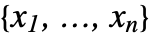 ,p,{{a,b},{c,d}}] is given by
 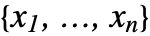 with r=a+(n+b)p, ⌊r⌋= Floor[r], ⌈r⌉=Ceiling[r] and =FractionalPart[r]. The indices are taken to be 1 or n if they are out of range. »
 - Common choices of parameters {{a,b},{c,d}} include:
-
{{0,0},{1,0}} inverse empirical CDF (default) {{0,0},{0,1}} linear interpolation (California method) {{1/2,0},{0,0}} element numbered closest to p n {{1/2,0},{0,1}} linear interpolation (hydrologist method) {{0,1},{0,1}} mean‐based estimate (Weibull method) {{1,-1},{0,1}} mode‐based estimate {{1/3,1/3},{0,1}} median‐based estimate {{3/8,1/4},{0,1}} normal distribution estimate - The default choice of parameters is {{0,0},{1,0}}.
- About 10 different choices of parameters are in use in statistical work.
- Quantile[list,p] always gives a result equal to an element of list.
- The same is true whenever d is 0.
- When d is 1, Quantile is piecewise linear as a function of p.
- Median[data] is equivalent to Quantile[data,1/2,{{1/2,0},{0,1}}].
- The data can have the following additional forms and interpretations:
-
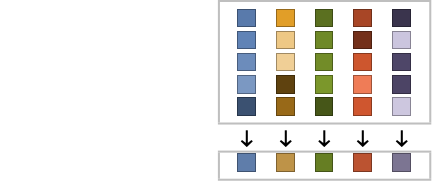
Association the values (the keys are ignored) » SparseArray as an array, equivalent to Normal[data] » QuantityArray quantities as an array » WeightedData based on the underlying EmpiricalDistribution » EventData based on the underlying SurvivalDistribution » TimeSeries, TemporalData, … vector or array of values (the time stamps ignored) » Image,Image3D RGB channel's values or grayscale intensity value » Audio amplitude values of all channels » DateObject, TimeObject list of dates or list of times » - Quantile[dist,p] is equivalent to InverseCDF[dist,p].
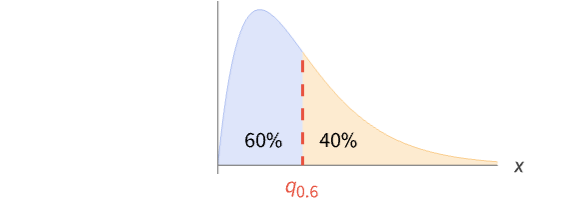
- Quantile[dist,p] is the minimum of the set of number(s)
 such that Probability[x≤
 ,xdist]≥p and Probability[x≥
 ,xdist]≥p. »
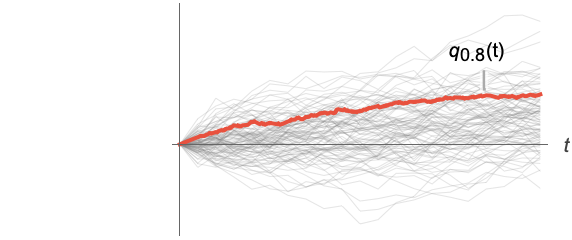
 - For a random process proc, the quantile function can be computed for slice distribution at time t, SliceDistribution[proc,t], as Quantile[SliceDistribution[proc,t], p]. »
- The value p can be symbolic or any number between 0 and 1. »

Examples
open all close allBasic Examples (7)
Find the halfway value of a list:
Quantile[{1, 2, 3, 4, 5, 6, 7}, 1 / 2]Find the 20% and 80% quantiles of a list:
Quantile[{1, 2, 3, 4, 5, 6, 7}, {0.2, 0.8}]Find the top percentile of a list:
Quantile[Range[100], .99]RandomDate[4]Quantile[%, .3]The q quantile for a normal distribution:
Quantile[NormalDistribution[μ, σ], q]Quantile function for a continuous univariate distribution:
Plot[Table[Quantile[BetaDistribution[1 / 2, β], q], {β, {1 / 4, 1 / 2, 1}}]//Evaluate, {q, 0, 1}, Filling -> Axis]Quantile function for a discrete univariate distribution:
𝒟 = PoissonDistribution[5];DiscretePlot[Quantile[𝒟, p], {p, CDF[𝒟, Range[0, 10]]}, ExtentSize -> Left, ExtentMarkers -> {"Empty", "Filled"}]Scope (33)
Basic Uses (7)
Quantile works with any real numeric quantities:
Quantile[{E, Pi, Sqrt[2], Sqrt[3]}, 1 / 4]Obtain results at any precision:
Quantile[N[{5, 10, 4, 25, 2, 1}, 30], 2 / 3]Compute results using other parametrizations:
Quantile[{5, 10, 4, 25, 2, 1}, 1 / 5]Quantile[{5, 10, 4, 25, 2, 1}, 1 / 5, {{1 / 2, 0}, {0, 1}}]Find quantiles for WeightedData:
Quantile[WeightedData[{1, 2, 3}, {3, 7, 4}], 0.4]data = {8, 3, 5, 4, 9, 0, 4, 2, 2, 3};
weights = {0.15, 0.09, 0.12, 0.10, 0.16, 0., 0.11, 0.08, 0.08, 0.09};Quantile[WeightedData[data, weights], 0.4]Find quantiles for EventData:
e = {1.0, 2.1, 3.2, 4.5, 5.7};
ci = {0, 0, 0, 1, 0};Quantile[EventData[e, ci], 0.4]Find a quantile for TimeSeries:
Quantile[TemporalData[TimeSeries, {{{2.3, 1.2, 6.7, 5.8, 7.1, 4.6}}, {{0, 5, 1}}, 1, {"Discrete", 1},
  {"Discrete", 1}, 1, {}}, False, 10.], 0.4]
The quantile depends only on the values:
Quantile[TemporalData[TimeSeries, {{{2.3, 1.2, 6.7, 5.8, 7.1, 4.6}}, {{0, 5, 1}}, 1, {"Discrete", 1},
  {"Discrete", 1}, 1, {}}, False, 10.]["Values"], 0.4]
Find a quantile for data involving quantities:
data = Quantity[RandomReal[1, 6], "Meters"]Quantile[data, 0.3]Array Data (6)
Find quantiles of elements in each column:
Quantile[{{1, 2Pi}, {2, Pi}, {3, 3Pi}}, 1 / 3]Find multiple quantiles of elements in each column:
Quantile[{{1, 2Pi}, {2, Pi}, {3, 3Pi}}, {1 / 3, 4 / 5}]The quantile for a tensor gives columnwise standard deviations at the first level:
Quantile[RandomReal[1, {10, 4, 3}], .2]Compute results for a large vector or matrix:
Quantile[RandomReal[1, 10 ^ 6], 1 / 10]Quantile[RandomReal[1, {10 ^ 5, 5}], 1 / 10]When the input is an Association, Quantile works on its values:
mat = RandomReal[1, {3, 2}];
assoc = AssociationThread[Range[3], mat]Quantile[assoc, .3]Compute results for a SparseArray:
sp = SparseArray[{{i_, i_} :> i, {i_, j_} /; j == i + 1 :> i - 1}, {100, 10}]Quantile[sp, 99 / 100]Find a quantile of a QuantityArray:
data = QuantityArray[RandomReal[1, 6], "Pounds"]Quantile[data, .1]Image and Audio Data (2)
Channelwise 30% percentile value of an RGB image:
Quantile[[image], .3]30% percentile intensity value of a grayscale image:
Quantile[[image], .3]30% percentile amplitude of all channels:
a = ExampleData[{"Audio", "Bee"}]Quantile[a, .3]Date and Time (5)
dates = WolframLanguageData[All, "DateIntroduced"];DateHistogram[dates]Quantile[dates, .9]Compute a weighted quantile of dates:
dates = RandomDate[4]weights = {1, 1, 1, 3};Quantile[WeightedData[dates, weights], .1]Compute a quantile of dates given in different calendars:
dates = {DateObject[{2024, 2, 29}, CalendarType -> "Jewish"],
DateObject[{1024, 8, 23}, CalendarType -> "Julian"], DateObject[{1524, 1, 1}, CalendarType -> "Islamic"], DateObject[{6024, 1, 15}, CalendarType -> "Julian"]}TimelinePlot[dates, ImageSize -> Medium]The quantile is given in one of the input calendars:
Quantile[dates, .3]%["CalendarType"]times = RandomTime[3, TimeZone -> "America/Chicago"]Quantile[times, .3]Compute a quantile of times with different time zone specifications:
times = {TimeObject[{12}, TimeZone -> 0], TimeObject[{12}, TimeZone -> 2], TimeObject[{12}, TimeZone -> "Asia/Tokyo"]}Quantile[times, .2]DateValue[%, "TimeZone"]Parametric Distributions (5)
Quantile[WeibullDistribution[2, 5], 1 / 4]Quantile[NegativeBinomialDistribution[20, 1 / 3], 1 / 5]Obtain a machine-precision result:
Quantile[WeibullDistribution[2, 5], 0.4]Obtain a result at any precision for a continuous distribution:
Quantile[WeibullDistribution[2, 5], N[1 / 4, 25]]Obtain a symbolic expression for the quantile:
Quantile[ChiSquareDistribution[ν], x]Quantile threads elementwise over lists:
Quantile[NormalDistribution[], {0.0, 0.2, 0.3}]Nonparametric Distributions (2)
Quantile for nonparametric distributions:
r = RandomVariate[NormalDistribution[], 10 ^ 2];Quantile[HistogramDistribution[r], 0.2]Quantile[SmoothKernelDistribution[r], 0.2]Quantile[KernelMixtureDistribution[r], 0.2]Quantile[SurvivalDistribution[r], 0.2]Quantile[EmpiricalDistribution[r], 0.2]Compare with the value for the underlying parametric distribution:
Quantile[NormalDistribution[], 0.2]Plot the quantile for a histogram distribution:
Plot[Quantile[HistogramDistribution[RandomVariate[NormalDistribution[], 10 ^ 3]], q]//Evaluate, {q, 0, 1}, Filling -> Axis, Exclusions -> None]Derived Distributions (4)
Quantile for a truncated distribution:
Quantile[TruncatedDistribution[{2, 4}, ExponentialDistribution[1]], q]Plot[{Quantile[ExponentialDistribution[1], q], %}, {q, 0, 1}, Filling -> Axis]Quadratic transformation of an exponential distribution:
Quantile[TransformedDistribution[x ^ 2, xExponentialDistribution[2]], q]Quantile[CensoredDistribution[{-2, 4}, CauchyDistribution[0, 1]], q]Quantile for distributions with quantities:
Quantile[RayleighDistribution[Quantity[502., "Newtons"]], Quantity[96, "Percent"]]Quantile[HistogramDistribution[QuantityArray[RandomReal[{2, 5}, 1000], "Grams"]], Quantity[96, "Percent"]]Random Processes (2)
Quantile function for a random process:
Quantile[WienerProcess[μ, σ][t], q]Plot[Evaluate[% /. {μ -> 3, σ -> 1, q -> 1 / 20}], {t, 0, 1}]Find a quantile of TemporalData at some time t=0.5:
td = RandomFunction[WienerProcess[1, 1], {0, 10, 0.05}, 100]Quantile[td[0.5], 0.4]Find the corresponding quantile function together with all the simulations:
Show[ListLinePlot[td, PlotStyle -> Directive[Opacity[0.3], Thin]], Plot[Quantile[td[t], 0.4], {t, 0, 10}, PlotStyle -> Thick]]Applications (7)
A set of  equally spaced quantiles divides the values into
  equal-sized groups:
𝒟 = NormalDistribution[3, 1];q = Quantile[𝒟, {0, 0.2, 0.4, 0.6, 0.8, 1}]//NLength[q]Plot the PDF divided according to the values of quantiles into five regions:
Plot[PDF[𝒟, x], {x, 0, 6}, Filling -> Axis, Epilog -> {Orange, Apply[Sequence, Table[Line[{{q[[i]], 0}, {q[[i]], PDF[𝒟, q[[i]]]}}], {i, 2, 5}]]}]Use quantile as a mesh function:
Plot[PDF[𝒟, x], {x, 0, 6}, Ticks -> {Automatic, None}, MeshFunctions -> {#1&}, Mesh -> {Quantile[𝒟, Range[0.2, 0.8, 0.2]]}, MeshStyle -> Red, MeshShading -> ColorData[97, "ColorList"], PlotStyle -> Thick]Plot the q quantile for a list:
data = RandomVariate[BinomialDistribution[10, 0.5], 40];Plot[Quantile[data, q], {q, 0, 1}, PlotRange -> {0, 10}]The linearly interpolated quantile:
Plot[Quantile[data, q, {{1 / 2, 0}, {0, 1}}], {q, 0, 1}]Compute an expectation using quantile  :
:
dist = TukeyLambdaDistribution[1 / 3];Integrate[(UnitStep[2x + 1] /. {x -> Quantile[dist, p]}), {p, 0, 1}]Use this method in Expectation:
Expectation[UnitStep[2x + 1], xTukeyLambdaDistribution[1 / 3], Method -> "Quantile"]Generate random numbers for a nonuniform distribution by transforming the uniform distribution by the quantile function of the nonuniform distribution:
Q[p_] = Refine[Quantile[NormalDistribution[3, 1], p], 0 ≤ p ≤ 1]data = RandomVariate[TransformedDistribution[Q[p], pUniformDistribution[]], 10000];Compare the histogram of the sample with the probability density function of the desired distribution:
Show[
	Histogram[data, 30, "PDF"],
	Plot[PDF[NormalDistribution[3, 1], x], {x, -9, 9}, PlotStyle -> Thick]]
Compute a moving quantile for some data:
data = TemporalData[TimeSeries, {{{0., 0.046491782116164254, 0.08903630113726002, 0.10513552796891892,
    0.15836877340214242, 0.16762760021154957, 0.22262040271007824, 0.09229029166541514,
    0.01638158916750626, -0.028243805037334938, 0.212763528740 ... 352256143162, 0.5558410175472224, 0.5068911071028394,
    0.500082375411682}}, {{0, 1., 0.01}}, 1, {"Continuous", 1}, {"Continuous", 1}, 1,
  {ValueDimensions -> 1, ResamplingMethod -> {"Interpolation", InterpolationOrder -> 1}}}, False,
10.1];mq = MovingMap[Quantile[#, 1 / 3]&, data, .1];ListLinePlot[{data, mq}]Compute selected quantiles for slices of a collection of paths of a random process:
data = RandomFunction[WienerProcess[], {0, 1, .01}, 10 ^ 3];times = Range[0, 1, .1];q1 = Map[{#, Quantile[data[#], .1]}&, times];
q3 = Map[{#, Quantile[data[#], .3]}&, times];
q7 = Map[{#, Quantile[data[#], .7]}&, times];Plot the quantiles over these paths:
Show[ListPlot[data], ListLinePlot[{q1, q3, q7}, PlotStyle -> {{Blue, Dotted}, {Blue, Dashed}, Blue}, PlotLegends -> LineLegend[{"q1", "q3", "q7"}, LegendLayout -> "ReversedColumn"]]]Compute quantiles for the heights of children in a class:
heights = Quantity[{134, 143, 131, 140, 145, 136, 131, 136, 143, 136, 133, 145, 147,
150, 150, 146, 137, 143, 132, 142, 145, 136, 144, 135, 141}, "Centimeters"];ListPlot[heights, Filling -> Axis, AxesLabel -> Automatic]qs = Quantile[heights, {0.1, 0.5, 0.9}]n = Length[heights];
ListPlot[Join[{heights}, Table[{{0, q}, {n, q}}, {q, qs}]], Joined -> {False, True, True, True}, Filling -> {1 -> 0}, AxesLabel -> Automatic, PlotLegends -> {"heights", "q = 0.1", "q = 0.5", "q = 0.9"} ]Properties & Relations (9)
Use Quantile to find the quartiles of a distribution:
Quantile[ExponentialDistribution[λ], {1 / 4, 1 / 2, 3 / 4}]Quartiles[ExponentialDistribution[λ]]% - %%With default parameters, Quantile always returns an element of the list:
Quantile[{1, 2, 3, 4}, 1 / 2]Quartiles gives linearly interpolated Quantile values for a list:
data = RandomReal[10, 20];Quantile[data, {1 / 4, 1 / 2, 3 / 4}, {{1 / 2, 0}, {0, 1}}]Quartiles[data]InterquartileRange is the difference of linearly interpolated Quantile values for a list:
data = RandomReal[10, 20];{q1, q2} = Quantile[data, {3 / 4, 1 / 4}, {{1 / 2, 0}, {0, 1}}];
q1 - q2InterquartileRange[data]QuartileDeviation is half the difference of linearly interpolated Quantile values for a list:
data = RandomReal[10, 20];{q1, q2} = Quantile[data, {3 / 4, 1 / 4}, {{1 / 2, 0}, {0, 1}}];
(q1 - q2) / 2QuartileDeviation[data]QuartileSkewness uses linearly interpolated Quantile values as a skewness measure:
data = RandomReal[10, 20];{q1, q2, q3} = Quantile[data, {1 / 4, 1 / 2, 3 / 4}, {{1 / 2, 0}, {0, 1}}];
(q1 - 2q2 + q3) / (q3 - q1)QuartileSkewness[data]Quantile is equivalent to InverseCDF for distributions:
Quantile[ParetoDistribution[k, α], q]InverseCDF[ParetoDistribution[k, α], q]QuantilePlot plots the quantiles of a list or distribution:
dist = ExponentialDistribution[2];
data = RandomVariate[dist, 10 ^ 3];{QuantilePlot[data], QuantilePlot[dist]}BoxWhiskerChart shows special quantiles for data:
BoxWhiskerChart[RandomVariate[NormalDistribution[0, 1], 100]]Possible Issues (4)
For computations with data, the value p can be any number between 0 and 1:
Quantile[{1, 4, 8, 3, 2, 0, 8}, p]
Quantile[{1, 4, 8, 3, 2, 0, 8}, 3]
The symbolic closed form may exist for some distributions:
Quantile[NormalDistribution[μ, σ], p]Symbolic closed forms do not exist for some distributions:
Quantile[StableDistribution[0, 1.8, -0.5, 1, 2], p]Quantile[StableDistribution[0, 1.8, -0.5, 1, 2], 0.3]Substitution of invalid values into symbolic outputs gives results that are not meaningful:
Quantile[CauchyDistribution[2, 3], p] /. {p -> 1. + I}








It stays unevaluated if passed as an argument:
Quantile[CauchyDistribution[2, 3], 1. + I]Quartiles of data computed via Quantile do not always agree with Quartiles:
data = RandomReal[10, 20];Quantile[data, {1 / 4, 1 / 2, 3 / 4}]Quartiles[data]%% - %Specify linear interpolation parameters in Quantile:
Quantile[data, {1 / 4, 1 / 2, 3 / 4}, {{1 / 2, 0}, {0, 1}}]%%% - %Neat Examples (1)
The distribution of Quantile estimates for 20, 100, and 300 samples:
Quantile[ExponentialDistribution[0.9], 0.7]SmoothHistogram[Table[Quantile[RandomVariate[ExponentialDistribution[0.9], {s, 1000}], 0.7], {s, {20, 100, 300}}], Filling -> Axis, PlotLegends -> {20, 100, 300}, PlotRange -> {{0, 3}, Automatic}]Text
Wolfram Research (2003), Quantile, Wolfram Language function, https://reference.wolfram.com/language/ref/Quantile.html (updated 2024).
CMS
Wolfram Language. 2003. "Quantile." Wolfram Language & System Documentation Center. Wolfram Research. Last Modified 2024. https://reference.wolfram.com/language/ref/Quantile.html.
APA
Wolfram Language. (2003). Quantile. Wolfram Language & System Documentation Center. Retrieved from https://reference.wolfram.com/language/ref/Quantile.html