

ImageStitch
ImageStitch[{image1,image2,…}]
gives a composed image from an unordered list of imagei.
ImageStitch[{{image11,image12,…},{image21,image22,…},…}]
returns a stitched image from a matrix of images imageij, according to their array position.
ImageStitch[images,canvas]
projects the stitched image onto the geometry specified by canvas.
Details and Options
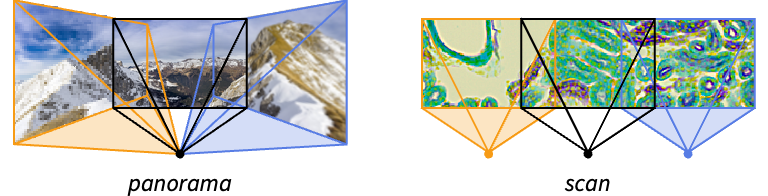
- ImageStitch merges overlapping images into a single image. It is typically used when larger scenes are acquired through smaller subimages, such as a panoramic image of a scene, a sample under a microscope or satellite images of the Earth.
- Images are always stitched together to show the object or scene as a 2D image.
- By default, the most suitable canvas geometry is chosen.
- Possible projection canvas geometries are:
-
"Plane" planar stitching "Cylinder" rolled out cylindrical projection "Sphere" return an equirectangular projection - By default, the center of gaze is assumed to be the center of the stitched image.
- The stitched image will have the same orientation as the most central subimage.
- To specify the center of gaze and orientation of the resulting image, additional canvas specifications are:
-
{"canvas",n} places the center of gaze at the center of the n  image
image{"canvas",n{x,y}} center of gaze at the {x,y} position in the n  image
image{"canvas",n{x,y},α} rotates the image vertical by angle 
{"canvas",n{x1,y1},m{x2,y2}} rotates the image such that {x1,y1} of the n  image and {x2,y2} of the m
 image fall on a horizontal line
 - The following options can be specified:
-
Method Automatic settings to use for stitching TransformationClass Automatic geometrical relation between images - The Method option can be used to specify the following settings:
-
"HistogramEqualization" True whether to perform brightness equalization on images "ImageBlending" "Feathering" the method to blend images "KeypointMethod" Automatic the ImageCorrespondingPoints method - Possible settings for "ImageBlending" are "Feathering" (default), {"Feathering",σ} or None.
Examples
open all close allBasic Examples (1)
Scope (1)
Canvas (1)
By default, the most suitable canvas is automatically chosen:
imgs = {[image], [image], [image]};ImageStitch[imgs]ImageStitch[imgs, "Plane"]Enforce cylindrical stitching:
ImageStitch[imgs, "Cylinder"]ImageStitch[imgs, "Sphere"]Specify the center of gaze to be the coordinate  in the third image:
ImageStitch[imgs, {"Plane", 3 -> {50, 120}}]Options (3)
Method (2)
By default, feathering is applied to image boundaries to blend stitched images:
images = {[image], [image], [image]};ImageStitch[images, Method -> {"ImageBlending" -> "Feathering"}]Specify the scale of image blending:
ImageStitch[images, Method -> {"ImageBlending" -> {"Feathering", 20}}]ImageStitch[images, Method -> {"ImageBlending" -> None}]By default, histogram equalization is performed on images:
list = {[image], [image], [image], [image]};ImageStitch[list]Turn off the histogram equalization:
ImageStitch[list, Method -> {"HistogramEqualization" -> False}]Applications (5)
Stitch images with different orientations:
ImageStitch[{[image], [image], [image]} ]Stitch an array of scanned microscopy images:
grid = {{[image], [image], [image], [image]}, {[image], [image], [image], [image]}, {[image], [image], [image], [image]}};ImageStitch[grid, TransformationClass -> "Rigid"]Stitch a sequence of aerial photographs:
ImageStitch[{[image], [image], [image]}]A vertical panorama of a sequoia tree:
ImageStitch[{[image], [image], [image]}]Stitch images including some camera rotations:
ImageStitch[{[image], [image], [image]}]Properties & Relations (1)
Different images may have captured parts of the scene with different exposures:
ImageStitch[{[image], [image], [image], [image], [image], [image], [image], [image], [image]}]Perform color tone mapping to make larger parts of the resulting image visible:
ColorToneMapping[%, Method -> "LogLuminance"]Text
Wolfram Research (2021), ImageStitch, Wolfram Language function, https://reference.wolfram.com/language/ref/ImageStitch.html (updated 2022).
CMS
Wolfram Language. 2021. "ImageStitch." Wolfram Language & System Documentation Center. Wolfram Research. Last Modified 2022. https://reference.wolfram.com/language/ref/ImageStitch.html.
APA
Wolfram Language. (2021). ImageStitch. Wolfram Language & System Documentation Center. Retrieved from https://reference.wolfram.com/language/ref/ImageStitch.html