

ImageSynthesize
ImageSynthesize[text]
generates an image based on the textual description text.
ImageSynthesize[image]
generates a new image based on image.
ImageSynthesize[spec,n]
generates n images based on the specification spec.
Details and Options
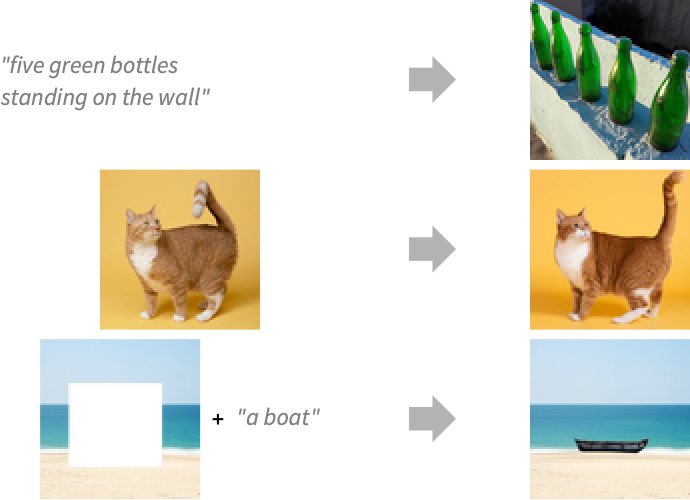
- ImageSynthesize is used to generate a synthetic image based on a textual description or a reference image, or to fill in a portion of an image.
- ImageSynthesize requires external service authentication, billing and internet connectivity.
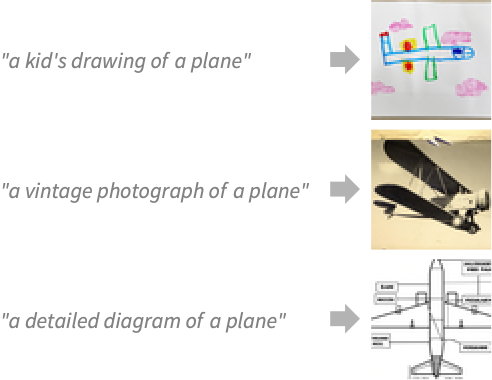
- The image description in text can be used to specify the image content, type (photorealistic, drawing, etc.), artistic style, colors, etc.
- Possible values of the spec include:
-
text generate an image based on text image generate a variation of image assoc generate an image based on the parameters in assoc - Possible keys in the parameter association assoc are:
-
"Text" image description "Image" image seed for the synthesis "Mask" part of the image to synthesize - According to the specified parameters, the following tasks will be performed:
-
{"Text"} image synthesis from a textual description {"Image"} image synthesis from a reference image {"Text","Image"} inpaint of the transparent part of the image {"Text","Image","Mask"} inpaint of the part of the image specified by the mask - The following options can be specified:
-
Authentication Automatic explicit user ID and API key ImageSize Small the size of the generated image LLMEvaluator Automatic LLM configuration to use ProgressReporting $ProgressReporting how to report the progress of the computation - LLMEvaluator can be set to an LLMConfiguration object or an association with any of the following keys:
-
"Model" base model - Valid forms of "Model" include:
-
name named model {service,name} named model from service <"Service"service,"Name"name> fully specified model - Possible values for Authentication are:
-
Automatic choose the authentication scheme automatically Environment check for a key in the environment variables SystemCredential check for a key in the system keychain ServiceObject[…] inherit the authentication from a service object "string" provide explicit API key - With AuthenticationAutomatic, the function checks the variable ToUpperCase[service]<>"_API_KEY" in Environment and SystemCredential; otherwise, it uses ServiceConnect[service].
- Possible values for ImageSize are:
-
Small 256×256 pixels Medium 512×512 pixels Large 1024×1024 pixels - ImageSynthesize uses machine learning. Its methods, training sets and biases included therein may change and yield varied results in different versions of the Wolfram Language.
Examples
open all close allBasic Examples (3)
Generate a Monet-like painting:
ImageSynthesize["A painting of a ram in the style of Monet"]Generate three variations of the same image:
ImageSynthesize[[image], 3]Generate several images using the same prompt:
ImageSynthesize["MRI scan of a knee", 3]Scope (5)
Synthesize an image from a prompt:
ImageSynthesize["car render, low poly, vibrant colors, film grain"]Synthesize an image variation using a reference image:
ImageSynthesize[[image]]Synthesize parts of an image using a prompt and a transparent reference image:
ImageSynthesize[{"a car in a computer generated city", [image]}]Synthesize parts of an image using a prompt and a binary mask:
ImageSynthesize[{"a car in a computer generated city", [image], [image]}]Synthesize multiple images at once:
ImageSynthesize[{"a car on a desert road", [image]}, 2]Options (6)
Authentication (4)
Provide an authentication key for the API:
ImageSynthesize["a dog", Authentication -> <|"APIKey" -> "1234abcd"|>]Provide both a user ID and the API key:
ImageSynthesize["a dog", Authentication -> <|"ID" -> "user1", "APIKey" -> "1234abcd"|>]Look for the key in the system keychain:
ImageSynthesize["a dog", Authentication -> SystemCredential]Look for the key in the system environment:
ImageSynthesize["a dog", Authentication -> Environment]Authenticate via a service object:
so = ServiceConnect["OpenAI"]ImageSynthesize["a dog", Authentication -> so]ImageSize (2)
Synthesize images of different sizes:
Table[ImageSynthesize["a detailed painting of an icy pond in winter with many trees", ImageSize -> size], {size, {Small, Medium, Large}}]Synthesize a larger variation of an image:
ImageSynthesize[[image], ImageSize -> Large]Text
Wolfram Research (2023), ImageSynthesize, Wolfram Language function, https://reference.wolfram.com/language/ref/ImageSynthesize.html.
CMS
Wolfram Language. 2023. "ImageSynthesize." Wolfram Language & System Documentation Center. Wolfram Research. https://reference.wolfram.com/language/ref/ImageSynthesize.html.
APA
Wolfram Language. (2023). ImageSynthesize. Wolfram Language & System Documentation Center. Retrieved from https://reference.wolfram.com/language/ref/ImageSynthesize.html