

PerceptronModel
represents a perceptron net for prediction.
PerceptronModel[hpars]
uses the custom hyperparameters hpars.
PerceptronModel[hpars,vars]
uses the provided variables vars.
Details
- PerceptronModel models a classification or regression task as a multilayer perceptron neural net.
- The following hyperparameters may be specified to control the perceptron net:
-
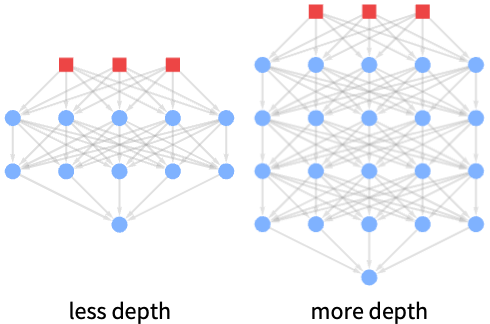
"Depth" 2 number of layers "Width" Scaled[10] neurons per layers "Activation" Tanh activation function - Deeper models can learn more complex, hierarchical patterns by building up abstractions layer by layer but require more data and training time. "Depth" can be increased when hierarchical structure in relationships between variables is suspected.
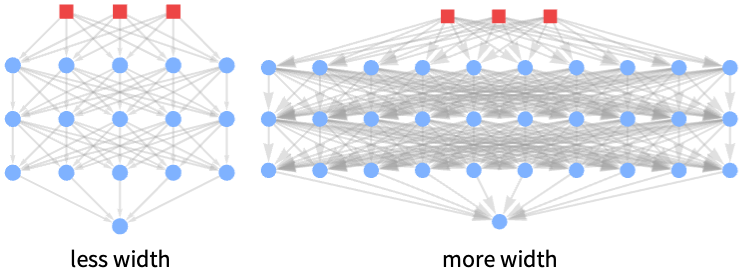
- Wider models can capture more variation and nuances in the data at each level of abstraction but use more parameters and memory. "Width" can be increased when there are many samples and there is need to capture more complex patterns at each level.
- Using "Width"Scaled[f] creates a net with Ceiling[f*Length[vars]] neurons per layer.
- When not specified, variables will automatically be enumerated using x[i].
- Valid variable specifications vars include:
-
n the number of variables symb a symbolic representation of a single variable {symb1,…} a list of symbolic variables - Model properties can be extracted using Information[PowerModel[…],prop].
- Valid basic properties include:
-
"BaseType" model base type "Name" model name "ShortName" short identifier to use as label "InputType" supported input types "OutputType" supported output types - Valid data-related properties include:
-
"ColumnNames" names of the input features "ColumnVariableMap" map between column names and model variables "InputSize" dimensionality of the input "OutputSize" dimensionality of the output "Trainable" whether the model is fully specified and can be trained "Trained" whether the model can be evaluated numerically "VariableColumnMap" map between model variables and column names "Variables" name of the model variables - Hyperparameter-related properties include:
-
"HyperparameterDomain" specified hyperparameter search domain "Hyperparameters" hyperparameter values
Hyperparameters
Variables
Properties
Examples
open all close allBasic Examples (3)
Create a generic perceptron net model:
PerceptronModel[]Specify multiple custom hyperparameters:
PerceptronModel[<|"Width" -> 10, "Depth" -> 3|>]Train a net on the Old Faithful Eruptions dataset:
model = ModelFit[ResourceData["Sample Data: Old Faithful Eruptions"], PerceptronModel[]]model[<|"Duration" -> Quantity[4, "Minutes"]|>]Extract the underlying net model:
Information[model, "Parameters"]Scope (16)
Hyperparameters (3)
"Depth" (1)
Variables (3)
Define a net with a specific number of variables:
PerceptronModel[Automatic, 2]PerceptronModel[Automatic, {x, y, z}]ModelFit will assume the number of variables is one less than the dimensionality of data points:
ModelFit[{{1, 9, 55}, {1, 1, 7}, {1, 4, 25}, {8, 9, 118}, {8, 10, 124}, {8, 5, 94}}, PerceptronModel[]]Evaluation (3)
Evaluate a trained perceptron net model numerically:
ModelFit[{...}, PerceptronModel[]][{1, 2}]Evaluate the net on a list of inputs:
ModelFit[{...}, PerceptronModel[]][{{1.17841, 7.0408}, {7.8774, 3.20304}, {5.12858, 7.89375}}]Perceptron nets cannot be evaluated symbolically:
ModelFit[{...}, PerceptronModel[]][{x, y}]
Information (5)
View general information about a model:
Information[PerceptronModel[]]Some information is only available when variables or parameters are fully specified:
Information[PerceptronModel[Association["Hyperparameters" -> Association["Depth" -> 2, "Width" -> 10,
    "Activation" -> Tanh]], Association["ParameterValues" ->
   Association["Net" -> NetChain[Association["Type" -> "Chain",
       "Nodes" -> Association[ ... , "Output" -> {3}],
     "SourceFunction" -> ModelFit, "CategoricalCastQ" -> False, "QuantityQ" -> False,
     "DateColumnsQ" -> False, "UncertaintyQ" -> False,
"Domain" -> Association["f1" -> {1, 8}, "f2" -> {1, 10}, "f3" -> {7, 124}]]]]]]Information[PerceptronModel[Association["Hyperparameters" -> Association["Depth" -> 2, "Width" -> 10,
"Activation" -> Tanh]], Association["ParameterValues" ->
Association["Net" -> NetChain[Association["Type" -> "Chain",
"Nodes" -> Association[ ... , "Output" -> {3}],
"SourceFunction" -> ModelFit, "CategoricalCastQ" -> False, "QuantityQ" -> False,
"DateColumnsQ" -> False, "UncertaintyQ" -> False,
"Domain" -> Association["f1" -> {1, 8}, "f2" -> {1, 10}, "f3" -> {7, 124}]]]]], "Variables"]Information[PerceptronModel[Association["Hyperparameters" -> Association["Depth" -> 2, "Width" -> 10,
"Activation" -> Tanh]], Association["ParameterValues" ->
Association["Net" -> NetChain[Association["Type" -> "Chain",
"Nodes" -> Association[ ... , "Output" -> {3}],
"SourceFunction" -> ModelFit, "CategoricalCastQ" -> False, "QuantityQ" -> False,
"DateColumnsQ" -> False, "UncertaintyQ" -> False,
"Domain" -> Association["f1" -> {1, 8}, "f2" -> {1, 10}, "f3" -> {7, 124}]]]]], {"Variables", "Hyperparameters"}]Get information about the default model values:
Information[PerceptronModel[Automatic, 2], {"Variables", "Hyperparameters"}]Fitting (2)
Fit a perceptron net model with the default hyperparameters:
ModelFit[{...}, PerceptronModel[]]report = ModelFit[{...}, {PerceptronModel[<|"Width" -> 5|>], PerceptronModel[<|"Depth" -> 1|>]}, "Report"]Compare the choice of hyperparameter values via cross-validation:
report["CrossValidationChart"]Text
Wolfram Research (2026), PerceptronModel, Wolfram Language function, https://reference.wolfram.com/language/ref/PerceptronModel.html.
CMS
Wolfram Language. 2026. "PerceptronModel." Wolfram Language & System Documentation Center. Wolfram Research. https://reference.wolfram.com/language/ref/PerceptronModel.html.
APA
Wolfram Language. (2026). PerceptronModel. Wolfram Language & System Documentation Center. Retrieved from https://reference.wolfram.com/language/ref/PerceptronModel.html