

PowerModel
represents a power law function.
PowerModel[vars]
represents a model with the given variables vars with unknown constants.
PowerModel[pars,vars]
represents the model of vars variables with the given parameters pars.
Details
- PowerModel represents a power law relationship in the given variables in a format suitable for symbolic or numerical evaluation and fitting.
- Power models describe phenomena such as geometric scaling (area/volume), allometric relationships, inverse-square laws and other scale-invariant physical and empirical relationships.
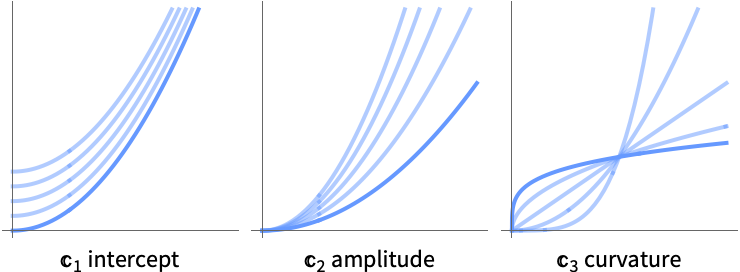
- PowerModel is parametrized as
 .
. - Multivariate power models are parametrized as
![TemplateBox[{1}, CTraditional]+TemplateBox[{2}, CTraditional] product_(i=3)^nx_i^(TemplateBox[{i}, CTraditional])](Files/PowerModel.en/3.png "TemplateBox[{1}, CTraditional]+TemplateBox[{2}, CTraditional] product_(i=3)^nx_i^(TemplateBox[{i}, CTraditional])") .
. - A fully specified model can be evaluated either numerically or symbolically using PowerModel[…][x].
- Multivariate models expect a list of variables PowerModel[…][{x,y,…}].
- When not specified, variables will automatically be enumerated using x[i].
- Valid variable specifications vars include:
-
n the number of variables symb a symbolic representation of a single variable {symb1,…} a list of symbolic variables - When not specified, parameters will automatically be enumerated using C[i].
- Valid parameter pars specifications in the form {par1,…} include:
-
val a fixed parameter value val par a symbolic parameter name par parval a symbolic name par set to a fixed value val {par,val0} a symbolic parameter named par with the initial value val0 - Model properties can be extracted using Information[PowerModel[…],prop].
- Valid basic properties include:
-
"BaseType" model base type "Name" model name "ShortName" short identifier to use as label "InputType" supported input types "OutputType" supported output types - Valid data-related properties include:
-
"ColumnNames" names of the input features "ColumnVariableMap" map between column names and model variables "InputSize" dimensionality of the input "OutputSize" dimensionality of the output "Trainable" whether the model is fully specified and can be trained "Trained" whether the model can be evaluated numerically "VariableColumnMap" map between model variables and column names "Variables" name of the model variables - Best model-related properties include:
-
"Expression" model expression "Function" model as a pure function "SymbolicExpression" model expression with symbolic parameters "TabularFunction" pure function suitable to work on a tabular row - Parameter-related properties include:
-
"ParameterAssociation" association of parameter names and values "ParameterCount" the number of parameters "ParameterInitialValues" initial values for the fit "ParameterNames" parameter names "ParameterRules" list of rules with parameter names and values "Parameters" parameter values if present; names otherwise "ParameterValues" parameter values "Constraints" parameter constraints
Variables
Parameters
Properties
Examples
open all close allBasic Examples (3)
Specify a generic power model:
PowerModel[]Use an explicit input size and custom names for the symbolic parameters:
PowerModel[{a, b, c}, 1]Compare the model of multiple different powers:
Plot[{PowerModel[{0, 1, -0.5}, 1][x], PowerModel[{1, 1, 0.5}, 1][x], PowerModel[{5, -1, 1.5}, 1][x]}, {x, 0, 5}]Scope (19)
Variables (2)
Specify a generic power model:
PowerModel[]The number of variables is inferred from the input:
PowerModel[][{x}]PowerModel[][{x, y}]ModelFit will assume the number of variables is one less than the dimensionality of data points:
ModelFit[{{1, 9, 55}, {1, 1, 7}, {1, 4, 25}, {8, 9, 118}, {8, 10, 124}, {8, 5, 94}}, PowerModel[]]Specify the number of variables:
PowerModel[2]Give the variables a custom symbolic representation:
PowerModel[{var1, var2}]These names are overwritten when the model is evaluated symbolically:
PowerModel[{var1, var2}][{a, b}]Parameters (5)
Parameter names are assigned automatically:
PowerModel[1]Specify custom parameter names:
PowerModel[{a, b, c}, 1]Set a parameter to a specific value:
PowerModel[{0, 42, b}, 1]Specify both parameter names and values:
PowerModel[{a -> 0, b, c}, 1]Specify initial values for some parameters:
PowerModel[{a, b, {c, -1}}, 1]Information[%, "ParameterInitialValues"]Evaluation (5)
Symbolically evaluate a single-variable model:
PowerModel[1][x]Symbolically evaluate a two-variable model:
PowerModel[2][{x, y}]The number of variables is automatically inferred if not specified:
PowerModel[][x]PowerModel[][{x, y}]Evaluate the model on multiple symbolic variables:
PowerModel[2][{{x, y}, {a, b}}]Evaluate the model on a list of points:
PowerModel[1][{1, 2, 3}]Information (4)
View general information about a model:
Information[PowerModel[]]A model will only show information available based on the provided variables and parameters:
Information[PowerModel[x]]Information[PowerModel[{a, b, c}, x], "Variables"]Information[PowerModel[{a, b, c}, x], {"Variables", "Parameters"}]Get information about the default model values:
Information[PowerModel[1], {"Variables", "Parameters"}]Model Fit (3)
Fit a power model specifying the parameter and variable names:
ModelFit[{{1, 1, 2}, {2, 5, 9}, {3, 8, 16}}, PowerModel[{a, b, c, d}, {x, y}]]Numerical parameter values are considered fixed during fitting:
ModelFit[{{1, 2}, {2, 9}, {3, 16}}, PowerModel[{0, Pi, a}, 1]]Specify initial parameter values:
ModelFit[{...}, PowerModel[{a, b, {c, -1}}, 1]]Applications (2)
Confirming the Formula for Kinetic Energy (1)
Experimentally validate the kinetic energy formula  . Measure the time it takes for a ball to roll a set horizontal distance after traveling down a ramp from different heights:
data = Tabular[...]Calculate the initial potential energy and the velocity given a 0.3m ball and a 0.104kg mass:
mass = 0.104;
distance = 0.30;
g  = 9.81 ;
velocityData = TransformColumns[data, {"PotentialEnergy" -> Function[mass * g * #Height], "Speed" -> Function[distance / #Time ]}]
Assuming all potential energy is converted to kinetic energy (no friction), you can find the kinetic energy by fitting a power model:
model = ModelFit[velocityData -> {"Speed", "PotentialEnergy"}, PowerModel[]]By definition, a stationary object must have zero kinetic energy. Set the intercept to zero for a better fit:
model = ModelFit[velocityData -> {"Speed", "PotentialEnergy"}, PowerModel[{0, c, m}, 1]]ListPlot[velocityData -> {"Speed", "PotentialEnergy"}, PlotFit -> model, AxesLabel -> {"Speed (m/s)", "Energy (J)"}]The fit is to the following expression:
Information[model, "Expression"]Compare with the theoretical formula  :
:
1 / 2 mass v ^ 2Predicting Abalone Weight (1)
Retrieve data on abalone (a marine mollusc) measurements:
abalone = Tabular@ResourceData["Sample Data: Abalone Measurements"]Clean the data by removing anomalous (0mm-high abalone) measurements:
cleanAbalone = Select[abalone, QuantityMagnitude[#Height] > 0&];Predict the weight of an abalone based on the shell measurements, treating the abalone as radially symmetric and ignoring the length:
ModelFit[cleanAbalone -> {"Diameter", "Height", "ShuckedWeight"}, PowerModel[]]Possible Issues (1)
Zero or negative input values will give errors during the fit:
data = ResourceData["Sample Data: Abalone Measurements"];
ModelFit[data -> {"Diameter", "Height", "WholeWeight"}, PowerModel[]]
Remove the  high crab from the dataset:
cleanData = Select[data, Positive[#Height]&];The fit will now complete as expected:
ModelFit[cleanData -> {"Diameter", "Height", "WholeWeight"}, PowerModel[]]Text
Wolfram Research (2026), PowerModel, Wolfram Language function, https://reference.wolfram.com/language/ref/PowerModel.html.
CMS
Wolfram Language. 2026. "PowerModel." Wolfram Language & System Documentation Center. Wolfram Research. https://reference.wolfram.com/language/ref/PowerModel.html.
APA
Wolfram Language. (2026). PowerModel. Wolfram Language & System Documentation Center. Retrieved from https://reference.wolfram.com/language/ref/PowerModel.html