
 dimension in data.

RangeFilter
RangeFilter[data,r]
filters data by replacing every value by the difference of the maximum and minimum in its range-r neighborhood.
RangeFilter[data,{r1,r2,…}]
uses ri for filtering the 
 dimension in data.
Details
- RangeFilter is used to detect local jumps in data, where the size of the local neighborhood is dependent on the value of r.
- The function applied to each range-r neighborhood is the absolute difference of MinMax.
- The data can be any of the following:
-
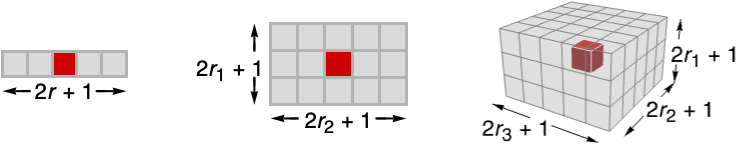
list arbitrary-rank numerical array tseries temporal data such as TimeSeries, TemporalData, … image arbitrary Image or Image3D object audio an Audio object video a Video object - RangeFilter[data,{r1,r2,…}] computes the range of sample values in
 blocks centered on each sample.
 - RangeFilter assumes the index coordinate system for lists and images.
- At the data boundaries, RangeFilter uses smaller neighborhoods.

Examples
open all close allBasic Examples (3)
RangeFilter[{1, 2, -3, 4, 5, 4, 3, 2, 1}, 1]Filter a TimeSeries:
ts = TemporalData[TimeSeries, {{{0., -0.27267267057145633, -0.6672983789995302, -0.5338541947930846,
    -0.6117404489279314, -0.6755527076595494, -0.02125421294486496, -0.10792797291843935,
    -0.6138271235477938, -0.3248568606554575, -0.08843449054 ... 2053424, -0.49980440691873723, -0.5388679788215971,
    -0.4101602764645551}}, {{0, 1., 0.01}}, 1, {"Continuous", 1}, {"Continuous", 1}, 1,
  {ValueDimensions -> 1, ResamplingMethod -> {"Interpolation", InterpolationOrder -> 1}}}, False,
10.1];filtered = RangeFilter[ts, .1]ListLinePlot[{ts, filtered}, PlotLegends -> {"original data", "filtered"}]Range filtering applied to a color image:
RangeFilter[[image], 1]Scope (12)
Data (7)
Range filtering of a numeric vector:
RangeFilter[{1, -1, 0, 1, 1, 0}, 1]Range filtering of a 2D array:
RangeFilter[(| | | | |
| - | - | - | - |
| 0 | 3 | 8 | 2 |
| 2 | 1 | 9 | 6 |
| 5 | 8 | 9 | 6 |
| 3 | 5 | 9 | 6 |), 1]//MatrixFormRange filtering of a list of Quantity objects:
data = {Quantity[9, "Feet"], Quantity[86, "Inches"], Quantity[27.1, "Meters"], Quantity[79, "Feet"], Quantity[90, "Feet"], Quantity[41, "Inches"], Quantity[99, "Inches"], Quantity[6, "Feet"], Quantity[38, "Feet"], Quantity[89, "Feet"], Quantity[53, "Feet"], Quantity[85, "Meters"], Quantity[92, "Meters"], Quantity[95, "Meters"], Quantity[49, "Feet"]};ListLinePlot[{data, RangeFilter[data, 3]}]Filter an Audio signal:
a = Import["ExampleData/rule30.wav"];b = RangeFilter[a, 35]AudioPlot[{a, b}]RangeFilter[[image], 1]RangeFilter[Video["ExampleData/fish.mp4"], 3]RangeFilter[[image], 2]Parameters (5)
Specify one radius to be used in all directions:
RangeFilter[[image], 1]Increasing the radius will result in brighter images and larger regions of uniform value:
Table[Labeled[RangeFilter[[image], r], Text["*r* = " <> ToString@r]], {r, {1, 2, 4}}]Range filtering just in the first direction:
MedianFilter[[image], {5, 0}]Filtering just in the second direction:
RangeFilter[[image], {0, 5}]Range filtering of a 3D image in the vertical direction only:
RangeFilter[[image], {4, 0, 0}]Filtering of a 3D image in the horizontal planes only:
RangeFilter[[image], {0, 3, 3}]Applications (2)
Text
Wolfram Research (2010), RangeFilter, Wolfram Language function, https://reference.wolfram.com/language/ref/RangeFilter.html (updated 2025).
CMS
Wolfram Language. 2010. "RangeFilter." Wolfram Language & System Documentation Center. Wolfram Research. Last Modified 2025. https://reference.wolfram.com/language/ref/RangeFilter.html.
APA
Wolfram Language. (2010). RangeFilter. Wolfram Language & System Documentation Center. Retrieved from https://reference.wolfram.com/language/ref/RangeFilter.html