


RegularPolygon
gives the regular polygon with n vertices equally spaced around the unit circle.
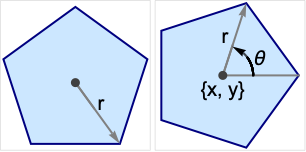
RegularPolygon[r,n]
gives the regular polygon of radius r.
RegularPolygon[{r,θ},n]
starts at angle θ with respect to the  axis.
axis.
RegularPolygon[{x,y},rspec,n]
centers the polygon at {x,y}.
Details and Options
- RegularPolygon can be used as a geometric region and a graphics primitive.
- The angle θ is measured in radians counterclockwise from the positive x direction.
- RegularPolygon for integer n represents a polygon with equal angles between subsequent points.
- CanonicalizePolygon can be used to convert a regular polygon to an explicit Polygon object.
- RegularPolygon can be used in Graphics.
- In graphics, the point {x,y} can be Scaled, Offset, ImageScaled, and Dynamic expressions and the radius r can be Scaled, ImageScaled, and Dynamic.
- Graphics rendering is affected by directives such as FaceForm, EdgeForm, and color.
Examples
open all close allBasic Examples (3)
Graphics[RegularPolygon[5]]Different styles applied to RegularPolygon:
ℛ = RegularPolygon[8];
{Graphics[{Pink, ℛ}], Graphics[{EdgeForm[Thick], Pink, ℛ}], Graphics[{EdgeForm[Dashed], Pink, ℛ}], Graphics[{EdgeForm[Directive[Thick, Dashed, Blue]], Pink, ℛ}]}Area[RegularPolygon[6]]RegionCentroid[RegularPolygon[6]]Scope (17)
Graphics (7)
Specification (4)
Generate an equilateral triangle, square, pentagon, hexagon, etc.:
Table[Graphics[RegularPolygon[n]], {n, 3, 10}]Generate pentagons of varying radii:
rp = Table[RegularPolygon[r, 5], {r, 1, 4}];Graphics[{Opacity[0.2], rp}]Generate triangles of varying starting angles:
rp = Table[RegularPolygon[{1, t Pi / 6}, 3], {t, 4}];Graphics[{Opacity[0.2], rp}]Place six hexagons equally spaced around the unit circle:
cp = CirclePoints[2, 6];rp = Table[RegularPolygon[p, {1, 0}, 6], {p, cp}];Graphics[rp]Styling (2)
Color directives specify the face colors of regular polygons:
Table[Graphics[{c, RegularPolygon[7]}], {c, {Red, Green, Blue, Yellow}}]FaceForm and EdgeForm can be used to specify the styles of the interior and boundary:
Graphics[{FaceForm[Pink], EdgeForm[Directive[Dashed, Thick, Blue]], RegularPolygon[7]}]Coordinate (1)
Use Dynamic coordinates:
Slider2D[Dynamic@a, {0, 3}]
Graphics[RegularPolygon[Dynamic[a], 5, 5], Frame -> True, PlotRange -> 5]Slider[Dynamic@b, {1, 3}]
Graphics[RegularPolygon[{0, 0}, Dynamic[b], 5], Frame -> True, PlotRange -> 5]Regions (10)
RegionEmbeddingDimension[RegularPolygon[n]]RegionDimension[RegularPolygon[n]]{RegionMember[RegularPolygon[7], {0, 0}], RegionMember[RegularPolygon[7], {0, 2}]}Get conditions for point membership:
RegionMember[RegularPolygon[{0, 0}, {1, 0}, 4], {x, y}]ℛ = RegularPolygon[6];{Area[ℛ], RegionMeasure[ℛ]}c = RegionCentroid[ℛ]Graphics[{{Pink, ℛ}, {Black, Point[c]}}]ℛ = RegularPolygon[6];{RegionDistance[ℛ, {1, 2}], RegionDistance[ℛ, {0, 0}]}The distance to the nearest point in the unit disk:
{Plot3D[Evaluate@RegionDistance[ℛ, {x, y}], {x, -2, 2}, {y, -2, 2}, MeshFunctions -> {#3&}, Mesh -> 5, Exclusions -> Norm[{x, y}] == 1], ContourPlot[Evaluate@RegionDistance[ℛ, {x, y}], {x, -3, 3}, {y, -3, 3}, Contours -> {{0.5, Red}, {1, Green}, {1.5, Blue}}]}ℛ = RegularPolygon[6];{SignedRegionDistance[ℛ, {1, 2}], SignedRegionDistance[ℛ, {0, 0}]}Signed distance to the unit disk:
Plot3D[SignedRegionDistance[ℛ, {x, y}], {x, -2, 2}, {y, -2, 2}, MeshFunctions -> {#3&}, Mesh -> {{0}}, MeshShading -> {Red, Green}, Exclusions -> Norm[{x, y}] == 1]ℛ = RegularPolygon[6];RegionNearest[ℛ, {5, 6}]pts = Table[2{Cos[k ], Sin[k]}, {k, 0., 15}];
nst = RegionNearest[ℛ, #]& /@ pts;Legended[Graphics[{{Gray, ℛ}, {Thin, Gray, Line[Transpose[{pts, nst}]]}, {Red, Point[pts]}, {Blue, Point[nst]}}], PointLegend[{Red, Blue}, {"start", "nearest"}]]ℛ = RegularPolygon[6];BoundedRegionQ[ℛ]rr = RegionBounds[ℛ]Graphics[{StandardGreen, ℛ, {EdgeForm[{Dashed, Red}], Opacity[0.1, Yellow], Cuboid@@Transpose[rr]}}]ℛ = RegularPolygon[{Subscript[x, 0], Subscript[y, 0]}, {r, 0}, 6];Integrate[x y, {x, y}∈ℛ]//Simplifyℛ = RegularPolygon[6];{MinValue[{x y - x, {x, y}∈ℛ}, {x, y}], ArgMin[{x y - x, {x, y}∈ℛ}, {x, y}]}ℛ = RegularPolygon[{1, 2}, {3, 0}, 6];Solve[x^2 + y^2 == 7 && x y == 1 && {x, y}∈ℛ, {x, y}]Show[{Graphics[{{StandardGreen, ℛ}, {Blue, Circle[{0, 0}, Sqrt[7]]}}], Plot[1 / x, {x, -3, 5}, PlotRange -> {{-3, 5}, {-3, 6}}], Graphics[{PointSize[Large], Red, Point[{x, y}] /. %}]}, Axes -> True]Applications (4)
Create a star region by taking the RegionUnion of rotated triangles about a common origin:
ℛ = RegionUnion@@Table[RegularPolygon[{1, t Pi / 6}, 3], {t, 4}];Region[ℛ]Create 3D extrusions with RegionProduct:
ℛ = RegionProduct[RegularPolygon[5], Line[{{0}, {1}}]];Region[ℛ]Plot a function over a hexagon:
Plot3D[Sin[x + Cos[y]], {x, y}∈RegularPolygon[6]]Some lattices will have regular polygons as their cells. Consider the lattice basis:
b = {{-Sqrt[3], -1}, {-Sqrt[3], 1}};Generate lattice points and tiles:
pts = Tuples[Range[0, 4], 2].b;tiles = Table[RegularPolygon[p, {1, 0}, 6], {p, pts}];Visualize the tiling and lattice points:
Graphics[{Gray, tiles, Red, Point[pts]}]Properties & Relations (3)
A RegularPolygon is a Polygon whose  vertices are equally spaced around the unit circle:
n = 7;p = Polygon[CirclePoints[n]];rp = RegularPolygon[n];Graphics /@ {p, rp}Use CirclePoints to generate points equally spaced around the unit circle:
n = 7;
{rp, cp} = {RegularPolygon[n], CirclePoints[n]};Graphics[{rp, PointSize[Large], Red, Point[cp]}]The area of a regular polygon on the unit circle as  is the area of a unit Disk:
Limit[Area[RegularPolygon[n]], n -> Infinity]Area[Disk[]]Neat Examples (2)
A collection of random regular polygons:
Graphics[{EdgeForm[Black], Table[{Opacity[0.2], Hue[RandomReal[]], RegularPolygon[RandomReal[9, 2], {RandomReal[], 0}, RandomInteger[{3, 7}]]}, {200}]}]Overlap regular polygons of increasing radii and vertices:
rp = Table[RegularPolygon[r, r + 2], {r, 9}];Graphics[{Opacity[0.15], rp}]
 An Elementary Introduction to the Wolfram Language
 An Elementary Introduction to the Wolfram Language
 An Elementary Introduction to the Wolfram Language
Text
Wolfram Research (2015), RegularPolygon, Wolfram Language function, https://reference.wolfram.com/language/ref/RegularPolygon.html (updated 2019).
CMS
Wolfram Language. 2015. "RegularPolygon." Wolfram Language & System Documentation Center. Wolfram Research. Last Modified 2019. https://reference.wolfram.com/language/ref/RegularPolygon.html.
APA
Wolfram Language. (2015). RegularPolygon. Wolfram Language & System Documentation Center. Retrieved from https://reference.wolfram.com/language/ref/RegularPolygon.html