

Rectangle
Details and Options
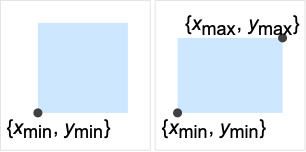
- Rectangle can be used as a geometric region and a graphics primitive.
- Rectangle represents the region
 .
. - Rectangle[] is equivalent to Rectangle[{0,0}]. »
- Rectangle can be used in Graphics.
- In graphics, the points {xi,yi} can be Scaled, Offset, ImageScaled, and Dynamic expressions.
- The option RoundingRadius->r can be used to specify rounded corners rendered using circles of radius r.
- Graphics rendering is affected by directives such as FaceForm, EdgeForm and color.
- CanonicalizePolygon can be used to convert a rectangle to an explicit Polygon object.
Examples
open all close allBasic Examples (5)
Graphics[Rectangle[]]Graphics[{Red, Rectangle[{0, 0}], Blue, Rectangle[{0.5, 0.5}]}]Graphics[{Red, Rectangle[{0, 0}, {1, 3}], Blue, Rectangle[{2, 1}, {4, 2}]}]Differently styled rectangles:
{Graphics[{Pink, Rectangle[]}], Graphics[{EdgeForm[Thick], Pink, Rectangle[]}], Graphics[{EdgeForm[Dashed], Pink, Rectangle[]}], Graphics[{EdgeForm[Directive[Thick, Dashed, Blue]], Pink, Rectangle[]}]}Area[Rectangle[{x1, y1}, {x2, y2}]]RegionCentroid[Rectangle[{x1, y1}, {x2, y2}]]Scope (17)
Graphics (7)
Specification (3)
Styling (1)
Color directives specify the face colors of rectangles:
Table[Graphics[{c, Rectangle[]}], {c, {Red, Green, Blue, Yellow}}]FaceForm and EdgeForm can be used to specify the styles of the interior and boundary of a rectangle:
Graphics[{FaceForm[Pink], EdgeForm[Directive[Thick, Dashed, Blue]], Rectangle[]}]Coordinates (3)
Use Scaled coordinates:
Graphics[Rectangle[Scaled[{0, .4}], Scaled[{1, .6}]], Frame -> True, PlotRange -> {{0, 10}, {0, 10}}]Use ImageScaled coordinates:
Graphics[Rectangle[ImageScaled[{0, .4}], ImageScaled[{1, .6}]], Frame -> True, PlotRange -> {{0, 10}, {0, 10}}]Use Offset coordinates:
Graphics[Rectangle[Offset[{10, 20}, {0, 0}], Offset[{-10, -20}, {1, 1}]], Frame -> True]Regions (10)
RegionEmbeddingDimension[Rectangle[{Subscript[x, min], Subscript[y, min]}, {Subscript[x, max], Subscript[y, max]}]]RegionDimension[Rectangle[{Subscript[x, min], Subscript[y, min]}, {Subscript[x, max], Subscript[y, max]}]]ℛ = Rectangle[{0, 0}];{RegionMember[ℛ, {0, 1}], RegionMember[ℛ, {0, 2}]}Get conditions for point membership:
RegionMember[ℛ, {x, y}]ℛ = Rectangle[{0, 0}];{Area[ℛ], RegionMeasure[ℛ]}c = RegionCentroid[ℛ]Graphics[{{Pink, ℛ}, {Black, Point[c]}}]ℛ = Rectangle[{-1, -1}, {1, 1}];{RegionDistance[ℛ, {2, 3}], RegionDistance[ℛ, {1, 0}]}{Plot3D[RegionDistance[ℛ, {x, y}], {x, -2, 2}, {y, -2, 2}, MeshFunctions -> {#3&}, Mesh -> 5, Exclusions -> Norm[{x, y}, ∞] == 1], ContourPlot[Evaluate@RegionDistance[ℛ, {x, y}], {x, -3, 3}, {y, -3, 3}, Contours -> {{0.5, Red}, {1, Green}, {1.5, Blue}}]}ℛ = Rectangle[{-1, -1}, {1, 1}];{SignedRegionDistance[ℛ, {2, 3}], SignedRegionDistance[ℛ, {0, 0}]}Plot3D[SignedRegionDistance[ℛ, {x, y}], {x, -2, 2}, {y, -2, 2}, MeshFunctions -> {#3&}, Mesh -> {{0}}, MeshShading -> {Red, Green}, Exclusions -> Norm[{x, y}, ∞] == 1]ℛ = Rectangle[{1, 2}, {3, 4}];RegionNearest[ℛ, {5, 6}]pts = Table[{2, 3} + 4{Cos[k 2 π / 16], Sin[k 2π / 16]}, {k, 0., 15}];
nst = RegionNearest[ℛ, #]& /@ pts;Legended[Graphics[{{Gray, ℛ}, {Thin, Gray, Line[Transpose[{pts, nst}]]}, {Red, Point[pts]}, {Blue, Point[nst]}}], PointLegend[{Red, Blue}, {"start", "nearest"}]]ℛ = Rectangle[{0, 0}, {1, 1}];BoundedRegionQ[ℛ]rr = RegionBounds[ℛ]Integrate over a rectangle:
ℛ = Rectangle[{Subscript[x, min], Subscript[y, min]}, {Subscript[x, max], Subscript[y, max]}];Integrate[x y, {x, y}∈ℛ]ℛ = Rectangle[{1, 2}, {3, 4}];Minimize[{x y - x, {x, y}∈ℛ}, {x, y}]Solve equations in a rectangle:
ℛ = Rectangle[{1, 2}, {3, 4}];Reduce[x^2 + y^2 == 7 && {x, y}∈ℛ, {x, y}]Options (1)
Applications (6)
data = RandomReal[{3, 10}, {10, 2}];Graphics[{EdgeForm[StandardGray], Blue,
Table[{Blue, Rectangle[{i - .4, 0}, {i, data[[i, 1]]}], Red, Rectangle[{i + .4, 0}, {i, data[[i, 2]]}]}, {i, 10}]}, AspectRatio -> 1 / GoldenRatio, Frame -> True]gr[0] := {{0, 0}, {1, -1}};
gr[n_] := Module[{ϕ = GoldenRatio, a, b, c, d}, {{a, b}, {c, d}} = gr[n - 1];
Switch[Mod[n, 4], 0, {{a, d}, {a + ϕ ^ -n, d - ϕ ^ -n}}, 1, {{c, d + ϕ ^ -n}, {c + ϕ ^ -n, d}}, 2, {{c - ϕ ^ -n, b + ϕ ^ -n}, {c, b}}, 3, {{a - ϕ ^ -n, b}, {a, b - ϕ ^ -n}}]];Graphics[{EdgeForm[Opacity[.5]], Table[{ColorData[24, k + 1], Rectangle@@gr[k]}, {k, 0, 8}]}]Animate[With[{q = Quotient[θ, π / 2], m = Mod[θ, π / 2]}, Graphics[{EdgeForm[Gray], LightGray, Rotate[Rectangle[{q, 0}], -m, {q + 1, 0}]}, Axes -> {True, False}, PlotRange -> {{-.5, 5.5}, {-0.5, 1.5}}, ImageSize -> 350]], {θ, 0, 2Pi}, AnimationRunning -> False, AnimationDirection -> ForwardBackward, DefaultDuration -> 2]The trajectory of the square wheel:
Graphics[{EdgeForm[Gray], FaceForm[LightGray], Table[With[{q = Quotient[θ, π / 2], m = Mod[θ, π / 2]}, Rotate[Rectangle[{q, 0}], -m, {q + 1, 0}]], {θ, 0, 2Pi, Pi / 12}]}, Axes -> {True, False}, PlotRange -> {{-.5, 5.5}, {-0.5, 1.5}}, ImageSize -> 350]A Rectangle with equal side lengths is a square:
SquareRegion[{x_, y_}, r_] := Rectangle[{x, y}, {x + r, y + r}]SquareRegion[{1, 2}, 3]Region[%]Maximize the area of a rectangle with a fixed perimeter:
r = Rectangle[{0, 0}, {x, y}];
Maximize[{Area[r], 2x + 2y == 4 && 0 < x && 0 < y}, {x, y}, Reals]
The resulting rectangle is a square:
Region[r /. {x -> 1, y -> 1}]Indeed, it will always be a square:
Assuming[p > 0, Simplify[Maximize[{Area[r], 2x + 2y == p && 0 < x && 0 < y}, {x, y}, Reals]]]Properties & Relations (9)
Use Rotate to get all possible rectangles:
Graphics[{Pink, Rotate[Rectangle[{0, 0}, {4, 3}], 30Degree]}, Frame -> True]Rectangle is a special case of Cuboid:
Subscript[ℛ, 1] = Cuboid[{0, 0}, {1, 1}];
Subscript[ℛ, 2] = Rectangle[{0, 0}, {1, 1}];RegionEqual[Subscript[ℛ, 1], Subscript[ℛ, 2]]Rectangle is a special case of Parallelogram:
Subscript[ℛ, 1] = Parallelogram[{0, 0}, {{1, 0}, {0, 1}}];
Subscript[ℛ, 2] = Rectangle[{0, 0}, {1, 1}];RegionEqual[Subscript[ℛ, 1], Subscript[ℛ, 2]]Rectangle is a special case of Polygon:
Subscript[ℛ, 1] = Polygon[{{0, 0}, {1, 0}, {1, 1}, {0, 1}}];
Subscript[ℛ, 2] = Rectangle[{0, 0}, {1, 1}];RegionEqual[Subscript[ℛ, 1], Subscript[ℛ, 2]]Rectangle is the union of two Triangle objects:
Subscript[ℛ, 1] = Rectangle[{0, 0}, {1, 1}];t1 = Triangle[{{0, 0}, {1, 0}, {1, 1}}];
t2 = Triangle[{{1, 1}, {0, 1}, {0, 0}}];
Subscript[ℛ, 2] = RegionUnion[t1, t2];RegionEqual[Subscript[ℛ, 1], Subscript[ℛ, 2]]Region[Subscript[ℛ, 2]]ImplicitRegion can represent any Rectangle region:
Subscript[ℛ, 1] = ImplicitRegion[0 ≤ x ≤ 1 && 0 ≤ y ≤ 1, {x, y}];
Subscript[ℛ, 2] = Rectangle[{0, 0}, {1, 1}];RegionEqual[Subscript[ℛ, 1], Subscript[ℛ, 2]]ParametricRegion can represent any Rectangle region:
Subscript[ℛ, 1] = ParametricRegion[{u, v}, {{u, 0, 1}, {v, 0, 1}}];
Subscript[ℛ, 2] = Rectangle[{0, 0}, {1, 1}];RegionEqual[Subscript[ℛ, 1], Subscript[ℛ, 2]]MeshRegion can represent any Rectangle region:
MeshRegion[{{0, 0}, {1, 0}, {1, 1}, {0, 1}}, Polygon[{1, 2, 3, 4}]]RegionEqual[%, Rectangle[]]BoundaryMeshRegion can represent any Rectangle region:
BoundaryMeshRegion[{{0, 0}, {1, 0}, {1, 1}, {0, 1}}, Line[{1, 2, 3, 4, 1}]]RegionEqual[%, Rectangle[]]Possible Issues (1)
RoundingRadius only affects Graphics:
RegionMeasure[Rectangle[{0, 0}, {1, 1}, RoundingRadius -> 1 / 3]]{DiscretizeGraphics[Rectangle[{0, 0}, {1, 1}, RoundingRadius -> 1 / 3]],
Graphics[Rectangle[{0, 0}, {1, 1}, RoundingRadius -> 1 / 3]]}Neat Examples (3)
A collection of random squares:
Graphics[{EdgeForm[Black], Table[{Hue[RandomReal[]], Rotate[Rectangle[RandomReal[2, 2]], RandomReal[2Pi]]}, {20}]}]Animate[Graphics[{EdgeForm[Opacity[.5]], Table[{Hue[(t + k) / 20, 1, .9], Rotate[Rectangle[{1, -Sin[Pi / 20]}, {1 + 2Sin[Pi / 20], Sin[Pi / 20]}], 2Pi t / 20, {0, 0}]}, {t, 20}]}], {k, 1, 20}, AnimationRunning -> False]Graphics[Table[{EdgeForm[Opacity[.6]], Hue[(-11 + q + 10 r) / 72], With[{t = 2Pi q / 12}, Rotate[Rectangle[(8 - r)({Cos[t], Sin[t]} - 1 / 4), (8 - r)({Cos[t], Sin[t]} + 1 / 4)], t + Pi / 4]]}, {r, 6}, {q, 12}]]Text
Wolfram Research (1988), Rectangle, Wolfram Language function, https://reference.wolfram.com/language/ref/Rectangle.html (updated 2019).
CMS
Wolfram Language. 1988. "Rectangle." Wolfram Language & System Documentation Center. Wolfram Research. Last Modified 2019. https://reference.wolfram.com/language/ref/Rectangle.html.
APA
Wolfram Language. (1988). Rectangle. Wolfram Language & System Documentation Center. Retrieved from https://reference.wolfram.com/language/ref/Rectangle.html