

RidgeFilter
RidgeFilter[data]
computes a measure for the presence of a ridge at every position of data.
RidgeFilter[data,σ]
uses the specified ridge scale σ.
Details and Options
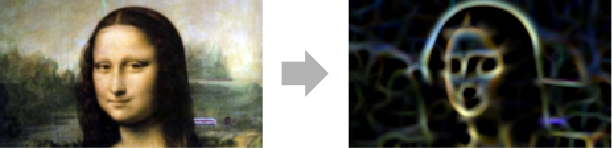
- RidgeFilter is commonly used to find ridges in images by computing estimates of the main principal curvature at each sample point using Gaussian derivatives.
- The main principal curvature orthogonal to a ridge is given by the main negative eigenvalue of the Hessian matrix.
- The data can be any of the following:
-
list 2D or 3D numerical array image arbitrary Image or Image3D object video a Video object - In RidgeFilter[data,σ], σ is the scale of the Gaussian derivatives in the Hessian matrix. By default,
 is used.
 - RidgeFilter[image,…] returns a real image of the same dimensions as image.
- RidgeFilter takes the following options used in the computation of the Hessian matrix:
-
InterpolationOrder Automatic interpolation order Padding "Fixed" padding method - Possible settings for the InterpolationOrder option are 3, 4, 5, …, 9.
- The Padding option accepts the settings "Fixed", "Periodic", "Reversed", "Reflected", or a numeric value. A list of two settings can specify different paddings for each dimension.
Examples
open all close allBasic Examples (2)
Scope (5)
Data (4)
Ridge filtering of a numeric matrix:
data = (| | | | | |
| - | - | - | - | - |
| 1 | 0 | 0 | 0 | 0 |
| 0 | 1 | 0 | 0 | 0 |
| 0 | 0 | 1 | 0 | 0 |
| 0 | 0 | 0 | 1 | 0 |
| 0 | 0 | 0 | 0 | 1 |);
RidgeFilter[data]//MatrixFormRidgeFilter of a grayscale image:
RidgeFilter[[image]]//ImageAdjustRidgeFilter[[image], 3]//ImageAdjustRidgeFilter[Video["ExampleData/fish.mp4"], 3]RidgeFilter of a 3D image:
i = [image];
RidgeFilter[i, 2]Options (2)
InterpolationOrder (1)
Filtering an array using different InterpolationOrder values:
Chop@MatrixForm@RidgeFilter[N@BoxMatrix[1, 5], 1,
InterpolationOrder -> #]& /@ {3, 8}Applications (5)
Ridges in a two-dimensional array:
data = (| | | | | | | |
| -- | -- | -- | -- | -- | -- | -- |
| -1 | -5 | 12 | 7 | 2 | -4 | -3 |
| 4 | 2 | 14 | 0 | -2 | 3 | 2 |
| -2 | -3 | 7 | 2 | 0 | -5 | -3 |
| -1 | 3 | 15 | 9 | -3 | 0 | -1 |
| -1 | -2 | 5 | 0 | 10 | 6 | -1 |
| -2 | -3 | 11 | -6 | -2 | 10 | -2 |
| -4 | -1 | 12 | -6 | -2 | -1 | 10 |);
UnitStep[RidgeFilter[data, 0.7] - 5]//MatrixFormEnhance the strokes of handwritten characters:
RidgeFilter[[image], 1.5]//ImageAdjustDetect lines of a given width in a noisy image with uneven brightness:
RidgeFilter[[image], 1.5]//ImageAdjustFind the red ridges in a microscopic photo of a Yucca leaf:
i = [image];
r = RidgeFilter[1 - ColorDistance[i, Purple], 1.5]//ImageAdjustDeleteSmallComponents[Binarize[r], 20]Enhance trabecular bone structure:
r = RidgeFilter[Threshold[\!\(\*Graphics3DBox[«8»]\), 0.08], 1.2]//ImageAdjustChange the transfer function and background to further highlight the structure:
Image3D[r, ColorFunction -> (Blend[{{0., RGBColor[0, .1, 0, 0.2]}, {0.1, RGBColor[0.8, 0.3, 0., 0.1]}, {1., RGBColor[1., 1, 0, 1]}}, #1]&), Background -> Black]Properties & Relations (2)
Ridge detection at scale σ=2 using DerivativeFilter:
σ = 2;
{Lxx, Lxy, Lyy} = DerivativeFilter[[image], {{0, 2}, {1, 1}, {2, 0}}, σ];

Clip[#, {0, Max[#]}]&[(σ^3 / 2/2)(Sqrt[(Lxx - Lyy)^2 + 4Lxy^2] - Lxx - Lyy)]//ImageAdjust
Compare to the result of RidgeFilter:
RidgeFilter[[image], 2]//ImageAdjustRidge filtering of an image gives a real-valued image:
RidgeFilter[Image[DiskMatrix[23, 81], "Bit"], 1]//ImageAdjustImageType[%]Text
Wolfram Research (2010), RidgeFilter, Wolfram Language function, https://reference.wolfram.com/language/ref/RidgeFilter.html (updated 2025).
CMS
Wolfram Language. 2010. "RidgeFilter." Wolfram Language & System Documentation Center. Wolfram Research. Last Modified 2025. https://reference.wolfram.com/language/ref/RidgeFilter.html.
APA
Wolfram Language. (2010). RidgeFilter. Wolfram Language & System Documentation Center. Retrieved from https://reference.wolfram.com/language/ref/RidgeFilter.html