

ShearingTransform
ShearingTransform[θ,v,n]
gives a TransformationFunction that represents a shear by θ radians along the direction of the vector v, normal to the vector n, and keeping the origin fixed.
ShearingTransform[θ,v,n,p]
gives a shear that keeps the point p fixed, rather than the origin.
Details
- ShearingTransform gives a TransformationFunction which can be applied to vectors.
- ShearingTransform works in any number of dimensions, and always gives area- or volume-preserving transformations.
- In 2D, ShearingTransform turns rectangles into parallelograms. ShearingTransform[θ,{1,0},{0,1}] effectively represents slanting by angle θ to the right.
- In 3D, ShearingTransform does the analog of shearing a deck of cards by angle θ in the direction v, with the cards oriented so as to have normal vector n, and the card that goes through the point p kept fixed.
Examples
open all close allBasic Examples (3)
Shearing by θ radians along the  axis:
axis:
ShearingTransform[θ, {1, 0}, {0, 1}]Apply a 30° shearing along the  axis to the unit rectangle:
Graphics[GeometricTransformation[Rectangle[], ShearingTransform[30Degree, {1, 0}, {0, 1}]], Frame -> True]Apply a shearing transform in the  plane:
cow = ExampleData[{"Geometry3D", "Cow"}, "GraphicsComplex"];Manipulate[Graphics3D[{EdgeForm[None], GeometricTransformation[cow, ShearingTransform[k Pi / 5, {1, 0, 0}, {0, 0, 1}]]}], {k, -1, 1}, SaveDefinitions -> True]Scope (5)
Simple shearing along the  axis:
axis:
ShearingTransform[θ, {1, 0}, {0, 1}]Simple shearing along the  axis in the
  plane:
ShearingTransform[θ, {1, 0, 0}, {0, 0, 1}]Shearing along the  axis in the plane
  :
:
t = ShearingTransform[θ, {1, 0, 0}, {0, 0, 1}, {0, 0, 1}]Points in the shearing plane are not changed:
t[{0, 0, 1}]Points outside the shearing plane are moved in the shearing direction:
t[{0, 0, 2}]Transformation applied to a 2D shape:
gr = {Rectangle[], AbsolutePointSize[10], Opacity[1], {Magenta, Point[{0, 0}]}, {Green, Point[{1, 1}]}};Graphics[{{Opacity[.35], Blue, gr}, GeometricTransformation[{Opacity[.85], Red, gr}, ShearingTransform[-Pi / 6, {1, 0}, {0, 1}, {0, 1}]]}]Transformation applied to a 3D shape:
gr = {Cuboid[], AbsolutePointSize[10], Opacity[1], {Magenta, Point[{0, 0, 0}]}, {Green, Point[{1, 1, 1}]}};Graphics3D[{{Opacity[.35], Blue, gr}, GeometricTransformation[{Opacity[.85], Red, gr}, ShearingTransform[-Pi / 6, {1, 0, 0}, {0, 0, 1}, {0, 0, 1}]]}, Boxed -> False]Applications (2)
Transforming the output of Plot:
Plot[Sin[x], {x, -2Pi, 2Pi}] /. L_Line :> GeometricTransformation[L, ShearingTransform[Pi / 4, {1, 0}, {0, 1}]]Construct a slanted font from an upright font by shearing:
Graphics[GeometricTransformation[Style[Text[StringJoin@CharacterRange["𝔸", "𝕆"]], 50], ShearingTransform[25 Degree, {1, 0}, {0, 1}]], ImageSize -> {All, {0, 50}}]Properties & Relations (3)
The inverse of ShearingTransform[θ,v,n] is given by ShearingTransform[-θ,v,n]:
Composition[ShearingTransform[θ, {1, 0}, {0, 1}], ShearingTransform[-θ, {1, 0}, {0, 1}]]//SimplifyThe inverse of ShearingTransform[θ,v,n] is given by ShearingTransform[θ,-v,n]:
Composition[ShearingTransform[θ, {1, 0}, {0, 1}], ShearingTransform[θ, -{1, 0}, {0, 1}]]//SimplifyPerforming the shearing transform multiple times corresponds to a single shearing transform:
t = ShearingTransform[Pi / 4, {1, 0}, {0, 1}];Composition[t, t] == ShearingTransform[ArcTan[2], {1, 0}, {0, 1}]Possible Issues (3)
The order in which shearings are applied is significant:
t1 = ShearingTransform[θ, {1, 0}, {0, 1}];
t2 = ShearingTransform[ϕ, {1, 1}, {1, -1}];
Applying the two shearings in different orders is not equivalent:
Composition[t1, t2][{x, y}] - Composition[t2, t1][{x, y}]//SimplifyThe transformation is not defined for angles  such that
 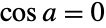 :
:
TransformationMatrix[ShearingTransform[a, {1, 0}, {0, 1}]] /. a -> Pi / 2For non-orthogonal vectors, the direction is determined by the projection of the direction vector:
ShearingTransform[a, {1, 1, 1}, {0, 0, 1}] == ShearingTransform[a, {1, 1, 0}, {0, 0, 1}]Neat Examples (1)
Shear a 3D object about a point p:
cow = ExampleData[{"Geometry3D", "Cow"}, "GraphicsComplex"];p = {0, 0, -0.251619};
Graphics3D[{EdgeForm[None], Opacity[0.5], Table[{Lighter[ColorData[1, k + 2], 0.5], GeometricTransformation[cow, ShearingTransform[k Pi / 5, {1, 0, 0}, {0, 0, 1}, p]]}, {k, -1, 1}]}, Lighting -> "Neutral", ImageSize -> Large, Boxed -> False]
Graphics3D[{EdgeForm[None], Opacity[0.5], Table[{Lighter[ColorData[1, k + 2], 0.5], GeometricTransformation[cow, ShearingTransform[k Pi / 5, {1, 0, 0}, {0, 1, 0}, p]]}, {k, -1, 1}]}, Lighting -> "Neutral", ImageSize -> Large, Boxed -> False]
Graphics3D[{EdgeForm[None], Opacity[0.5], Table[{Lighter[ColorData[1, k + 2], 0.5], GeometricTransformation[cow, ShearingTransform[k Pi / 8, {0, 1, 0}, {0, 0, 1}, p]]}, {k, -1, 1}]}, Lighting -> "Neutral", ImageSize -> Large, Boxed -> False]Text
Wolfram Research (2007), ShearingTransform, Wolfram Language function, https://reference.wolfram.com/language/ref/ShearingTransform.html.
CMS
Wolfram Language. 2007. "ShearingTransform." Wolfram Language & System Documentation Center. Wolfram Research. https://reference.wolfram.com/language/ref/ShearingTransform.html.
APA
Wolfram Language. (2007). ShearingTransform. Wolfram Language & System Documentation Center. Retrieved from https://reference.wolfram.com/language/ref/ShearingTransform.html