

TreeFold
Details
- TreeFold constructs an expression from a Tree object, folding its subtrees from the bottom up using a binary operation f:
- TreeFold is useful for accumulating or reducing the data or subtrees of a tree to a single value.
- TreeFold folds subtrees in a depth-first order, folding children before folding parents: »
- In TreeFold[f,tree,h], h[tree] is used as the first argument of f rather than TreeData[tree]. »
- TreeFold[{…,f-1},tree,h] gives f-1[h[tree]] if tree is a leaf. »
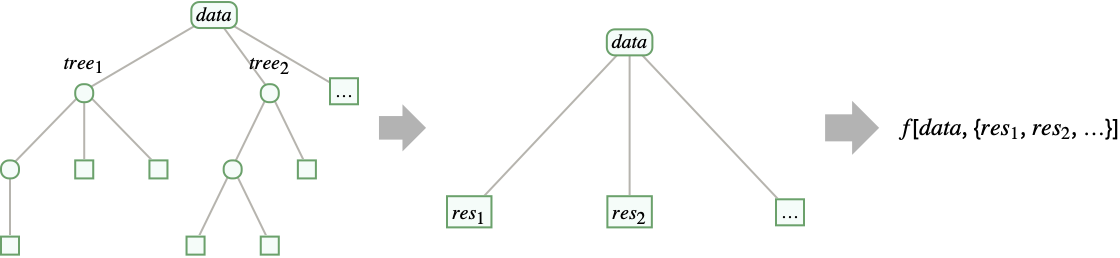
- TreeFold[f,Tree[data,<key1tree1,key2tree2,…>]] gives f[data,<key1res1,key2res2,…>], where resi is the result of TreeFold[f,treei]. »
- TreeFold[f][tree] is equivalent to TreeFold[f,tree]. »
- TreeFold[f][tree,h] is equivalent to TreeFold[f,tree,h]. »

Examples
open all close allBasic Examples (4)
Fold a tree with a binary function f:
TreeFold[f, [image]]Fold a tree with a binary function f after applying a function g to the data in the leaves:
TreeFold[{f, g}, [image]]Visualize trees as subscripted data with highlighted leaves, adding frames around inner subtrees:
TreeFold[{Framed @* Subscript, Highlighted}, [image]]Fold a tree with children specified as an association:
TreeFold[f, [image]]Scope (9)
TreeFold[f, [image]]Fold an inner node with no children:
TreeFold[f, [image]]TreeFold[f, [image]]Fold a tree with multiple levels:
TreeFold[f, [image]]Apply an operator to the leaves:
TreeFold[{f, g}, [image]]TreeFold[{f, g}, [image], h]Fold a tree with children specified as an association:
TreeFold[{f, g}, [image]]Use the operator form of TreeFold on one argument:
TreeFold[f][[image]]Use the operator form of TreeFold on two arguments:
TreeFold[f][[image], h]Applications (11)
Convert a tree of solid regions and operations into a CSGRegion:
TreeFold[CSGRegion, [image]]Get a nested list of the data in the leaves of a tree:
TreeFold[#2&, [image]]Construct a tree from the atoms of an expression:
ExpressionTree[f[g[1, 2], h][x, y[1, 2, 3]], "Atoms", Heads -> True]Convert this tree to nested lists:
TreeFold[#2&, %]Total the data in the leaves of a tree:
TreeFold[Total[#2]&, [image]]TreeFold[# + Total[#2]&, [image]]Create a tree of terms in a linear recurrence:
NestTree[If[# > 2, {# - 1, # - 2}, None]&, 6, Infinity, fib]Compute the terms of the linear recurrence:
TreeFold[{Tree[Total[TreeData /@ #2], #2]&, RulesTree[1]&}, %]Convert a tree to a TextElement:
TreeFold[TextElement[#2, <|"GrammaticalUnit" -> #|>]&, [image]]Compute the minimum level of leaves in a tree using TreeFold with this function:
TreeFold[{1 + Min@@#2&, 0&}, [image]]TreeFold[{1 + Min@@#2&, 0&}, [image]]TreeFold[{1 + Min@@#2&, 0&}, [image]]TreeFold[Grid[{{#, Null}, {Null, Column[#2]}}]&, [image]]Get a list of US cities with populations over 100,000:
largeCities = CityData[{Large, "UnitedStates"}];Construct a graph giving the hierarchical clustering of the cities according to their geodetic positions:
GeoPosition[largeCities]clusteringGraph = ClusteringTree[largeCities]Convert the clustering hierarchy from a Graph object to a Tree object:
clusteringTree = GraphTree[clusteringGraph]For each leaf, obtain the geodetic position of a city from its index in the hierarchical clustering graph:
gps[cityIndex_] := Tree[GeoPosition[Lookup[AnnotationValue[clusteringGraph, "LeafLabels"], cityIndex]], None]For each subtree representing a cluster, give the tree containing the spatial median of its children:
gps[clusterIndex_, children_] := Tree[SpatialMedian[TreeData /@ children], children]Obtain a tree of geodetic positions by using the position of a city for each leaf and the spatial median of the positions for each cluster:
positionTree = TreeFold[{gps, gps}, clusteringTree]Show the edges in this tree of geodetic positions on a map of the United States:
GeoGraphics[Line[Graph[EdgeList[TreeGraph[positionTree]] /. {pos1_, _}{pos2_, _} :> pos1pos2]], GeoBackground -> "VectorBusiness"]tree = RulesTree[Rule[...]];TreeSize[tree]Create an association giving the dates of birth:
birthDates = <|...|>;Define a function that compares two people, giving the person who was younger when they had their first child, together with that child and their age when that child was born:
youngerParent[{parent1_, firstChild1_, age1_}, {parent2_, firstChild2_, age2_}] := If[age1 < age2, {parent1, firstChild1, age1}, {parent2, firstChild2, age2}]Define a function that compares two siblings, giving the older sibling together with their date of birth, in addition to the youngest first-time parent among their descendants:
youngestParentOlderChild[{parent1_, firstChild1_, age1_, child1_, date1_}, {parent2_, firstChild2_, age2_, child2_, date2_}] := Join[youngerParent[{parent1, firstChild1, age1}, {parent2, firstChild2, age2}], If[date1 < date2, {child1, date1}, {child2, date2}]]Define a function that gives the youngest first-time parent among a person's descendants, given the results for their children:
youngestParent[ent_, list_] := Module[{youngest, first, ageYoungest, oldest, dateOldest, date, age},
	{youngest, first, ageYoungest, oldest, dateOldest} = Fold[youngestParentOlderChild, {_, _, Quantity[Infinity, "Years"], _, InfiniteFuture}, list];date = Lookup[birthDates, ent];age = DateDifference[date, dateOldest, Quantity[1, "Years"]];Join[youngerParent[{ent, oldest, age}, {youngest, first, ageYoungest}], {ent, date}]]
Find the youngest first-time parent in the tree, together with their first child and their age when the child was born:
TreeFold[youngestParent, tree]~Take~3Properties & Relations (14)
Fold gives the result of successively applying a binary operator f to the elements of a list:
Fold[f, {a, b, c, d}]TreeFold gives the result of successively applying a binary operator f to the data of a tree:
TreeFold[ReverseApplied[f], [image]]TreeFold applies the operator f to the list of results for each child:
TreeFold[ReverseApplied[f], [image]]TreeFold[f,Tree[data,None]] gives data:
TreeFold[f, [image]]TreeFold[{f,f-1},Tree[data,None]] applies the operator f-1 to data instead:
TreeFold[{f, fl}, [image]]TreeFold[f,Tree[data,{…}]] gives f[data,{…}]:
TreeFold[f, [image]]This is true even if the tree has no children:
TreeFold[f, [image]]TreeFold[f,tree,h] gives the result of applying f to both h[tree] and the list of results TreeFold[f,treei,h] for the children treei:
TreeFold[f, [image], h]% === f[h[[image]], {TreeFold[f, [image], h], TreeFold[f, [image], h]}]TreeFold[f,tree] is equivalent to TreeFold[{f,Identity},tree]:
TreeFold[f, [image]]% === TreeFold[{f, Identity}, [image]]TreeFold[{Tree,Tree[#,None]&},tree] is equivalent to tree:
TreeFold[{Tree, data Tree[data, None]}, [image]]TreeFold applies a function to the data and results for the children:
TreeFold[f, [image]]TreeMap can compute the same result:
TreeMap[f, [image], "NonLeaves" -> {"Data", "ChildrenData"}]The new data of the root is the result of TreeFold:
TreeData[%]Construct a tree from the heads in an expression:
ExpressionTree[1[2[3, 4], 5[6, 7]], "Heads"]Use TreeFold to insert a parent node above each subtree:
TreeFold[Tree[f, {Tree[##]}]&, %]This corresponds to mapping on the arguments in an expression:
TreeExpression[%, "Heads"]Map maps on the arguments in an expression by default:
% === Map[f, 1[2[3, 4], 5[6, 7]], {0, -2}]Construct a tree from the atoms in an expression:
ExpressionTree[1[2, 3][4[5, 6], 7[8, 9]], "Atoms", Heads -> True]Use TreeFold to insert a sibling node before each subtree:
TreeFold[Tree[{f, Tree[##]}]&, %]This corresponds to mapping on the subexpressions in an expression:
TreeExpression[%, "Atoms", Heads -> True]Map maps on the subexpressions in an expression with HeadsTrue:
% === Map[f, 1[2, 3][4[5, 6], 7[8, 9]], {0, -2}, Heads -> True]TreeFold[{f,f-1},tree] is equivalent to TreeFold[f,TreeMap[f-1,tree,{-1}]]:
TreeFold[{f, fl}, [image]]First map the operator f-1 on the leaves of the tree:
TreeMap[fl, [image], {-1}]Then fold the tree using the operator f for internal subtrees:
TreeFold[f, %]TreeFold can be used to compute the depth of a tree:
TreeFold[{1 + Max@@#2&, 0&}, [image]]TreeDepth[[image]]TreeFold can be used to compute the size of a tree:
TreeFold[{1 + Total[#2]&, 1&}, [image]]TreeSize[[image]]TreeFold can be used to convert a tree to nested rules:
TreeFold[Rule, [image]]TreeRules[[image]]TreeFold can be used to create an expression from the leaves of a tree:
TreeFold[First[#2]@@Rest[#2]&, [image]]TreeExpression[[image], "Atoms", Heads -> True]Neat Examples (2)
Construct a tree with levels giving the triangles in the 0 - through 3
 -step Sierpiński triangles:
NestTree[Array[(1/2) (KroneckerDelta[#1, #3] + KroneckerDelta[#2, #3])&, {3, 3, 3}].#&, CirclePoints@3, 3, IconizedObject[«options»]]Obtain the 3 -step Sierpiński triangle from this tree:
TreeFold[{RegionUnion@@#2&, Region @* Triangle}, %]Construct a tree with levels giving the intervals in the 0 - through 3
 -step Cantor sets:
NestTree[Array[(1/3) (2 KroneckerDelta[#1, #3] + KroneckerDelta[#2, #3])&, {2, 2, 2}].#&, {0, 1}, 3, IconizedObject[«image size»]]Obtain the 3 -step Cantor set from this tree:
TreeFold[{RegionUnion@@#2&, Region @* Interval}, %]Text
Wolfram Research (2021), TreeFold, Wolfram Language function, https://reference.wolfram.com/language/ref/TreeFold.html (updated 2022).
CMS
Wolfram Language. 2021. "TreeFold." Wolfram Language & System Documentation Center. Wolfram Research. Last Modified 2022. https://reference.wolfram.com/language/ref/TreeFold.html.
APA
Wolfram Language. (2021). TreeFold. Wolfram Language & System Documentation Center. Retrieved from https://reference.wolfram.com/language/ref/TreeFold.html