

CSGRegion
CSGRegion[{reg1,reg2,…}]
represents the solid region corresponding to the union of solid regions reg1,reg2,….
CSGRegion["op",{reg1,reg2,…}]
represents the solid region corresponding to the Boolean combination "op" of regions reg1,reg2,….
CSGRegion["op",{…,wi[regi],…}]
represents the solid region defined by regions regi transformed by a geometric transformation wi.
Details and Options
- CSGRegion is also known as constructive solid geometry (CSG) object.
- CSGRegion is typically used to construct solid geometric regions by using nested combinations of union, intersection and subtraction of simple geometric primitives.
- CSGRegion[…] displays in a notebook as a plot of a solid region in 2D and 3D.
- In CSGRegion["op",{reg1,reg2,…}], "op" are Boolean operations and regions regi are other CSGRegion objects or geometric regions.
- The following Boolean operators "op" can be used:
-
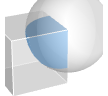
"Intersection" smallest solid containing the intersection of two regions 
"Difference" smallest solid containing the difference of two regions 
"Union" smallest solid containing the union of two regions - The following 2D solid regions regi are supported:
-

Disk disk 
Ellipsoid ellipsoid 
Parallelogram parallelogram 
Rectangle rectangle 
Triangle triangle 
Simplex simplex - The following 3D solid regions regi are supported:
-

Ball ball 
Cone cone 
Cube cube 
Cuboid cuboid 
Cylinder cylinder 
Dodecahedron dodecahedron 
Ellipsoid ellipsoid 
Icosahedron icosahedron 
Octahedron octahedron 
Parallelepiped parallelepiped 
Prism prism 
Pyramid pyramid 
Simplex simplex 
Tetrahedron tetrahedron - The following n‐dimensional solid regions regi are supported:
-

Ball ball 
Cuboid axis-aligned cuboid 
Ellipsoid ellipsoid 
Parallelepiped parallelotope 
Simplex simplex - In CSGRegion["op",{…,wi[regi],…}], wi are geometric transformations or wrappers for regions regi.
- The following geometric transformations wi can be used:
-
GeometricTransformation[regi,…] geometric affine transformation Rotate[regi,…] rotation Scale[regi,…] scaling Translate[regi,…] translation - The following special wrappers wi can be used:
-
Annotation[regi,…] associate an annotation with regi Style[regi,…] show regi with the specified style - CSGRegion[{reg1,reg2,…}] is equivalent to CSGRegion["Union",{reg1,reg2,…}].
- CSGRegion takes the same options as Region.
- CSGRegion can be used with functions such as RegionMember, RegionDistance, RegionMeasure and NIntegrate.
Examples
open all close allBasic Examples (3)
Intersection of two solid regions in 2D:
CSGRegion["Intersection", {Disk[], Rectangle[]}]Area[%]Intersection of two solid regions in 3D:
CSGRegion["Intersection", {Ball[], Cuboid[]}]Volume[%]CSGRegion["Intersection", {Style[Cube[1.5], Hue[0.58, 1, 0.9]], Style[Ball[], Hue[0.13, 1, 0.91]]}]Scope (11)
Basic Uses (4)
Union of regions:
CSGRegion["Union", {Cube[3 / 2], Ball[]}]CSGRegion["Difference", {Cube[3 / 2], Ball[]}]CSGRegion["Intersection", {Cube[3 / 2], Ball[]}]CSGRegion["Intersection", {Disk[], Rectangle[]}]CSGRegion["Intersection", {Ball[], Cuboid[]}]CSGRegion["Intersection", {Ball[{0, 0, 0, 0}], Ball[{1, 0, 1, 0}]}]CSGRegion["Intersection", {Ball[], Cube[3 / 2]}]CSGRegion["Difference", {CSGRegion["Intersection", {Ball[], Cube[3 / 2]}], Cylinder[{{0, 0, -1}, {0, 0, 1}}, 1 / 2]}]Union with more than two regions:
CSGRegion["Union", {Ball[], Cube[{2, 0, 0}, 2], Ball[{4, 0, 0}]}]Use Or as an alternative to "Union":
CSGRegion[Or, {Cube[3 / 2], Ball[]}]Use And as an alternative to "Intersection":
CSGRegion[And, {Cube[3 / 2], Ball[]}]Presentation (4)
Specify styling for parts of a CSGRegion in 2D:
CSGRegion["Union", {Style[Disk[], Hue[0.58, 1, 0.9]], Style[Rectangle[], Hue[0.13, 1, 1]]}]CSGRegion["Intersection", {Style[Cuboid[], Hue[0.58, 1, 0.9]], Style[Ball[], Hue[0.13, 1, 0.91]]}]Specify styling for a subtree within CSGRegion:
CSGRegion[Cube /@ {{-1, -1, 0}, {-1, 1, 0}, {1, -1, 0}, {1, 1, 0}}]CSGRegion[{Cube[], Style[%, Red]}]Apply styling to a CSGRegion:
CSGRegion[{Cuboid[], Ball[]}]Annotate[%, "CSGRegionStyle" -> Red]Modify styling of an existing CSGRegion:
csg = CSGRegion[{Cuboid[], Ball[]}]AnnotationValue[csg, "CSGRegionStyle"] = Red;Styling is now applied to the original CSGRegion expression:
csgAnnotations (3)
Specify annotations with Annotation:
csg = CSGRegion[{Annotation[Cube[3 / 2], "Material" -> "Wood"], Ball[]}]Check for existing annotations with AnnotationKeys:
AnnotationKeys[{csg, {1}}]Retrieve annotations with AnnotationValue:
AnnotationValue[{csg, {1}}, "Material"]Apply annotations with Annotate:
Annotate[{csg, {1}}, "Weight" -> Quantity[30, "Grams"]]AnnotationKeys[{%, {1}}]Delete annotations with AnnotationDelete:
AnnotationDelete[{csg, {1}}, "Material"]AnnotationKeys[{%, {1}}]Modify annotations with AnnotationValue:
csg = CSGRegion[{Annotation[Cuboid[], "Material" -> "Wood"], Ball[]}]AnnotationValue[{csg, {1}}, "Material"] = "Iron";Original CSGRegion gives updated annotation value:
AnnotationValue[{csg, {1}}, "Material"]CSGRegion styling is managed through annotations:
Annotate[{CSGRegion[{Ball[], Cuboid[]}], {1}}, "CSGRegionStyle" -> Red]AnnotationValue[{%, {1}}, "CSGRegionStyle"]Use Style wrapper as a shorthand to specify styling annotations:
CSGRegion[{Style[Ball[], Red], Cuboid[]}]AnnotationValue[{%, {1}}, "CSGRegionStyle"]Applications (7)
Basic Applications (4)
rings = Table[CSGRegion["Difference", {Disk[{0, 0}, t + 0.1], Disk[{0, 0}, t]}], {t, 0.1, 1.0, 0.2}];
CSGRegion["Union", rings]
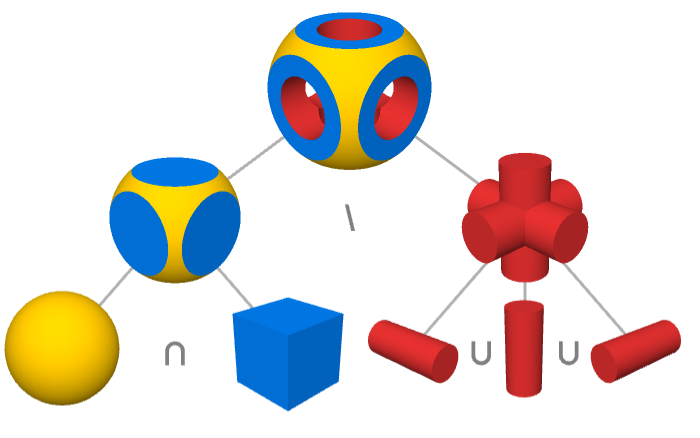
CSGRegion using multiple operations:
cylinder = Cylinder[{{0., 0., -0.6}, {0., 0., 0.6}}, 0.3];
CSGRegion["Difference", {CSGRegion["Intersection", {Ball[{0, 0, 0}, 0.65], Cube[]}],
   CSGRegion["Union", {cylinder,
       Rotate[cylinder, {{0, 0, 1}, {1, 0, 0}}], Rotate[cylinder, {{0, 0, 1}, {0, 1, 0}}]}]}]
Create polyhedron with rounded corners:
CSGRegion["Intersection", {Icosahedron[], Ball[{0, 0, 0}, 0.85]}]CSGRegion["Union", {...}]CAD Modeling (3)
CSGRegion["Difference", {CSGRegion["Union", {Cuboid[{-10, -10, 0}, {10, 10, 40}], Cuboid[{-26, -10, 0}, {26, 10, 5}]}], CSGRegion["Union", {Cuboid[{-1, -12, 30}, {1, 12, 50}], Cylinder[{{-20, 0, 35}, {20, 0, 35}}, 2], Cylinder[{{0, -20, 25}, {0, 20, 25}}, 7], Cylinder[{{-18, 0, -1}, {-18, 0, 12}}, 4], Cylinder[{{18, 0, -1}, {18, 0, 12}}, 4]}]}]Construct a pipe guide bracket:
CSGRegion["Union", {Cuboid[{-30, -30, -1}, {30, 30, 1}], Cylinder[{{-30, 0, 0}, {30, 0, 0}}, 10], Cylinder[{{0, -30, 0}, {0, 30, 0}}, 10]}]CSGRegion["Union", {Cylinder[{{-31, 0, 0}, {31, 0, 0}}, 9], Cylinder[{{0, -31, 0}, {0, 31, 0}}, 9], Cylinder[{{-20, -20, -2}, {-20, -20, 2}}, 3], Cylinder[{{20, -20, -2}, {20, -20, 2}}, 3], Cylinder[{{-20, 20, -2}, {-20, 20, 2}}, 3], Cylinder[{{20, 20, -2}, {20, 20, 2}}, 3], Cuboid[{-40, -40, 0}, {40, 40, -15}], Cylinder[{{0, 0, -15}, {0, 0, 15}}, 10], Sequence@@Table[CSGRegion["Difference", {Cube[c * 25 + c * 5 * Sqrt[2], 15], Cylinder[{c * 25 - {0, 0, 10}, c * 25 + {0, 0, 10}}, 5]}], {c, Append[#, 0]& /@ {{-1, -1}, {-1, 1}, {1, -1}, {1, 1}}}]}]CSGRegion["Difference", {%%, %}]CSGRegion["Difference", {Cylinder[{{0, 0, -15}, {0, 0, 15}}, 10], CSGRegion["Union", {Cylinder[{{-9, -10, 0}, {-9, 10, 0}}, 5], Cylinder[{{9, -10, 0}, {9, 10, 0}}, 5], Cuboid[{-12, -10, 0}, {-4, 10, 10}], Cuboid[{12, -10, 0}, {4, 10, 10}], Cylinder[{{0, 0, -8}, {0, 0, 16}}, 8], Cylinder[{{0, 0, -16}, {0, 0, 16}}, 4], Cylinder[{{0, -14, 8}, {0, 14, 8}}, 2], CSGRegion["Difference", {Cuboid[{-11, -12, 8}, {11, 12, 18}], Cylinder[{{0, -14, 8}, {0, 14, 8}}, 4]}]}]}]CSGRegion["Union", {%, Translate[Rotate[Rotate[%, 180Degree, {1, 0, 0}], 90Degree, {0, 0, 1}], {0, 0, 16}], CSGRegion["Union", {Cylinder[{{0, -12, 8}, {0, 12, 8}}, 1.5], Cylinder[{{-12, 0, 8}, {12, 0, 8}}, 1.5], Ball[{0, 0, 8}, 4]}]}]Properties & Relations (4)
Compute the union of two regions:
Region[RegionUnion[Rectangle[], Rectangle[{0.5, 0.5}]]]Region[RegionIntersection[Rectangle[], Rectangle[{0.5, 0.5}]]]Region[RegionDifference[Rectangle[], Rectangle[{0.5, 0.5}]]]CSG regions can be represented as Boolean regions:
CSGRegion["Union", {Ball[], Cuboid[]} ]Region[BooleanRegion[Or, {Ball[], Cuboid[]}]]A CSGRegion object is solid:
SolidRegionQ[CSGRegion["Intersection", {Ball[], Cuboid[]}]]The embedding dimension of a CSG region is the same as its geometry dimension:
CSGRegion["Intersection", {Ball[], Cuboid[]}]RegionEmbeddingDimension[%] === RegionDimension[%]Possible Issues (1)
CSGRegion with transparency does not show occluded regions:
CSGRegion[{Cube[], Style[Ball[], RGBColor[1, 0, 0, 1 / 4]]}]Use Graphics3D to show all regions:
Graphics3D[{Cube[], Style[Ball[], RGBColor[1, 0, 0, 1 / 4]]}]Interactive Examples (3)
Create an interactive CSG region to visualize the intersection of multiple draggable disks:
DynamicModule[{p = CirclePoints[1 / 2, 3]}, LocatorPane[Dynamic@p, Dynamic@Graphics[{CSGRegion["Intersection", Disk /@ p], Dashed, FaceForm[], Circle /@ p}, PlotRange -> {{-2, 2}, {-2, 2}}], Appearance -> "•"]]Create an interactive CSG region with draggable points. Click the region to add and remove draggable points:
DynamicModule[{p = RandomReal[{-4, 4}, {8, 2}]}, LocatorPane[Dynamic@p, Dynamic@CSGRegion["Difference", {Rectangle[{-5, -5}, {5, 5}], CSGRegion["Union", Disk /@ p]}, ImageSize -> Small], LocatorAutoCreate -> True, Appearance -> "•"]]Separate an object into multiple chunks:
Manipulate[DynamicModule[{positions, base}, positions = Flatten[Table[{x, y, z}, {x, {-1, 1}}, {y, {-1, 1}}, {z, {-1, 1}}], 2];
	CSGRegion["Union", Table[base = t * positions[[i]];
	CSGRegion["Intersection", {Ball[base, 2], Cube[base + positions[[i]], 2]}], {i, Length[positions]}]]], {{t, 1 / 2}, 0, 1}]
Neat Examples (3)
CSGRegion["Difference", {Style[#[1], RGBColor[0.430592, 0.585007, 0.337497]], CSGRegion[{Style[#[0.8], RGBColor[0.882911, 0.359638, 0.360092]], Style[Cube[{0, 0, 5}, 9.5], RGBColor[0.949819, 0.725559, 0.725754]]}]}]& /@ {Icosahedron, Dodecahedron, Octahedron}Separate an object into chunks:
pts = Flatten[Table[{x, y, z}, {x, {-1, 1}}, {y, {-1, 1}}, {z, {-1, 1}}], 2];
chunks = CSGRegion["Intersection", {Ball[{0, 0, 0}, 2], Cube[#, 2]}]& /@ pts;
colors = {RGBColor[0.131838, 0.159976, 0.163333], RGBColor[0.230913, 0.290626, 0.293972], RGBColor[0.392506, 0.513992, 0.525327], RGBColor[0.484579, 0.662274, 0.695467], RGBColor[0.523077, 0.717819, 0.782847], RGBColor[0.566364, 0.722379, 0.819837], RGBColor[0.609652, 0.686364, 0.806245], RGBColor[0.479438, 0.4981, 0.622843]};
CSGRegion[Table[Style[Translate[chunks[[i]], # * pts[[i]]], colors[[i]]], {i, 8}], ImageSize -> Tiny]& /@ {0, 1 / 2, 1}
Show slices of complex objects:
pts1 = Prepend[#, -11]& /@ CirclePoints[3, 24];
pts2 = RotateRight[Prepend[#, 11]& /@ CirclePoints[3, 24], 7];
cylinders = Cylinder[#, 1 / 5]& /@ Transpose[{pts1, pts2}];
slices = Table[Cuboid[{x - 1, -4, -4}, {x + 1, 4, 4}], {x, -9, 9, 18 / 5}];
CSGRegion["Intersection", {Style[CSGRegion[cylinders], Hue[0.11, 1., 0.98]], Style[CSGRegion[slices], Hue[0., 1., 0.71]]}]Text
Wolfram Research (2021), CSGRegion, Wolfram Language function, https://reference.wolfram.com/language/ref/CSGRegion.html (updated 2024).
CMS
Wolfram Language. 2021. "CSGRegion." Wolfram Language & System Documentation Center. Wolfram Research. Last Modified 2024. https://reference.wolfram.com/language/ref/CSGRegion.html.
APA
Wolfram Language. (2021). CSGRegion. Wolfram Language & System Documentation Center. Retrieved from https://reference.wolfram.com/language/ref/CSGRegion.html