

NestTree
NestTree[f,tree]
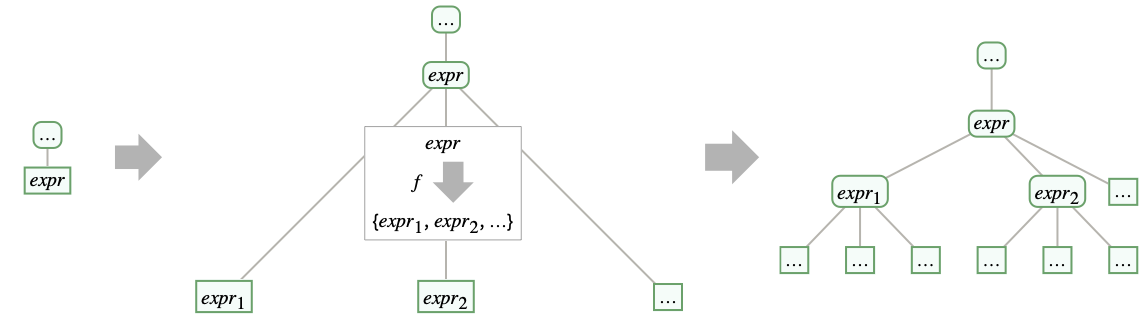
adds children to each leaf of tree, with f[expr] giving the list of data for the new children of a leaf with data expr.
NestTree[f,tree,n]
successively applies f to the data of each leaf up to level n, adding at most n levels to each leaf.
NestTree[f,tree,n,h]
additionally applies h to the data of the new subtrees.
NestTree[f,expr,…]
constructs a tree by nesting f on the tree leaf with data expr.
Details and Options
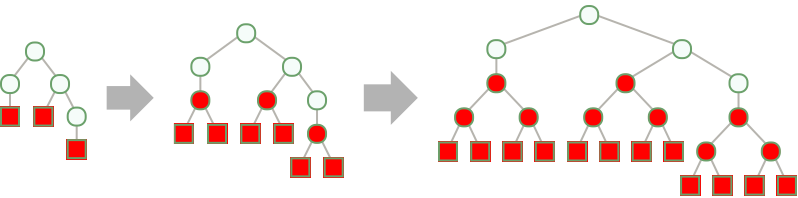
- NestTree grows Tree objects, adding successively deeper levels of children to the leaves using an operation f:
- NestTree is useful for constructing a tree from an expression and extending the leaves of a tree.
- For each new level of nesting, every leaf Tree[expr,None] is replaced by Tree[expr,{Tree[expr1,None],…}], where f[expr] gives {expr1,expr2,…}: »
- In NestTree[f,tree,n], n can be any non-negative machine integer or Infinity. »
- NestTree[f,tree,n] adds at most n additional levels to each leaf. If f returns None, {}, <> or Hold[], no further levels are added to that leaf. »
- In NestTree[f,tree,n,h], every leaf Tree[expr,None] is replaced by Tree[h[expr],…], including initial leaves and those generated in intermediate steps. »
- If expr is not an explicit Tree object, then NestTree[f,expr,…] is equivalent to NestTree[f,Tree[expr,None],…]. »
- If f[expr] gives Hold[expr1,expr2,…], then the expressions expri are given to the functions f and h unevaluated in NestTree[f,tree,n,h]. »
- In NestTree[f,tree], f[expr] should give {expr1,expr2,…}, <key1expr1,key2expr2,…> Hold[expr1,expr2,…] or None.
- If f does not return {…}, <|…|>, Hold[…] or None, NestTree[f,tree,…] is equivalent to NestTree[List@*f,tree,…]. »
- NestTree[f,tree,0] gives tree. NestTree[f,tree,0,h] is equivalent to TreeMap[h,tree,{-1}].
- If f[expr] gives <key1expr1,key2expr2,…>, then NestTree[f,expr,n] gives Tree[expr,<key1tree1,key2tree2,…>], where treei is the result of NestTree[f,expri,n-1]. »
- NestTree has the same options as Tree.
List of all options
Examples
open all close allBasic Examples (4)
NestTree[{2#, 2# + 1}&, [image]]NestTree[{2#, 2# + 1}&, [image], 2]Build a tree from an expression:
NestTree[f, x, 2]NestTree[{f[#], g[#]}&, x, 2]Build a tree by adding a level of children to a leaf:
NestTree[EntityValue[#, EntityProperty["Person", "Children"]]&, Entity["Person", "QueenElizabethII::f5243"]]Specify children as an association:
NestTree[<|"Even" -> 2#, "Odd" -> 2# + 1|>&, 1, 2]Scope (9)
NestTree[None&, x]Build a non-leaf with no child:
NestTree[{}&, x]NestTree[{1, 2, 3}&, x]NestTree[{2#, 2# + 1}&, [image]]Build a tree with multiple levels:
NestTree[f, x, 3]Apply a function to the data in addition to extending the tree:
NestTree[Rest @* Most @* Divisors, [image], 1, FactorInteger]Specify the number of additional levels:
NestTree[Range[# - 1]&, 6, 2]Repeatedly apply operators until no more levels are added:
NestTree[Range[# - 1]&, 6, Infinity]Build a tree without evaluating intermediate results:
NestTree[Function[expr, Level[Unevaluated[expr], {1}, Hold], HoldFirst], Unevaluated[3 * 2 + 1], 2, HoldForm]Specify children as an association:
NestTree[<|"Even" -> 2#, "Odd" -> 2# + 1|>&, 1, 2]Options (9)
Styling Individual Tree Elements (2)
Specify the label for the generated tree element:
NestTree[{2#, 2# + 1}&, 1, TreeElementLabel -> "?"]Specify labels and styles for subtrees by position:
NestTree[Range[3# - 1, 3# + 1]&, 1, 2,
	TreeElementLabel -> {___, _ ? EvenQ} -> None, TreeElementStyle -> {___, _ ? OddQ} -> {LightRed, EdgeForm[{Red, Dashed}]}]
Styling Entire Tree (4)
Specify labels and styles for all subtrees:
NestTree[{# - 1, # - 2}&, 6, 3, TreeElementLabel -> All -> None, TreeElementStyle -> All -> EdgeForm[Red]]NestTree[{# - 1, # - 2}&, 6, 3, BaseStyle -> LightRed]Specify the style for both the edges and the edges of the tree elements:
NestTree[{# - 1, # - 2}&, 6, 3, BaseStyle -> {Dashed, EdgeForm[{Dashing[{}], Thick}]}]Specify the base style and styles for individual tree elements:
NestTree[{# - 1, # - 2}&, 6, 3, BaseStyle -> {Red, EdgeForm[None]}, TreeElementStyle -> All -> Opacity[0]]Tree Layout and Graphics Options (3)
Specify the orientation for the root:
NestTree[{2#, 2# + 1}&, 1, 2, TreeLayout -> Bottom]NestTree[{a, a, a, a}&, a, 3, TreeLayout -> "BalloonEmbedding", IconizedObject[«labels»]]Specify Graphics options:
NestTree[Divisors, 24, Background -> LightBlue, ImageSize -> Full]Applications (8)
childTaxa[ent_] := Replace[ent[EntityProperty["Species", "SubEntities"]], _Missing -> {}];tree = NestTree[childTaxa, Entity["Species", "Kingdom:Animalia"], 3];TreeOutline[tree]children[ent : Entity["Person", _]] := Replace[ent[EntityProperty["Person", "Children"]], _Missing -> {}];
children[_] = {};NestTree[children, Entity["Person", "QueenElizabethII::f5243"], 2]Create a tree from the hierarchy of files in a directory:
NestTree[FileNames[All, #]&, FileNameJoin[{$InstallationDirectory, "Documentation"}], 2, FileBaseName]Create a tree of terms in a linear recurrence:
NestTree[If[# > 2, {# - 1, # - 2}, None]&, 6, Infinity, fib]Compute the terms of the linear recurrence:
TreeFold[{Tree[Total[TreeData /@ #2], #2]&, RulesTree[1]&}, %]Define a function that converts a TextElement object to a tree:
textElementTree[TextElement[{elem_}]] := textElementTree[elem];
textElementTree[te_TextElement] := NestTree[textElementChildren, te, Infinity, textElementData];
Define a function that yields the child elements of a TextElement:
textElementChildren[TextElement[elems_List, RepeatedNull[_, 1]]] := elems;
textElementChildren[TextElement[elem_, RepeatedNull[_, 1]]] := {elem};
textElementChildren[text_String] := None;
Define a function that extracts the "GrammaticalUnit" from a TextElement:
textElementData[TextElement[_]] := Null;
textElementData[TextElement[_, prop_]] := CanonicalName[prop["GrammaticalUnit"]];
textElementData[text_String] := text;
Convert TextElement to a tree:
textElementTree[TextStructure["Time flies like an arrow."]]Create a tree of permutations:
choice[{_, list_List}] := MapIndexed[{e, pos} |-> {e, Delete[list, pos]}, list]NestTree[choice, {Null, Range[4]}, Infinity, First, IconizedObject[«layout»]]NestTree[Replace[{m_, n_} :> {{m, m + n}, {m + n, n}}], {1, 1}, 3, Replace[{m_, n_} :> m / n]]NestTree[n Replace[ContinuedFraction[n], {as___, a_} :> Sort[FromContinuedFraction /@ {{as, a - 1, 2}, {as, a + 1}}]], 1, 3]Properties & Relations (12)
NestList gives a list of the results of successive applications of an operator f to an expression:
NestList[f, x, 3]NestTree gives a tree of the results of successive applications of an operator f to an expression:
NestTree[f, x, 3]NestTree applies subsequent operators to each element of a list:
NestTree[{f1[#], f2[#]}&, x, 2]NestTree[f,expr,…] constructs a tree starting from the expression expr if expr is not a tree:
NestTree[{2#, 2# + 1}&, 1, 3]This is equivalent to NestTree[f,Tree[expr,None],…]:
% === NestTree[{2#, 2# + 1}&, [image], 3]If f does not return {…}, <|…|>, Hold[…] or None, NestTree[f,tree,…] is equivalent to NestTree[List@*f,tree,…]:
NestTree[f, x]% === NestTree[List @* f, x]NestTree[f,Tree[expr,None],0] gives Tree[expr,None]:
NestTree[f, expr, 0]NestTree[f,Tree[expr,None]] gives Tree[expr,None] if f[expr] gives None:
NestTree[None&, expr]NestTree[f,Tree[expr,None]] gives Tree[expr,{…}] if f[expr] gives {…} or Hold[…]:
NestTree[{expr1, expr2, expr3}&, expr]This is true even if f[expr] gives {} or Hold[]:
NestTree[{}&, expr]NestTree successively applies an operator f until the maximum level is reached or f returns None, {}, <> or Hold[]:
NestTree[Range[# - 1]&, 5, Infinity]NestTree[f,Tree[expr,None],n,h] gives the tree with data h[expr] and children NestTree[f,Tree[expri,None],n-1,h], where f[expr] gives {expr1,expr2,…}:
f[x_] := If[x > 7, {}, {2x, 2x + 1}]NestTree[f, 1, 2, h]% === Tree[h[1], {NestTree[f, 2, 1, h], NestTree[f, 3, 1, h]}]NestTree[TreeChildren,Tree[tree,None],Infinity,TreeData] is equivalent to tree:
NestTree[TreeChildren, Tree[[image], None], Infinity, TreeData]NestGraph applies an operator to each vertex in a graph:
NestGraph[Range[2#, 2# + 2]&, [image], VertexLabels -> Automatic]NestTree applies an operator to each leaf in a tree:
NestTree[Range[2#, 2# + 2]&, [image]]Imitate the output of CompleteKaryTree using NestTree:
CompleteKaryTree[4, 3]NestTree[{Null, Null, Null}&, Null, 3]Convert the tree to an actual Graph object:
TreeGraph[%]Generate a tree containing random integers from 0 to 10 and between 1 and 3 children for internal subtrees:
SeedRandom[3];NestTree[RandomInteger[10, RandomInteger[{1, 3}]]&, RandomInteger[10], 3]Use RandomTree to generate a random tree of a certain size:
SeedRandom[125];RandomTree[21]Possible Issues (1)
Neat Examples (3)
Construct a tree of subdivisions of a geological period:
NestTree[#["Subdivisions"]&, Entity["GeologicalPeriod", "PhanerozoicEon"], 2, TreeElementStyleFunction -> All -> (#["CGMWColor"]&), TreeElementLabelFunction -> All -> CommonName, TreeLayout -> Left, AspectRatio -> 2]Construct a tree with levels giving the triangles in the 0 - through 3
 -step Sierpiński triangles:
NestTree[Array[(1/2) (KroneckerDelta[#1, #3] + KroneckerDelta[#2, #3])&, {3, 3, 3}].#&, CirclePoints@3, 3, IconizedObject[«options»]]Obtain the 3 -step Sierpiński triangle from this tree:
TreeFold[{RegionUnion@@#2&, Region @* Triangle}, %]Construct a tree with levels giving the intervals in the 0 - through 3
 -step Cantor sets:
NestTree[Array[(1/3) (2 KroneckerDelta[#1, #3] + KroneckerDelta[#2, #3])&, {2, 2, 2}].#&, {0, 1}, 3, IconizedObject[«image size»]]Obtain the 3 -step Cantor set from this tree:
TreeFold[{RegionUnion@@#2&, Region @* Interval}, %]Text
Wolfram Research (2021), NestTree, Wolfram Language function, https://reference.wolfram.com/language/ref/NestTree.html (updated 2022).
CMS
Wolfram Language. 2021. "NestTree." Wolfram Language & System Documentation Center. Wolfram Research. Last Modified 2022. https://reference.wolfram.com/language/ref/NestTree.html.
APA
Wolfram Language. (2021). NestTree. Wolfram Language & System Documentation Center. Retrieved from https://reference.wolfram.com/language/ref/NestTree.html