"AlgebraicValue" (Comparison Method)
Details
- The algebra solution comparison method considers two expressions to be equivalent if they are mathematically equal without performing any solving operations, e.g. Solve, SolveValues, Fit, Reduce, etc.
- The values of the key and answer can both be specified as held expressions with Hold[expr] to maintain the values exactly as provided. However, even when the values are held, evaluation of non-algebra functions (i.e. excluding Solve and similar functions) is performed during assessment. It is recommended to always hold the answer.
- "AlgebraicValue" assessments accept the setting "OptionalResultName" for specifying the variable of interest in a question: AssessmentFunction[key,<"ComparisonMethod""AlgebraicValue","OptionalResultName"setting>]
- The supported values of setting include:
-
var accept the variable var in the submitted result False (default) only match answers provided as ans True attempt to infer var from the key - When using "OptionalResultName"var, any of the following forms are accepted as correct for an answer ans:
-
ans Hold[var=ans] Hold[var==ans] varans - Equations and inequalities are supported in the answer key, and any equivalent form is considered correct.
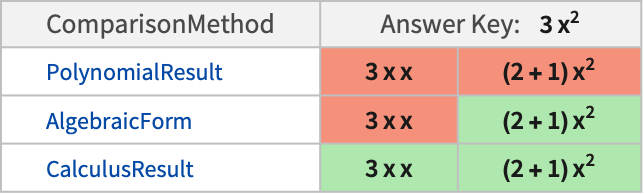
- The following tables show comparisons of "AlgebraicValue" with other comparison methods for typical answer keys:

Examples
open all close allBasic Examples (1)
Create an AssessmentFunction for an algebra question:
solvetest = AssessmentFunction[{(-b - Sqrt[b^2 - 4 a c]/2 a), (-b + Sqrt[b^2 - 4 a c]/2 a)}, "AlgebraicValue"]Use it to assess an equivalent form of the answer:
solvetest[-(b/2 a) - (Sqrt[b^2 - 4 a c]/2 a)]Scope (5)
Create an assessment function to find where a line intersects a circle:
geometryassess = AssessmentFunction[SolveValues[{x, y}∈InfiniteLine[{{0, 0}, {2, 1}}] && {x, y}∈Circle[], {x, y}], "AlgebraicValue"]geometryassess[{(2/Sqrt[5]), (1/Sqrt[5])}]Define code that finds a solution:
heldSolutionCode = Hold[First@SolveValues[Norm[{x, y}] == 1 && y == x / 2, {x, y}]];The code is not marked as correct because it contains algebraic solving code:
geometryassess[heldSolutionCode]Allowing the code to evaluate to a correct answer before assessment gives a correct marking:
geometryassess[ReleaseHold@heldSolutionCode]Calculate a solution to an equation:
solution = SolveValues[x + 3 a == 5, x]Create an assessment that accepts alternate forms of answers containing the variable x as the result name:
solvetest = AssessmentFunction[solution, <|"ComparisonMethod" -> "AlgebraicValue", "OptionalResultName" -> x|>]The regular answer does not need to include the variable name that is searched for:
solvetest[Hold[-3a + 5]]The alternate forms accepted are:
solvetest[Hold[x = 5 - 3a]]solvetest[Hold[x -> 5 - 3a]]solvetest[Hold[x == 5 - 3a]]The use of any other variable name results in a false assessment:
solvetest[Hold[z == 5 - 3a]]The variable name can be inferred from the answer key if it uses any of the allowed alternate forms:
infered = AssessmentFunction[Hold[x = 5 - 3a], <|"ComparisonMethod" -> "AlgebraicValue", "OptionalResultName" -> True|>]infered[Hold[x -> 5 - 3a]]The variable name needs not to figure in the answer:
AssessmentFunction[Hold[x = 5 - 3a], <|"ComparisonMethod" -> "AlgebraicValue", "OptionalResultName" -> True|>][Hold[5 - 3a]]Compute the solution to an equation reduction problem:
answerkey = Eliminate[{x == 2 + y, y == z}, y]Define an assessment function:
equationtest = AssessmentFunction[answerkey, "AlgebraicValue"]All equations equivalent to the correct answer are accepted:
equationtest[Hold[2 + z == x]]equationtest[Hold[2 + z - x == 0]]The original question is not accepted as an answer:
equationtest[Hold[Eliminate[{x == 2 + y, y == z}, y]]]Create an assessment function for an inequality:
af = AssessmentFunction[Hold[y - x > 8], "AlgebraicValue"]Equivalent inequalities are marked as correct:
af[Hold[x + 5 < y - 3]]Use "AlgebraicForm" to more tightly limit accepted answers:
AssessmentFunction[Hold[y - x > 8], "AlgebraicForm"][Hold[x + 5 < y - 3]]Applications (3)
Create a QuestionObject for an algebra problem with multiple correct answers:
QuestionObject["Find a root of a x^2==b+1",
	AssessmentFunction[
	{(-Sqrt[1 + b]/Sqrt[a]), (Sqrt[1 + b]/Sqrt[a])}, "AlgebraicValue"
	]]
Create a QuestionObject for a geometry question:
QuestionObject[Column[{
	StringForm["Find a point of intersection {x,y} for a circle at the origin of radius one and the line ``", y == (1 / a) x],
	Graphics[{Red, InfiniteLine[{0, 0}, {2, 1}],
	Blue, Circle[]}, Rule[...]]
	}], AssessmentFunction[SolveValues[{x, y}∈InfiniteLine[{{0, 0}, {a, 1}}] && {x, y}∈Circle[], {x, y}, Rule[...]], "AlgebraicValue"]]
Create a polynomial solving problem including a plot to help find values. Setting "OptionalResultName" allows flexibility in the accepted answer forms:
QuestionObject[Column[{StringForm["Find all the roots of the polynomial p(x) = ``", pol = Expand[(x - 1) (x - 2) (x - 3) (x - 4)]], OpenerView[{Style["Helper:", Blue, Smaller], Plot[...]}]}], AssessmentFunction[{{1, 2, 3, 4}}, <|"ComparisonMethod" -> "AlgebraicValue", "OptionalResultName" -> HoldPattern@x, "ListAssessment" -> "AllElementsOrderless"|>]]Properties & Relations (3)
Evaluation for operations not considered to be algebra occurs even when the answer is held:
AssessmentFunction[Hold[10x], "AlgebraicValue"][Hold[Echo[5x + 5x]]]When values are held, global definitions are ignored during assessment:
x = 0;
AssessmentFunction[Hold[10x], "AlgebraicValue"][Hold[0]]
Global definitions may also conflict with the name specified for the "OptionalResultName", if the variable is not held:
z = 0;AssessmentFunction[10, <|"ComparisonMethod" -> "AlgebraicValue", "OptionalResultName" -> z|>][Hold[z = 10]]Wrap the variable into Hold or HoldPattern to ignore the global definition:
AssessmentFunction[10, <|"ComparisonMethod" -> "AlgebraicValue", "OptionalResultName" -> HoldPattern@z|>][Hold[z = 10]]AssessmentFunction[10, <|"ComparisonMethod" -> "AlgebraicValue", "OptionalResultName" -> Hold@z|>][Hold[z = 10]]"AlgebraicValue" method allows functions, like Plus, that do not solve algebraic problems to evaluate:
AssessmentFunction[-1, "AlgebraicValue"][Hold[-3 + 2]]Functions that do solve algebraic problems do not evaluate and are marked incorrect:
AssessmentFunction[-1, "AlgebraicValue"][Hold[SolveValues[x + 1 == 0, {x}][[1, 1]]]]"CalculusResult" allows the algebraic solving functions to evaluate:
AssessmentFunction[-1, "CalculusResult"][Hold[SolveValues[x + 1 == 0, {x}][[1, 1]]]]Possible Issues (1)
Create an answer key using Solve for multiple variables:
sol = Solve[{x, y}∈InfiniteLine[{{0, 0}, {2, 1}}] && {x, y}∈Circle[], {x, y}]Creating an AssessmentFunction with the default "ListAssessment" setting treats each list in the key as a single answer:
wholelistassessment = AssessmentFunction[sol, <|"ComparisonMethod" -> "AlgebraicValue", "OptionalResultName" -> True|>]Only answers identical to the keys are considered as correct:
wholelistassessment[{x -> -(2/Sqrt[5]), y -> -(1/Sqrt[5])}]Even with the setting "OptionalResultName"True, values without variable names are marked as incorrect:
wholelistassessment[{-(2/Sqrt[5]), -(1/Sqrt[5])}]Instead, use "AllElementsOrderless" or "AllElementsOrdered" as the "ListAssessment" setting to assess each subvalue independently:
elementassessment = AssessmentFunction[sol, <|"ComparisonMethod" -> "AlgebraicValue", "OptionalResultName" -> True, "ListAssessment" -> "AllElementsOrdered"|>]Each individual element of the key and answer is matched separately, and the "OptionalResultName" setting works as expected:
elementassessment[{x -> -(2/Sqrt[5]), y == -(1/Sqrt[5])}]Mathematically equivalent results that differ only by arithmetic are accepted:
elementassessment[{Hold[-2Sqrt[5] / 5], -Hold[Sqrt[5] / 5]}]To provide answers using an equal sign, use Hold to prevent setting values:
elementassessment[{Hold[x = -2Sqrt[5] / 5], Hold[y = -Sqrt[5] / 5]}]