"CUDA" (External Evaluation System)
Details
- CUDA 12.0+ is supported.
- The Wolfram Language will automatically use an installed CUDA GPU. If no CUDA GPU is available, then CUDA execution cannot work. For advanced configuration, follow the instructions from the CUDAProgramming workflow.
ExternalEvaluate Usage
- ExternalEvaluate["CUDA",func] uses the Wolfram Compiler to compile function func to an ExternalFunction representing a kernel that can execute on a CUDA GPU.
- ExternalEvaluate["CUDA",str] uses a CUDA toolkit to compile a string of C++ code to an ExternalFunction representing a kernel that can execute on a CUDA GPU.
- ExternalEvaluate["CUDA",file] uses a CUDA toolkit to compile a file of C++ code to an ExternalFunction representing a kernel that can execute on a CUDA GPU.
- Code compiled to run on the CUDA GPU is also known as a CUDA kernel.
- CUDA kernels that are stored in ExternalFunction objects can be executed by applying them to their arguments.
- When CUDA kernels run on the GPU, the functions are executed in parallel on multiple GPU processors in a way that is controlled by the options "BlockDimensions" and "GridDimensions":
- The following options are supported:
-
"BlockDimensions" Automatic specify how threads are run on each block "GridDimensions" Automatic specify how blocks are run on a grid - Possible settings for "BlockDimensions" and "GridDimensions" include:
-
Automatic choose a value by inspecting the size of the input x a 1-dimensional setting {x,y} a 2-dimensional setting {x,y,z} a 3-dimensional setting
Wolfram Language Data Types
- Wolfram Language functions that are compiled to CUDA require arguments with low-level types representing scalars and arrays.
-
"CArray"::[ty] GPUArray arrays of numeric data stored on the GPU "CArray"::[ty] NumericArray arrays of numeric data stored on the CPU "CArray"::[ty] ExternalObject arrays of numeric data stored in an ExternalObject "Integer64","Integer32", etc. Integer integer "Real64","Real32", etc. Real real number "ComplexReal32","ComplexReal64",etc. Complex complex number - The types used by Wolfram Language functions compiled to CUDA are those used by the Wolfram Compiler.
C++ Data Types
- C++ code that is compiled to CUDA requires arguments with low-level types representing scalars and arrays.
-
ty* GPUArray arrays of numeric data stored on the GPU ty* NumericArray arrays of numeric data stored on the CPU ty* ExternalObject arrays of numeric data stored in an ExternalObject int, long, etc. Integer integer double,float, etc. Real real number
Supported External Operations
- ExternalOperation["Function","code"] compiles Wolfram Language or C++ code to an ExternalFunction representing a kernel that can execute on a CUDA GPU.
- ExternalOperation["Program","code"] compiles Wolfram Language or C++ code to an external object that contains multiple external function objects representing kernels that can execute on a CUDA GPU.
- ExternalOperation["HostFunction","code"] compiles C++ code to an ExternalFunction representing host code that can execute on the host (typically a CPU).
- ExternalOperation["HostProgram","code"] compiles C++ code to an external object that contains multiple external function objects representing host code that can execute on the host (typically a CPU).
Examples
open all close allBasic Examples (4)
Compile Wolfram Language code to an ExternalFunction that contains a CUDA kernel that can execute on a CUDA GPU:
gpuFun = ExternalEvaluate["CUDA", Function[{Typed[x, "CArray"::["Integer64"]], Typed[n, "MachineInteger"]},
	Module[{id},
	id = LibraryFunction["BlockDimensions.x"][] * LibraryFunction["BlockID.x"][] + LibraryFunction["ThreadID.x"][];
	If[id < n,
	ToRawPointer[ x, id, FromRawPointer[ x, id] + 5]
	];
	]
	]]
Use GPUArray to store data on the GPU that can be used as an argument to the CUDA code:
data = GPUArray[NumericArray[Range[10], "Integer64"]];Execute the function on the GPU:
gpuFun[data, 10]The result was written into the array argument:
Normal[data]Compile C++ code to an ExternalFunction that contains a CUDA kernel that can execute on a CUDA GPU:
code = "#include \"WolframLibrary.h\"
__global__ void addFun(double *x, mint N) {
    const int tid =  blockIdx.x * blockDim.x + threadIdx.x;
    if (tid < N) {
        x[tid] = x[tid] + 5;
    }
}";
gpuFun = ExternalEvaluate["CUDA", code]
Use GPUArray to store data on the GPU that can be used as an argument to the CUDA code:
data = GPUArray[NumericArray[Range[10], "Real64"]];The function can be called by passing in arguments:
gpuFun[data, 10]The result was written into the array argument:
Normal[data]A file of C++ code that can execute on a CUDA GPU:
file = File[FileNameJoin[{PacletObject["CUDALink"]["Location"], "CUDACode", "increment_kernel.cu"}]];
FilePrint[file]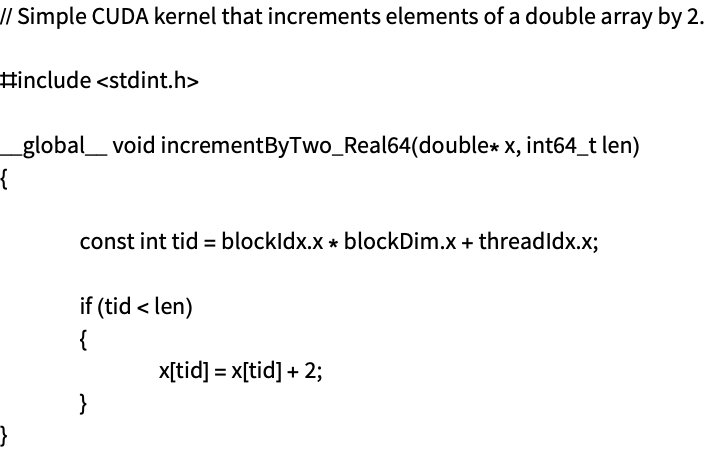
Compile the C++ code in the file to an ExternalFunction that contains a CUDA kernel that can execute on a CUDA GPU:
gpuFun = ExternalEvaluate["CUDA", file]Use GPUArray to store data on the GPU that can be used as an argument to the CUDA code:
data = GPUArray[NumericArray[Range[10], "Real64"]];The function can be called by passing in arguments:
gpuFun[data, 10]The result was written into the array argument:
Normal[data]An external session for CUDA can be created:
session = StartExternalSession["CUDA"]Use the external session in ExternalEvaluate to compile Wolfram Language code to an ExternalFunction that contains a CUDA kernel that can execute on a CUDA GPU:
gpuFun = ExternalEvaluate[session, Function[{Typed[x, "CArray"::["Integer64"]], Typed[n, "MachineInteger"]},
	Module[{id},
	id = LibraryFunction["BlockDimensions.x"][] * LibraryFunction["BlockID.x"][] + LibraryFunction["ThreadID.x"][];
	If[id < n,
	ToRawPointer[ x, id, FromRawPointer[ x, id] + 5]
	];
	]
	]]
Use GPUArray to store data on the GPU that can be used as an argument to the CUDA code:
data = GPUArray[NumericArray[Range[10], "Integer64"]];Execute the function on the GPU:
gpuFun[data, 10]The result was written into the array argument:
Normal[data]Starting the external session can be useful to get information about problems with the CUDA installation. Also, the instructions in the CUDAProgramming workflow are also quite useful.
Scope (11)
Wolfram Language Code (1)
Wolfram Language code to execute on a CUDA GPU:
func = Function[{Typed[x, "CArray"::["Real64"]], Typed[n, "MachineInteger"]},
	Module[{id},
	id = LibraryFunction["BlockDimensions.x"][] * LibraryFunction["BlockID.x"][] + LibraryFunction["ThreadID.x"][];
	If[id < n,
	ToRawPointer[ x, id, FromRawPointer[ x, id] + 2]
	];
	]
	];
Compilation can be done with the ExternalOperation "Function":
gpuFun = ExternalEvaluate["CUDA", ExternalOperation["Function", func]]Use GPUArray to store data on the GPU that can be used as an argument to the CUDA code:
data = GPUArray[NumericArray[Range[10], "Real64"]];gpuFun[data, 10]The result was written into the array argument:
Normal[data]Extra code declarations can be given with FunctionDeclaration:
decl = FunctionDeclaration[increment, Typed[{"Real64"} -> "Real64"]@Function[arg, arg + 1]];A Wolfram Language function that uses the declaration:
func = Function[{Typed[x, "CArray"::["Real64"]], Typed[n, "MachineInteger"]},
	Module[{id},
	id = LibraryFunction["BlockDimensions.x"][] * LibraryFunction["BlockID.x"][] + LibraryFunction["ThreadID.x"][];
	If[id < n,
	ToRawPointer[ x, id, increment[FromRawPointer[ x, id]]]
	];
	]
	];
Compilation can be done with the ExternalOperation "Function" using both the declaration and a function:
gpuFun = ExternalEvaluate["CUDA", ExternalOperation["Function", decl, func]]Create an argument for the function:
data = GPUArray[NumericArray[Range[10], "Real64"]];gpuFun[data, 10]The actual result of the operation was written in the argument:
data//NormalC++ Code (4)
C++ code to execute on a CUDA GPU:
code = "#include \"WolframLibrary.h\"
__global__ void addFun(double *x, mint N) {
    const int tid =  blockIdx.x * blockDim.x + threadIdx.x;
    if (tid < N) {
        x[tid] = x[tid] + 5;
    }
}";
Compilation can be done with the ExternalOperation "Function":
gpuFun = ExternalEvaluate["CUDA", ExternalOperation["Function", code]]Use GPUArray to store data on the GPU that can be used as an argument to the CUDA code:
data = GPUArray[NumericArray[Range[10], "Real64"]];gpuFun[data, 10]The result was written into the array argument:
Normal[data]A file of C++ code that can execute on a CUDA GPU:
file = File[FileNameJoin[{PacletObject["CUDALink"]["Location"], "CUDACode", "increment_kernel.cu"}]];
FilePrint[file]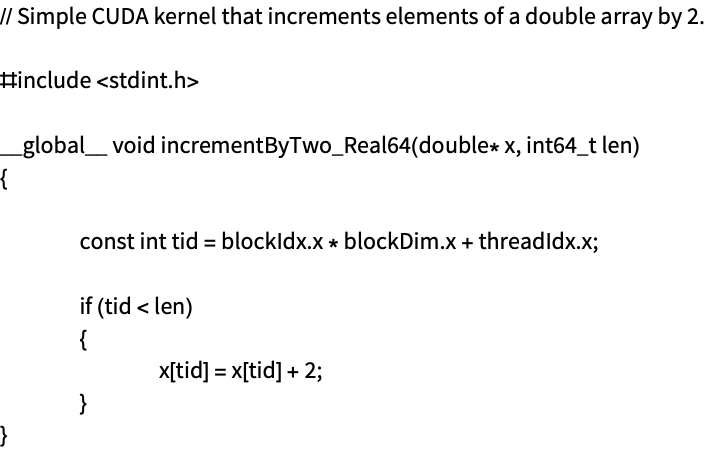
Compilation can be done with the ExternalOperation "Function":
gpuFun = ExternalEvaluate["CUDA", ExternalOperation["Function", file]]Use GPUArray to store data on the GPU that can be used as an argument to the CUDA code:
data = GPUArray[NumericArray[Range[10], "Real64"]];gpuFun[data, 10]The result was written into the array argument:
Normal[data]A file of C++ code that contains two functions that can execute on the GPU:
file = File[FileNameJoin[{PacletObject["CUDALink"]["Location"], "CUDACode", "arithmetic_kernels.cu"}]];
FilePrint[file]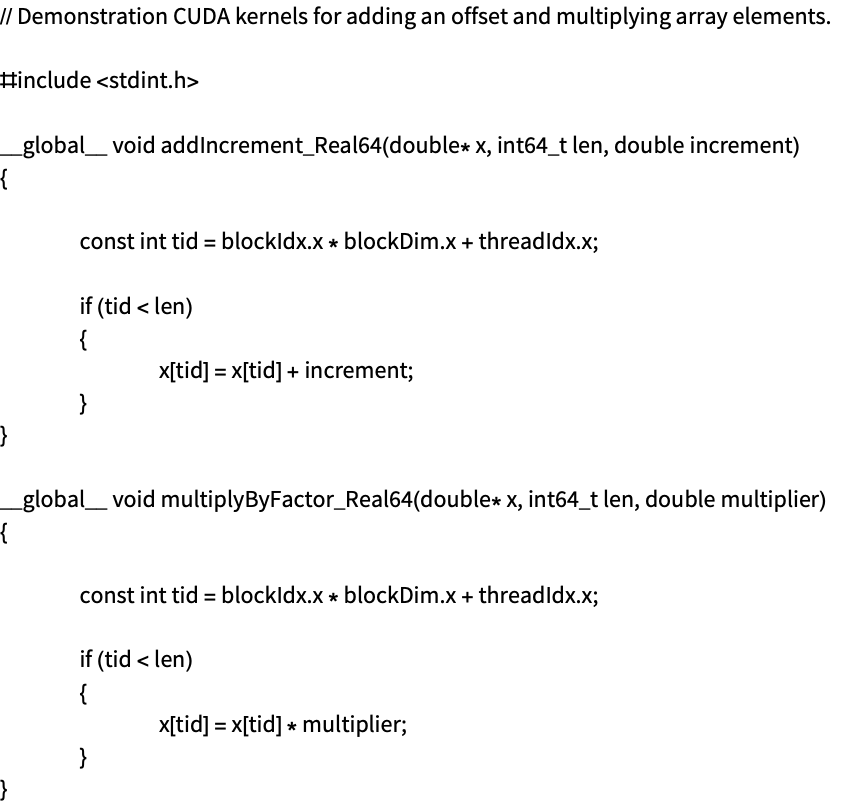
Use the ExternalOperation "Program" to compile the code to an ExternalObject:
compFuns = ExternalEvaluate["CUDA", ExternalOperation["Program", file]]The functions with their names:
compFuns["Functions"]data = GPUArray[NumericArray[Range[10], "Real64"]];
compFuns["Functions"]["addIncrement_Real64"][data, 10, 42]The argument array is overwritten with the result:
Normal[data]data = GPUArray[NumericArray[Range[10], "Real64"]];
compFuns["Functions"]["multiplyByFactor_Real64"][data, 10, 42]The argument array is overwritten with the result:
Normal[data]In the case that the functions are overloaded with the same name, an association using the mangled names is available:
compFuns["FunctionsByMangledName"]A file of C++ code that contains functions that use C++ templates:
file = File[FileNameJoin[{PacletObject["CUDALink"]["Location"], "CUDACode", "scale_kernel.cu"}]];
FilePrint[file]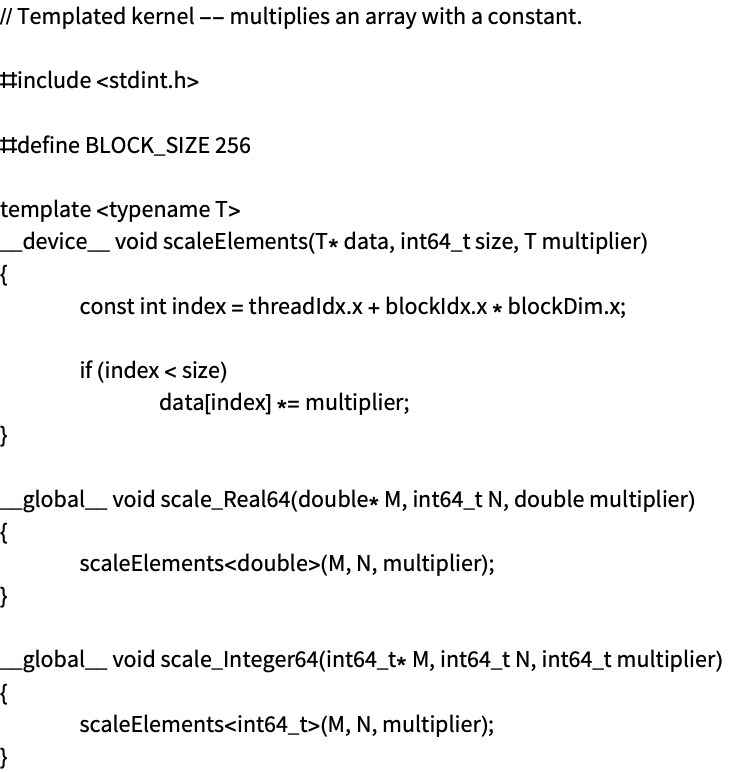
Use ExternalOperation with "Program" to compile the code to an ExternalObject:
compFuns = ExternalEvaluate["CUDA", ExternalOperation["Program", file]]The functions with their names:
compFuns["Functions"]data = GPUArray[NumericArray[Range[10], "Integer64"]];
compFuns["Functions"]["scale_Integer64"][data, 10, 42]The argument array is overwritten with the result:
Normal[data]Grid and Block Dimensions (1)
When CUDA kernels run on the GPU, the functions are executed in parallel on multiple GPU processors. These are arranged by the block and grid dimensions for the actual call. In code, these are reflected in the "BlockDimensions", "BlockID" and "ThreadID" intrinsics.
Compile a function that explores the setup of the processors by storing the computed position of each data point into an array:
gpuFun = ExternalEvaluate["CUDA", Function[{Typed[x, "CArray"::["Integer64"]], Typed[n, "MachineInteger"]},
	Module[{id},
	id = LibraryFunction["BlockDimensions.x"][] * LibraryFunction["BlockID.x"][] + LibraryFunction["ThreadID.x"][];
	If[id < n,
	ToRawPointer[ x, id, Cast[id, "Integer64"]]
	];
	]
	]];
Create an argument for the function:
len = 10;
data = GPUArray[NumericArray[ConstantArray[0, len], "Integer64"]];gpuFun[data, len]This shows how the array has been filled in the expected way:
Normal[data]len = 10000;
data = GPUArray[NumericArray[ConstantArray[0, len], "Integer64"]];gpuFun[data, len]This shows that this data is such that each element contains its index:
Take[Normal[data], -10]Generate larger data and execute the function but set the grid and block dimensions so that only one block that has 256 threads is actually used:
len = 10000;
data = GPUArray[NumericArray[ConstantArray[0, len], "Integer64"]];
gpuFun[data, len, "GridDimensions" -> 1, "BlockDimensions" -> 256]The first part of the data has been filled in as expected:
Take[Normal[data], 10]But the end of the data has not been filled in because of how the grid and block dimensions were set:
Take[Normal[data], -10]Typically the code makes an estimate of the grid and block dimensions based on the input. This works in simple cases such as these.
Grid and Block Intrinsics (1)
When CUDA kernels run on the GPU, the functions are executed in parallel on multiple GPU processors. These are arranged by the grid and block dimensions for the actual call. In code these are reflected in the "BlockDimensions", "BlockID" and "ThreadID" intrinsics.
Compile a function that explores the setup of the processors by storing the thread ID into an array:
gpuFun = ExternalEvaluate["CUDA", Function[{Typed[x, "CArray"::["Integer64"]], Typed[n, "MachineInteger"]},
	Module[{id},
	id = LibraryFunction["BlockDimensions.x"][] * LibraryFunction["BlockID.x"][] + LibraryFunction["ThreadID.x"][];
	If[id < n,
	ToRawPointer[ x, id, Cast[LibraryFunction["ThreadID.x"][], "Integer64"]]
	];
	]
]];len = 10000;
data = GPUArray[NumericArray[ConstantArray[0, len], "Integer64"]];
gpuFun[data, len]This shows that 256 threads were used (this is the default setting):
Take[Normal[data], 500]Setting the grid and block dimensions to only run 32 threads in each block:
len = 10000;
data = GPUArray[NumericArray[ConstantArray[0, len], "Integer64"]];
gpuFun[data, len, "GridDimensions" -> Quotient[len, 32], "BlockDimensions" -> 32]
This shows that only 32 threads were used:
Take[Normal[data], 500]Host Functions and Programs (4)
CUDA programming also involves code that executes on the host (typically the CPU), and this code takes care of launching the CUDA kernels on the GPU. This is supported with ExternalOperation with "HostFunction" and "HostProgram" when the input is CUDA C++. Note that these are not pure CUDA kernels, but code that executes on the host.
C++ code to execute on the host:
code = "#include \"WolframLibrary.h\"
#include <cuda_runtime.h>

__global__ void addKernel(double* out, const double* in, int n)
{
	int id = blockDim.x * blockIdx.x + threadIdx.x;
	if (id < n)
		out[id] = in[id] + 1.0;
}

extern \"C\" DLLEXPORT int runAdd(double* out, const double* in, int n)
{
	double *d_in, *d_out;
	cudaMalloc((void**)&d_in, n * sizeof(double));
	cudaMalloc((void**)&d_out, n * sizeof(double));
	cudaMemcpy(d_in, in, n * sizeof(double), cudaMemcpyHostToDevice);
	addKernel<<<(n + 255) / 256, 256>>>(d_out, d_in, n);
	cudaMemcpy(out, d_out, n * sizeof(double), cudaMemcpyDeviceToHost);
	cudaFree(d_in);
	cudaFree(d_out);
	return 0;
}";
Create an external function object:
hostFun = ExternalEvaluate["CUDA", ExternalOperation["HostFunction", code]]The code is written to expect data stored on the host, and this can be done by passing NumericArray objects that are created here:
dataIn = NumericArray[Range[10], "Real64"];
dataOut = NumericArray[ConstantArray[0, 10], "Real64"];hostFun[dataOut, dataIn, Length[dataIn]]The result was written into the array argument:
Normal[dataOut]Host code can also be loaded from a file. For example, this is a file of C++ code that can execute on the host:
file = File[FileNameJoin[{PacletObject["CUDALink"]["Location"], "CUDACode", "add_library.cu"}]];
FilePrint[file]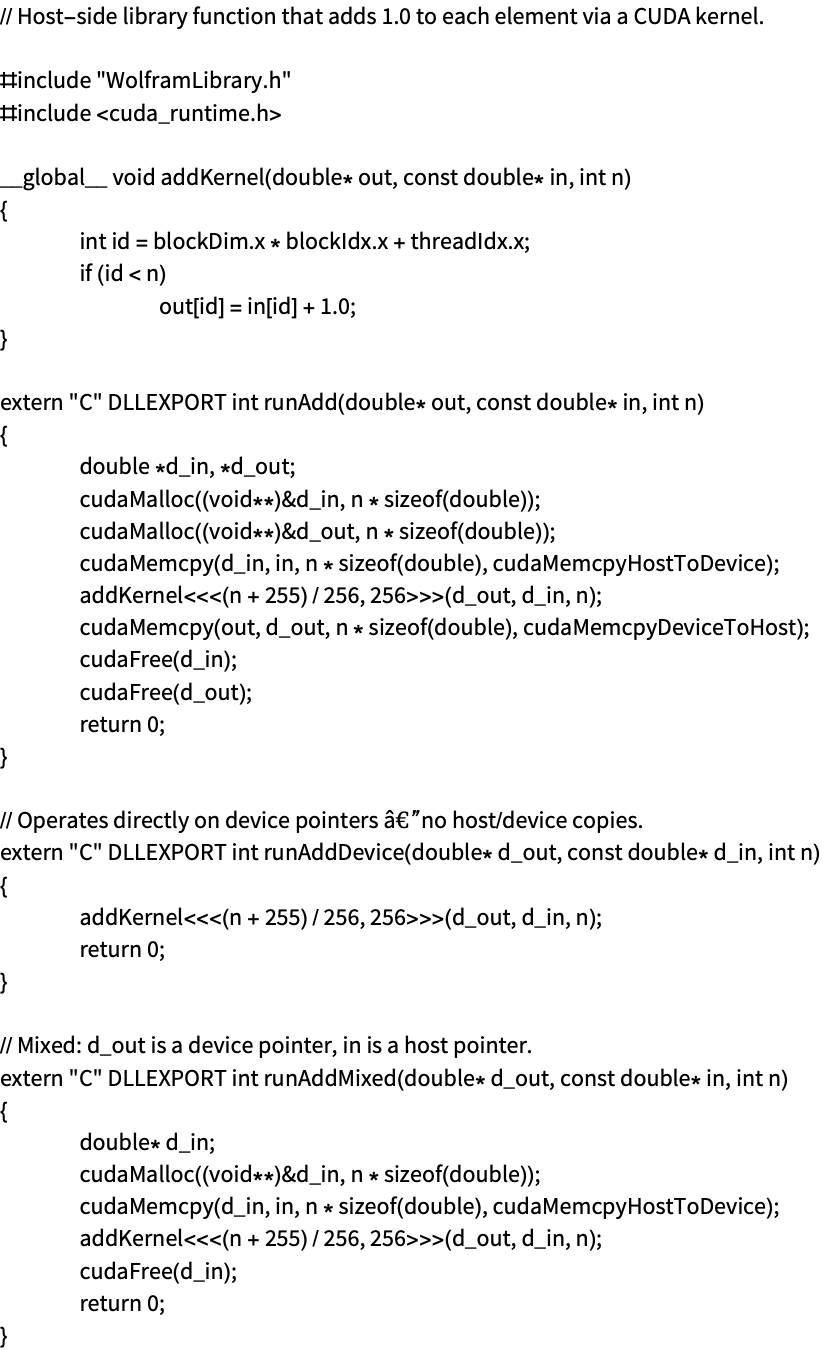
Compile the function runAddDevice with the ExternalOperation "HostFunction":
hostFun = ExternalEvaluate["CUDA", ExternalOperation["HostFunction", file, "runAddDevice"]]This function is written to take data that already lives on the CUDA device, which is done by using GPUArray. Data on the GPU that can be used as an argument function is given here:
dataIn = GPUArray[NumericArray[Range[10], "Real64"]];
dataOut = GPUArray[NumericArray[ConstantArray[0, 10], "Real64"]];hostFun[dataOut, dataIn, 10]The result was written into the array argument:
Normal[dataOut]It is also possible to compile multiple functions in the input code, and this is done with the ExternalOperation "HostProgram".
An example file that uses the thrust library is shown here:
file = File[FileNameJoin[{PacletObject["CUDALink"]["Location"], "CUDACode", "add_thrust_library.cu"}]];
FilePrint[file]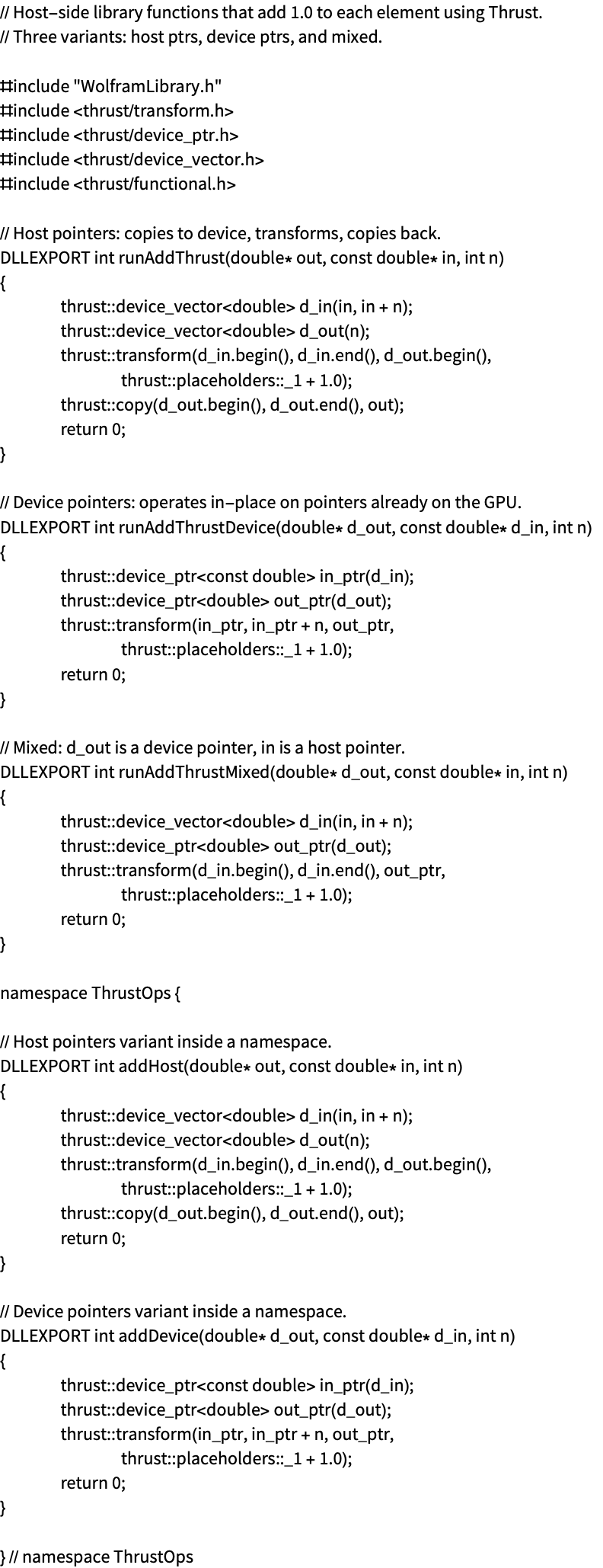
Use the ExternalOperation "HostProgram" to compile the code to an ExternalObject:
compFuns = ExternalEvaluate["CUDA", ExternalOperation["HostProgram", file]]The functions with their names:
compFuns["Functions"]dataIn = NumericArray[Range[10], "Real64"];
dataOut = NumericArray[ConstantArray[0, 10], "Real64"];
compFuns["Functions"]["runAddThrust"][dataOut, dataIn, 10]The argument array is overwritten with the result:
Normal[dataOut]The host execution functionality can take data that lives on the host or on the device. Host data is given as a NumericArray, and device data is given as a GPUArray. The system analyzes the code to decide automatically whether arguments are expected on the host or device. However, it is possible to use LibraryFunctionDeclaration to specify the type signature of the functions:
code = "#include \"WolframLibrary.h\"
#include <cuda_runtime.h>

__global__ void addKernel(double* out, const double* in, int n)
{
	int id = blockDim.x * blockIdx.x + threadIdx.x;
	if (id < n)
		out[id] = in[id] + 1.0;
}

extern \"C\" DLLEXPORT int runAdd(double* out, const double* in, int n)
{
	double *d_in, *d_out;
	cudaMalloc((void**)&d_in, n * sizeof(double));
	cudaMalloc((void**)&d_out, n * sizeof(double));
	cudaMemcpy(d_in, in, n * sizeof(double), cudaMemcpyHostToDevice);
	addKernel<<<(n + 255) / 256, 256>>>(d_out, d_in, n);
	cudaMemcpy(out, d_out, n * sizeof(double), cudaMemcpyDeviceToHost);
	cudaFree(d_in);
	cudaFree(d_out);
	return 0;
}";
The signature of the "runAdd" function is given. Since the data arguments are given to use the "NumericArray" type, they are specified to be data that lives on the host:
ExternalEvaluate["CUDA", ExternalOperation["HostFunction", code, LibraryFunctionDeclaration["runAdd", {"NumericArray"::["Real64", 1], "NumericArray"::["Real64", 1], "CInt"} -> "CInt"]]]