



ARPublish
Details and Options
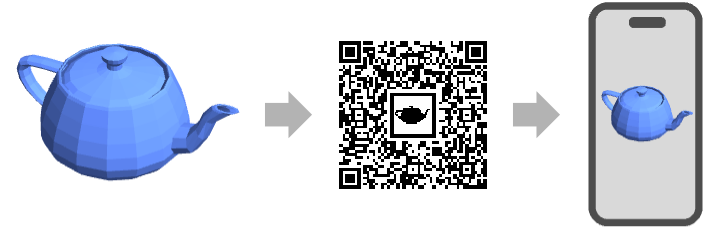
- ARPublish is typically used to visualize 3D geometric or graphics objects in an augmented reality (AR) device such as a mobile phone or tablet.
- ARPublish returns a barcode image that can be scanned by an AR device.
- The following expressions expr can be given:
-

Graphics3D deploy 3D graphics 
Graphics create 3D graphics by projecting the graphics 
Region deploy a geometric region (balls, meshes, ...) 
Image3D deploy a 3D image as voxels 
Image use an image as a rectangular texture 
Molecule display molecules as ball-and-stick models 
BioMolecule display polymer chains as ribbons 
Text create an extruded shape of a text 
Entity deploy the "Region" property of an entity - ARPublish takes the following options:
-
Permissions Automatic permissions for the deployed object TargetSystem All target architecture - Typical values for TargetSystem include "iOS", "iPadOS" and "Android".
Examples
open all close allBasic Examples (3)
Deploy a Graphics3D object to an AR device:
g = ResourceData["Utah Teapot"]Scan the barcode image to visualize on a phone or tablet:
ARPublish[g]map = ["france"];Region[Polygon[map]]Scan the barcode image to visualize on a phone or tablet:
ARPublish[map]Display a list of models in a browsable gallery layout:
ARPublish[{[image] , [image], [image]}]Scope (20)
Graphics (4)
g = Graphics[{Red, Disk[], Green, Rectangle[{0, 0}, {2, 2}], Blue, Disk[{2, 2}]}]ARPublish[g]Deploy a Graphics3D object:
g = Graphics3D[Cube[]]ARPublish[g]plot = ContourPlot3D[x ^ 4 + y ^ 4 + z ^ 4 - (x ^ 2 + y ^ 2 + z ^ 2) ^ 2 + 3 (x ^ 2 + y ^ 2 + z ^ 2) == 3, {x, -2, 2}, {y, -2, 2}, {z, -2, 2}, Mesh -> None, ContourStyle -> Directive[Orange, Opacity[0.8], Specularity[White, 30]]]ARPublish[plot]g = Import["ExampleData/seashell.stl", "Graphics3D"]ARPublish[g]Regions (3)
ARPublish[Ball[]]mesh = MengerMesh[2, 3]ARPublish[mesh]mesh = ParametricRegion[{u, v, u^2 - v^2}, {{u, -1, 1}, {v, -1, 1}}];Region[mesh]ARPublish[mesh]GeoPolygons (2)
Deploy a polygon with GeoPosition:
ARPublish[Polygon[GeoPosition[{{{40.083441, -88.235716}, {40.083607, -88.257488}, {40.082603, -88.257149},
   {40.076136999999996, -88.25740499999999}, {40.076178, -88.270888}, {40.076516, -88.271558},
   {40.083686, -88.271512}, {40.083659999999995, -88.267046},  ... 33323}, {40.098112, -88.228687},
   {40.095216, -88.228627}, {40.095179, -88.238547}, {40.094480999999995, -88.238546},
   {40.094508999999995, -88.23267}, {40.094106, -88.232556}, {40.090666999999996, -88.232477},
   {40.090741, -88.235745}}}]]]
Deploy a polygon with GeoGridPosition:
ARPublish[Polygon[GeoGridPosition[{{{-0.9950503945490105, 1.2366760550756015},
   {-0.9952074890903578, 1.2369207053693891}, {-0.9952196732768064, 1.2369073327446167},
   {-0.9953160063787643, 1.236848436956935}, {-0.9954141759436825, 1.2369993898475449},
   {-0. ... 197645333103}, {-0.9949098578570917, 1.2368130881428654},
   {-0.9948663952535768, 1.2367477711687371}, {-0.9948714472169538, 1.2367426500757825},
   {-0.9949211061652593, 1.2367089232486177}, {-0.9949439717990124, 1.236746107097628}}}, "Bonne"]]]
Images (2)
Entities (5)
knot = ["trefoil knot"];Region[Polyhedron[ knot]]ARPublish[knot]skull = ["skull"];AnatomyData[skull, "Graphics3D"]ARPublish[ skull]map = ["france"];Region[Polygon[map]]ARPublish[map]graph = Entity["Graph", "PetersenGraph"];Graph3D[graph]ARPublish[graph]chemical = Entity["Chemical", "Caffeine"];MoleculePlot3D[chemical]ARPublish[chemical]Texts (2)
Molecule (2)
molecule = Molecule[Entity["Chemical", "Caffeine"]];MoleculePlot3D[molecule]ARPublish[molecule]biomolecule = BioMolecule[ExternalIdentifier["PDBStructureID", "6WXD"]];BioMoleculePlot3D[biomolecule]ARPublish[ biomolecule]Options (1)
TargetSystem (1)
TargetSystem can be used to specify additional platforms; includes "iOS":
m = ExampleData[{"Geometry3D", "UtahTeapot"}];ARPublish[m, TargetSystem -> "iOS"]ARPublish[m, TargetSystem -> "Android"]ARPublish[m, TargetSystem -> "iPadOS"]Applications (11)
Graphics (3)
Visualize 3D basic primitives:
objs = {Graphics3D[{Blue, Ball[]}], Graphics3D[{Red, Cube[]}], Graphics3D[{Yellow, Dodecahedron[]}]}ARPublish[objs]Visualize 2D basic primitives:
objs = {Graphics[{Blue, Disk[]}], Graphics[{Red, StadiumShape[]}], Graphics[{Brown, Triangle[]}]}ARPublish[objs]name = "Wolf";ARPublish[name]Visualization (3)
Visualize a spherical surface:
obj = SphericalPlot3D[1 + 2 Cos[2 θ], {θ, 0, Pi}, {ϕ, 0, 2 Pi}]ARPublish[obj]obj = BarChart3D[{{1, 2, 4, 5}}]ARPublish[obj]Visualize a reconstructed surface from 3D data:
data = ExampleData[{"Geometry3D", "StanfordBunny"}, "VertexData"];
obj = ListSurfacePlot3D[data, ...]ARPublish[obj]Chemistry (3)
obj = MoleculePlot3D[Molecule["NC(=O)C[C@H](C(=O)O)N"]]ARPublish[obj]objs = MoleculePlot3D[Molecule[#]]& /@ {"NC(=O)C[C@H](C(=O)O)N", "CCCC", "O=C(C1CCC1)S[C@@H]1CCC1(C)C"}ARPublish[objs]obj = Entity["Chemical", "Caffeine"]ARPublish[obj]Biology (2)
obj = BioMoleculePlot3D[BioMolecule[Association["Models" ->
   {Association["Chains" -> Association["A" -> Association["AuthorChainName" -> "A",
         "Type" -> "Peptide", "Residues" -> {Association["Name" -> "GLY", "ResidueId" -> 1,
            "Atoms" -> {"N", "CA ... ID" -> "36",
        "DbBeginID" -> "26", "DbEndID" -> "61"]}], Association["EntityType" -> "NonPolymer",
     "SubChains" -> {"B"}]}, "Name" -> "1PPT", "LatticeParameters" ->
{34.18, 32.92, 28.4, 90., 105.26, 90.}, "SpaceGroupNumber" -> 9]], PlotTheme -> "Backbone"]ARPublish[obj]Visualize a protein in different plot themes:
objs = BioMoleculePlot3D[BioMolecule[Association["Models" ->
   {Association["Chains" -> Association["A" -> Association["AuthorChainName" -> "A",
         "Type" -> "Peptide", "Residues" -> {Association["Name" -> "GLY", "ResidueId" -> 1,
            "Atoms" -> {"N", "CA ... ID" -> "36",
        "DbBeginID" -> "26", "DbEndID" -> "61"]}], Association["EntityType" -> "NonPolymer",
     "SubChains" -> {"B"}]}, "Name" -> "1PPT", "LatticeParameters" ->
{34.18, 32.92, 28.4, 90., 105.26, 90.}, "SpaceGroupNumber" -> 9]], PlotTheme -> #]& /@ {"Ribbons", "Tubes", "Spacefilling"}ARPublish[objs]Text
Wolfram Research (2023), ARPublish, Wolfram Language function, https://reference.wolfram.com/language/ref/ARPublish.html (updated 2025).
CMS
Wolfram Language. 2023. "ARPublish." Wolfram Language & System Documentation Center. Wolfram Research. Last Modified 2025. https://reference.wolfram.com/language/ref/ARPublish.html.
APA
Wolfram Language. (2023). ARPublish. Wolfram Language & System Documentation Center. Retrieved from https://reference.wolfram.com/language/ref/ARPublish.html