



ArrayMesh
ArrayMesh[array]
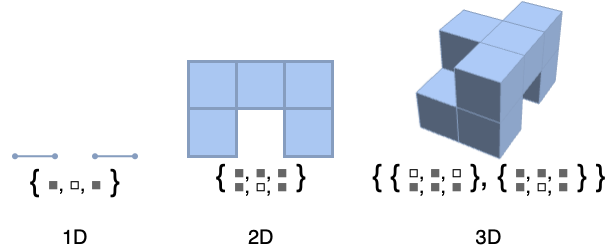
generates a mesh region from an array of rank d in which each cell has a geometric dimension d and represents a nonzero value of the array.
Details and Options
- ArrayMesh is generated from a grid where cells are intervals, squares, or cubes, and grid points are uniformly spaced integer points.
- ArrayMesh arranges successive rows of array down and successive columns across.
- ArrayMesh has the same options as MeshRegion, with the following additions:
-
DataRange Automatic the range of mesh coordinates to generate DataReversed False whether to reverse the order of rows - ArrayMesh works with SparseArray objects.
Examples
open all close allBasic Examples (3)
Scope (2)
ArrayMesh[{1, 1, 0, 0, 1}]ArrayMesh[{{1, 1, 0, 1}, {1, 1, 1, 1}, {0, 1, 0, 1}}]ArrayMesh[{{{1, 1}, {1, 1}, {1, 0}}, {{0, 1}, {1, 1}, {0, 0}}}]ArrayMesh works on SparseArray:
ArrayMesh[SparseArray[{{x_, y_} /; Abs[x - y] < 2 -> 1}, {3, 3}]]Options (14)
DataRange (1)
DataRange allows you to specify the range of mesh coordinates to generate:
ArrayMesh[{{1, 0}, {1, 1}}]MeshCoordinates[%]ArrayMesh[{{1, 0}, {1, 1}}, DataRange -> {{0, 1}, {0, 2}}]MeshCoordinates[%]DataReversed (1)
DataReversed allows you to reverse the order of rows:
ArrayMesh[{{1, 0, 0}, {1, 1, 0}, {1, 0, 1}, {1, 1, 1}}]ArrayMesh[{{1, 0, 0}, {1, 1, 0}, {1, 0, 1}, {1, 1, 1}}, DataReversed -> True]MeshCellHighlight (2)
MeshCellHighlight allows you to specify highlighting for parts of an ArrayMesh:
ArrayMesh[{{1, 0}, {1, 1}}, MeshCellHighlight -> {{1, All} -> Red, {0, All} -> Green}]Individual cells can be highlighted using their cell index:
ArrayMesh[{{1, 0}, {1, 1}}, MeshCellHighlight -> {{1, 1} -> {Thick, Red}, {1, 2} -> {Dashed, Green}}]ArrayMesh[{{1, 0}, {1, 1}}, MeshCellHighlight -> {Line[{4, 6}] -> {Thick, Red}, Line[{5, 6}] -> {Dashed, Green}}]MeshCellLabel (2)
MeshCellLabel can be used to label parts of an ArrayMesh:
ArrayMesh[{{1, 0}, {1, 1}}, MeshCellLabel -> {0 -> "Index"}]Individual cells can be labeled using their cell index:
ArrayMesh[{{1, 0}, {1, 1}}, MeshCellLabel -> {{1, 2} -> "x", {1, 1} -> "y"}]ArrayMesh[{{1, 0}, {1, 1}}, MeshCellLabel -> {Line[{5, 6}] -> "x", Line[{4, 6}] -> "y"}]MeshCellMarker (1)
MeshCellMarker can be used to assign values to parts of an ArrayMesh:
ArrayMesh[{{1, 0}}, MeshCellMarker -> {{0, 1} -> 1, {0, 2} -> 2, {0, 3} -> 3, {0, 4} -> 4}]Use MeshCellLabel to show the markers:
ArrayMesh[{{1, 0}}, MeshCellMarker -> {{0, 1} -> 1, {0, 2} -> 2, {0, 3} -> 3, {0, 4} -> 4}, MeshCellLabel -> {0 -> "Marker"}]MeshCellShapeFunction (2)
MeshCellShapeFunction can be used to assign values to parts of an ArrayMesh:
ArrayMesh[{{{1, 0}}}, MeshCellShapeFunction -> {1 -> (Tube[#1, .1]&)}]Individual cells can be drawn using their cell index:
ArrayMesh[{{{1, 0}}}, MeshCellShapeFunction -> {{1, 4} -> (Tube[#1, .1]&)}]ArrayMesh[{{{1, 0}}}, MeshCellShapeFunction -> {Line[{1, 2}] -> (Tube[#1, .1]&)}]MeshCellStyle (3)
MeshCellStyle allows you to specify styling for parts of an ArrayMesh:
ArrayMesh[{{1, 0}}, MeshCellStyle -> {{1, All} -> Red, {0, All} -> Green}]Individual cells can be highlighted using their cell index:
ArrayMesh[{{1, 0}}, MeshCellStyle -> {{1, 1} -> {Thick, Red}, {1, 2} -> {Dashed, Green}}]ArrayMesh[{{1, 0}}, MeshCellStyle -> {Line[{3, 4}] -> {Thick, Red}, Line[{2, 4}] -> {Dashed, Green}}]Give explicit color directives to specify colors for individual cells:
ArrayMesh[{{1, 0, 0, 1}, {1, 1, 0, 1}, {1, 0, 1, 1}}, MeshCellStyle -> {{2, All} -> Black, {2, 1} -> Red, {2, {2, 3}} -> Pink}]Applications (15)
Cellular Automaton (5)
A two-dimensional cellular automaton evolution:
ArrayMesh[CellularAutomaton[30, {{1}, 0}, 50]]Show a sequence of steps in the evolution of a 3D cellular automaton:
ArrayMesh /@ CellularAutomaton[{14, {2, 1}, {1, 1, 1}}, {{{{1}}}, 0}, 10]Use an outer-totalistic 2D cellular automaton to generate a maze-like pattern:
ArrayMesh[CellularAutomaton[{746, {2, {{2, 2, 2}, {2, 1, 2}, {2, 2, 2}}}, {1, 1}}, {{Table[1, {7}]}, 0}, {{{150}}}]]Show a "glider" in the Game of Life:
c = CellularAutomaton[{224, {2, {{2, 2, 2}, {2, 1, 2}, {2, 2, 2}}}, {1, 1}}, {{{0, 1, 0}, {0, 0, 1}, {1, 1, 1}}, 0}, 8];glider = (First /@ Position[Flatten[#], 1])& /@ c;ArrayMesh[ConstantArray[1, {5, 5}], MeshCellStyle -> {{1, All} -> Black, {2, All} -> White, {2, #} -> Black}]& /@ gliderPatterns generated by a sequence of 2D nine-neighbor rules:
Table[ArrayMesh[CellularAutomaton[{i, {2, 1}, {1, 1}}, {{{1}}, 0}, {{{30}}}]], {i, 2, 20, 4}]Table[ArrayMesh[Mean[CellularAutomaton[{i, {2, 1}, {1, 1}}, {{{1}}, 0}, 10]]], {i, 2, 20, 4}]Image (2)
Convert a 2D image to a MeshRegion:
img = [image];cells = ImageData[img];style = MapIndexed[{2, First[#2]} -> GrayLevel[#1] &, Flatten[cells]];ArrayMesh[cells, MeshCellStyle -> style]img = Image3D[RandomReal[1, {2, 3, 4}], ColorFunction -> GrayLevel]cells = Transpose[ImageData[img], {2, 3, 1}];style = MapIndexed[{3, First[#2]} -> GrayLevel[#1] &, Flatten[cells]];ArrayMesh[cells, MeshCellStyle -> style]Pattern (2)
ArrayMesh[Table[If[Mod[i, 4] == 2 && Mod[j, 4] == 2, 0, 1], {i, 11}, {j, 11}]]ArrayMesh[{{{1, 1, 1}, {1, 0, 1}, {1, 1, 1}},
{{1, 1, 1}, {1, 0, 1}, {1, 1, 1}}, {{1, 1, 1}, {1, 0, 1}, {1, 1, 1}}}]ArrayMesh[CellularAutomaton[{14, {2, 1}, {1, 1}}, {{{1}}, 0}, 10]]Construct a Seidel mesh, i.e. a mesh region with tunnels going in every direction without crossing:
SeidelMesh[{r_, s_, t_}] := ArrayMesh[Table[If[Mod[i, 4] == 2 && Mod[j, 4] == 2 || Mod[i, 4] == 0 && Mod[k, 4] == 0 || Mod[j, 4] == 0 && Mod[k, 4] == 2, 0, 1], {i, 3 + r 4}, {j, 3 + s 4}, {k, 3 + t 4}]]SeidelMesh[{1, 1, 1}]By converting to a boundary mesh and styling it, it becomes easier to comprehend:
HighlightMesh[BoundaryMesh[%], {Style[1, None], Style[2, Opacity[0.5]]}]SubstitutionSystem (4)
ArrayMesh[{1, 0, 1, 0, 0, 0, 1, 0, 1}]Length of the Cantor set at each stage:
Table[Rationalize[RegionMeasure[ArrayMesh[n]]], {n, SubstitutionSystem[{1 -> {1, 0, 1}, 0 -> {0, 0, 0}}, {1}, 5]}]FindSequenceFunction[%, n]Steps in constructing a Cantor set:
ArrayMesh[{#}]& /@ SubstitutionSystem[{1 -> {1, 0, 1}, 0 -> {0, 0, 0}}, {1}, 3]Create an analogous 2D nested object:
ArrayMesh /@ SubstitutionSystem[{1 -> {{1, 1, 1}, {1, 0, 1}, {1, 1, 1}}, 0 -> ConstantArray[0, {3, 3}]}, {{1}}, 3]ArrayMesh /@ SubstitutionSystem[{1 -> 1 - CrossMatrix[{1, 1, 1}], 0 -> ConstantArray[0, {3, 3, 3}]}, {{{1}}}, 3]Game Design (2)
m = Join@@ConstantArray[{{0, 1, 0, 1, 0, 1, 0, 1}, {1, 0, 1, 0, 1, 0, 1, 0}}, 4];p = First /@ Position[Flatten[m], 1];style = {{1, All} -> {Thick, Black}, {2, All} -> White, {2, #}& /@ p -> Black};r = ArrayMesh[ConstantArray[1, {8, 8}], MeshCellStyle -> style]m = Join@@ConstantArray[{{{0}, {1}, {0}, {1}, {0}, {1}, {0}, {1}}, {{1}, {0}, {1}, {0}, {1}, {0}, {1}, {0}}}, 4];p = First /@ Position[Flatten[m], 1];style = {{1, All} -> {Thick, Black}, {3, All} -> White, {3, #}& /@ p -> Black};r = ArrayMesh[ConstantArray[1, {8, 8, 1}], MeshCellStyle -> style]Generate tetrominoes, shapes composed of four squares each:
reg = ArrayMesh /@ {(| | | | |
| - | - | - | - |
| 1 | 0 | 0 | 0 |
| 1 | 0 | 0 | 0 |
| 1 | 0 | 0 | 0 |
| 1 | 0 | 0 | 0 |), (| | | | |
| - | - | - | - |
| 1 | 1 | 0 | 0 |
| 0 | 1 | 0 | 0 |
| 0 | 1 | 0 | 0 |
| 0 | 0 | 0 | 0 |), (| | | | |
| - | - | - | - |
| 1 | 1 | 0 | 0 |
| 1 | 0 | 0 | 0 |
| 1 | 0 | 0 | 0 |
| 0 | 0 | 0 | 0 |), (| | | | |
| - | - | - | - |
| 0 | 1 | 0 | 0 |
| 1 | 1 | 0 | 0 |
| 0 | 1 | 0 | 0 |
| 0 | 0 | 0 | 0 |), (| | | | |
| - | - | - | - |
| 1 | 0 | 0 | 0 |
| 1 | 1 | 0 | 0 |
| 0 | 1 | 0 | 0 |
| 0 | 0 | 0 | 0 |), (| | | | |
| - | - | - | - |
| 1 | 1 | 0 | 0 |
| 1 | 1 | 0 | 0 |
| 0 | 0 | 0 | 0 |
| 0 | 0 | 0 | 0 |), (| | | | |
| - | - | - | - |
| 1 | 1 | 0 | 0 |
| 0 | 1 | 1 | 0 |
| 0 | 0 | 0 | 0 |
| 0 | 0 | 0 | 0 |)}col = ColorData[97, "ColorList"];Table[MeshRegion[reg[[i]], MeshCellStyle -> {2 -> col[[i]]}], {i, 7}]Properties & Relations (6)
The output of ArrayMesh is always a full-dimensional MeshRegion:
ArrayMesh[RandomInteger[1, {3, 4}]]{MeshRegionQ[%], RegionDimension[%]}ArrayMesh consists of intervals in 1D:
ArrayMesh[{1, 1, 0, 0, 1}]MeshCells[%, RegionDimension[%]]ArrayMesh[{{0, 0, 1, 1}, {0, 1, 1, 0}, {1, 0, 0, 0}}]MeshCells[%, RegionDimension[%]]ArrayMesh[{{{1, 0}, {0, 1}}}]MeshCells[%, RegionDimension[%]]ArrayPlot can be used to generate a plot:
arr = {{0, 1, 1, 0}, {1, 0, 1, 0}, {1, 1, 0, 1}};ArrayMesh[arr]ArrayPlot[arr]MatrixPlot can be used to generate a plot:
arr = {{0, 1, 1, 0}, {1, 0, 1, 0}, {1, 1, 0, 1}};ArrayMesh[arr]MatrixPlot[arr]Find a boundary mesh region by using BoundaryMesh:
BoundaryMesh[ArrayMesh[{{0, 1, 1, 0}, {1, 0, 1, 0}, {1, 1, 0, 1}}]]DataRange range is equivalent to using RescalingTransform[{...},range]:
ArrayMesh[{{1, 0}, {1, 1}}, DataRange -> {{1, 2}, {1, 3}}, Frame -> True]Use RescalingTransform:
box = TransformedRegion[ArrayMesh[{{1, 0}, {1, 1}}], RescalingTransform[{{0, 2}, {0, 2}}, {{1, 2}, {1, 3}}]];MeshRegion[box, Frame -> True]Text
Wolfram Research (2016), ArrayMesh, Wolfram Language function, https://reference.wolfram.com/language/ref/ArrayMesh.html.
CMS
Wolfram Language. 2016. "ArrayMesh." Wolfram Language & System Documentation Center. Wolfram Research. https://reference.wolfram.com/language/ref/ArrayMesh.html.
APA
Wolfram Language. (2016). ArrayMesh. Wolfram Language & System Documentation Center. Retrieved from https://reference.wolfram.com/language/ref/ArrayMesh.html