

AudioGenerator
AudioGenerator[model]
generates one second of audio of a given model.
AudioGenerator[model,t]
generates t seconds of audio.
AudioGenerator[model,t,"type"]
generates audio samples of the specified "type".
Details and Options
- AudioGenerator can generate different types of audio, including oscillators or noises.
- Possible settings for model include:
-
f sample an arbitrary function f of time (in seconds) proc generate samples from a random process proc tseries generate samples from a TimeSeries tseries "model" generate sample from a named function "model" - Silence:
-

"Silence" silence (zero) signal - Oscillators:
-

{"Sin",freq,phase} sine wave 
{"Triangle",freq,phase} triangle wave 
{"Sawtooth",freq,phase} sawtooth wave 
{"Square",freq,phase} square wave 
{"Pulse",freq,phase,width} rectangular wave using the duty cycle width 
{"Impulse",freq,phase} impulse signal - By default,
![freq=TemplateBox[{440, "Hz", hertz, "Hertz"}, Quantity]](Files/AudioGenerator.en/8.png "freq=TemplateBox[{440, \"Hz\", hertz, \"Hertz\"}, Quantity]") ,
, ![phase=TemplateBox[{0, "rad", radians, "Radians"}, Quantity]](Files/AudioGenerator.en/9.png "phase=TemplateBox[{0, \"rad\", radians, \"Radians\"}, Quantity]") , and
, and ![width=TemplateBox[{25, "%", percent, "Percent"}, QuantityPostfix]](Files/AudioGenerator.en/10.png "width=TemplateBox[{25, \"%\", percent, \"Percent\"}, QuantityPostfix]") are used.
are used. - The parameters freq, phase, and width can be a scalar value, a Quantity, an Audio object, a TimeSeries, or a pure function.
- Noise:
-

"White" constant power spectral density 
"Pink" power spectral density that follows 

"Brown" power spectral density that follows 

"Blue" power spectral density that follows 

{"Color",α} power spectral density that follows  with
with 

{"White",dist} random noise with values sampled from dist 
"PeriodicRandomNoise" sum of sinusoidal components with constant amplitude and random phase - Other:
- AudioGenerator generates an audio object of "Real32" type. See the reference page for Audio for possible settings of "type".
- AudioGenerator has the same options as Audio.
List of all options
Examples
open all close allBasic Examples (3)
Scope (17)
Basic Uses (2)
By default, 1 second of audio is generated:
AudioGenerator["Sin"]//DurationAudioGenerator["Sin", 5]//DurationSpecify the duration as a time quantity:
AudioGenerator["Sin", Quantity[100, "ms"]]//DurationSpecify the number of samples to generate:
AudioGenerator["Sin", Quantity[4410, "samples"]]//DurationBy default, the generated audio is of "Real32" type:
AudioGenerator["Sin", 1]//AudioTypeSpecify a different data type:
AudioGenerator["Sin", 5, "SignedInteger8"]//AudioTypeModel Specifications (15)
Oscillators (5)
Sinusoidal oscillator at 2000 Hz:
AudioGenerator[{"Sin", Quantity[2000, "Hertz"]}]Control the frequency of the sine wave with a function:
AudioGenerator[{"Sin", 1000 + 1000Sin[2 * Pi#]&}]Spectrogram[%, PlotRange -> {All, {0, 3000}}]Control the frequency of the sine wave with another Audio object:
freqMod = Import["ExampleData/rule30.wav"];
AudioGenerator[{"Sin", 440 + 2000 * freqMod}]
Visualize a spectrogram of the generated audio:
Spectrogram[%, PlotRange -> {All, {0, 2000}}]Control the frequency of the sine wave with a TimeSeries:
frequencies = {378, 366, 287, 482, 595, 522, 227, 412, 481, 390};
times = {0.2, 0.5, 0.7, 1.1, 1.4, 1.7, 1.9, 2., 2.4, 2.7};
freqMod = TimeSeries[frequencies, {times}]AudioGenerator[{"Sin", freqMod}]Generate different oscillators:
waveforms = {"Sin", "Triangle", "Sawtooth", "Square", "Pulse", "Impulse"};Table[AudioPlot[AudioGenerator[i, .01], PlotTheme -> "Minimal", PlotLabel -> i],
{i, waveforms}]//MulticolumnNoise Generators (5)
AudioGenerator["White"]The values for the white noise can be sampled from a distribution:
Histogram@AudioData@AudioGenerator[{"White", NormalDistribution[]}]Generate different kinds of noises:
noises = {"White", "Pink", "Brown", "Blue", {"Color", 1.5}, "PeriodicRandomNoise"};Table[AudioPlot[AudioGenerator[i, .01], PlotLabel -> i, PlotTheme -> "Minimal"], {i, noises}]//MulticolumnThe spectra of pink, brown, and blue noises follow a distribution of f-α, with α equal to 1, 2, and  , respectively:
colors = {"Pink", "Brown", "Blue"};
Periodogram[AudioGenerator /@ colors, 4000, ScalingFunctions -> {"Log10", Automatic}, PlotRange -> {-50, 25}, PlotLegends -> colors, PlotStyle -> {RGBColor[1, 0.5, 0.5], RGBColor[0.772079, 0.431554, 0.102387], RGBColor[0.368417, 0.506779, 0.709798]}]
The spectrum of "PeriodicRandomNoise" is perfectly flat:
Periodogram[AudioGenerator["PeriodicRandomNoise"]]Using Functions (1)
AudioGenerator supports functions of time:
f[x_] := Sin[440 2Pi x];
AudioGenerator[f, 2]
Using Processes (2)
Generate audio from a noise process:
AudioGenerator[FractionalGaussianNoiseProcess[.2]]//AudioNormalizeUse an audio object generated from a random process to control the amplitude of a sinusoid:
telegraph = AudioGenerator[TelegraphProcess[4], 4];(1 + telegraph) * \!\(\*AudioBox[""]\)Using TimeSeries (2)
Generate an audio object from a TimeSeries:
AudioGenerator[TimeSeries[Range[10] / 10.]]//AudioPlotGenerate an audio object from an irregular TimeSeries:
amplitudes = AudioGenerator[TimeSeries[{{0, 1}, {1, 0}, {1.5, .3}, {3, 0}}]];
amplitudes * AudioGenerator["Sin", 3]AudioPlot@%Options (1)
SampleRate (1)
By default, SampleRate->44100 is used:
AudioGenerator["Sin"]//AudioSampleRateSpecify a different sample rate:
AudioGenerator["Sin", SampleRate -> 1000]//AudioSampleRateApplications (8)
Noise Applications (2)
a = ExampleData[{"Audio", "Cello"}, "Audio"];noisy = .5a + .03AudioGenerator["White", Duration[a]]Use "PeriodicRandomNoise" to test the frequency response of a linear system:
Periodogram[LowpassFilter[AudioGenerator["PeriodicRandomNoise", .1], 2 Pi 10000]]Audio Generation from Temporal Data (2)
Compare the stock price trends of two companies:
msft = TimeSeriesRescale[TimeSeries@FinancialData["MSFT", {"Jan. 1, 1990", "Jan. 1, 2018"}], {0, 10}];
aapl = TimeSeriesRescale[TimeSeries@FinancialData["AAPL", {"Jan. 1, 1990", "Jan. 1, 2018"}], {0, 10}];resampledMSFT = QuantityMagnitude@TimeSeriesResample[Round[MovingAverage[msft, 60]], 1 / 8];
resampledAAPL = QuantityMagnitude@TimeSeriesResample[Round[MovingAverage[aapl, 60]], 1 / 8];
ListLinePlot[{resampledMSFT, resampledAAPL}, PlotStyle -> {Automatic, Automatic, PointSize[Large]}, PlotLegends -> {"MSFT", "AAPL"}]midiToFreq[m_] := 2 ^ ((m - 69) / 12) * 440.;Generate audio controlled by the two time series:
res = .8Mean[{AudioGenerator[{"Sin", midiToFreq[.5resampledMSFT + 40]}], AudioGenerator[{"Triangle", midiToFreq[.5resampledAAPL + 40]}]}]Use a list of TimeSeries to control the amplitudes of a list of harmonic sine waves:
duration = 5;sineBank = Table[AudioGenerator[{"Sin", Quantity[100, "Hertz"] * i, 0}, duration], {i, 10}];amplitudes = Table[AudioGenerator[TimeSeries[RandomInteger[{0, 1}, 40], {RandomReal[{0, duration}, 40]}], duration, SampleRate -> 200], 10];Mean[amplitudes * sineBank]AudioPlot@%Multi-Frequency Generation (3)
Generate a series of DTMF tones to simulate the dialing of a phone number:
keys = {1 -> {697, 1209}, 2 -> {697, 1336}, 3 -> {697, 1477}, 4 -> {770, 1209}, 5 -> {770, 1336}, 6 -> {770, 1477}, 7 -> {852, 1209}, 8 -> {852, 1336}, 9 -> {852, 1477}, 0 -> {941, 1336}};dtmf[str_String] := AudioJoin[Table[{Mean[AudioGenerator[{"Sin", #}, Quantity[200, "Milliseconds"]]& /@ (key /. keys)], Quantity[50, "Milliseconds"]}, {key, ToExpression /@ Characters[str]}]]phoneNumber = "6345789";dtmf[phoneNumber]Grid[Partition[MapIndexed[Labeled[Audio[Mean[AudioGenerator[{"Sin", #}, .1]& /@ #], Appearance -> "Minimal"], First@#2]&, Flatten[Outer[List, {697, 770, 852}, {1209, 1336, 1477}], 1]], 3]]range = 12;
duration = 20;
lfoFreq = .05;
basePitch = 30;
numOsc = 8;
midiToFreq[m_] := 2 ^ ((m - 69) / 12) * 440.Generate ramps to control frequencies and amplitudes of the oscillators:
phasors = Table[AudioGenerator[{"Sawtooth", lfoFreq, 2.Pi / numOsc(i - 1.)}, duration, SampleRate -> 500] / 2. + .5, {i, numOsc}];
AudioPlot[phasors, PlotLayout -> "Overlaid", PlotRange -> All]
Create frequencies that will control the oscillators. The frequencies are exactly one octave apart from each other and increase exponentially, so that pitch increases linearly:
freqs = Table[midiToFreq[(phasors[[i]]) * 12 * numOsc + basePitch], {i, numOsc}];
AudioPlot[freqs, PlotLayout -> "Overlaid", PlotRange -> All]
Create amplitudes that will control the oscillators. Amplitudes go to 0 when the frequencies drop to the minimum value:
amps = Cos[# * Pi - Pi / 2.]& /@ phasors;
AudioPlot[amps, PlotLayout -> "Overlaid", PlotRange -> All]
Show the relation between frequency and amplitude of one oscillator:
AudioPlot[AudioNormalize /@ {freqs[[2]], amps[[2]]}, PlotRange -> All]Combine a bank of oscillators using the created frequencies and amplitudes:
res = Mean[
Table[amps[[i]]AudioGenerator[{"Sin", freqs[[i]]}, SampleRate -> 24000], {i, numOsc}]]Spectrogram[res, 8192, 4096, HannWindow]Frequency and Amplitude Modulation (1)
Generation and reconstruction of an AM signal:
a = \!\(\*AudioBox[""]\);Periodogram[a, 2000, PlotRange -> {{0, 10000}, All}]Modulate the amplitude with a 22050 Hz sinusoid to shift the content at the high end of the spectrum. The result should be already inaudible for most people:
amsignal = a×AudioGenerator[{"Sin", Quantity[22050, "Hertz"]}, Duration@a, SampleRate -> 96000]Periodogram[amsignal, 2200]Demodulate the AM signal by multiplying the result by another sinusoid at 22050 Hz with the same phase:
result = LowpassFilter[amsignal * AudioGenerator[{"Sin", Quantity[22050, "Hertz"]}, Duration@amsignal, SampleRate -> 96000], Quantity[5000, "Hertz"], 201]Possible Issues (2)
With oscillators, the frequency should be less than or equal to half of the sample rate:
AudioGenerator[{"Sin", 5001}, SampleRate -> 10000]
If a TimeSeries is used as an input, it needs to have numeric non-negative time stamps:
ts = TimeSeries[FinancialData["GE", {"Jan. 1, 2015", "Jan. 1, 2016"}]]AudioGenerator[{"Sin", ts}]//Head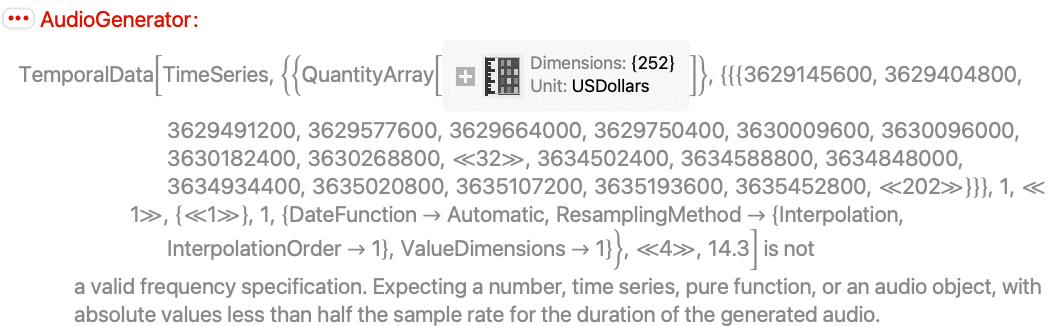
The TimeSeries needs to have a single scalar-valued path:
ts = TimeSeries[{{0, {600, 300}}, {1, {400, 300}}}]AudioGenerator[{"Sin", ts}]//Head
Interactive Examples (3)
Control frequency and phase of an oscillator:
Manipulate[
	AudioPlot[
	AudioGenerator[{"Sin", freq, phase}, .1]
	], {freq, 10, 100}, {phase, 0, 10}, ContinuousAction -> False]
The spectrum of AudioGenerator[{"Color",α}] follows a distribution of f-α:
Manipulate[
	Periodogram[AudioGenerator[{"Color", α}], 2000, ScalingFunctions -> {"Log10", Automatic}, PlotRange -> {-60, 30}], {α, -2, 2}, ContinuousAction -> False]
Create a complex audio signal using frequency modulation:
Manipulate[
	Periodogram[
	AudioGenerator[{"Sin", freq + freqModAmount * modFreq * AudioGenerator[{"Sin", modFreq}]}],
	ScalingFunctions -> "Absolute", PlotRange -> {{0, 1000}, All}, ImageSize -> Medium],
	{{freq, 440, "Carrier Frequency"}, -500, 500},
	{{modFreq, 100, "Modulation Frequency"}, -200, 200},
	{{freqModAmount, 0, "Amount of Frequency Modulation"}, 0, 10},
	ControlPlacement -> Top, ContinuousAction -> False
	]
Neat Examples (4)
Sweep the frequency of the modulating signal:
AudioGenerator[{"Sin", 400 + 300 * AudioGenerator[{"Sin", 100 * #&}, 4]}, SampleRate -> 8000]Use the digits of Pi in base 24 to generate a sequence of frequencies for a sinusoidal oscillator:
digits = First@RealDigits[π, 24, 100]midiToFreq[m_] := 2 ^ ((m - 69) / 12) * 440.
AudioGenerator[{"Sin", TimeSeries[midiToFreq[50 + digits], {0, 10}]}, SampleRate -> 8000]Create a melody using DiscreteMarkovProcess:
𝒫 = DiscreteMarkovProcess[12, (| | | | | | | | | | | | |
| -------- | ------- | -------- | ------- | -------- | -------- | ------- | -------- | ------- | -------- | ------- | -------- |
| (7/153) | 0 | (31/153) | (2/153) | (23/153) | (2/51) | (8/153) | (1/9) | (1/153) | (25/153) | (5/153) | (28/153) |
| 0 | 0 | (1/3) | 0 | 0 | 0 | 0 | (1/2) | 0 | (1/6) | 0 | 0 |
| (31/111) | 0 | 0 | 0 | (29/111) | (2/37) | (1/37) | (8/111) | 0 | (11/111) | (1/37) | (20/111) |
| (1/4) | 0 | (1/12) | (1/6) | 0 | 0 | 0 | (1/4) | 0 | (1/4) | 0 | 0 |
| (25/128) | (1/128) | (27/128) | 0 | (3/128) | (23/128) | (5/128) | (21/128) | (1/128) | (5/64) | (5/128) | (7/128) |
| (4/113) | 0 | (19/113) | 0 | (23/113) | 0 | 0 | (35/113) | 0 | (13/113) | 0 | (19/113) |
| (7/29) | 0 | (2/29) | (1/29) | (5/29) | 0 | 0 | (7/29) | (2/29) | (1/29) | 0 | (4/29) |
| (15/166) | (3/166) | (2/83) | (2/83) | (27/166) | (37/166) | (7/166) | (19/166) | 0 | (15/83) | (1/166) | (19/166) |
| 0 | 0 | 0 | 0 | (1/14) | 0 | (1/7) | (1/14) | 0 | (1/2) | 0 | (3/14) |
| (5/32) | 0 | (1/16) | (3/128) | (3/64) | (11/64) | (1/128) | (29/128) | (3/64) | 0 | (1/64) | (31/128) |
| (5/16) | 0 | (1/16) | 0 | (5/16) | 0 | 0 | (1/8) | 0 | (3/16) | 0 | 0 |
| (36/131) | (2/131) | (16/131) | 0 | (6/131) | (19/131) | (3/131) | (21/131) | (4/131) | (24/131) | 0 | 0 |)];midiToFreq[m_] := 2 ^ ((m - 69) / 12) * 440.;AudioGenerator[{"Sin", midiToFreq[59 + TimeSeriesRescale[RandomFunction[𝒫, {0, 50}], {0, 6}]]}, SampleRate -> 8000]Generate an audio signal using Morse code:
code = <|"a" -> ".-", "b" -> "-...", "c" -> "-.-.", "d" -> "-..", "e" -> ".", "f" -> "..-.", "g" -> "--.", "h" -> "....", "i" -> "..", "j" -> ".---", "k" -> "-.-", "l" -> ".-..", "m" -> "--", "n" -> "-.", "o" -> "---", "p" -> ".--.", "q" -> "--.-", "r" -> ".-.", "s" -> "...", "t" -> "-", "u" -> "..-", "v" -> "...-", "w" -> ".--", "x" -> "-..-", "y" -> "-.--", "z" -> "--..", "1" -> ".----", "2" -> "..---", "3" -> "...--", "4" -> "....-", "5" -> ".....", "6" -> "-....", "7" -> "--...", "8" -> "---..", "9" -> "----.", "0" -> "-----", "." -> ".-.-.-", "," -> "--..--", "!" -> "-.-.--", "?" -> "..--.."|>;
withgaps = Map[StringRiffle[Characters[#], "_"]&, code];
withpauses = Map[StringInsert[#, "___", -1]&, withgaps];
withspace = AssociateTo[withpauses, " " -> "_______"];
replacements = Map[StringReplace[#, {"-" -> "111", "." -> "1", "_" -> "0"}]&, withspace];
Create a function to translate a message to an audio signal using the dictionary:
createMorseSignal[s_String, t_] := Module[{events = Characters[StringReplace[ToLowerCase[s], Normal@replacements]], ts, amps},
	ts = TimeSeries[ToExpression@events, {0, (Length[events] - 1) * t, t}];
	amps = AudioGenerator[ts, SampleRate -> 1000];AudioGenerator[{"Sin", 800}, Duration@amps, SampleRate -> 8000]amps
	]
Encode a string into an audio signal:
morse = createMorseSignal["hello world", .05]AudioPlot@%Text
Wolfram Research (2016), AudioGenerator, Wolfram Language function, https://reference.wolfram.com/language/ref/AudioGenerator.html.
CMS
Wolfram Language. 2016. "AudioGenerator." Wolfram Language & System Documentation Center. Wolfram Research. https://reference.wolfram.com/language/ref/AudioGenerator.html.
APA
Wolfram Language. (2016). AudioGenerator. Wolfram Language & System Documentation Center. Retrieved from https://reference.wolfram.com/language/ref/AudioGenerator.html