

ButterworthFilterModel
creates a lowpass Butterworth filter of order n and cutoff frequency of 1.
ButterworthFilterModel[{n,ωc}]
uses the cutoff frequency ωc.
ButterworthFilterModel[{"type",spec}]
creates a filter of a given "type" using the specified parameters spec.
ButterworthFilterModel[{"type",spec},var]
expresses the model in terms of the variable var.
Details
- ButterworthFilterModel returns the filter as a TransferFunctionModel.
- ButterworthFilterModel[{n,ω}] returns a lowpass filter with attenuation of
 (approximately 3 dB) at frequency ω.
 - ButterworthFilterModel[n] uses the cutoff frequency of 1.
- Lowpass filter specification {"type",spec} can be any of the following:
-
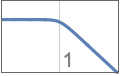
{"Lowpass",n} lowpass filter of order n and cutoff frequency 1 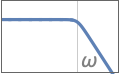
{"Lowpass",n,ωp} use cutoff frequency ωp 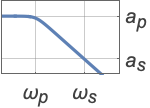
{"Lowpass",{ωp,ωs},{ap,as}} use full filter specification giving passband and stopband frequencies and attenuations - Highpass filter specifications:
-
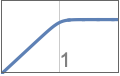
{"Highpass",n} highpass filter with cutoff frequency 1 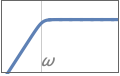
{"Highpass",n,ωp} use cutoff frequency ωp 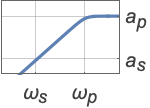
{"Highpass",{ωs,ωp},{as,ap}} full filter specification - Bandpass filter specifications:
-
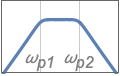
{"Bandpass",n,{ωp1,ωp2}} bandpass filter with passband frequencies ωp1 and ωp2 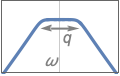
{"Bandpass",n,{{ω,q}}} use center frequency ω and quality factor q 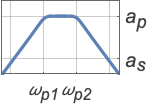
{"Bandpass",{ωs1,ωp1,ωp2,ωs2},{as,ap}} full filter specification - Bandstop filter specifications:
-
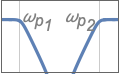
{"Bandstop",n,{ωp1,ωp2}} bandstop filter with passband frequencies ωp1 and ωp2 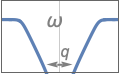
{"Bandstop",n,{{ω,q}}} use center frequency ω and quality factor q 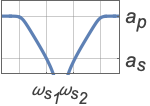
{"Bandstop",{ωp1,ωs1,ωs2,ωp2},{ap,as}} full filter specification - Values ap and as are, respectively, absolute values of passband and stopband attenuations.
- Given a gain fraction
 , the attenuation is
  .
. - The quality factor q is defined as
 , with
  being the center frequency of a bandpass or bandstop filter. Higher values of q give narrower filters.
Examples
open all close allBasic Examples (2)
A third-order Butterworth filter model with cutoff frequency at  :
:
ButterworthFilterModel[3]Express the filter model in terms of variable  :
:
tf = ButterworthFilterModel[3, s]BodePlot[tf, GridLines -> Automatic, PlotLayout -> "Magnitude"]A lowpass Butterworth filter using the full specification:
ωp = 1;ωs = 3;ap = 1.;as = 20.;
tf = ButterworthFilterModel[{"Lowpass", {ωp, ωs}, {ap, as}}, s]
Magnitude response of the filter showing the design specification:
BodePlot[tf, GridLines -> {{ωp, ωs}, {-ap, -as}}, GridLinesStyle -> Pink, FrameTicks -> {{None, {-ap, -as}}, {{ωp, ωs}, None}}, PlotLayout -> "Magnitude"]Scope (4)
A symbolic lowpass Butterworth filter of order 3 with a cutoff frequency  :
:
ButterworthFilterModel[{3, ω}, s]Exact computation of the model:
ButterworthFilterModel[{3, 1}, s]Computation of the model with precision 24:
ButterworthFilterModel[{3, N[1, 24]}, s]
BodePlot[ButterworthFilterModel[{3, 10.}, s], GridLines -> Automatic, PlotLayout -> "Magnitude"]Create a highpass Butterworth filter of order 3:
tf = ButterworthFilterModel[{"Highpass", 3}, s]//ChopBodePlot[tf, {0.1, 10}, GridLines -> Automatic, PlotLayout -> "Magnitude"]Create a highpass Butterworth filter of order 3 with a cutoff frequency of 10:
BodePlot[ButterworthFilterModel[{"Highpass", 3, 10}], {1, 100}, GridLines -> Automatic, PlotLayout -> "Magnitude"]Same filter using the full specification:
tf = ButterworthFilterModel[{"Highpass", {1, 10}, {60, -20Log10[1 / Sqrt[2]]}}, s];
BodePlot[tf, {1, 100}, GridLines -> Automatic, PlotLayout -> "Magnitude"]
Create a "Bandpass" filter with passband frequencies  and
and  and attenuation of order 3:
ωp1 = 1.;ωp2 = 10.;
BodePlot[ButterworthFilterModel[{"Bandpass", 3, {ωp1, ωp2}}], {0.1, 100}, GridLines -> Automatic, PlotLayout -> "Magnitude"]
Same filter using center frequency and quality factor specification {{ω,q}}:
ω = Sqrt[ωp1 ωp2];q = ω / (ωp2 - ωp1);
BodePlot[ButterworthFilterModel[{"Bandpass", 3, {{ω, q}}}], {0.1, 100}, GridLines -> Automatic, PlotLayout -> "Magnitude"]
Same filter using the full specification:
tf = ButterworthFilterModel[{"Bandpass", {0.1, ωp1, ωp2, 100.}, {60, -20Log10[1 / Sqrt[2]]}}];
BodePlot[tf, {0.1, 100}, GridLines -> Automatic, PlotLayout -> "Magnitude"]
Create a bandstop filter with passband frequencies  and
and  and attenuation of order 3:
ωp1 = 1.;ωp2 = 10.;
BodePlot[ButterworthFilterModel[{"Bandstop", 3, {ωp1, ωp2}}], {0.1, 100}, GridLines -> Automatic, PlotLayout -> "Magnitude"]
Same filter using center frequency and quality factor specification {{ω,q}}:
ω = Sqrt[ωp1 ωp2];q = ω / (ωp2 - ωp1);
BodePlot[ButterworthFilterModel[{"Bandstop", 3, {{ω, q}}}], {0.1, 100}, GridLines -> Automatic, PlotLayout -> "Magnitude"]
Create a bandstop Butterworth filter using the full specification:
tf = ButterworthFilterModel[{"Bandstop", {0.1, 1., 10., 100.}, {-20Log10[1 / Sqrt[2]], 60}}];
BodePlot[tf, {0.01, 1000}, GridLines -> Automatic, PlotLayout -> "Magnitude"]
Applications (6)
Create a lowpass Butterworth filter:
tf = ButterworthFilterModel[{"Lowpass", {1., 2.}, {1, 40}}];Filter out high-frequency noise from a sinusoidal signal:
ω = 1 / 5;input = (Sin[ω t] + 1 / 2 Sin[25ω t]) UnitStep[t];
response1 = OutputResponse[tf, input, {t, 0, 100}];
Butterworth filter phase shifts the response by Arg[tf[ω ]], where ω is the frequency of the input sinusoid:
Plot[{input, response1}, {t, 20, 100}]delay = Arg[tf[I ω]][[1, 1]] / ω;
Plot[Evaluate[Flatten[{input, response1 /. t -> (t - delay)}]], {t, 20, 100}]Create a highpass Butterworth filter from the lowpass prototype:
tf2 = TransferFunctionTransform[1 / #&, tf];Filter out low-frequency sinusoid from the input:
Plot[Evaluate[Flatten[{input, OutputResponse[tf2, input, {t, 0, 100}]}]], {t, 20, 100}]Design a digital FIR lowpass filter using the Butterworth approximation that satisfies the following passband and stopband frequencies and attenuations:
Subscript[ω, p] = 0.4π;Subscript[ω, s] = 0.7π;
Subscript[a, p] = 3;Subscript[a, s] = 20;
Obtain the equivalent analog frequencies assuming a sampling period of 1:
{Subscript[Ω, p] = 2 Tan[(Subscript[ω, p]/2)], Subscript[Ω, s] = 2 Tan[(Subscript[ω, s]/2)]}Compute the analog Butterworth transfer function:
tf = ButterworthFilterModel[{"Lowpass", {Subscript[Ω, p], Subscript[Ω, s]}, {Subscript[a, p], Subscript[a, s]}}, s]Convert to discrete-time model:
dtf = ToDiscreteTimeModel[tf, 1, z]//ChopBodePlot[dtf, {0.1 π, π}, PlotLayout -> "Magnitude", GridLines -> {{Subscript[ω, p], Subscript[ω, s]}, {10^-Subscript[a, p] / 20, 10^-Subscript[a, s] / 20}}, ScalingFunctions -> {"Linear", "Absolute"}, PlotRange -> All]Create an FIR approximation of a discrete-time Butterworth IIR filter.
Implement a lowpass digital Butterworth filter:
dtf = ToDiscreteTimeModel[ButterworthFilterModel[{"Lowpass", {2 Tan[(0.4π/2)], 2 Tan[(0.7π/2)]}, {3, 20}}, s], 1, z]//ChopObtain the desired number of FIR samples from the impulse response of the discrete-time Butterworth filter:
OutputResponse[dtf, KroneckerDelta[n], {n, 0, 24}]//ChopListPlot[%, PlotRange -> All, Filling -> 0]Smooth financial data using an FIR approximation of a Butterworth filter:
data = Transpose[FinancialData["GE", {"Jan. 1, 2012", "Jan. 1, 2013"}]["Path"]];
fir = OutputResponse[ToDiscreteTimeModel[ButterworthFilterModel[{3, 0.33}], 1], KroneckerDelta[n], {n, 0, 30}]//Chop//Flatten;
DateListPlot[{Transpose[data], Transpose[{data[[1]], ListConvolve[fir, data[[2]], 8]}]}, PlotRange -> All, PlotLegends -> {"original", "smoothed"}]
Filter an image using a discrete-time lowpass Butterworth filter:
h = ToDiscreteTimeModel[ButterworthFilterModel[5], 1];
RecurrenceFilter[h, [image]]
Filter an image using a highpass Butterworth filter:
h = ToDiscreteTimeModel[ButterworthFilterModel[{"Highpass", 3, 0.5}], 1];
RecurrenceFilter[h, [image]]
Properties & Relations (9)
Stopband attenuation increases by a factor of  per decade as order
  increases:
tf = ButterworthFilterModel[{"Lowpass", #}]& /@ {1, 2, 3};
BodePlot[tf, {0.1, 10}, GridLines -> Automatic, PlotLayout -> "Magnitude", PlotLegends -> {1, 2, 3}]
Passband width of "Bandpass" filter decreases with increasing quality factor q:
tf = ButterworthFilterModel[{"Bandpass", 2, {{1., #}}}]& /@ {0.5, 1., 3.};
BodePlot[tf, {0.1, 10}, GridLines -> Automatic, PlotLayout -> "Magnitude", PlotRange -> {-80, 5}, PlotLegends -> {0.5, 1., 3.}]
Phase response of a third-order lowpass Butterworth filter:
BodePlot[ButterworthFilterModel[{"Lowpass", 3}], {0.1, 10.}, PlotLayout -> "Phase", GridLines -> Automatic]Compare phase responses for different filter orders:
BodePlot[ButterworthFilterModel[{"Lowpass", #}]& /@ {1, 2, 3}, {0.1, 10.}, PlotLayout -> "Phase", GridLines -> Automatic, PlotLegends -> {1, 2, 3}]Phase response of a "Bandpass" filter for several quality factors:
BodePlot[ButterworthFilterModel[{"Bandpass", 2, {{1., #}}}]& /@ {1., 3., 5.}, {0.1, 10}, GridLines -> Automatic, PlotLayout -> "Phase", PlotLegends -> {1., 3., 5.}]Extract the order of a Butterworth polynomial:
SystemsModelOrder[StateSpaceModel[ButterworthFilterModel[{"Lowpass", {1., 2.}, {1., 20.}}]]]The order of a Butterworth polynomial for lowpass and highpass is the same as the specified order:
SystemsModelOrder[StateSpaceModel[ButterworthFilterModel[{"Lowpass", 3, 1.}]]]The filter order for bandpass and bandstop is twice the given order:
SystemsModelOrder[StateSpaceModel[ButterworthFilterModel[{"Bandpass", 3, {1, 10}}]]]Show the Butterworth polynomial in the denominator of the transfer function:
tf = TransferFunctionExpand[ButterworthFilterModel[3, s]]//ChopFind the poles of a Butterworth filter by solving for the roots of the denominator:
tf = ButterworthFilterModel[5];Solve[Denominator@tf[s][[1, 1]] == 0, s]Extract poles using TransferFunctionPoles:
poles = TransferFunctionPoles[tfm]Plot poles of the Butterworth filter:
PoleZeroPlot[tf, IconizedObject[«plotOpts»]]Implement a lowpass digital Butterworth filter:
dtf = ToDiscreteTimeModel[ButterworthFilterModel[5, s], 1, z]Plot poles of the digital Butterworth filter:
PoleZeroPlot[dtf]Create a highpass filter using a lowpass prototype:
lo = ButterworthFilterModel[3, s];
hi = TransferFunctionTransform[(1 / #&), lo]//ChopBodePlot[{lo, hi}, {0.1, 10}, GridLines -> Automatic, PlotLayout -> "Magnitude"]Text
Wolfram Research (2012), ButterworthFilterModel, Wolfram Language function, https://reference.wolfram.com/language/ref/ButterworthFilterModel.html (updated 2016).
CMS
Wolfram Language. 2012. "ButterworthFilterModel." Wolfram Language & System Documentation Center. Wolfram Research. Last Modified 2016. https://reference.wolfram.com/language/ref/ButterworthFilterModel.html.
APA
Wolfram Language. (2012). ButterworthFilterModel. Wolfram Language & System Documentation Center. Retrieved from https://reference.wolfram.com/language/ref/ButterworthFilterModel.html