

GaborFilter
GaborFilter[data,r,k]
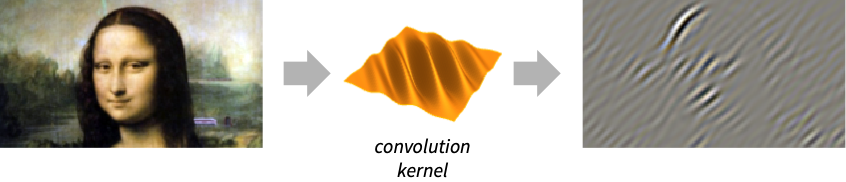
filters data by convolving with a Gabor kernel of pixel radius r and wave vector k.
GaborFilter[data,r,k,ϕ]
uses a Gabor kernel with phase shift ϕ.
GaborFilter[data,{r,σ},…]
uses a Gabor kernel with radius r and standard deviation σ.
Details and Options
- GaborFilter is a linear, spatially directional and frequency-selective filter commonly used in image processing for texture analysis and segmentation. In the spatial domain, a 2D Gabor filter kernel is a Gaussian function modulated by a sinusoidal plane wave.
- The data can be any of the following:
-
list arbitrary-rank numerical array tseries temporal data such as TimeSeries, TemporalData, … image arbitrary Image or Image3D object audio an Audio object video a Video object - GaborFilter[data,r,k] is equivalent to GaborFilter[data,{r,r/2},k,0].
- Either of the r or σ can be lists, specifying different values for different directions.
- GaborFilter[image,…] by default gives an image of a real type of the same dimensions as image.
- The following options can be specified:
-
Padding "Fixed" padding method Standardized True whether to rescale the Gabor kernel to account for truncation WorkingPrecision Automatic the precision to use - With a setting Padding->None, GaborFilter[data,…] normally gives a result smaller than data.
Examples
open all close allBasic Examples (3)
GaborFilter[[image], 20, {.5, .5}]//ImageAdjustGabor filtering of a 3D image:
10GaborFilter[[image], 5, {0, 0, 1}]Apply a Gabor filter to a list of values:
list = N@Table[Sin[ π t^2 + 2π], {t, 0, 5, (1/30)}];
ListLinePlot[{list, GaborFilter[ list, 20, {.5}]}]
Scope (8)
Data (5)
Gabor filtering of a 2D array:
mat = Array[KroneckerDelta, {20, 20}];
res = GaborFilter[mat, 10, {.5, -.5}];
ArrayPlot /@ {mat, res}
Filter a TimeSeries object:
ts = TemporalData[TimeSeries, {{{0., -0.27267267057145633, -0.6672983789995302, -0.5338541947930846,
    -0.6117404489279314, -0.6755527076595494, -0.02125421294486496, -0.10792797291843935,
    -0.6138271235477938, -0.3248568606554575, -0.08843449054 ... 2053424, -0.49980440691873723, -0.5388679788215971,
    -0.4101602764645551}}, {{0, 1., 0.01}}, 1, {"Continuous", 1}, {"Continuous", 1}, 1,
  {ValueDimensions -> 1, ResamplingMethod -> {"Interpolation", InterpolationOrder -> 1}}}, False,
10.1];filtered = GaborFilter[ts, 10, {.1}]ListLinePlot[{ts, filtered}, PlotLegends -> {"original data", "filtered"}]Filter an Audio signal:
a = Import["ExampleData/rule30.wav"];
b = AudioNormalize[GaborFilter[a, 20, {1}]]AudioPlot[{a, b}]GaborFilter[[image], 20, {0.3, 0.3}]//ImageAdjustGaborFilter[Video["ExampleData/fish.mp4"], 10, {0.3, 0.3}]Parameters (3)
Gabor filtering of a noisy signal using different kernel radii:
ts = TemporalData[TimeSeries, {{{0., -0.27267267057145633, -0.6672983789995302, -0.5338541947930846,
    -0.6117404489279314, -0.6755527076595494, -0.02125421294486496, -0.10792797291843935,
    -0.6138271235477938, -0.3248568606554575, -0.08843449054 ... 2053424, -0.49980440691873723, -0.5388679788215971,
    -0.4101602764645551}}, {{0, 1., 0.01}}, 1, {"Continuous", 1}, {"Continuous", 1}, 1,
  {ValueDimensions -> 1, ResamplingMethod -> {"Interpolation", InterpolationOrder -> 1}}}, False,
10.1];filtered = GaborFilter[ts, #, {0}]& /@ {1, 3, 9};
ListLinePlot[filtered, PlotLegends -> {"r=1", "r=3", "r=9"}]Use different standard deviations:
filtered = GaborFilter[ts, {9, #}, {0}]& /@ {1, 5};
ListLinePlot[filtered, PlotLegends -> {"σ=1", "σ=5"}]filtered = Table[GaborFilter[ts, 3, {k}], {k, {0., π / 3., 2π / 3.}}];
ListLinePlot[filtered, PlotLegends -> {"k={0}", "k={π/3}", "k={2π/3}"}]Gabor filtering in the vertical direction:
GaborFilter[[image], 6, {π / 3, 0}]//ImageAdjustFiltering in the horizontal direction:
GaborFilter[[image], 6, {0, π / 3}]//ImageAdjustFiltering in a diagonal direction:
GaborFilter[[image], 6, {π, π} / 4]//ImageAdjustThe cosine part of a Gabor filter is computed when  :
:
GaborFilter[[image], 3, {1, 1}, 0]//ImageAdjustThe sine part of a Gabor filter is computed when  :
:
GaborFilter[[image], 3, {1, 1}, π / 2]//ImageAdjustOptions (6)
Padding (3)
Gabor filtering using different padding schemes:
v = Table[SawtoothWave[(n/10)], {n, -10, 10}];
pad = {"Fixed", "Periodic", "Reversed"};ListLinePlot[GaborFilter[v, 5, {0}, Padding -> #]& /@ pad, PlotRange -> All, PlotLegends -> pad]Gabor filtering of a grayscale image using different padding schemes:
ImageAdjust[GaborFilter[[image], 20, {Pi, Pi} / 2, Padding -> #]]& /@ {"Fixed", "Periodic"}Padding->None normally returns an image smaller than the input image:
GaborFilter[[image], 20, {0, 0}, Padding -> None]WorkingPrecision (3)
MachinePrecision is by default used with integer arrays:
GaborFilter[{3, 4, 4, 3}, 1, {1}]Perform exact computation instead:
GaborFilter[{3, 4, 4, 3}, 1, {1}, WorkingPrecision -> ∞]With real arrays, by default the precision of the input is used:
GaborFilter[{1.0000000000000000000, 2.0000000000000000000, 3.0000000000000000000, 4.0000000000000000000}, 1, {1}]GaborFilter[{1.0000000000000000000, 2.0000000000000000000, 3.0000000000000000000, 4.0000000000000000000}, 1, {1}, WorkingPrecision -> MachinePrecision]WorkingPrecision is ignored when filtering images:
GaborFilter[[image], 2, {1, 1}, WorkingPrecision -> Infinity]An image of a real type is always returned:
ImageType[%]Applications (3)
Gabor filtering of an image to detect vertical lines in an image:
GaborFilter[[image], {9, {3, 1}}, {0, 2}]//ImageAdjustDetect edges in the specified direction in a noisy image:
GaborFilter[[image], 6, {1, 1} / 2, Pi / 2]//ImageAdjustThe magnitude of the Gabor filter is computed as the squared norm of the sine and cosine components:
gaborMagnitude[image_, r_, k_] := With[{data = ImageData[image]}, Image[GaborFilter[image, r, k, 0] ^ 2 + GaborFilter[image, r, k, Pi / 2] ^ 2]]Extract regions with the dominant direction parallel to  and
and  :
:
i = [image];
λ = .5;r = 10;
{t1, t2} = Table[ImageAdjust[gaborMagnitude[i, r, λ k]], {k, {{1, -1}, {1, 1}}}]
Highlight two texture segments on the image:
ImageCompose[i, {ImageAdd@@MapThread[ImageMultiply[MorphologicalBinarize[#1], #2]&, {{t1, t2}, {Red, Green}}], .3}]Properties & Relations (5)
GaborFilter is equivalent to a convolution with a GaborMatrix:
i = [image];
g1 = GaborFilter[i, 10, .5{1, -1}]//ImageAdjustg2 = ImageConvolve[i, GaborMatrix[10, .5{1, -1}]]//ImageAdjustg1 === g2Gabor filtering with a zero-valued wave vector is equivalent to Gaussian smoothing:
GaborFilter[{1, 1, 1, 1, 1, 0, 0, 3, 12, 1, 0, 0, 0, 0, 0}, 1, {0}] == GaussianFilter[{1, 1, 1, 1, 1, 0, 0, 3, 12, 1, 0, 0, 0, 0, 0}, 1, Method -> "Gaussian"]Impulse response of a Gabor filter:
h = GaborFilter[ArrayPad[{{1}}, 10], 10, .75{1, 1}];
ListPlot3D[h, Mesh -> False, PlotRange -> All]
Magnitude spectrum of the filter:
Plot3D[Evaluate[Abs@ListFourierSequenceTransform[h, {u, v}]], {u, 0, π}, {v, 0, π}, Mesh -> False, PlotRange -> All]Gabor filtering of an image gives a real-valued image:
GaborFilter[[image], 5, {1, 1}]//ImageAdjustGaborFilter is a linear filter:
list1 = {1, 1, 1, 1, 1, 0, 0, 3, 12, 1, 0, 0, 0, 0, 0};
list2 = {2, 2, 2, 2, 1, 5, 4, 6, 2, 2, 1, 1, 1, 1, 1};
GaborFilter[list1 + list2, 1, {1}] == GaborFilter[list1, 1, {1}] + GaborFilter[list2, 1, {1}]Text
Wolfram Research (2012), GaborFilter, Wolfram Language function, https://reference.wolfram.com/language/ref/GaborFilter.html (updated 2025).
CMS
Wolfram Language. 2012. "GaborFilter." Wolfram Language & System Documentation Center. Wolfram Research. Last Modified 2025. https://reference.wolfram.com/language/ref/GaborFilter.html.
APA
Wolfram Language. (2012). GaborFilter. Wolfram Language & System Documentation Center. Retrieved from https://reference.wolfram.com/language/ref/GaborFilter.html