

GenerateDocument
GenerateDocument[nb]
generates a document by evaluating all template elements in the notebook nb.
GenerateDocument[nb,args]
generates a document using args to fill template slots.
GenerateDocument[nb,output]
writes the generated document in the output file represented by output.
GenerateDocument[nb,args,output]
uses args to fill template slots and puts the result in output.
Details
- The nb can be a notebook in any of the following forms:
-
"file" or File["file"] explicit file name CloudObject[…] a cloud object LocalObject[…] a local object NotebookObject[…] a NotebookObject Notebook a Notebook expression - GenerateDocument[nb] and GenerateDocument[nb,args] return a notebook object.
- The output in GenerateDocument can be any of the following:
-
"file" or File["file"] explicit file name "!prog" export data to a pipe CloudObject[…] a cloud object LocalObject[…] a local object - GenerateDocument typically works with template notebooks, which can usually be created interactively.
- If the notebook nb does not contain any template elements, GenerateDocument effectively operates like NotebookEvaluate.
- If the notebook nb contains template elements, GenerateDocument will fill template slots from args.
- A positional template slot i is filled from the i
 position of args.
 - A named template slot "name" is filled from an element with key "name" in an association appearing in the first position of args.
- A blank template notebook suitable for use with GenerateDocument can be opened in the front end using CreateNotebook["Template"].
Examples
open all close allBasic Examples (1)
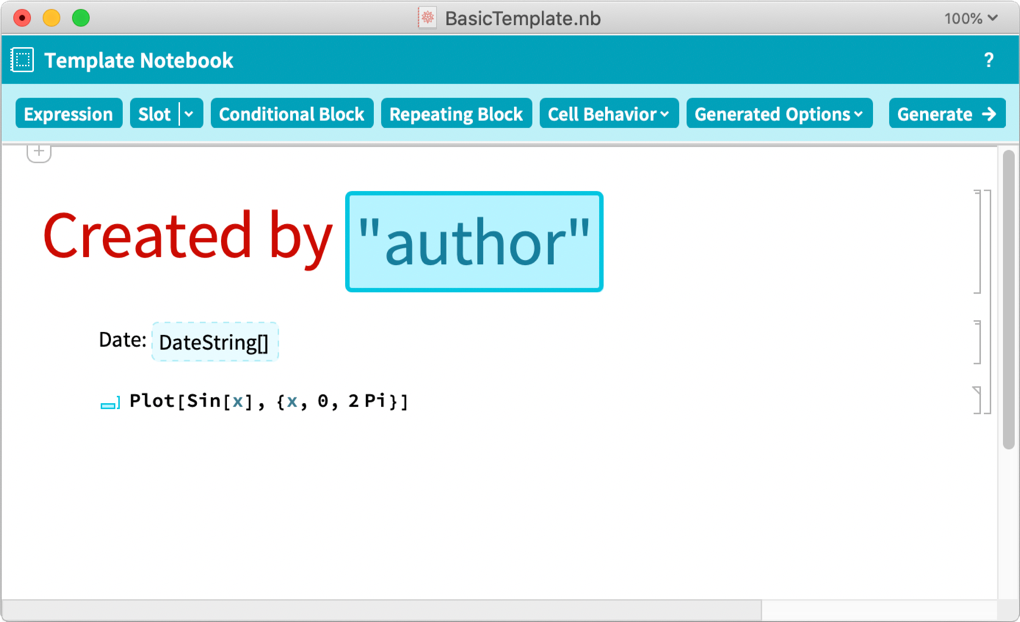
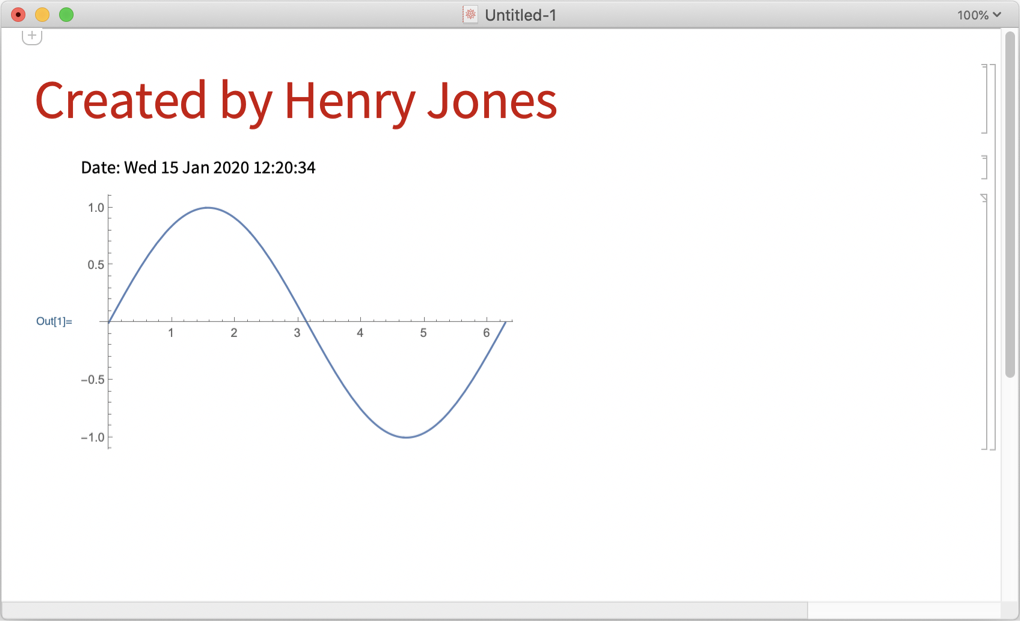
Scope (1)
Template elements can iterate over lists of data to create repeating blocks:
fields = {"name", "english", "maths", "science"};
raw = { {"John Smith",    85, 74, 72}, {"Sarah Cook", 79, 92, 88}, {"Sam Jones", 82, 86, 91}};
args = <|"people" -> (AssociationThread[fields -> #]& /@ raw)|>
Use the data in a template notebook:
GenerateDocument["ExampleData/RepeatingTemplate.nb", args]The Repeating Block element in the template notebook:
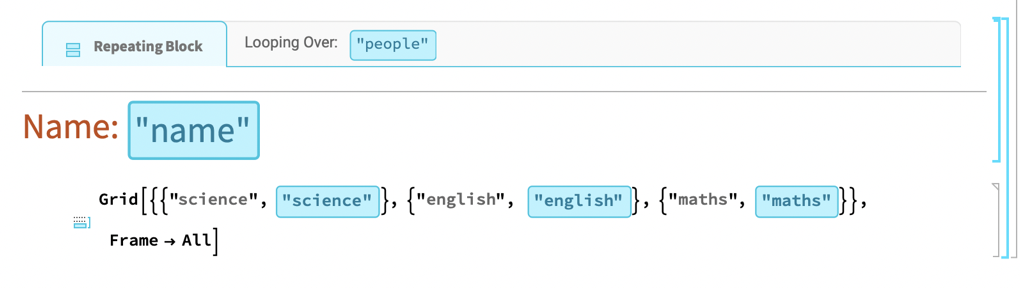
The result of evaluating the repeating block element:

Generalizations & Extensions (5)
Generated documents may contain anything notebooks may contain, including interactive elements:
args = <|"Start" -> "1 Jan 2014", "Stocks" -> {
	<|"Name" -> "Amazon", "Ticker" -> "AMZN"|>
	, <|"Name" -> "Apple", "Ticker" -> "AAPL"|>
	, <|"Name" -> "IBM", "Ticker" -> "IBM"|>
	, <|"Name" -> "Microsoft", "Ticker" -> "MSFT"|>
	}|>;
obj = GenerateDocument["ExampleData/StocksTemplate.nb", args]
A copy of an interactive section of the generated report:
SelectionMove[obj, Next, Cell, 6];
CellPrint[NotebookRead[obj]]
| |

| |

| |

| |

| |

| |
GenerateDocument can take the input template from a cloud object:
co = CloudDeploy[Import["ExampleData/BasicTemplate.nb"]]GenerateDocument[co, <|"author" -> "Henry Jones"|>]GenerateDocument can generate an output document deployed as a cloud object:
GenerateDocument["ExampleData/BasicTemplate.nb", <|"author" -> "Henry Jones"|>, CloudObject[]]Generate a document as a cloud object with Permissions and MetaInformation:
GenerateDocument["ExampleData/BasicTemplate.nb", <|"author" -> "Henry Jones"|>, CloudObject[], Permissions -> "Public", MetaInformation -> <|"Owner" -> "John"|>]Deploy a template as a cloud object:
co = CloudDeploy[Import["ExampleData/BasicTemplate.nb"]]Generate a document locally using the deployed template; deploy the result as a cloud object:
GenerateDocument[co, <|"author" -> "Henry Jones"|>, CloudObject[]]Applications (1)
Use a template to programmatically produce individualized outputs, as in a mail merge:
letters = MapIndexed[
	GenerateDocument["ExampleData/LetterTemplate.nb", #1]&, {
	<|"To" -> "Anu Reddy", "Base" -> 6500, "AnnualRaise" -> 0.04|>
	, <|"To" -> "Denise Malcolm", "Base" -> 9600, "AnnualRaise" -> 0.03|>
	, <|"To" -> "Steve Etcheverry", "Base" -> 4250, "AnnualRaise" -> 0.06|>
	}]
One of the generated documents:
Rasterize[Last[letters]]Text
Wolfram Research (2014), GenerateDocument, Wolfram Language function, https://reference.wolfram.com/language/ref/GenerateDocument.html (updated 2020).
CMS
Wolfram Language. 2014. "GenerateDocument." Wolfram Language & System Documentation Center. Wolfram Research. Last Modified 2020. https://reference.wolfram.com/language/ref/GenerateDocument.html.
APA
Wolfram Language. (2014). GenerateDocument. Wolfram Language & System Documentation Center. Retrieved from https://reference.wolfram.com/language/ref/GenerateDocument.html