
 dimension in data.

GeometricMeanFilter
GeometricMeanFilter[data,r]
filters data by replacing every value by the geometric mean value in its range-r neighborhood.
GeometricMeanFilter[data,{r1,r2,…}]
uses ri for filtering the 
 dimension in data.
Details
- GeometricMeanFilter is used to locally smooth data by using geometric mean as opposed to arithmetic mean, where the amount of smoothing is dependent on the value of r.
- The function applied to each range-r neighborhood is GeometricMean.
- The data can be any of the following:
-
list arbitrary-rank numerical array tseries temporal data such as TimeSeries, TemporalData, … image arbitrary Image or Image3D object audio an Audio object video a Video object - For multichannel images and audio signals, GeometricMeanFilter operates separately on each channel.
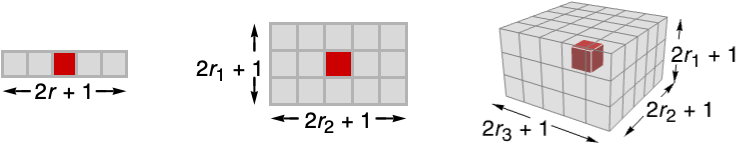
- GeometricMeanFilter[data,{r1,r2,…}] computes the geometric mean value in
 blocks centered on each sample.
 - GeometricMeanFilter assumes the index coordinate system for lists and images.
- At the data boundaries, GeometricMeanFilter uses smaller neighborhoods.

Examples
open all close allBasic Examples (3)
Geometric mean filtering of a list:
GeometricMeanFilter[ {1, 2, 4, 8, 16}, 1]Filter a TimeSeries:
ts = TemporalData[TimeSeries, {{{1.6822413925758568, 1.5219174391144983, 1.9973736747454531,
    1.6415040132205478, 2.343217089768049, 2.084783743067781, 1.1351714143749005,
    2.002767932712488, 2.252258418508231, 1.3441535276154277, 1.591914032996 ... 0014642836, 2.04651425850399,
    1.8547408293958698, 1.4796960501647136}}, {{0, 1., 0.01}}, 1, {"Continuous", 1},
  {"Continuous", 1}, 1, {ValueDimensions -> 1, ResamplingMethod ->
{"Interpolation", InterpolationOrder -> 1}}}, False, 10.1];filtered = GeometricMeanFilter[ts, 0.1]ListLinePlot[{ts, filtered}, PlotLegends -> {"original data", "filtered"}]Geometric mean filtering of an image:
GeometricMeanFilter[[image], 3]Scope (13)
Data (8)
Apply a moving geometric mean filter to a vector:
GeometricMeanFilter[{1, 2, 3, 2, 1}, 1]GeometricMeanFilter[{a, a^2, a^3, a^4, a^5}, 1]GeometricMeanFilter[(| | | | |
| - | -- | -- | -- |
| 1 | 2 | 4 | 8 |
| 2 | 4 | 8 | 16 |
| 4 | 8 | 16 | 32 |
| 8 | 16 | 32 | 64 |), 1]//MatrixFormdata = Quantity[RandomReal[1, 8], "Meters"];
filtered = GeometricMeanFilter[data, 1]Filter an Audio signal:
a = Import["ExampleData/rule30.wav"];b = GeometricMeanFilter[a, 15]AudioPlot[{a, b}]Filtering a 2D grayscale image:
GeometricMeanFilter[[image], 3]GeometricMeanFilter[Video["ExampleData/fish.mp4"], 3]Geometric mean filtering of a 3D volume:
GeometricMeanFilter[[image], 3]Parameters (5)
Specify one radius to be used in all directions:
GeometricMeanFilter[[image], 3]Increasing the radius will result in smoother images:
Table[Labeled[GeometricMeanFilter[[image], r], Text["*r* = " <> ToString@r]], {r, {1, 3, 6}}]Geometric mean filtering just in the first direction:
GeometricMeanFilter[[image], {5, 0}]GeometricMeanFilter[[image], {0, 5}]Geometric mean filtering of a 3D image in the vertical direction only:
GeometricMeanFilter[[image], {4, 0, 0}]Filtering of the horizontal planes only:
GeometricMeanFilter[[image], {0, 4, 4}]Use a quantity parameter with a TimeSeries input:
data = TimeSeries[FinancialData["AAPL", {{2016, 7, 1}, {2017, 1, 1}, "Day"}]]DateListPlot[{data, GeometricMeanFilter[data, Quantity[5, "Days"]]}]Applications (3)
Use GeometricMeanFilter to smooth a positive-valued time series and identify the trend:
ts = TemporalData[TimeSeries, {{{80.89576922254395, 81.84000090895346, 83.03432343926568,
    83.72564812358453, 85.38980344510735, 86.30217405399064, 87.99223737435075, 90.20650621756305,
    92.11188729177361, 90.59502815354307, 91.21680329850624, 9 ... 51.88204639122333, 152.98259712435015, 154.5669904898752, 153.14375080767493,
    153.9422804090023, 153.59498797717634}}, {{0, 782, 1}}, 1, {"Continuous", 1}, {"Discrete", 1},
1, {ValueDimensions -> 1, ResamplingMethod -> None}}, False, 11.1];res = Table[GeometricMeanFilter[ts, r], {r, {10, 50, 100}}];ListLinePlot[Join[{ts}, res], PlotLegends -> {"data", "r = 10", "r = 50", "r = 100"}]Reduce noise using geometric mean filtering:
GeometricMeanFilter[[image], 1]Unsharp masking using geometric mean filtering:
i = [image];
ImageAdd[i, ImageSubtract[i, GeometricMeanFilter[i, 3]]]
Properties & Relations (3)
For positive data, HarmonicMeanFilter[data,r]≤GeometricMeanFilter[data,r]≤MeanFilter[data,r]:
data = RandomReal[1, 50];
ListLinePlot[{MeanFilter[data, 5], GeometricMeanFilter[data, 5], HarmonicMeanFilter[data, 5]}, PlotRange -> {0, 1}, PlotLegends -> {"mean", "geometric mean", "harmonic mean"}]
Geometric mean filtering is the same as ArrayFilter with function GeometricMean:
r = 1;
x = {1, 2, -1, 1, 2, 3, 1, -1, 3, 1};
ArrayFilter[GeometricMean[Flatten[#]]&, x, r, Padding -> None] == GeometricMeanFilter[x, r][[r + 1 ;; -r - 1]]
Geometric mean filtering is the same as ImageFilter with function GeometricMean:
ImageCrop[GeometricMeanFilter[[image], 1], 3] == ImageCrop[ImageFilter[GeometricMean[Flatten[#]]&, [image], 1], 3]Text
Wolfram Research (2008), GeometricMeanFilter, Wolfram Language function, https://reference.wolfram.com/language/ref/GeometricMeanFilter.html (updated 2025).
CMS
Wolfram Language. 2008. "GeometricMeanFilter." Wolfram Language & System Documentation Center. Wolfram Research. Last Modified 2025. https://reference.wolfram.com/language/ref/GeometricMeanFilter.html.
APA
Wolfram Language. (2008). GeometricMeanFilter. Wolfram Language & System Documentation Center. Retrieved from https://reference.wolfram.com/language/ref/GeometricMeanFilter.html