

Hue
Details
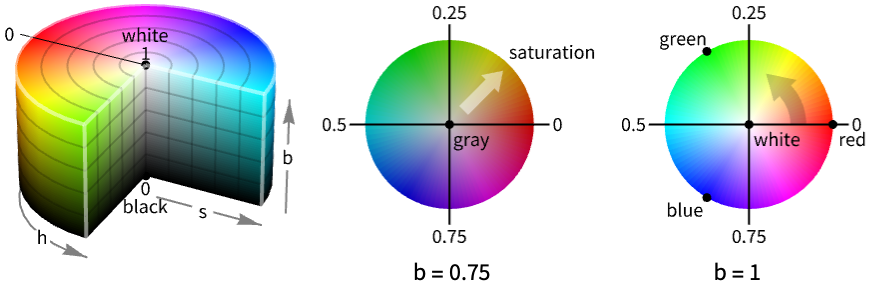
- Hue is also known as HSB (hue, saturation and brightness) or HSV (hue, saturation and value).
- Hue corresponds to a cylindrical transformation of RGBColor, typically used for color picking, allowing for easier interpretation of color parameters.
- The parameters h, s, b, and a must all be between 0 and 1. Values of s, b, and a outside this range are clipped. Values of h outside this range are treated cyclically. »
- As h varies from 0 to 1, the color corresponding to Hue[h] runs through red, yellow, green, cyan, blue, magenta, and back to red again. »
- Hue[color] can be used to convert any ColorQ expression to HSB.
- Hue["htmlcolor"] can be used to represent the HTML color "htmlcolor" in the HSB space.
- If no opacity has been specified, Hue[h,s,b] is equivalent to Hue[h,s,b,1].
- Hue[h,s,b,a] is equivalent to {Hue[h,s,b],Opacity[a]}.
- Hue[h] is equivalent to Hue[h,1,1]. »
- The alternative forms Hue[{h,s,b}] and Hue[{h,s,b,a}] can also be used. »
- On monochrome output devices, a gray level based on the brightness value is used.
- ColorConvert can be used to convert Hue to other color spaces.
- The following wrappers can be used around colors:
-
ColorsNear[color,…] specifies a region around color Directive[…,color,…] specifies a color in combination with other directives Glow[color] specifies color independent of lighting » Opacity[a,color] specifies a color with an opacity a Style[expr,color] displays expr with the specified color » - For 3D surfaces, explicit Hue directives define surface colors; the final shading depends on lighting.
Examples
open all close allBasic Examples (4)
Specify the color of graphics primitives:
Graphics[{Hue[1], Disk[]}]Specify the color with opacity:
Graphics3D[{Hue[1 / 3, 1, 1, .5], Sphere[]}]Specify the output color of expressions:
Style[x ^ 2 + y ^ 2, Hue[5 / 6]]Plot[Sin[x ^ 2], {x, 0, 2Pi}, PlotStyle -> Hue[5 / 6, 1, 1 / 2]]Scope (3)
Colors in 3D (1)
Graphics3D[{Hue[0.08], Sphere[]}]Use diffuse and specular surface color:
Graphics3D[{Hue[0.08], Specularity[White, 20], Sphere[]}]Use glow color, setting the diffuse surface color to black:
Graphics3D[{Black, Glow[Hue[0.08]], Sphere[]}]Color Operations (2)
Use Blend to mix two or more colors:
{Graphics[{Hue[0], Disk[]}],
	Graphics[{Blend[{Hue[0], Hue[2 / 3]}], Disk[]}],
	Graphics[{Hue[2 / 3], Disk[]}]}
Use Lighter and Darker to mix with white and black respectively:
{Graphics[{Lighter[Hue[1], .4], Disk[]}],
	Graphics[{Hue[1], Disk[]}],
	Graphics[{Darker[Hue[1], .4], Disk[]}]}
Generalizations & Extensions (3)
Hue[h] is equivalent to Hue[h,1,1]:
{Graphics[{Hue[1 / 8], Disk[]}], Graphics[{Hue[1 / 8, 1, 1], Disk[]}]}Hue[{h,s,b}] is equivalent to Hue[h,s,b]:
Map[Graphics[{Hue[#], Disk[]}]&, {{1, 1, 1}, {1 / 2, 1, 1}, {1 / 4, 1, 1}}]Table[Graphics[{Hue[0.08], Disk[{1, 0}], Opacity[a], Hue[1], Disk[]}], {a, 0, 1, .33}]Use the opacity argument in Hue directly:
Table[Graphics[{Hue[.08], Disk[{1, 0}], Hue[1, 1, 1, a], Disk[]}], {a, 0, 1, .33}]Applications (8)
Visualization (3)
Select  complementary colors, by selecting them maximally apart on the color wheel:
Table[Graphics[Table[{Hue[k / n], Disk[{Cos[k 2Pi / n], Sin[k 2Pi / n]}, 1 / 2]}, {k, 0, n - 1}], PlotRange -> {{-2, 2}, {-2, 2}}], {n, 2, 8, 2}]Color the filling according to the argument of a complex function:
Plot[Abs[Exp[2I x - x ^ 2 / 2]], {x, -4, 4}, Filling -> Axis, FillingStyle -> Automatic, ColorFunction -> Function[{x, y}, Hue[Rescale[Arg[Exp[2I x - x ^ 2 / 2]], {-Pi, Pi}]]], ColorFunctionScaling -> False]Color the surface according to the argument of a complex function:
Plot3D[Abs[Sin[x + I y]], {x, -2Pi, 2Pi}, {y, -Pi / 2, Pi / 2}, ColorFunction -> Function[{x, y, z}, Hue[Rescale[Arg[Sin[x + I y]], {-Pi, Pi}]]], ColorFunctionScaling -> False, PlotStyle -> Opacity[0.8], Mesh -> False]HSB Color Model (5)
Plot the iso hue surfaces from the RGB cube. The hues are 0 (red), 1/6 (yellow), 2/6 (green), 3/6 (cyan), 4/6 (blue), and 5/6 (magenta). The primary colors are red at 0, green at 1/3, and blue at 2/3. The secondary colors are mixtures of two primary colors, so yellow at 1/6 is a mixture of equal parts red and green, etc.:
Table[ParametricPlot3D[List@@ColorConvert[Hue[h, s, b], RGBColor], {s, 0, 1}, {b, 0, 1}, ColorFunction -> Function[{x, y, z}, RGBColor[x, y, z]], Lighting -> "Neutral", Mesh -> None, Axes -> False, PlotLabel -> h, ImageSize -> Tiny], {h, {0, 1 / 6, 2 / 6, 3 / 6, 4 / 6, 5 / 6}}]Manipulating the hue component interactively makes this easier to understand:
Manipulate[ParametricPlot3D[List@@ColorConvert[Hue[h, s, b], RGBColor], {s, 0, 1}, {b, 0, 1}, ColorFunction -> Function[{x, y, z}, RGBColor[x, y, z]], Lighting -> "Neutral", Mesh -> None, Axes -> False, PlotLabel -> h], {h, 0, 1}]Plot the iso saturation surfaces from the RGB cube. The resulting iso surfaces are hexagonal cones, and the HSB color model is also known as the hexcone model:
Table[ParametricPlot3D[List@@ColorConvert[Hue[h, s, b], RGBColor], {h, 0, 1}, {b, 0, 1}, ColorFunction -> Function[{x, y, z}, RGBColor[x, y, z]], Lighting -> "Neutral", Mesh -> None, Axes -> False, PlotLabel -> s, ImageSize -> Tiny, PlotRange -> {0, 1}], {s, {0.1, 0.3, 0.5, 1.0}}]Saturation for RGBColor[r,g,b] is given by (Max[r,g,b]-Min[r,g,b])/Max[r,g,b], so saturation 0 corresponds to the gray line, i.e.  :
:
Reduce[(Max[r, g, b] - Min[r, g, b]) / Max[r, g, b] == 0 && 0 ≤ r ≤ 1 && 0 ≤ g ≤ 1 && 0 ≤ b ≤ 1, {r, g, b}]Saturation 1 corresponds (see above) to the surfaces  ,
,  , or
, or  :
:
Reduce[(Max[r, g, b] - Min[r, g, b]) / Max[r, g, b] == 1 && 0 ≤ r ≤ 1 && 0 ≤ g ≤ 1 && 0 ≤ b ≤ 1, {r, g, b}, Backsubstitution -> True]Manipulating the iso saturation surfaces makes it more intuitive:
Manipulate[ParametricPlot3D[List@@ColorConvert[Hue[h, s, b], RGBColor], {h, 0, 1}, {b, 0, 1}, ColorFunction -> Function[{x, y, z}, RGBColor[x, y, z]], Lighting -> "Neutral", Mesh -> None, Axes -> False, PlotLabel -> s, PlotRange -> {0, 1}], {{s, 0.3}, 0, 1}]Plot the iso brightness surfaces. The brightness for RGBColor[r,g,b] is given by Max[r,g,b], maximal output from any color channel:
Table[ParametricPlot3D[List@@ColorConvert[Hue[h, s, b], RGBColor], {h, 0, 1}, {s, 0, 1}, ColorFunction -> Function[{x, y, z}, RGBColor[x, y, z]], Lighting -> "Neutral", Mesh -> None, Axes -> False, PlotLabel -> b, ImageSize -> Tiny, PlotRange -> {0, 1}], {b, {0., 0.3, 0.5, 1.0}}]Brightness 0 corresponds to black, i.e. RGBColor[0,0,0]:
Reduce[Max[r, g, b] == 0 && 0 ≤ r ≤ 1 && 0 ≤ g ≤ 1 && 0 ≤ b ≤ 1, {r, g, b}]Brightness 1 corresponds to the planes  ,
,  , or
, or  :
:
Reduce[Max[r, g, b] == 1 && 0 ≤ r ≤ 1 && 0 ≤ g ≤ 1 && 0 ≤ b ≤ 1, {r, g, b}, Backsubstitution -> True]Manipulating the iso brightness surfaces makes it more intuitive:
Manipulate[ParametricPlot3D[List@@ColorConvert[Hue[h, s, b], RGBColor], {h, 0, 1}, {s, 0, 1}, ColorFunction -> Function[{x, y, z}, RGBColor[x, y, z]], Lighting -> "Neutral", Mesh -> None, Axes -> False, PlotLabel -> b, PlotRange -> {0, 1}], {{b, 0.3}, 0, 1}]Plot iso chroma or colorfulness surfaces in the RGB cube. The chroma c for Hue[h,s,b] is given by c==s b, resulting in saturation sc/b:
Table[ParametricPlot3D[List@@ColorConvert[Hue[h, c / b, b], RGBColor], {h, 0, 1}, {b, 0, 1}, ColorFunction -> Function[{x, y, z}, RGBColor[x, y, z]], Lighting -> "Neutral", Mesh -> None, Axes -> False, PlotLabel -> c, ImageSize -> Tiny, PlotRange -> {0, 1}], {c, {0.1, 0.3, 0.5, 1.0}}]Chroma for RGBColor[r,g,b] is the distance to the gray point with the same brightness. The resulting formula is Max[r,g,b]-Min[r,g,b], which can also be used to visualize the following:
ContourPlot3D[Max[r, g, b] - Min[r, g, b] == 0.3, {r, 0, 1}, {g, 0, 1}, {b, 0, 1}, ColorFunction -> Function[{x, y, z}, RGBColor[x, y, z]], Lighting -> "Neutral", Mesh -> None]Chroma 0, the achromatic colors, corresponds to the gray line  :
:
Reduce[Max[r, g, b] - Min[r, g, b] == 0 && 0 ≤ r ≤ 1 && 0 ≤ g ≤ 1 && 0 ≤ b ≤ 1, {r, g, b}, Backsubstitution -> True]Manipulating the iso chroma surfaces gives more intuition:
Manipulate[ParametricPlot3D[List@@ColorConvert[Hue[h, c / b, b], RGBColor], {h, 0, 1}, {b, 0, 1}, ColorFunction -> Function[{x, y, z}, RGBColor[x, y, z]], Lighting -> "Neutral", Mesh -> None, Axes -> False, PlotLabel -> c, PlotRange -> {0, 1}], {{c, 0.3}, 0, 1}]Combine the iso saturation and iso brightness surfaces and show that the intersection is a polygonal curve. The hue is the fraction of length around this polygonal curve in the counterclockwise direction as seen from the white RGB corner, i.e.  , starting at red:
saturation = ParametricPlot3D[List@@ColorConvert[Hue[h, 0.3, b], RGBColor], {h, 0, 1}, {b, 0, 1}, ColorFunction -> Function[{x, y, z}, RGBColor[x, y, z]], Lighting -> "Neutral", Mesh -> None, Axes -> False, PlotRange -> {0, 1}]brightness = ParametricPlot3D[List@@ColorConvert[Hue[h, s, 0.6], RGBColor], {h, 0, 1}, {s, 0, 1}, ColorFunction -> Function[{x, y, z}, RGBColor[x, y, z]], Lighting -> "Neutral", Mesh -> None, Axes -> False, PlotRange -> {0, 1}]Iso saturation and iso brightness intersect at the hue curve, a polygonal curve with six vertices:
Show[saturation, brightness]Properties & Relations (1)
The hue value is cyclic with period 1:
Graphics[Table[{Hue[h], EdgeForm[Gray], Rectangle[{8h, 0}]}, {h, 0, 2, 1 / 8}]]Saturation determines how vivid the color is:
Graphics[Table[{Hue[1 / 4, s], EdgeForm[Gray], Rectangle[{7s, 0}]}, {s, 0, 1, 1 / 7}]]Brightness determines the brightness of the color:
Graphics[Table[{Hue[1 / 4, 1, s], EdgeForm[Gray], Rectangle[{7s, 0}]}, {s, 0, 1, 1 / 7}]]A portion of HSB color space with maximal brightness:
Graphics[Raster[Table[{h, s, 1}, {s, 0, 1, .01}, {h, 0, 1, .01}], ColorFunction -> Hue]]Possible Issues (1)
Saturation and brightness values outside of the 0, 1 range will be clipped:
Graphics[Table[{Hue[1, s], EdgeForm[Gray], Rectangle[{4s, 0}]}, {s, 0 - 1 / 4, 1 + 1 / 4, 1 / 4}]]Graphics[Table[{Hue[1, 1, b], EdgeForm[Gray], Rectangle[{4b, 0}]}, {b, 0 - 1 / 4, 1 + 1 / 4, 1 / 4}]]In plot functions, use ColorFunctionScaling to control global scaling of variables:
Table[DensityPlot[x, {x, -2, 3}, {y, 0, 1}, FrameTicks -> None, ColorFunction -> (Hue[1, #1]&), ColorFunctionScaling -> t], {t, {False, True}}]Neat Examples (3)
Visualizing the HSB color space:
Graphics3D[{Opacity[.7], {Hue[#], Cuboid[#, # + .1]}& /@ Tuples[Range[0, 1, .2], 3]}, Axes -> True, AxesLabel -> {"Hue", "Saturation", "Brightness"}, Lighting -> "Neutral"]Dynamically view the color planes in the brightness direction:
DynamicModule[{b = .5}, Panel[Row[{Column[{"Lighter", VerticalSlider[Dynamic[b], {0, 1}, ImageSize -> Small], "Darker"}], Graphics[Raster[Table[{h, s, Dynamic[b]}, {s, 0, 1, .05}, {h, 0, 1, .05}], ColorFunction -> Hue]]}]]]Graphics[{Pink, Disk[{100, 100}, 40], Raster[RandomReal[1, {200, 200, 4}], ColorFunction -> Hue]}]
 An Elementary Introduction to the Wolfram Language
 An Elementary Introduction to the Wolfram Language
Text
Wolfram Research (1991), Hue, Wolfram Language function, https://reference.wolfram.com/language/ref/Hue.html (updated 2021).
CMS
Wolfram Language. 1991. "Hue." Wolfram Language & System Documentation Center. Wolfram Research. Last Modified 2021. https://reference.wolfram.com/language/ref/Hue.html.
APA
Wolfram Language. (1991). Hue. Wolfram Language & System Documentation Center. Retrieved from https://reference.wolfram.com/language/ref/Hue.html