

HighlightRegion
HighlightRegion[reg,roi]
highlights the specified region of interest roi in the geometric region reg.
HighlightRegion[reg,{roi1,roi2,…}]
highlights several regions of interest roii.
HighlightRegion[reg,{…,w[roii],…}]
highlights using a feature defined by the symbolic wrapper w.
Details and Options
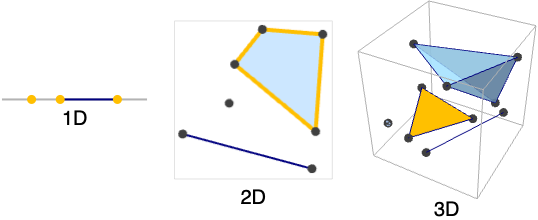
- HighlightRegion[…] displays in a notebook as a plot of a region with embedding dimensions 1, 2 and 3.
- HighlightRegion[reg,roi] returns a new geometric region with the overlapping region between reg and roi highlighted.
- The following wrappers can be used:
-
Labeled[cell,…] display the element with labeling Style[cell,spec] show the element using the specified styles - HighlightRegion takes the same options as Region.
- Styles and other specifications are taken to apply to the highlighted regions.
Examples
open all close allBasic Examples (4)
HighlightRegion[Disk[{0, 0}, 1], Point[{0, 0}]]HighlightRegion[Disk[{0, 0}, 1], Line[{{-1 / 2, 0}, {1 / 2, 0}}]]HighlightRegion[Disk[{0, 0}, 1], Disk[{0, 0}, 1, {Pi / 4, 3 Pi / 4}]]Highlight several regions of a disk:
HighlightRegion[Disk[{0, 0}, 1], {Point[{0, 1 / 2}], Line[{{-1 / 2, -1 / 2}, {1 / 2, 1 / 2}}]}]Scope (6)
Specification (2)
HighlightRegion works with MeshRegion:
ℛ = MeshRegion[{{0, 0}, {1, 0}, {1, 1}}, Polygon[{1, 2, 3}]];HighlightRegion[ℛ, Point[{(2/3), (1/3)}]]ℛ = BoundaryMeshRegion[{{0, 0}, {1, 0}, {1, 1}}, Line[{1, 2, 3, 1}]];HighlightRegion[ℛ, Point[{(2/3), (1/3)}]]HighlightRegion works on 2D regions:
ℛ = Rectangle[];HighlightRegion[Rectangle[], Disk[{1 / 2, 1 / 2}, 1 / 2]]ℛ = Octahedron[];HighlightRegion[Octahedron[], Line[{{0, -(1/2 Sqrt[2]), (1/2 Sqrt[2])}, {(1/2 Sqrt[2]), 0, (1/2 Sqrt[2])}}]]Wrappers (4)
Use wrappers on a HighlightRegion:
HighlightRegion[Disk[], Style[Point[{0, 0}], Red]]Add interactive behavior with wrappers such as Tooltip:
HighlightRegion[Disk[], Tooltip[Style[Point[{0, 0}], Red], "hello"]]Any object can be used in the tooltip:
HighlightRegion[Disk[], Tooltip[Style[Point[{0, 0}], Red], Plot[Sin[x], {x, 0, 2Pi}]]]Use Button to trigger actions when clicking a Region:
HighlightRegion[Disk[], Button[Style[Point[{0, 0}], Red], Speak["Disk"]]]Use PopupWindow to provide information drilldown:
HighlightRegion[Disk[], PopupWindow[Point[{0, 0}], DateListPlot[FinancialData["IBM", "Jan. 1, 2004"]]]]Text
Wolfram Research (2025), HighlightRegion, Wolfram Language function, https://reference.wolfram.com/language/ref/HighlightRegion.html.
CMS
Wolfram Language. 2025. "HighlightRegion." Wolfram Language & System Documentation Center. Wolfram Research. https://reference.wolfram.com/language/ref/HighlightRegion.html.
APA
Wolfram Language. (2025). HighlightRegion. Wolfram Language & System Documentation Center. Retrieved from https://reference.wolfram.com/language/ref/HighlightRegion.html