



PlanarGraph
PlanarGraph[{e1,e2,…}]
yields a planar graph with edges ej.
PlanarGraph[{v1,v2,…},{e1,e2,…}]
yields a planar graph with vertices vi and edges ej.
PlanarGraph[{…,wi[vi],…},{…,wj[ej],…}]
yields a planar graph with vertex and edge properties defined by the symbolic wrappers wk.
PlanarGraph[{vivj,…}]
uses rules vivj to specify a planar graph.
Details and Options
- PlanarGraph generates a Graph object.
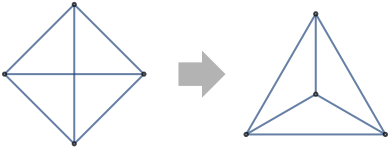
- A graph is planar if it can be drawn in the plane without edge crossings.
- PlanarGraph displays the graph using a planar embedding if possible.
- PlanarGraph supports the same vertices, edges, and wrappers as Graph.
- PlanarGraph takes the same options as Graph, with GraphLayout methods restricted to "PlanarEmbedding" and "TutteEmbedding".
Examples
open all close allBasic Examples (2)
PlanarGraph[{12, 13, 14, 23, 24, 34}]The three-dimensional HypercubeGraph is planar:
g = HypercubeGraph[3]PlanarGraphQ[g]PlanarGraph[EdgeList[g]]Scope (25)
Connectivity (6)
Create an undirected planar graph using characters; enter the character as  ue
ue :
:
PlanarGraph[{12, 13, 14, 23, 24, 34}]Create a directed planar graph using characters; enter the character as  de
de :
:
PlanarGraph[{12, 13, 14, 23, 24, 34}]Create a directed planar graph from a list of rules:
PlanarGraph[{1 -> 2, 1 -> 3, 1 -> 4, 2 -> 3, 2 -> 4, 3 -> 4}]Create an undirected planar graph from a list of rules:
PlanarGraph[{1 -> 2, 1 -> 3, 1 -> 4, 2 -> 3, 2 -> 4, 3 -> 4}, DirectedEdges -> False]Use VertexList and EdgeList to get vertices and edges:
{g1, g2} = {PlanarGraph[{12, 13, 14, 23, 24, 34}], PlanarGraph[{34, 12, 13, 14, 23, 24}]}The ordering for edges is the order in which they were entered:
EdgeList /@ {g1, g2}The ordering for vertices is the order in which they were entered in the edges:
VertexList /@ {g1, g2}Use an explicit vertex list to control the ordering used by VertexList:
{g1, g2} = {PlanarGraph[{1, 2, 3, 4}, {12, 13, 14, 23, 24, 34}], PlanarGraph[{3, 2, 1, 4}, {12, 13, 14, 23, 24, 34}]}The input vertex list controls the resulting vertex order:
VertexList /@ {g1, g2}Any expression can be used as vertices:
{PlanarGraph[{ab, ac, bc}], PlanarGraph[{"foo""bar", "foo""gnu", "bar""gnu"}],
PlanarGraph[{[image][image], [image][image], [image][image]}]}VertexList /@ %Wrappers (5)
Use wrappers on vertices or edges:
{PlanarGraph[{Style[1, Red], 2, 3, 4}, {12, 13, 14, 23, 24, 34}], PlanarGraph[{1, 2, 3, 4}, {Style[12, Red], 13, 14, 23, 24, 34}]}{PlanarGraph[{Labeled[Style[1, Red], "hello"], 2, 3, 4}, {12, 13, 14, 23, 24, 34}], PlanarGraph[{1, 2, 3, 4}, {Style[Labeled[12, "hello"], Red], 13, 14, 23, 24, 34}]}Add interactive behavior by wrappers such as Tooltip:
PlanarGraph[{12, 13, 14, 23, 24, Tooltip[Style[34, Red], "hello"]}]Any object can be used in the tooltip:
PlanarGraph[{12, 13, 14, 23, 24, Tooltip[Style[34, Red], Plot[Sin[x], {x, 0, 2Pi}]]}]Use Button to trigger actions when clicking an edge or vertex:
{PlanarGraph[{12, 13, 14, Button[Style[23, Red], Speak["Edge from 1 to 3"]], 24, 34}], PlanarGraph[{1, 2, Button[Style[3, Red], Speak["Vertex 3"]]}, {12, 13, 14, 23, 24, 34}, VertexSize -> Medium]}Use PopupWindow to provide information drilldown:
PlanarGraph[{12, 13, 14, 23, 24, PopupWindow[Style[34, Red], DateListPlot[FinancialData["IBM", "Jan. 1, 2004"]]]}]Styling (8)
Set the style for all vertices or edges:
{PlanarGraph[{12, 13, 14, 23, 24, 34}, VertexStyle -> Green], PlanarGraph[{12, 13, 14, 23, 24, 34}, EdgeStyle -> Green]}Style individual vertices or edges using options:
{PlanarGraph[{12, 13, 14, 23, 24, 34}, VertexStyle -> {1 -> Green, Orange}], PlanarGraph[{12, 13, 14, 23, 24, 34}, EdgeStyle -> {12 -> Green, Orange}]}Use wrappers for individual styling:
{PlanarGraph[{Style[1, Green], 2, 3}, {12, 13, 14, 23, 24, 34}, VertexStyle -> Orange], PlanarGraph[{Style[12, Green], 13, 14, 23, 24, 34}, EdgeStyle -> Orange]}Adjust the size of vertices using symbolic sizes:
Table[PlanarGraph[{12, 13, 14, 23, 24, 34}, VertexSize -> s, PlotLabel -> s], {s, {Tiny, Small, Medium, Large}}]Or use sizes in terms of the smallest distance between vertex centers:
Table[PlanarGraph[{12, 13, 14, 23, 24, 34}, VertexSize -> s, PlotLabel -> s], {s, {0.1, 0.2, 0.5, 1}}]Use built-in collections for VertexShapeFunction:
Table[PlanarGraph[{12, 13, 14, 23, 24, 34}, VertexShapeFunction -> s, VertexSize -> 0.2, PlotLabel -> s], {s, {"Triangle", "Square", "Rectangle", "Pentagon", "Hexagon", "Octagon"}}]Table[PlanarGraph[{12, 13, 14, 23, 24, 34}, VertexShapeFunction -> s, VertexSize -> 0.2, PlotLabel -> Style[s, 9]], {s, ResourceData["VertexShapeFunction", "Rounded"]}]Table[PlanarGraph[{12, 13, 14, 23, 24, 34}, VertexShapeFunction -> s, VertexSize -> 0.2, PlotLabel -> Style[s, 9]], {s, ResourceData["VertexShapeFunction", "Concave"]}]PlanarGraph[{12, 13, 14, 23, 24, 34}, VertexShapeFunction -> { 1 -> "Square"}, VertexSize -> 0.2]Combine with a default vertex function:
PlanarGraph[{12, 13, 14, 23, 24, 34}, VertexShapeFunction -> { 1 -> "Square", "Triangle"}, VertexSize -> 0.2]Use any Graphics, Image, or Graphics3D as a vertex shape:
Table[PlanarGraph[{12, 13, 14, 23, 24, 34}, VertexShape -> s, VertexSize -> Medium], {s, {[image], [image], [image]}}]Use built-in collections for EdgeShapeFunction:
Table[PlanarGraph[{12, 13, 14, 23, 24, 34}, EdgeShapeFunction -> {{ef, "ArrowSize" -> 0.1}}, PlotLabel -> ef], {ef, {"BoxLine", "DiamondLine", "DotLine"}}]Directed edges including solid arrows:
Table[PlanarGraph[{12, 13, 14, 23, 24, 34}, EdgeShapeFunction -> {{ef, "ArrowSize" -> 0.1}}, PlotLabel -> Style[ef, 9]], {ef, ResourceData["EdgeShapeFunction", "FilledArrow"]}]Table[PlanarGraph[{12, 13, 14, 23, 24, 34}, EdgeShapeFunction -> {{ef, "ArrowSize" -> 0.1}}, PlotLabel -> Style[ef, 9]], {ef, ResourceData["EdgeShapeFunction", "UnfilledArrow"]}]Table[PlanarGraph[{12, 13, 14, 23, 24, 34}, EdgeShapeFunction -> {{ef, "ArrowSize" -> 0.1}}, PlotLabel -> Style[ef, 9]], {ef, ResourceData["EdgeShapeFunction", "CarvedArrow"]}]Specify an edge function for an individual edge:
PlanarGraph[{12, 13, 14, 23, 24, 34}, EdgeShapeFunction -> {12 -> "UnfilledArrow"}]Combine with a different default edge function:
PlanarGraph[{12, 13, 14, 23, 24, 34}, EdgeShapeFunction -> {12 -> "FilledArrow", "CarvedArrow"}]Labeling (6)
{PlanarGraph[{Labeled[12, "hello"], 13, 14, 23, 24, 34}], PlanarGraph[{Labeled[1, "hello"], 2, 3, 4}, {12, 13, 14, 23, 24, 34}]}Use any expression as a label:
Table[PlanarGraph[{1, 2, Labeled[3, l], 4}, {12, 13, 14, 23, 24, 34}], {l, {Sin[x], [image], [image]}}]Table[PlanarGraph[{12, 13, 14, 23, 24, Labeled[34, l]}], {l, {Sin[x], [image], [image]}}]Control the placement of vertex labels using Placed, including symbolic inside positions:
Table[PlanarGraph[{1, 2, Labeled[3, Placed["■■", p]]}, {12, 13, 14, 23, 24, 34}, PlotLabel -> p, VertexSize -> 0.25, VertexShapeFunction -> "Square"], {p, {Left, Right, Top, Bottom}}]Table[PlanarGraph[{1, 2, Labeled[3, Placed["■■", p]]}, {12, 13, 14, 23, 24, 34}, PlotLabel -> p, VertexSize -> Small, VertexShapeFunction -> "Square"], {p, {Before, After, Below, Above}}]Table[PlanarGraph[{1, 2, Labeled[3, Placed["■", p]]}, {12, 13, 14, 23, 24, 34}, VertexSize -> 0.25, VertexShapeFunction -> "Square", PlotLabel -> p, BaselinePosition -> Bottom], {p, {{0, 0}, {1 / 2, 1 / 2}, {1, 1}}}]Place multiple labels using Placed in a wrapper:
PlanarGraph[{1, 2, Labeled[3, Placed[{"lbl1", "lbl2"}, {Above, Below}]]}, {12, 13, 14, 23, 24, 34}]Any number of labels can be used:
PlanarGraph[{1, 2, Labeled[3, Placed[{"lbl1", "lbl2", "lbl3", "lbl4"}, {Above, After, Below, Before}]]}, {12, 13, 14, 23, 24, 34}]Place multiple labels using VertexLabels:
PlanarGraph[{12, 13, 14, 23, 24, 34}, VertexLabels -> {3 -> Placed[{"lbl1", "lbl2"}, {Above, Below}]}]Use Placed with symbolic locations to control label placement along an edge:
Table[PlanarGraph[{Labeled[12, Placed["■■", p]], 13, 14, 23, 24, 34}, PlotLabel -> p, VertexSize -> Small], {p, {"Start", "Middle", "End"}}]Use explicit coordinates to place labels:
Table[PlanarGraph[{Labeled[12, Placed["■■", p]], 13, 14, 23, 24, 34}, PlotLabel -> p, VertexSize -> Small, BaselinePosition -> Bottom], {p, {0, 1 / 4, 1 / 3}}]Place multiple labels using Placed in a wrapper:
PlanarGraph[{12, Labeled[31, Placed[{"lbl1", "lbl2"}, {"Start", "End"}]], 14, 23, 24, 34}]Any number of labels can be used:
PlanarGraph[{12, Labeled[31, Placed[{"lbl1", "lbl2", "lbl3"}, {"Start", "Middle", "End"}]], 14, 23, 24, 34}]Place multiple labels using EdgeLabels:
PlanarGraph[{12, 13, 14, 23, 24, 34}, EdgeLabels -> {31 -> Placed[{"lbl1", "lbl2"}, {"Start", "End"}]}]Options (80)
AnnotationRules (3)
Specify an annotation for vertices:
PlanarGraph[{12, 13, 14, 23, 24, 34}, AnnotationRules -> {1 -> {VertexLabels -> "hello"}}]PlanarGraph[{12, 13, 14, 23, 24, 34}, AnnotationRules -> {12 -> {EdgeLabels -> "hello"}}]PlanarGraph[{12, 13, 14, 23, 24, 34}, AnnotationRules -> {"GraphProperties" -> {"Message" -> "hello"}}]AnnotationValue[%, "Message"]DirectedEdges (2)
By default, a directed planar graph is generated when giving a list of rules:
PlanarGraph[{1 -> 2, 1 -> 3, 1 -> 4, 2 -> 3, 2 -> 4, 3 -> 4}]Use DirectedEdges->False to interpret rules as undirected edges:
PlanarGraph[{1 -> 2, 1 -> 3, 1 -> 4, 2 -> 3, 2 -> 4, 3 -> 4}, DirectedEdges -> False]Use DirectedEdge or UndirectedEdge to directly specify whether a graph is directed or not:
{PlanarGraph[{12, 13, 14, 23, 24, 34}], PlanarGraph[{12, 13, 14, 23, 24, 34}]}EdgeLabels (7)
PlanarGraph[{12, 13, 14, 23, 24, 34}, EdgeLabels -> {12 -> "Hello"}]el = {12, 13, 14, 23, 24, 34};PlanarGraph[el, EdgeLabels -> Table[el[[i]] -> Subscript["e", i], {i, Length[el]}]]Use any expression as a label:
PlanarGraph[{12, 13, 14, 23, 24, 34}, EdgeLabels -> {12 -> [image], 14 -> [image], 24 -> [image]}]Use Placed with symbolic locations to control label placement along an edge:
Table[PlanarGraph[{12, 13, 14, 23, 24, 34}, EdgeLabels -> {12 -> Placed["■■■", p]}, PlotLabel -> p], {p, {"Start", "Middle", "End"}}]Use explicit coordinates to place labels:
Table[PlanarGraph[{12, 13, 14, 23, 24, 34}, EdgeLabels -> {12 -> Placed["■■■", p]}, PlotLabel -> p, BaselinePosition -> Bottom], {p, {0, 1 / 3, 1 / 4}}]Vary positions within the label:
Table[PlanarGraph[{12, 13, 14, 23, 24, 34}, EdgeLabels -> {12 -> Placed["■■■", {1 / 2, p}]}, PlotLabel -> p, BaselinePosition -> Bottom], {p, {{0, 0}, {1 / 2, 1 / 2}, {1, 1}}}]Place multiple labels using Placed in a wrapper:
PlanarGraph[{12, Labeled[31, Placed[{"lbl1", "lbl2"}, {"Start", "End"}]], 14, 23, 24, 34}]Any number of labels can be used:
PlanarGraph[{12, Labeled[31, Placed[{"lbl1", "lbl2", "lbl3"}, {"Start", "Middle", "End"}]], 14, 23, 24, 34}]Place multiple labels using EdgeLabels:
PlanarGraph[{12, 13, 14, 23, 24, 34}, EdgeLabels -> {12 -> Placed[{"lbl1", "lbl2"}, {"Start", "End"}]}]Use automatic labeling by values through Tooltip and StatusArea:
PlanarGraph[{12, 13, 14, 23, 24, 34}, EdgeLabels -> Placed["Name", Tooltip]]PlanarGraph[{12, 13, 14, 23, 24, 34}, EdgeLabels -> Placed["Name", StatusArea]]EdgeShapeFunction (6)
Get a list of built-in settings for EdgeShapeFunction:
ResourceData["EdgeShapeFunction"]Undirected edges including the basic line:
PlanarGraph[{12, 13, 14, 23, 24, 34}, EdgeShapeFunction -> "Line"]Lines with different glyphs on the edges:
Table[PlanarGraph[{12, 13, 14, 23, 24, 34}, EdgeShapeFunction -> {{ef, "ArrowSize" -> 0.1}}, PlotLabel -> ef], {ef, {"BoxLine", "DiamondLine", "DotLine"}}]Directed edges including solid arrows:
Table[PlanarGraph[{12, 13, 14, 23, 24, 34}, EdgeShapeFunction -> {{ef, "ArrowSize" -> 0.1}}, PlotLabel -> ef], {ef, ResourceData["EdgeShapeFunction", "FilledArrow"]}]Table[PlanarGraph[{12, 13, 14, 23, 24, 34}, EdgeShapeFunction -> {{ef, "ArrowSize" -> 0.1}}, PlotLabel -> ef], {ef, ResourceData["EdgeShapeFunction", "UnfilledArrow"]}]Table[PlanarGraph[{12, 13, 14, 23, 24, 34}, EdgeShapeFunction -> {{ef, "ArrowSize" -> 0.1}}, PlotLabel -> ef], {ef, ResourceData["EdgeShapeFunction", "CarvedArrow"]}]Specify an edge function for an individual edge:
PlanarGraph[{12, 13, 14, 23, 24, 34}, EdgeShapeFunction -> {12 -> "FilledArcArrow"}]Combine with a different default edge function:
PlanarGraph[{12, 13, 14, 23, 24, 34}, EdgeShapeFunction -> {12 -> "FilledArcArrow", "CarvedArrow"}]Draw edges by running a program:
ef[pts_List, e_] :=
Block[{s = 0.015, g = [image]}, {Arrowheads[{{s, 0.33, g}, {s, 0.67, g}}], Arrow[pts]}]PlanarGraph[{12, 13, 14, 23, 24, 34}, EdgeShapeFunction -> ef]EdgeShapeFunction can be combined with EdgeStyle:
PlanarGraph[{12, 13, 14, 23, 24, 34}, EdgeStyle -> Blue, EdgeShapeFunction -> (Line[#1]&)]EdgeShapeFunction has higher priority than EdgeStyle:
PlanarGraph[{12, 13, 14, 23, 24, 34}, EdgeStyle -> Blue, EdgeShapeFunction -> ({Red, Line[#1]}&)]EdgeStyle (2)
EdgeWeight (2)
Specify the weight for all edges:
PlanarGraph[{12, 13, 14, 23, 24, 34}, EdgeWeight -> RandomInteger[5, 6]]WeightedAdjacencyMatrix[%]//MatrixFormUse any numeric expression as a weight:
PlanarGraph[{12, 13, 14, 23, 24, 34}, EdgeWeight -> {a, b, c, d, e, f}]WeightedAdjacencyMatrix[%]//MatrixFormGraphHighlight (3)
PlanarGraph[{12, 13, 14, 23, 24, 34}, VertexSize -> Medium, GraphHighlight -> {1}]PlanarGraph[{12, 13, 14, 23, 24, 34}, VertexSize -> Tiny, GraphHighlight -> {12}]PlanarGraph[{12, 13, 14, 23, 24, 34}, VertexSize -> Tiny, GraphHighlight -> {1, 2, 12, 23}]GraphHighlightStyle (2)
Get a list of built-in settings for GraphHighlightStyle:
ResourceData["GraphHighlightStyle"]Use built-in settings for GraphHighlightStyle:
PlanarGraph[{12, 13, 14, 23, 24, 34}, GraphHighlight -> {1, 23}, VertexSize -> Small, GraphHighlightStyle -> #, PlotLabel -> #]& /@ Select[ResourceData["GraphHighlightStyle"], # =!= Automatic&]GraphLayout (2)
By default, the layout is chosen automatically:
PlanarGraph[{12, 13, 14, 23, 24, 34}, GraphLayout -> Automatic]Specify layouts on planar graphs:
Table[PlanarGraph[{12, 15, 16, 23, 27, 34, 38, 45, 49, 510, 67, 610, 78, 89, 910}, GraphLayout -> l, PlotLabel -> l], {l, {"TutteEmbedding", "PlanarEmbedding"}}]PlotTheme (4)
Base Themes (2)
VertexCoordinates (3)
By default, any vertex coordinates are computed automatically:
PlanarGraph[{12, 13, 14, 23, 24, 34}]Extract the resulting vertex coordinates using AbsoluteOptions:
AbsoluteOptions[%, VertexCoordinates]Specify a layout function along an ellipse:
ellipseLayout[n_, {a_, b_}] := Table[{a Cos[2Pi / n u], b Sin[2Pi / n u]}, {u, 1, n}]Graphics[Point[ellipseLayout[20, {2, 1}]]]Use it to generate vertex coordinates for a graph:
PlanarGraph[Table[1i, {i, 2, 20}], VertexCoordinates -> ellipseLayout[20, {2, 1}]]VertexCoordinates has higher priority than GraphLayout:
PlanarGraph[{12, 13, 14, 23, 24, 34}, VertexCoordinates -> Table[{i, i}, {i, 4}], GraphLayout -> "TutteEmbedding"]VertexLabels (13)
PlanarGraph[{12, 13, 14, 23, 24, 34}, VertexLabels -> "Name"]PlanarGraph[{12, 13, 14, 23, 24, 34}, VertexLabels -> {2 -> "one"}]PlanarGraph[{12, 13, 14, 23, 24, 34}, VertexLabels -> Table[i -> Subscript[v, i], {i, 4}]]Use any expression as a label:
PlanarGraph[{12, 13, 14, 23, 24, 34}, VertexLabels -> {1 -> [image], 2 -> [image], 4 -> [image]}]Use Placed with symbolic locations to control label placement, including outside positions:
Table[PlanarGraph[{12, 13, 14, 23, 24, 34}, VertexSize -> 0.1, VertexShapeFunction -> "Square", VertexLabels -> Placed["■■■", p], PlotLabel -> p], {p, {Before, After, Below, Above}}]Symbolic outside corner positions:
pl = {{Before, Below}, {After, Below}, {Before, Above}, {After, Above}};Table[PlanarGraph[{12, 13, 14, 23, 24, 34}, VertexSize -> 0.1, VertexShapeFunction -> "Square", VertexLabels -> Placed["■■■", p], PlotLabel -> p], {p, pl}]Table[PlanarGraph[{12, 13, 14, 23, 24, 34}, VertexSize -> 0.35, VertexLabels -> Placed["■■", p], VertexShapeFunction -> "Square", PlotLabel -> p], {p, {Left, Top, Right, Bottom}}]Symbolic inside corner positions:
pl = {{Left, Bottom}, {Right, Bottom}, {Left, Top}, {Right, Top}};Table[PlanarGraph[{12, 13, 14, 23, 24, 34}, VertexSize -> .6, VertexShapeFunction -> "Square", VertexLabels -> Placed["■■", p], PlotLabel -> p], {p, pl}]Use explicit coordinates to place the center of labels:
Table[PlanarGraph[{12, 13, 14, 23, 24, 34}, VertexSize -> 0.5, VertexShapeFunction -> "Square", VertexLabels -> Placed[[image], p], PlotLabel -> p, BaselinePosition -> Bottom], {p, {{0, 0}, {1 / 2, 1 / 2}, {1, 1}}}]Place all labels at the upper-right corner of the vertex and vary the coordinates within the label:
Table[PlanarGraph[{12, 13, 14, 23, 24, 34}, VertexSize -> 0.35, VertexShapeFunction -> "Square", VertexLabels -> Placed[[image], {{1, 1}, p}], PlotLabel -> p, BaselinePosition -> Bottom], {p, {{0, 0}, {1 / 2, 1 / 2}, {1, 1}}}]Place multiple labels using Placed in a wrapper:
PlanarGraph[{1, 2, Labeled[3, Placed[{"lbl1", "lbl2"}, {Above, Below}]]}, {12, 13, 14, 23, 24, 34}]Any number of labels can be used:
PlanarGraph[{1, 2, Labeled[3, Placed[{"lbl1", "lbl2", "lbl3", "lbl4"}, {Above, After, Below, Before}]]}, {12, 13, 14, 23, 24, 34}]Place multiple labels using VertexLabels:
PlanarGraph[{12, 13, 14, 23, 24, 34}, VertexLabels -> {3 -> Placed[{"lbl1", "lbl2"}, {Above, Below}]}]Use the argument to Placed to control formatting including Tooltip:
PlanarGraph[{12, 13, 14, 23, 24, 34}, VertexLabels -> Placed["Name", Tooltip]]Or StatusArea:
PlanarGraph[{12, 13, 14, 23, 24, 34}, VertexLabels -> Placed["Name", StatusArea]]Use more elaborate formatting functions:
rotateLabel[lab_] := Rotate[lab, 45Degree]PlanarGraph[{12, 13, 14, 23, 24, 34}, VertexLabels -> Placed["xxx", Below, rotateLabel]]panelLabel[lab_] := Panel[lab, FrameMargins -> 0, Background -> Lighter[Yellow, 0.7]]PlanarGraph[{12, 13, 14, 23, 24, 34}, VertexLabels -> Placed["xxx", Center, panelLabel]]hyperlinkLabel[lab_] := Hyperlink[lab, "http://www.wolfram.com"]PlanarGraph[{12, 13, 14, 23, 24, 34}, VertexLabels -> Placed["xxx", Center, hyperlinkLabel]]VertexShape (5)
Use any Graphics, Image, or Graphics3D as a vertex shape:
Table[PlanarGraph[{12, 13, 14, 23, 24, 34}, VertexShape -> s, VertexSize -> 0.3], {s, {[image], [image], [image]}}]Specify vertex shapes for individual vertices:
PlanarGraph[{12, 13, 14, 23, 24, 34}, VertexShape -> {2 -> [image]}, VertexSize -> 0.3]VertexShape can be combined with VertexSize:
Table[PlanarGraph[{12, 13, 14, 23, 24, 34}, VertexSize -> s, VertexShape -> [image], PlotLabel -> s], {s, {Medium, Large}}]VertexShape is not affected by VertexStyle:
PlanarGraph[{12, 13, 14, 23, 24, 34}, VertexSize -> 0.3, VertexShape -> [image], VertexStyle -> Blue]VertexShapeFunction has higher priority than VertexShape:
PlanarGraph[{12, 13, 14, 23, 24, 34}, VertexSize -> 0.2, VertexShapeFunction -> "Square", VertexShape -> [image]]VertexShapeFunction (10)
Get a list of built-in collections for VertexShapeFunction:
ResourceData["VertexShapeFunction"]Use built-in settings for VertexShapeFunction in the "Basic" collection:
ResourceData["VertexShapeFunction", "Basic"]Table[PlanarGraph[{12, 13, 14, 23, 24, 34}, VertexShapeFunction -> vf, VertexSize -> 0.2, PlotLabel -> vf], {vf, {"Triangle", "Square", "Rectangle", "Pentagon", "Hexagon", "Octagon"}}]Table[PlanarGraph[{12, 13, 14, 23, 24, 34}, VertexShapeFunction -> vf, VertexSize -> 0.2, PlotLabel -> vf], {vf, {"DownTrapezoid", "UpTrapezoid", "Parallelogram", "FiveDown", "Circle", "Diamond", "Star", "Capsule"}}]Use built-in settings for VertexShapeFunction in the "Rounded" collection:
ResourceData["VertexShapeFunction", "Rounded"]Table[PlanarGraph[{12, 13, 14, 23, 24, 34}, VertexShapeFunction -> vf, VertexSize -> 0.2, PlotLabel -> vf], {vf, ResourceData["VertexShapeFunction", "Rounded"]}]Use built-in settings for VertexShapeFunction in the "Concave" collection:
ResourceData["VertexShapeFunction", "Concave"]Table[PlanarGraph[{12, 13, 14, 23, 24, 34}, VertexShapeFunction -> vf, VertexSize -> 0.2, PlotLabel -> vf], {vf, ResourceData["VertexShapeFunction", "Concave"]}]PlanarGraph[{12, 13, 14, 23, 24, 34}, VertexShapeFunction -> { 1 -> "Square"}, VertexSize -> 0.2]Combine with a default vertex function:
PlanarGraph[{12, 13, 14, 23, 24, 34}, VertexShapeFunction -> { 1 -> "Square", "Triangle"}, VertexSize -> 0.2]Draw vertices using a predefined graphic:
PlanarGraph[{12, 13, 14, 23, 24, 34}, VertexShapeFunction -> (Inset[[image], #]&)]Draw vertices by running a program:
vf[{xc_, yc_}, name_, {w_, h_}] :=
	Block[{xmin = xc - w, xmax = xc + w, ymin = yc - h, ymax = yc + h},
	Polygon[{{xmin, ymin}, {xmax, ymax}, {xmin, ymax}, {xmax, ymin}}]
];PlanarGraph[{12, 13, 14, 23, 24, 34}, VertexShapeFunction -> vf, VertexSize -> 0.2]VertexShapeFunction can be combined with VertexStyle:
vf1[{xc_, yc_}, name_, {w_, h_}] := Rectangle[{xc - w, yc - h}, {xc + w, yc + h}]PlanarGraph[{12, 13, 14, 23, 24, 34}, VertexSize -> 0.2, VertexStyle -> Blue, VertexShapeFunction -> vf1]VertexShapeFunction has higher priority than VertexStyle:
vf2[{xc_, yc_}, name_, {w_, h_}] := {Red, Rectangle[{xc - w, yc - h}, {xc + w, yc + h}]}PlanarGraph[{12, 13, 14, 23, 24, 34}, VertexSize -> 0.2, VertexStyle -> Blue, VertexShapeFunction -> vf2]VertexShapeFunction can be combined with VertexSize:
PlanarGraph[{12, 13, 14, 23, 24, 34}, VertexShapeFunction -> "Star", VertexSize -> {1 -> Small, Medium}]VertexShapeFunction has higher priority than VertexShape:
PlanarGraph[{12, 13, 14, 23, 24, 34}, VertexSize -> 0.3, VertexShapeFunction -> "Star", VertexShape -> [image]]VertexSize (8)
By default, the size of vertices is computed automatically:
PlanarGraph[{12, 13, 14, 23, 24, 34}, VertexSize -> Automatic]Specify the size of all vertices using symbolic vertex size:
Table[PlanarGraph[{12, 13, 14, 23, 24, 34}, VertexSize -> s, PlotLabel -> s], {s, {Tiny, Small, Medium, Large}}]Use a fraction of the minimum distance between vertex coordinates:
Table[PlanarGraph[{12, 13, 14, 23, 24, 34}, VertexSize -> s, PlotLabel -> s], {s, 0.1, 1, 0.3}]Use a fraction of the overall diagonal for all vertex coordinates:
Table[PlanarGraph[{12, 13, 14, 23, 24, 34}, VertexSize -> {"Scaled", s}, PlotLabel -> {"Scaled", s}], {s, 0.1, 1, 0.3}]Specify size in both the  and
and  directions:
Table[PlanarGraph[{12, 13, 14, 23, 24, 34}, VertexSize -> s, PlotLabel -> s], {s, {{0.1, 0.2}, {0.2, 0.1}}}]Specify the size for individual vertices:
PlanarGraph[{12, 13, 14, 23, 24, 34}, VertexSize -> {1 -> 0.2, 2 -> 0.3}]VertexSize can be combined with VertexShapeFunction:
Table[PlanarGraph[{12, 13, 14, 23, 24, 34}, VertexSize -> s, VertexShapeFunction -> "Square", PlotLabel -> s], {s, {0.05, 0.1, 0.2}}]VertexSize can be combined with VertexShape:
Table[PlanarGraph[{12, 13, 14, 23, 24, 34}, VertexSize -> s, VertexShape -> [image], PlotLabel -> s], {s, {0.1, 0.2, 0.4}}]VertexStyle (5)
Table[PlanarGraph[{12, 13, 14, 23, 24, 34}, VertexStyle -> style, VertexSize -> 0.3, PlotLabel -> style], {style, {Yellow, EdgeForm[Dashed]}}]PlanarGraph[{12, 13, 14, 23, 24, 34}, VertexStyle -> {1 -> Blue, 2 -> Red}, VertexSize -> 0.2]VertexShapeFunction can be combined with VertexStyle:
vf1[{xc_, yc_}, name_, {w_, h_}] := Rectangle[{xc - w, yc - h}, {xc + w, yc + h}]PlanarGraph[{12, 13, 14, 23, 24, 34}, VertexSize -> 0.2, VertexStyle -> Blue, VertexShapeFunction -> vf1]VertexShapeFunction has higher priority than VertexStyle:
vf2[{xc_, yc_}, name_, {w_, h_}] := {Red, Rectangle[{xc - w, yc - h}, {xc + w, yc + h}]}PlanarGraph[{12, 13, 14, 23, 24, 34}, VertexSize -> 0.2, VertexStyle -> Blue, VertexShapeFunction -> vf2]VertexStyle can be combined with BaseStyle:
PlanarGraph[{12, 13, 14, 23, 24, 34}, VertexStyle -> LightBlue, BaseStyle -> EdgeForm[Dotted], VertexSize -> 0.2]VertexStyle has higher priority than BaseStyle:
PlanarGraph[{12, 13, 14, 23, 24, 34}, VertexStyle -> LightBlue, BaseStyle -> Gray, VertexSize -> 0.2]VertexShape is not affected by VertexStyle:
PlanarGraph[{12, 13, 14, 23, 24, 34}, VertexSize -> 0.3, VertexShape -> [image], VertexStyle -> Blue]VertexWeight (3)
Set the weight for all vertices:
PlanarGraph[{12, 13, 14, 23, 24, 34}, VertexWeight -> {2, 3, 4, 5}]AnnotationValue[{%, 1}, VertexWeight]Specify the weight for individual vertices:
PlanarGraph[{12, 13, 14, 23, 24, 34}, VertexWeight -> {1 -> 2}]Use any numeric expression as a weight:
PlanarGraph[{12, 13, 14, 23, 24, 34}, VertexWeight -> {a, b, c, d}]AnnotationValue[{%, 1}, VertexWeight]Text
Wolfram Research (2016), PlanarGraph, Wolfram Language function, https://reference.wolfram.com/language/ref/PlanarGraph.html.
CMS
Wolfram Language. 2016. "PlanarGraph." Wolfram Language & System Documentation Center. Wolfram Research. https://reference.wolfram.com/language/ref/PlanarGraph.html.
APA
Wolfram Language. (2016). PlanarGraph. Wolfram Language & System Documentation Center. Retrieved from https://reference.wolfram.com/language/ref/PlanarGraph.html