

SendMail
SendMail[body]
sends mail consisting of body to the address specified by $CloudUserID.
SendMail[{"subject"}]
sends mail with the specified subject and no body.
SendMail[{"subject",body}]
sends mail with the specified subject and body.
SendMail[{"subject",body,att}]
sends mail with the attachment or attachments att.
SendMail["to",content]
sends mail to the specified To: address.
SendMail[{"to1","to2",…},content]
sends mail to multiple To: addresses.
SendMail[{{"to1",…},{"cc1",…}},content]
includes the cci as Cc: addresses.
SendMail[{{"to1",…},{"cc1",…},{"bcc1",…}},content]
also includes the bcci as Bcc: addresses.
SendMail[assoc]
sends mail with elements specified in the association assoc.
Details and Options
- SendMail attempts to send the specified email to all recipients, returning Success or Failure.
- Email addresses are given as strings.
- The message body can be a string, an expression, or a list of expressions.
- SendMail automatically embeds the following types of expressions as separate parts in a message:
-
EmbeddedHTML["string"] an HTML body part Hyperlink[…] embedded hyperlink in the body CloudObject[…] a cloud object with an embedded URL Image[…],Graphics[…],… a GIF file Audio[…], Sound[…] a WAV file Dataset[…], TimeSeries[…],… a CSV file NotebookObject[…] a .nb file XMLObject[…] an XML file InputForm[expr] a .wl file of Wolfram Language code ExportForm[expr,"fmt"] a file in the format specified by "fmt" expr raster image file of the formatted form of expr {expr1,expr2,…} a sequence of email body parts - SendMail uses appropriate encodings to handle any special characters that appear in a message.
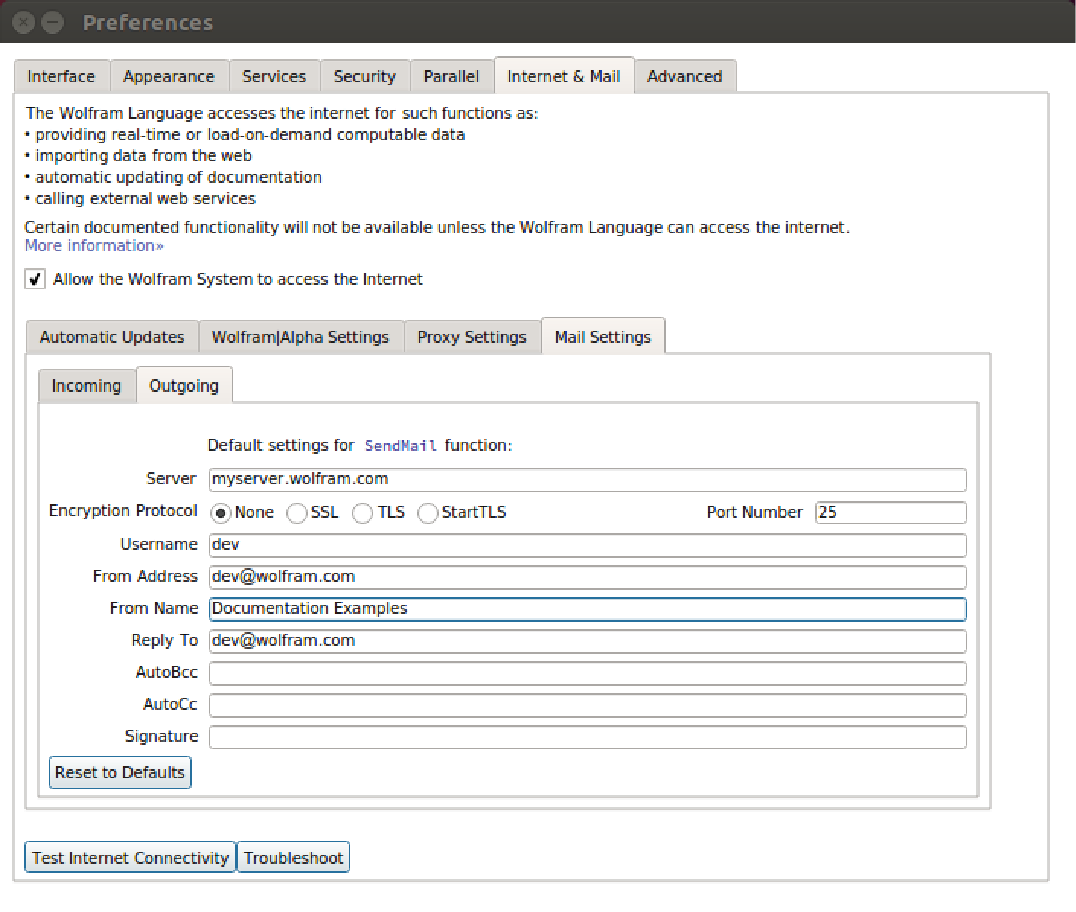
- On desktop systems, SendMail requires certain user mail settings. These can be defined through Preferences ▶ Internet & Mail ▶ Mail Settings in the notebook front end or by using SetOptions[SendMail,MailSettings]. SendMail will attempt to send email via the Wolfram Cloud if these settings have not been provided. »
- In the Wolfram Cloud, emails are always relayed from the Wolfram Cloud server.
- In SendMail[assoc], the association assoc can include the following basic elements:
-
"To" {} email addresses of primary recipients "Cc" {} email addresses of secondary recipients "Bcc" {} email addresses of hidden recipients "Subject" None message subject line "Body" None main message body "TextBody" None additional message body for text clients "HTMLBody" None additional message body for HTML clients "AttachedExpressions" {} expressions to send as attachments "AttachedFiles" {} files to send as attachments "Priority" Automatic email priority "ReturnReceipt" None where to send a return receipt - If "Body" is specified, it is included in the message before "TextBody" and "HTMLBody".
- With "AttachedExpressions"->"file1"->expr1,…, each expression expri is attached with the filename filei.
- "Priority" can have settings "High", "Normal" or "Low", or 1 (high) through 5 (low).
- "ReturnReceipt"->Automatic returns a receipt to the sender. "ReturnReceipt"->None returns no receipt. "ReturnReceipt"->"address" returns a receipt to the specified address.
- The association assoc can contain the following additional elements, which can also be given when setting the option MailSettings:
-
"AutoBcc" None automatic hidden recipients "AutoCc" None automatic secondary recipients "FromAddress" Automatic sender's email address "FromName" None sender's full name "ReplyTo" None suggested address for replies "Signature" None text to be appended at the end of the email - The following elements related to the mail connection can also be given in the association assoc, and in the settings for MailSettings:
-
"EncryptionProtocol" Automatic email encryption protocol "Password" Automatic user password "PortNumber" Automatic server port number or numbers "Server" Automatic server host name or IP address "ServerAuthentication" Automatic whether and how to verify server certificates "Username" $Username user login name - Possible settings for "EncryptionProtocol" include "SSL", "TLS", "StartTLS" and None. With the setting Automatic, the encryption is chosen based on the server used.
- "Password" is typically set to None if no password authentication is required, or to Automatic if the password is to be entered in an interactive dialog. The password can also be given as a plain text string.
- Email credentials can be optionally stored via the "Password" interactive dialog. The credentials are encrypted using keys stored on your computer's hard drive. The encrypted credentials will be transmitted to the Wolfram Cloud and may only be accessed after you have authenticated using your Wolfram ID.
- SendMail has the following options:
-
MailAddressValidation Automatic function for address validation MailSettings Automatic an association of mail settings - The setting for MailAddressValidation is applied to all sender and recipient email addresses. If validation fails for any address, SendMail will not send any message.
Examples
open all close allBasic Examples (2)
Scope (38)
Account Configuration (2)
Configure outgoing mail settings in the Internet & Mail tab of the Preferences dialog:
Configure default parameters using SetOptions:
SetOptions[SendMail, MailSettings -> <|"Server" -> "myserver.wolfram.com", "EncryptionProtocol" -> "SSL", "PortNumber" -> 465|>]Basic Uses (12)
Send a text email to the specified recipient:
SendMail["wlmailtest@wolfram.com", {"Subject", "Body"}]Send a text email to $CloudUserID:
SendMail["Here is the body of the message."]Send an HTML email to $CloudUserID:
SendMail[EmbeddedHTML["<html><body><font color=\"blue\">Here is an HTML message.</font></body></html>"]]Send an email with the specified subject to $CloudUserID:
SendMail[{"Here is the subject of the message."}]Send an email with a subject and a body to $CloudUserID:
SendMail[{"Here is the subject of the message.", "Here is the body of the message."}]Send an email containing a subject, body and attachment to $CloudUserID:
SendMail[{"Here is the subject of the message.", "Here is the body of the message.", Export["image.jpg", ExampleData[{"TestImage", "House"}]]}]Send an email to multiple recipients:
SendMail[{"wlmailtest@wolfram.com", "wlmailtest2@wolfram.com"}, "This is the body of the message."]Send an email to multiple recipients in the To and Cc fields:
SendMail[{{"wlmailtest@wolfram.com", "wlmailtest2@wolfram.com"}, {"wlmailtestCc@wolfram.com", "wlmailtestCc2@wolfram.com"}}, "This is the body of the message."]Send an email to multiple recipients in the To, Cc and Bcc fields:
SendMail[{{"wlmailtest@wolfram.com", "wlmailtest2@wolfram.com"}, {"wlmailtestCc@wolfram.com", "wlmailtestCc2@wolfram.com"}, {"wlmailtestBcc@wolfram.com", "wlmailtestBcc2@wolfram.com"}}, "This is the body of the message."]Send an email with text and HTML alternatives:
SendMail[<|
"TextBody" -> "Here is the text version of the mail.", "HTMLBody" -> EmbeddedHTML["<html><body><font color=\"blue\">Here is the HTML version of the mail.</font></body></html>"]|>]SendMail[\!\(\*AudioBox[""]\)]Specify the recipients and email content using an Association:
SendMail[<|
	"To" -> "wlmailtest@wolfram.com",
	"Subject" -> "Subject line",
	"Body" -> "Here is the body of the message."|>]
Content (18)
Text Only (3)
Send an email only with a text body:
SendMail["Here is the body of the message."]Send an email only with a subject line and an empty body:
SendMail[{"Subject line"}]Send a text email with a subject line:
SendMail[{"Subject line", "Here is the body of the message."}]Text and HTML (3)
SendMail[<|"To" -> "wlmailtest@wolfram.com", "Body" -> EmbeddedHTML["<html><body><font color=\"blue\">Here is an HTML email.</font></body></html>"]|>]Send an email with text and HTML alternatives:
SendMail[<|"To" -> "wlmailtest@wolfram.com",
	"TextBody" -> "Here is the text version of the email.", "HTMLBody" -> EmbeddedHTML["<html><body><font color=\"blue\">Here is the HTML version of the email.</font></body></html>"]|>]
Send an email with mixed text and HTML body parts:
SendMail[<|"To" -> "wlmailtest@wolfram.com", "Body" -> {"Here is the text part of the email.", EmbeddedHTML["<html><body><font color=\"blue\">Here is the HTML part of the email.</font></body></html>"]}|>]Other Expressions (9)
Send an email with a Hyperlink:
SendMail[<|"To" -> "wlmailtest@wolfram.com", "Body" -> Hyperlink["Wolfram", "http://wolfram.com"]|>]Send a Wolfram Language cloud object:
SendMail[<|"To" -> "wlmailtest@wolfram.com", "Body" -> CloudObject[]|>]Send an Image object:
SendMail[<|"To" -> "wlmailtest@wolfram.com", "Body" -> [image]|>]Send an Audio object as a WAV file:
SendMail[<|"To" -> "wlmailtest@wolfram.com", "Body" -> \!\(\*AudioBox[""]\)|>]Send a TimeSeries object as a CSV file:
SendMail[<|"To" -> "wlmailtest@wolfram.com", "Body" -> TimeSeries[FinancialData["MSFT", "Jan. 1, 2018"]]|>]SendMail[<|"To" -> "wlmailtest@wolfram.com", "Body" -> InputNotebook[]|>]Send the InputForm of an arbitrary expression:
SendMail[<|"To" -> "wlmailtest@wolfram.com", "Body" -> InputForm[Integrate[1 / (x ^ 3 + 1), {x, 0, 1}]]|>]Send the ExportForm of an arbitrary expression:
SendMail[<|"To" -> "wlmailtest@wolfram.com", "Body" -> ExportForm[Graphics[Disk[]], "GIF"]|>]Send a list of arbitrary expressions:
SendMail[<|"To" -> "wlmailtest@wolfram.com", "Body" -> {"Some text", [image], QuantityArray[{2.3, 1.5}, "Meters"]}|>]Attachments (3)
Send an email with attachments:
SendMail[{"Subject", "Body", Export["image.jpg", ExampleData[{"TestImage", "House"}]]}]Attach a local file to an email:
SendMail[<|"To" -> "wlmailtest@wolfram.com", "AttachedFiles" -> File[FindFile["ExampleData/car.mp3"]]|>]Send an arbitrary expression as an attachment to the specific recipient:
SendMail[<|"To" -> "wlmailtest@wolfram.com", "AttachedExpressions" -> Plot[{Callout[Log[x] Sin[x], "max", Above], Log[x] Cos[x]}, {x, 0, 2 π}]|>]Recipients (6)
SendMail["wlmailtest@wolfram.com", {"Subject", "Body text.", Export["mandrill.jpg", ExampleData[{"TestImage", "Mandrill"}]]}]Recipients can be specified with a name and an email address:
SendMail["Mail Test <wlmailtest@wolfram.com>", {"Subject", "Body text.", Export["mandrill.jpg", ExampleData[{"TestImage", "Mandrill"}]]}]SendMail[<|"To" -> "wlmailtest@wolfram.com", "Body" -> "Here is the body of the message."|>]SendMail[<|"To" -> {"wlmailtest@wolfram.com", "wlmailtest2@wolfram.com"}, "Body" -> "Here is the body of the message."|>]SendMail[<|"To" -> "wlmailtest@wolfram.com", "Cc" -> "wlmailtestCc@wolfram.com", "Body" -> "Here is the body of the message."|>]SendMail[<|"To" -> "wlmailtest@wolfram.com", "Bcc" -> "wlmailtestBcc@wolfram.com", "Body" -> "Here is the body of the message."|>]Options (9)
MailAddressValidation (2)
Specify a function to be used to validate all email addresses before sending:
SendMail[<|"To" -> "to@wolframsendmail.com"|>, MailAddressValidation -> (True&)]Specify a function to be used to validate all email addresses before sending:
SendMail[<|"To" -> "to@blah.com"|>, MailAddressValidation -> (StringEndsQ[#, "wolframsendmail.com"]&)]MailSettings (7)
Server & Account Settings (2)
Specify the outgoing mail server and credential:
SendMail[<|"To" -> "wlmailtest@wolfram.com"|>, MailSettings -> <|"Server" -> "mail.wolfram.com", "UserName" -> "wlmailtest", "Password" -> "XXXXXXXX"|>]Specify whom the email is from:
SendMail[<|"To" -> "wlmailtest@wolfram.com"|>, MailSettings -> <|"FromAddress" -> "wlmailtest@wolfram.com", "FromName" -> "Documentation Project"|>]Auto Cc and Auto Bcc (2)
Automatically Cc a second recipient:
SendMail[<|"To" -> "to@wolframsendmail.com"|>, MailSettings -> <|"AutoCc" -> "to2@wolframsendmail.com"|>]Automatically Bcc a second recipient:
SendMail[<|"To" -> "to@wolframsendmail.com"|>, MailSettings -> <|"AutoBcc" -> "to2@wolframsendmail.com"|>]Auto Cc and Auto Bcc can also be set in the Internet & Mail tab of the Preferences dialog.
Signature (1)
Other Message Settings (2)


 An Elementary Introduction to the Wolfram Language
Text
Wolfram Research (2008), SendMail, Wolfram Language function, https://reference.wolfram.com/language/ref/SendMail.html (updated 2020).
CMS
Wolfram Language. 2008. "SendMail." Wolfram Language & System Documentation Center. Wolfram Research. Last Modified 2020. https://reference.wolfram.com/language/ref/SendMail.html.
APA
Wolfram Language. (2008). SendMail. Wolfram Language & System Documentation Center. Retrieved from https://reference.wolfram.com/language/ref/SendMail.html