

SmoothMesh
SmoothMesh[mesh]
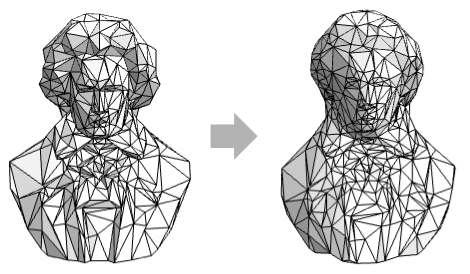
smooths a mesh region mesh by adjusting cells and keeping the overall shape.
Details and Options
- SmoothMesh is also known as mesh smoothing, denoising, filtering and fairing.
- SmoothMesh is typically used to improve mesh quality by reducing noise from 3D scanning and reconstruction.
- SmoothMesh[mesh] returns a mesh region obtained by adjusting cells while improving minimum angle, maximum angle and aspect ratio.
- SmoothMesh takes the same options as MeshRegion, with the following additions:
-
Method Automatic method to use - Possible method settings include "ExplicitLaplacian" and "ImplicitLaplacian".
Examples
open all close allBasic Examples (1)
Scope (3)
SmoothMesh works on surfaces:
DiscretizeGraphics[ListPlot3D[Table[Sin[j ^ 2 + i], {i, 0, Pi, Pi / 5}, {j, 0, Pi, Pi / 5}]]]SmoothMesh[%]BoundaryDiscretizeRegion[Dodecahedron[], MaxCellMeasure -> .01]SmoothMesh[%]Apply SmoothMesh multiple times:
ℛ = ResourceData["Beethoven"];
NestList[SmoothMesh, ℛ, 3]
Options (7)
Method (7)
"ExplicitLaplacian" (3)
Update vertex positions directly based on the Laplacian:
SmoothMesh[[image], Method -> "ExplicitLaplacian"]Use the option "UniformLaplace"True to use a uniform Laplacian:
SmoothMesh[[image], Method -> {"ExplicitLaplacian", "UniformLaplace" -> True}]Use the option "MaxIterations"->n to specify the maximum number of iterations:
SmoothMesh[[image], Method -> {"ExplicitLaplacian", "MaxIterations" -> 5}]"ImplicitLaplacian" (4)
Solve a linear system to update vertex positions:
SmoothMesh[[image], Method -> "ImplicitLaplacian"]Use the option "UniformLaplace"True to use a uniform Laplacian:
SmoothMesh[[image], Method -> {"ImplicitLaplacian", "UniformLaplace" -> True}]Use the option "MaxIterations"->n to specify the maximum number of iterations:
SmoothMesh[[image], Method -> {"ImplicitLaplacian", "MaxIterations" -> 5}]Use the option "TimeStep"->t to controls the extent of smoothing applied in each iteration:
SmoothMesh[[image], Method -> {"ImplicitLaplacian", "TimeStep" -> .05}]Applications (1)
Denoise a 3D mesh by smoothing out high-frequency surface variations:
ℛ = [image];noisemesh = MeshRegion[MeshCoordinates[ℛ] + RandomReal[{-0.015, 0.015}, Dimensions[MeshCoordinates[ℛ]]], MeshCells[ℛ, 2]]Apply SmoothMesh:
SmoothMesh[%]Text
Wolfram Research (2025), SmoothMesh, Wolfram Language function, https://reference.wolfram.com/language/ref/SmoothMesh.html.
CMS
Wolfram Language. 2025. "SmoothMesh." Wolfram Language & System Documentation Center. Wolfram Research. https://reference.wolfram.com/language/ref/SmoothMesh.html.
APA
Wolfram Language. (2025). SmoothMesh. Wolfram Language & System Documentation Center. Retrieved from https://reference.wolfram.com/language/ref/SmoothMesh.html