"CodeEquivalence" (Comparison Method)
Details
- The "CodeEquivalence" method attempts to determine intentional equivalence by transforming expressions into a canonical representation.
- When equivalence can be determined by transformation, no evaluation is performed and the comparison is not based on the expression's output. In particular, this makes it possible to compare code that produces non-deterministic outputs (e.g. random values, dates, etc.).
- The "CodeEquivalence" method is directly based on the CodeEquivalenceUtilities paclet.
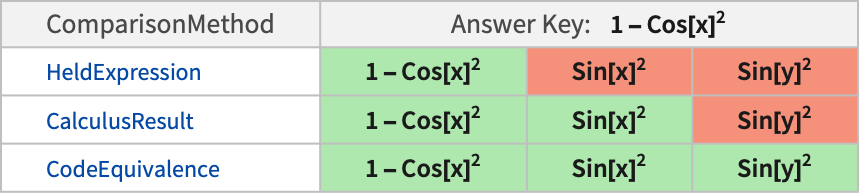
- For mathematical expressions, "CodeEquivalence" relies on the Simplify function to determine equivalence. For more control, use the specific math methods "ArithmeticResult", "CalculusResult", "PolynomialResult" and "AlgebraicValue".
- The following tables show comparisons of "CodeEquivalence" with other comparison methods for typical answer keys and several possible submitted answers:

Examples
open all close allBasic Examples (1)
Create an AssessmentFunction for a coding question:
codeequivalence = AssessmentFunction[HoldPattern[Table[f[i], {i, n}]], "CodeEquivalence"]Use it to assess equivalent code:
codeequivalence[Hold[Table[f[i], {i, n}]]]codeequivalence[Hold[f /@ Table[i, {i, n}]]]Scope (1)
The "CodeEquivalence" method supports the comparison of code with random outputs:
asmf = AssessmentFunction[{HoldPattern[RandomInteger /@ Range[5]]}, "CodeEquivalence"]Compare with equivalent code for random numbers with an increasing range:
asmf[HoldPattern[Array[RandomInteger, 5]]]This code is different; each number has the same range:
asmf[HoldPattern[RandomInteger[5, 5]]]Applications (2)
Create a QuestionObject for a coding problem:
QuestionObject["Define a function to take the first and last letter from a string", AssessmentFunction[HoldPattern[firstlast[str_] := {StringTake[str, 1], StringTake[str, -1]}], "CodeEquivalence"]]Create a QuestionObject for a coding problem:
QuestionObject["Write code that takes a string `str` and returns the input joined with its reversal.", AssessmentFunction[HoldPattern[str <> StringReverse[str]], "CodeEquivalence"]]Create a classical coding challenge:
QuestionObject["Given a list of integers from 1 to 100, write a function that replaces multiples of 3 with \"Fizz\", multiples of 5 with \"Buzz\", multiples of both 3 and 5 with \"FizzBuzz\" and leaves other numbers fixed.", AssessmentFunction[HoldPattern[Which[Mod[#, 15] == 0, "FizzBuzz", Mod[#, 3] == 0, "Fizz", Mod[#, 5] == 0, "Buzz", True, #]& /@ Range[1, 100]], "CodeEquivalence"]]Properties & Relations (2)
Symbol names need not match exactly. Undefined symbols will match any other unique undefined symbols:
AssessmentFunction[HoldPattern[a + b / 2], "CodeEquivalence"][HoldPattern[x + y / 2]]The "CodeEquivalence" method can compare mathematical expressions:
AssessmentFunction[HoldPattern[1 - Cos[x] ^ 2], "CodeEquivalence"][Sin[x] ^ 2]Dedicated mathematical methods like "CalculusResult" also find the equivalence:
AssessmentFunction[Hold[1 - Cos[x] ^ 2], "CalculusResult"][Sin[x] ^ 2]Code equivalence will treat expressions as code, where symbol names are arbitrary and any distinct symbols are considered equivalent:
AssessmentFunction[HoldPattern[1 - Cos[x] ^ 2], "CodeEquivalence"][Sin[y] ^ 2]Mathematical comparison methods require symbol names to match:
AssessmentFunction[Hold[1 - Cos[x] ^ 2], "CalculusResult"][Sin[y] ^ 2]Possible Issues (1)
Answers that evaluate to a deterministic output are considered equivalent to that output:
deterministic = AssessmentFunction[HoldPattern[Table[i, {i, 1, 5}]], "CodeEquivalence"]deterministic[{1, 2, 3, 4, 5}]If this is not desired, use an answer key that does not have a deterministic output:
random = AssessmentFunction[AssessmentFunction[HoldPattern[Table[RandomInteger[], {i, 1, 5}]], "CodeEquivalence"]]random[{0, 0, 1, 0, 1}]