

TriangleElement
TriangleElement[{{i11,i12,i13},…,{in1,in2,in3}}]
represents n linear triangle elements ek with incidents {ik1,ik2,ik3}.
TriangleElement[{{i11,…,i16},…,{in1,…,in6}}]
represents n quadratic triangle elements ek with incidents {ik1,…,ik6}.
TriangleElement[{e1,…,en},{m1,…,mn}]
represents n triangle elements ek and n integer markers mk.
Details and Options
- TriangleElement is used to represent triangle mesh elements in ElementMesh.
- TriangleElement can be used as an input to ToElementMesh or ToBoundaryMesh.
- Incidents ik,j are integers that index an array of spatial coordinates. The coordinates referenced by ek={ik1,…} are the nodes of the k
 triangle.
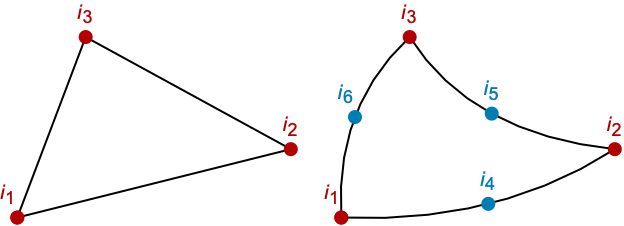
 - The first three incidents ik1, ik2, and ik3 are always vertices.
- For quadratic triangle elements, the next three incidents are mid-side nodes of possibly curved edges.
- Linear elements are order 1 elements and quadratic elements are order 2 elements.
- In TriangleElement[{e1,…,en}], all elements ek need to be of the same order.
- The triangles in TriangleElement[{e1,…,en}] will share common nodes and edges but cannot intersect with each other, or for second order triangles, with themselves.
- The nodes for a linear and a quadratic triangle are shown:
- The incidents {i1,i2,i3} must be ordered so that going from the coordinates referenced by i1 to i2 to i3 is in the counterclockwise direction.
- Typically, TriangleElement is used for two-dimensional regions, but may be embedded in three dimensions, for example, as a part of a boundary mesh.
- The triangle element is known in the finite element method as a Serendipity element.
Examples
open all close allBasic Examples (1)
Scope (1)
A boundary mesh with triangle elements:
bmesh = ToBoundaryMesh["Coordinates" -> {{0., 0., 0.}, {2., 0., 0.}, {2., 1., 0.}, {0., 1., 0.}, {0., 0., 1.}, {2., 0., 1.}, {2., 1., 1.}, {0., 1., 1.}}, "BoundaryElements" -> {TriangleElement[{{1, 2, 3}, {6, 5, 7}, {3, 4, 1}, {7, 2, 6}, {7, 5, 8}, {7, 8, 3}, {3, 2, 7}, {1, 4, 8}, {8, 4, 3}, {1, 5, 6}, {8, 5, 1}, {6, 2, 1}}]}]bmesh["Wireframe"[Boxed -> False]]Generalizations & Extensions (4)
The base coordinates of the linear element:
c = MeshElementBaseCoordinates[TriangleElement, 1]The base incidents of the linear element:
e = TriangleElement[{MeshElementBaseIncidents[TriangleElement, 1]}]A mesh with a linear unit element:
mesh = ToElementMesh["Coordinates" -> c, "MeshElements" -> {e}]Visualization of the linear unit element:
Show[mesh["Wireframe"],
	mesh["Wireframe"["MeshElement" -> "PointElements", "MeshElementStyle" -> Directive[Red, PointSize[0.02]], "MeshElementIDStyle" -> Blue]]]
The base coordinates of the quadratic element:
c = MeshElementBaseCoordinates[TriangleElement, 2]The base incidents of the quadratic element:
e = TriangleElement[{MeshElementBaseIncidents[TriangleElement, 2]}]mesh = ToElementMesh["Coordinates" -> c, "MeshElements" -> {e}]Show[mesh["Wireframe"],
mesh["Wireframe"["MeshElement" -> "PointElements", "MeshElementStyle" -> Directive[Red, PointSize[0.02]], "MeshElementIDStyle" -> Blue]]]The base face incidents of the linear element:
e = MeshElementBaseFaceIncidents[TriangleElement, 1]The base face incidents of the quadratic element:
e = MeshElementBaseFaceIncidents[TriangleElement, 2]Applications (3)
Linear triangle elements in a mesh:
mesh = ToElementMesh["Coordinates" -> {{1.293, 0.228}, {1., 0.}, {0.94, 0.342}, {1.293, 0.}, {1.215, 0.442}, {2., 0.}, {1.879, 0.684}}, "MeshElements" -> {TriangleElement[{{1, 3, 2}, {1, 2, 4}, {1, 4, 6}, {1, 6, 7}, {1, 7, 5}, {1, 5, 3}}]}]Visualize the mesh with the elements' vertices:
Show[mesh["Wireframe"],
mesh["Wireframe"["MeshElement" -> "PointElements", "MeshElementStyle" -> Directive[Red, PointSize[0.02]], "MeshElementIDStyle" -> Blue]]]Quadratic triangle elements in a mesh:
coordinates = {{1.293, 0.228}, {1., 0.}, {0.94, 0.342}, {1.293, 0.}, {1.215, 0.442}, {2., 0.}, {1.879, 0.684}, {0.97, 0.171}, {1.0775000000000001, 0.392}, {1.1164999999999998, 0.28500000000000003}, {1.1465, 0.}, {1.1465, 0.114}, {1.254, 0.335}, {1.293, 0.114}, {1.5470000000000002, 0.5630000000000001}, {1.5859999999999999, 0.456}, {1.6465, 0.}, {1.6465, 0.114}, {1.9395, 0.342}};mesh = ToElementMesh["Coordinates" -> coordinates, "MeshElements" -> {TriangleElement[{{1, 3, 2, 10, 8, 12}, {1, 2, 4, 12, 11, 14}, {1, 4, 6, 14, 17, 18}, {1, 6, 7, 18, 19, 16}, {1, 7, 5, 16, 15, 13}, {1, 5, 3, 13, 9, 10}}]}]Visualize the mesh with the elements' vertices:
Show[mesh["Wireframe"],
mesh["Wireframe"["MeshElement" -> "PointElements", "MeshElementStyle" -> Directive[Red, PointSize[0.02]], "MeshElementIDStyle" -> Blue]]]A triangle element mesh with markers:
coordinates = {{0., 0.}, {1., 0.}, {2., 0.}, {2.5, 0.5}, {0., 1.}, {1., 1.}, {2., 1.}, {3., 1.}, {2.5, 1.5}, {0., 2.}, {1., 2.}, {2., 2.}};mesh = ToElementMesh["Coordinates" -> coordinates, "MeshElements" -> {TriangleElement[{{1, 2, 6}, {6, 5, 1}, {2, 3, 7}, {7, 6, 2}, {3, 4, 7}, {4, 8, 7}, {5, 6, 11}, {11, 10, 5}, {6, 7, 12}, {12, 11, 6}, {7, 9, 12}, {7, 8, 9}}, {1, 1, 1, 1, 1, 1, 2, 2, 2, 2, 2, 2}]}]Visualize the mesh with the elements' markers:
mesh["Wireframe"["MeshElementMarkerStyle" -> Red]]Possible Issues (6)
The incidents must be of the appropriate length:
TriangleElement[{{1, 2, 6, 5}, {2, 3, 7, 6}, {5, 6, 11, 10}, {6, 7, 12, 11}}]
The incidents order cannot be mixed:
TriangleElement[{{1, 2, 6}, {2, 3, 7, 6, 5, 1}}]
The incidents must be lists of integers:
TriangleElement[{{a, 2, 6}, {2, 3, 7}, {5, 6, 11}}]
The number of markers must match the number of incidents:
TriangleElement[{{1, 2, 6}, {2, 3, 7}, {5, 6, 11}}, {1, 1, 2, 2}]
Markers must be a vector of integers:
TriangleElement[{{1, 2, 6}, {2, 3, 7}, {5, 6, 11}}, {1, 1, a}]
When possible, noninteger markers will be converted to integers:
TriangleElement[{{1, 2, 6}, {2, 3, 7}, {5, 6, 11}}, {1, 1, 2.}]Text
Wolfram Research (2014), TriangleElement, Wolfram Language function, https://reference.wolfram.com/language/FEMDocumentation/ref/TriangleElement.html.
CMS
Wolfram Language. 2014. "TriangleElement." Wolfram Language & System Documentation Center. Wolfram Research. https://reference.wolfram.com/language/FEMDocumentation/ref/TriangleElement.html.
APA
Wolfram Language. (2014). TriangleElement. Wolfram Language & System Documentation Center. Retrieved from https://reference.wolfram.com/language/FEMDocumentation/ref/TriangleElement.html