

AdjacentMeshCells
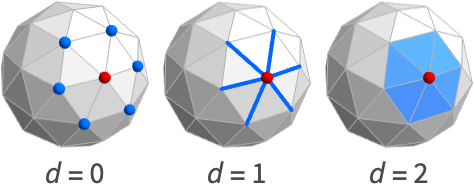
AdjacentMeshCells[mr,cellspec,d]
gives cells of dimension d adjacent to the cell specified by cellspec in the mesh mr.
Details
- AdjacentMeshCells is also known as neighboring cells.
- Typical uses include getting cell adjacencies and topological information in a mesh.
- AdjacentMeshCells[mr,cellspec,d] returns a list of cell indices associated to the d-dimensional cells adjacent to cells specified by cellspec.
- The following cell specifications cellspec can be used:
-
{d,i} cell with index i of dimension d {d,ispec} cells with index specification ispec of dimension d {dspec,…} cells of dimensions given by dspec h[{i1,…}] explicit cell with head h and vertex indices i1, … {c1,c2,…} list of explicit cells ci - The index specification ispec can have the following form:
-
i cell index i {i1,i2,…} cells with indices ik All all cells patt cells with indices matching the pattern patt - The dimension specification dspec can have the following form:
-
d explicit dimension d All all dimensions from 0 to geometric dimension of region patt dimensions matching the pattern patt
Examples
open all close allBasic Examples (2)
A list of lines adjacent to the cell {0,2}:
ℛ = MengerMesh[1, MeshCellStyle -> {{0, 2} -> Red}]AdjacentMeshCells[ℛ, {0, 2}, 1]HighlightMesh[ℛ, %]Find all faces adjacent to the cells that match a pattern:
pattern = {0, _ ? (# < 3&)};
ℛ = VoronoiMesh[RandomReal[1, {10, 2}], MeshCellStyle -> {pattern -> Red}];AdjacentMeshCells[ℛ, pattern, 2]HighlightMesh[ℛ, %]Scope (5)
Basic Uses (2)
Specify cells with index and dimension:
ℛ = MeshRegion[{{0, 0, 0}, {2, 0, 0}, {2, 2, 0}, {0, 2, 0}, {1, 1, 2}},
{Tetrahedron[{{1, 2, 3, 5}, {1, 3, 4, 5}}]}]AdjacentMeshCells[ℛ, {0, 1}, 2]AdjacentMeshCells[ℛ, {_, 1}, 2]AdjacentMeshCells[ℛ, Line[{1, 2}], 2]AdjacentMeshCells[ℛ, {{0, 1}, {1, 2}}, 2]Find the cells of different dimensions adjacent to the cell {0, 1}:
Table[AdjacentMeshCells[[image], {0, 1}, d], {d, {0, 1, 2, 3}}]Mesh Regions (2)
The AdjacentMeshCells of a MeshRegion in 2D:
mesh = DelaunayMesh[RandomReal[1, {10, 2}], MeshCellStyle -> {{0, 1} -> Green}]AdjacentMeshCells[mesh, {0, 1}, 1]HighlightMesh[mesh, %]AdjacentMeshCells[[image], {0, 1}, 1]mesh = [image];AdjacentMeshCells[mesh, {0, 1}, 1]HighlightMesh[mesh, %]The AdjacentMeshCells of a BoundaryMeshRegion:
mesh = BoundaryMeshRegion[{{0, 0}, {3, 0}, {3, 3}, {0, 3}, {1, 1}, {2, 1}, {2, 2}, {1, 2}}, Line[{1, 2, 3, 4, 1}], Line[{5, 6, 7, 8, 5}], MeshCellStyle -> {{0, 1} -> Green}]AdjacentMeshCells[mesh, {0, 1}, 1]HighlightMesh[mesh, %]AdjacentMeshCells[[image], {0, 1}, 0]mesh = [image];AdjacentMeshCells[mesh, {0, 1}, 1]HighlightMesh[mesh, %]Polygons & Polyhedra (1)
AdjacentMeshCells of a Cube:
ℛ = Cube[];AdjacentMeshCells[ℛ, {0, 1}, 1]HighlightMesh[ℛ, %]ℛ = Simplex[{{0, 0, 1}, {1, 0, 0}, {1, 0, 1}, {1, 1, 1}}];AdjacentMeshCells[ℛ, {0, 1}, 1]HighlightMesh[ℛ, %]ℛ = Polyhedron[{{-0.85065080835204, 0., 1.1135163644116066}, {-0.2628655560595668, 0.8090169943749475,
1.1135163644116066}, {-0.42532540417602, 1.3090169943749475, 0.2628655560595668},
{-1.1135163644116066, 0.8090169943749475, -0.262865556059566 ...
{{1, 2, 3, 4, 5}, {6, 7, 1, 5, 8}, {9, 10, 6, 8, 11}, {12, 13, 9, 11, 14}, {4, 14, 11, 8, 5},
{3, 15, 12, 14, 4}, {16, 17, 10, 9, 13}, {18, 16, 13, 12, 15}, {19, 18, 15, 3, 2},
{20, 19, 2, 1, 7}, {17, 20, 7, 6, 10}, {16, 18, 19, 20, 17}}];AdjacentMeshCells[ℛ, {0, 1}, 1]HighlightMesh[ℛ, %]ℛ = Triangle[{{0, 0}, {1, 1}, {2, 0}}];AdjacentMeshCells[ℛ, {0, 1}, 1]HighlightMesh[ℛ, %]ℛ = Polygon[{{1, 0}, {1/2, Sqrt[3]/2}, {-1/2, Sqrt[3]/2}, {-1, 0}, {-1/2, -1/2*Sqrt[3]},
{1/2, -1/2*Sqrt[3]}}];AdjacentMeshCells[ℛ, {0, 1}, 1]HighlightMesh[ℛ, %]Line:
ℛ = Line[{{1, 0}, {2, 1}, {3, 0}, {4, 1}}];AdjacentMeshCells[ℛ, {0, 1}, 1]HighlightMesh[ℛ, %]Applications (8)
Basic Applications (5)
Adjacent mesh cells of Triangle:
mesh = [image];cells = AdjacentMeshCells[mesh, {0, 2}, 0]HighlightMesh[mesh, cells]Adjacent mesh cells of Cube:
mesh = [image];cells = AdjacentMeshCells[mesh, {0, 6}, 0]HighlightMesh[mesh, cells]Adjacent mesh cells of MengerMesh:
mesh = MengerMesh[2, MeshCellStyle -> {{0, 6} -> Red}];cells = AdjacentMeshCells[mesh, {0, 6}, 0]HighlightMesh[mesh, cells]Adjacent mesh cells of 3D boundary mesh:
mesh = [image];cells = AdjacentMeshCells[mesh, {0, 12}, 0]HighlightMesh[mesh, cells]Get the point adjacency of a Voronoi mesh:
pts = RandomReal[1, {10, 2}];mesh = VoronoiMesh[pts, MeshCellStyle -> {{0, 12} -> Red}];cells = AdjacentMeshCells[mesh, {0, 12}, 0]HighlightMesh[mesh, cells]Adjacency Queries (1)
Use AdjacentMeshCells to find all the points that are connected to the point with cell index {0,1}:
AdjacentMeshCells[[image], {0, 1}, 0]Polyhedra Operations (1)
Use AdjacentMeshCells to compute the DualPolyhedron of a cuboid:
cube = [image];Get the adjacent faces for each point:
faces = (Last /@ AdjacentMeshCells[cube, {0, #}, 2])& /@ Range[MeshCellCount[cube, 0]]Compute the coordinates of the dual:
pts = MeshCoordinates[cube];
fs  = And@@@ MeshCells[cube, 2];
coords = Table[Mean[pts[[i]]], {i, fs}]
Construct the dual of the cube:
dual = Polyhedron[coords, faces]Graphics3D[{Opacity[0.2], cube, dual}]Topological Operations (1)
Use MeshConnectivityGraph to test whether a mesh is connected:
ConnectedMeshQ[mesh_] := Block[{a = {{0, 1}}, b},
	While[b = Union[Join[a, AdjacentMeshCells[mesh, a, 0]]];b =!= a, a  = b];
	Length[a]  == MeshCellCount[mesh, 0]
]Table[ConnectedMeshQ[i], {i, {[image], [image], [image], [image]}}]Properties & Relations (2)
The cell index {d, k} corresponds to the k cells of dimension d:
mesh = MeshRegion[{{0, 0}, {1, 0}, {2, 1 / 2}, {2, -1 / 2}}, {Line[{1, 2}], Line[{2, 3}], Line[{3, 4}], Line[{4, 2}]}]AdjacentMeshCells[mesh, {1, 2}, 1]AdjacentMeshCells can be found using MeshConnectivityGraph:
mesh = MeshRegion[{{0, 0, 0}, {2, 0, 0}, {2, 2, 0}, {0, 2, 0}, {1, 1, 2}}, {Tetrahedron[{1, 2, 3, 5}], Tetrahedron[{1, 3, 4, 5}]}]MeshConnectivityGraph[mesh, {0, 2}]AdjacencyList[%, {0, 1}]AdjacentMeshCells[mesh, {0, 1}, 2]Neat Examples (1)
AdjacentMeshCells of a Menger mesh:
g = MengerMesh[4];
spec = Thread[List[0, RandomSample[Range[MeshCellCount[g, 0]], 35]]];
cells = AdjacentMeshCells[g, spec, 0];MeshRegion[g, MeshCellStyle -> Join[{spec -> Red}, Thread[cells -> Green], {{_ ? (# > 0&), All} -> White}], ImageSize -> 200]Text
Wolfram Research (2020), AdjacentMeshCells, Wolfram Language function, https://reference.wolfram.com/language/ref/AdjacentMeshCells.html.
CMS
Wolfram Language. 2020. "AdjacentMeshCells." Wolfram Language & System Documentation Center. Wolfram Research. https://reference.wolfram.com/language/ref/AdjacentMeshCells.html.
APA
Wolfram Language. (2020). AdjacentMeshCells. Wolfram Language & System Documentation Center. Retrieved from https://reference.wolfram.com/language/ref/AdjacentMeshCells.html