

Cube
Cube[]
represents a regular cube centered at the origin with unit edge length.
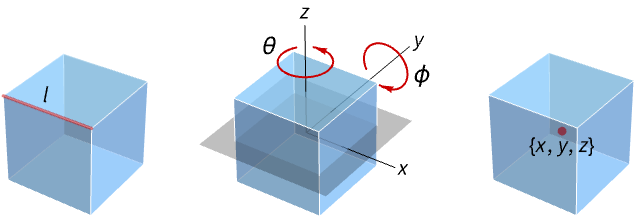
Cube[l]
represents a cube with edge length l.
Cube[{θ,ϕ},…]
represents a cube rotated by an angle θ with respect to the z axis and angle ϕ with respect to the y axis.
Cube[{x,y,z},…]
represents a cube centered at {x,y,z}.
Details and Options
- Cube is also known as regular cube.
- Cube can be used as a geometric region and graphics primitive.
- Cube[] is equivalent to Cube[{0,0,0},1].
- Cube[l] is equivalent to Cube[{0,0,0},l].
- CanonicalizePolyhedron can be used to convert a cube to an explicit Polyhedron object.
- Cube can be used in Graphics3D.
- In graphics, the points and edge lengths can be Scaled and Dynamic expressions.
- Graphics rendering is affected by directives such as FaceForm, EdgeForm, Opacity, Texture and color.
- The following options and settings can be used in graphics:
-
VertexColors Automatic vertex colors to be interpolated VertexTextureCoordinates None coordinates for textures
Examples
open all close allBasic Examples (3)
Graphics3D[Cube[]]ℛ = Cube[];{Graphics3D[{Pink, ℛ}], Graphics3D[{EdgeForm[Thick], ℛ}], Graphics3D[{EdgeForm[Dashed], ℛ}], Graphics3D[{EdgeForm[Directive[Thick, Dashed, Blue]], Pink, ℛ}]}ℛ = Cube[{1, 2, 3}, 2];Volume[ℛ]RegionCentroid[ℛ]Scope (11)
Graphics (8)
Specification (5)
Graphics3D[Cube[]]Graphics3D[Cube[], PlotRange -> 1.1]A unit cube with explicitly specified edge length:
Graphics3D[Cube[1], PlotRange -> 1.1]Graphics3D[Cube[2], PlotRange -> 1.1]A cube with edge length 1/2 centered at (1/2, 1/2, 1/2):
Graphics3D[Cube[{1, 1, 1} / 2, 1 / 2], PlotRange -> 1.1]A unit cube rotated by 45° around the  axis:
axis:
Graphics3D[Cube[{45°, 0}], PlotRange -> 2]A unit cube rotated by 45° around the  axis:
axis:
Graphics3D[Cube[{0, 45°}], PlotRange -> 2]A cube of edge length 2 rotated by 45° around the  axis and 45° around the
  axis:
axis:
Graphics3D[Cube[{45°, 45°}, 2], PlotRange -> 2]A cube of edge length 1 centered at (1/2, 1/2, 1/2) rotated by 45° around the  axis and 45° around the
  axis:
axis:
Graphics3D[Cube[{1, 1, 1} / 2, {45°, 45°}, 1], PlotRange -> 2]Styling (3)
FaceForm and EdgeForm can be used to specify the styles of the faces and edges:
ℛ = Cube[];Graphics3D[{EdgeForm[{Thick, Dashed, Blue}], FaceForm[{Pink, Opacity[0.7]}], ℛ}, Boxed -> False]Apply a Texture to the faces:
ℛ = Cube[{0, 0, 0}, VertexTextureCoordinates -> Flatten[Table[{j / 2, i / 3}, {i, 0, 3}, {j, 0, 2}], 1]];Graphics3D[{Texture[[image]], ℛ}, Lighting -> "Neutral"]Assign VertexColors to vertices:
ℛ = Cube[{0, 0, 0}, VertexColors -> ColorData[54, "ColorList"]];Graphics3D[ℛ, Lighting -> "Neutral"]Regions (3)
Embedding dimension is the dimension of the space in which the cube lives:
ℛ = Cube[];RegionEmbeddingDimension[ℛ]Geometric dimension is the dimension of the shape itself:
RegionDimension[ℛ]ℛ = Cube[];c = RegionCentroid[ℛ]Graphics3D[{{Opacity[0.5], LightBlue, ℛ}, {PointSize[Large], Red, Point[c]}}, Boxed -> False]ℛ = Cube[];BoundedRegionQ[ℛ]RegionBounds[ℛ]Neat Examples (2)
Create a polygrammic prism by rotating copies of a cube about the  axis:
axis:
Graphics3D[Table[Cube[{k Pi / 10, 0}], {k, 5}]]Show the hyperboloid as the envelope of a cube rotated about a space diagonal:
zCube = GeometricTransformation[
	Cube[],
	RotationTransform[{{1, 1, 1}, {0, 0, 1}}]
];Graphics3D[Table[GeometricTransformation[zCube, RotationTransform[k Pi / 15, {0, 0, 1}]], {k, 15}], ViewPoint -> {2, 0, 0}]Text
Wolfram Research (2019), Cube, Wolfram Language function, https://reference.wolfram.com/language/ref/Cube.html.
CMS
Wolfram Language. 2019. "Cube." Wolfram Language & System Documentation Center. Wolfram Research. https://reference.wolfram.com/language/ref/Cube.html.
APA
Wolfram Language. (2019). Cube. Wolfram Language & System Documentation Center. Retrieved from https://reference.wolfram.com/language/ref/Cube.html