

BrightnessEqualize
BrightnessEqualize[image]
adjusts the brightness across image, correcting uneven illumination.
BrightnessEqualize[image,flatfield]
uses the correction model given by flatfield, which models the variation in brightness across image.
BrightnessEqualize[image,flatfield,darkfield]
uses the dark environment model given by darkfield.
Details and Options
- Local brightness adjustment is also known as flat fielding, and is used for removing image artifacts caused by nonuniform lighting or variations in sensor sensitivities.
- BrightnessEqualize works with arbitrary 2D and 3D images, adjusting the lightness channel in the LABColor space.
- A flatfield image is an image of a homogeneous signal like a plain well-lit white background. A darkfield is the same image obtained without lighting. The flat fielding of an image with an object in the same setting is given by
![(image-darkfield)xMean[flatfield-darkfield]/(flatfield-darkfield)](Files/BrightnessEqualize.en/2.png "(image-darkfield)xMean[flatfield-darkfield]/(flatfield-darkfield)") .
. - Possible settings for either flatfield or darkfield include:
-
val a constant value val corrimage a correction image (rescaled to the image dimensions) {scope,model} fit the data into a given model - The default flatfield consists of a 2nd order polynomial fit. The default darkfield is assumed to be 0.
- Using {scope,model}, the flatfield or darkfield is estimated by fitting a function.
- The scope parameter specifies whether to fit the entire image data or the image projections along each axis. Possible settings include:
-
"Global" fit the entire image to the model "Marginal" separately fit model to the projections along each axis - The model can be one of the following:
-
n an n-degree polynomial f,params,vars an arbitrary model f with parameters params and variables vars - The following options are available:
-
Masking Automatic the regions to use for model estimation PerformanceGoal Automatic aspects of performance to try to optimize - Using Masking->Automatic, over- and underexposed pixels are not used for the adjustment.
- With partially transparent images, the alpha channel is multiplied with the mask.
Examples
open all close allBasic Examples (1)
Scope (7)
Data (3)
Equalize a grayscale image of a scanned document:
BrightnessEqualize[[image]]Adjust brightness in an unevenly illuminated color photo:
BrightnessEqualize[[image]]Adjust brightness of a 3D CT scan image:
BrightnessEqualize[\!\(\*Graphics3DBox[«13»]\)]Parameters (4)
Remove uneven illumination in a microscopy image by estimating the brightness distribution:
img = [image];Fitting a multivariate polynomial of first order on the entire image domain:
BrightnessEqualize[img, {"Global", 1}]Using a second-order polynomial:
BrightnessEqualize[img, {"Global", 2}]Fitting second-order univariate polynomials to the image marginals in each direction:
BrightnessEqualize[img, {"Marginal", 2}]BrightnessEqualize[[image], [image]]Remove a vignette effect by fitting the lightness channel to a given model:
img = [image];Assuming a rotationally symmetric, radial-dependent vignette:
BrightnessEqualize[
	img,
	{"Global", a + b(x^2 + y^2) + c(x^2 + y^2)^2 + d(x^2 + y^2)^3, {a, b, c, d}, {x, y}}
]BrightnessEqualize[
img,
{"Global", a Exp[-(x^2 + y^2) / σ^2], {a, σ}, {x, y}}
]Perform a subtractive correction on an astronomical image by estimating the dark field:
BrightnessEqualize[[image], 1, {"Global", 6}]Options (1)
Masking (1)
By default, an automatic mask is used:
img = [image];BrightnessEqualize[img, {"Global", 6}]Equalize brightness based on the image background:
mask = Erosion[Binarize[img], 1]BrightnessEqualize[img, {"Global", 6}, Masking -> mask]Applications (7)
Achieve a constant luminosity of the Moon surface:
moon = [image];BrightnessEqualize[moon, {"Global", 4}, Masking -> Binarize[moon]]Equalize brightness of a microscopy image:
img = [image];mask = ColorNegate@AlphaChannel@RemoveBackground[img]Equalize brightness distribution assuming a homogeneous background:
BrightnessEqualize[img, Masking -> mask]Equalize color distribution by handling each channel separately:
ColorCombine[BrightnessEqualize[#, Masking -> mask]& /@ ColorSeparate[img]]Remove uneven illumination from a scanned document:
scan = [image];Create a mask to omit text in the subsequent equilibration:
mask = ColorNegate@Closing[Binarize[BottomHatTransform[scan, 12]], 1]Equalize brightness distribution fitting a sixth-order polynomial:
BrightnessEqualize[scan, {"Global", 6}, Masking -> mask]This improves the text recognition result:
TextRecognize[%]Equalize the brightness distribution without a mask applying a horizontal fit:
BrightnessEqualize[scan, {"Marginal", {6, 0}}]This also improves the text recognition result:
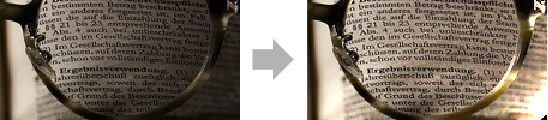
TextRecognize[%]Reduce the vignette effect of a photograph:
img = [image];Compute a mask for the background that is expected to have even illumination:
mask = ColorNegate@AlphaChannel@RemoveBackground[img]BrightnessEqualize[img, {"Global", 3}, Masking -> mask]Remove CCD artifacts from an image taken by a low-quality camera with many pixel defects.
Flat-field image of the camera:
flatfield = [image];Microscopy image of a tear drop:
image = [image];BrightnessEqualize[image, flatfield]Correct uneven illumination in an MR scan:
img = [image];Use only muscle tissue for brightness estimation:
mask = Opening[Binarize[img, {.12, .3}], 1]BrightnessEqualize[img, Masking -> mask] // ImageAdjustCorrect uneven brightness in a 3D magnetic resonance volume:
knee = [image];Note the reduced brightness toward the perimeter of the volume:
Image3D[knee, ColorFunction -> "GrayLevelAlpha", ClipRange -> {All, {0, 23}, All}, Boxed -> True]Select the muscle tissue to estimate the brightness distribution:
ImageHistogram[knee]mask = Erosion[Binarize[knee, {.05, .3}], 1]Estimate the brightness distribution by a polynomial in cylindrical coordinates of even orders up to 4:
knee2 = BrightnessEqualize[knee,
	{"Global", {1, x^2 + y^2, z^2, (x^2 + y^2)^2, z^4, (x^2 + y^2)z^2}, {x, y, z}}, Masking -> mask];
Compare the initial volume and the result with equalized brightness:
Map[Image3D[#, ColorFunction -> "GrayLevelAlpha", ClipRange -> {All, {0, 23}, All}, Boxed -> True]&, {knee, knee2}]//GraphicsRowText
Wolfram Research (2017), BrightnessEqualize, Wolfram Language function, https://reference.wolfram.com/language/ref/BrightnessEqualize.html.
CMS
Wolfram Language. 2017. "BrightnessEqualize." Wolfram Language & System Documentation Center. Wolfram Research. https://reference.wolfram.com/language/ref/BrightnessEqualize.html.
APA
Wolfram Language. (2017). BrightnessEqualize. Wolfram Language & System Documentation Center. Retrieved from https://reference.wolfram.com/language/ref/BrightnessEqualize.html