

ConvexHullMesh
ConvexHullMesh[{p1,p2,…}]
gives a BoundaryMeshRegion representing the convex hull from the points p1, p2, ….
ConvexHullMesh[mreg]
gives the convex hull of the mesh region mreg.
Details and Options
- ConvexHullMesh is also known as convex envelope or convex closure.
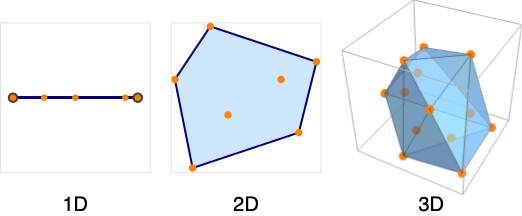
- The convex hull mesh is the smallest convex set that includes the points pi.
- The convex hull boundary consists of points in 1D, line segments in 2D, and convex polygons in 3D.
- ConvexHullMesh takes the same options as BoundaryMeshRegion.
Examples
open all close allBasic Examples (3)
pts = RandomReal[{-1, 1}, {5, 1}];ConvexHullMesh[pts]The region is the smallest convex region that includes the points:
Show[%, Show[%, Graphics[Point[Append[#, 0]& /@ pts]]]]pts = RandomReal[{-1, 1}, {50, 2}];ConvexHullMesh[pts]The region is the smallest convex region that includes the points:
Show[%, Graphics[Point[pts]]]pts = RandomReal[{-1, 1}, {50, 3}];ConvexHullMesh[pts]The region is the smallest convex region that includes the points:
Show[HighlightMesh[%, Style[2, Opacity[0.5]]], Graphics3D[Point[pts]]]Scope (3)
Create a 1D convex hull mesh from a set of points:
pts = RandomReal[{-1, 1}, {50, 1}];ℛ = ConvexHullMesh[pts]{RegionQ[ℛ], BoundaryMeshRegionQ[ℛ]}Convex hull meshes are bounded:
{BoundedRegionQ[ℛ], RegionBounds[ℛ]}Convex hull meshes are full dimensional:
{RegionDimension[ℛ], RegionEmbeddingDimension[ℛ]}{RegionMeasure[ℛ], RegionCentroid[ℛ]}RegionMember[ℛ, {0}]Find the nearest point and its distance:
{RegionDistance[ℛ, {2}], RegionNearest[ℛ, {2}]}Create a 2D convex hull mesh from a set of points:
pts = RandomReal[{-1, 1}, {50, 2}];ℛ = ConvexHullMesh[pts]{RegionQ[ℛ], BoundaryMeshRegionQ[ℛ]}Convex hull meshes are bounded:
{BoundedRegionQ[ℛ], RegionBounds[ℛ]}Convex hull meshes are full dimensional:
{RegionDimension[ℛ], RegionEmbeddingDimension[ℛ]}{RegionMeasure[ℛ], RegionCentroid[ℛ]}RegionMember[ℛ, {0, 0}]Find the nearest point and its distance:
{RegionDistance[ℛ, {2, 2}], RegionNearest[ℛ, {2, 2}]}Create a 3D convex hull mesh from a set of points:
pts = RandomReal[{-1, 1}, {50, 3}];ℛ = ConvexHullMesh[pts]{RegionQ[ℛ], BoundaryMeshRegionQ[ℛ]}Convex hull meshes are bounded:
{BoundedRegionQ[ℛ], RegionBounds[ℛ]}Convex hull meshes are full dimensional:
{RegionDimension[ℛ], RegionEmbeddingDimension[ℛ]}{RegionMeasure[ℛ], RegionCentroid[ℛ]}Area[RegionBoundary[ℛ]]RegionMember[ℛ, {0, 0, 0}]Find the nearest point and its distance:
{RegionDistance[ℛ, {2, 2, 2}], RegionNearest[ℛ, {2, 2, 2}]}Options (13)
MeshCellHighlight (3)
MeshCellHighlight allows you to specify highlighting for parts of a ConvexHullMesh:
ConvexHullMesh[{{0, 0}, {1, 0}, {0, 1}, {1, 1}}, MeshCellHighlight -> {{1, All} -> Orange, {0, All} -> Green}]By making faces transparent, the internal structure of a 3D ConvexHullMesh can be seen:
ConvexHullMesh[{{0, 0, 0}, {1, 0, 0}, {0, 1, 0}, {0, 0, 1}, {1, 1, 0}}, MeshCellHighlight -> {{2, All} -> Opacity[0.5, Orange]}]Individual cells can be highlighted using their cell index:
ConvexHullMesh[{{0, 0}, {1, 0}, {0, 1}, {1, 1}}, MeshCellHighlight -> {{1, 1} -> {Thick, Orange}, {1, 2} -> {Dashed, Green}}]ConvexHullMesh[{{0, 0}, {1, 0}, {0, 1}, {1, 1}}, MeshCellHighlight -> {Line[{1, 2}] -> {Thick, Orange}, Line[{2, 4}] -> {Dashed, Green}}]MeshCellLabel (2)
MeshCellLabel can be used to label parts of a ConvexHullMesh:
ConvexHullMesh[{{0, 0}, {1, 0}, {0, 1}, {1, 1}}, MeshCellLabel -> {0 -> "Index"}]Individual cells can be labeled using their cell index:
ConvexHullMesh[{{0, 0}, {1, 0}, {0, 1}, {1, 1}}, MeshCellLabel -> {{1, 1} -> "x", {1, 2} -> "y"}]ConvexHullMesh[{{0, 0}, {1, 0}, {0, 1}, {1, 1}}, MeshCellLabel -> {Line[{1, 2}] -> "x", Line[{2, 4}] -> "y"}]MeshCellMarker (1)
MeshCellMarker can be used to assign values to parts of a ConvexHullMesh:
ConvexHullMesh[{{0, 0}, {1, 0}, {0, 1}, {1, 1}}, MeshCellMarker -> {{0, 1} -> 1, {0, 2} -> 2, {0, 3} -> 3, {0, 4} -> 4}]Use MeshCellLabel to show the markers:
ConvexHullMesh[{{0, 0}, {1, 0}, {0, 1}, {1, 1}}, MeshCellMarker -> {{0, 1} -> 1, {0, 2} -> 2, {0, 3} -> 3, {0, 4} -> 4}, MeshCellLabel -> {0 -> "Marker"}]MeshCellShapeFunction (2)
MeshCellShapeFunction allows you to specify functions for parts of a ConvexHullMesh:
ConvexHullMesh[{{0, 0}, {1, 0}, {0, 1}, {1, 1}}, MeshCellShapeFunction -> {0 -> (Disk[#, .1]&)}]Individual cells can be drawn using their cell index:
ConvexHullMesh[{{0, 0}, {1, 0}, {0, 1}, {1, 1}}, MeshCellShapeFunction -> {{0, 1} -> (Disk[#, .1]&), {0, 2} -> (Disk[#, {.1, .2}]&)}]ConvexHullMesh[{{0, 0}, {1, 0}, {0, 1}, {1, 1}}, MeshCellShapeFunction -> {Point[1] -> (Disk[#, .1]&), Point[2] -> (Disk[#, {.1, .2}]&)}]MeshCellStyle (3)
MeshCellStyle allows you to specify styling for parts of a ConvexHullMesh:
ConvexHullMesh[{{0, 0}, {1, 0}, {0, 1}, {1, 1}}, MeshCellStyle -> {{1, All} -> Orange, {0, All} -> Green}]By making faces transparent, the internal structure of a 3D ConvexHullMesh can be seen:
ConvexHullMesh[{{0, 0, 0}, {1, 0, 0}, {0, 1, 0}, {0, 0, 1}, {1, 1, 0}}, MeshCellStyle -> {{2, All} -> Opacity[0.5, Orange]}]Individual cells can be highlighted using their cell index:
ConvexHullMesh[{{0, 0}, {1, 0}, {0, 1}, {1, 1}}, MeshCellStyle -> {{1, 1} -> {Thick, Orange}, {1, 2} -> {Dashed, Green}}]ConvexHullMesh[{{0, 0}, {1, 0}, {0, 1}, {1, 1}}, MeshCellStyle -> {Line[{1, 2}] -> {Thick, Orange}, Line[{2, 4}] -> {Dashed, Green}}]PlotTheme (2)
Use a theme with grid lines and a legend:
ConvexHullMesh[ExampleData[{"Geometry3D", "UtahTeapot"}, "VertexData"], PlotTheme -> "Detailed"]Use a theme to draw a wireframe:
ConvexHullMesh[ExampleData[{"Geometry3D", "UtahTeapot"}, "VertexData"], PlotTheme -> "Lines"]Applications (2)
The convex hull of a compound of five tetrahedra is a dodecahedron:
ℛ = DiscretizeGraphics[PolyhedronData["TetrahedronFiveCompound"]]ConvexHullMesh[MeshCoordinates[ℛ]]Compute the convex hull of a cow:
cowPoints = ExampleData[{"Geometry3D", "Cow"}, "VertexData"];cowvexHull = ConvexHullMesh[cowPoints];Visualize convex hull and cow:
cow = ExampleData[{"Geometry3D", "Cow"}, "Graphics3D"];Show[HighlightMesh[cowvexHull, {Style[1, {Brown}], Style[2, Opacity[0.3, Brown]]}], cow]Properties & Relations (3)
ConvexHullMesh is effectively the BoundaryMesh of a DelaunayMesh:
pts = RandomReal[1, {5, 2}];{BoundaryMesh[DelaunayMesh[pts]], ConvexHullMesh[pts]}pts = RandomReal[{-1, 1}, {50, 3}];{BoundaryMesh[DelaunayMesh[pts]], ConvexHullMesh[pts]}Use DelaunayMesh to get a Delaunay triangulation of the interior of the convex hull:
DelaunayMesh[RandomReal[1, {25, 2}]]Use TriangulateMesh to control the triangulation of the interior:
ℛ = ConvexHullMesh[RandomReal[1, {25, 2}]];{TriangulateMesh[ℛ], TriangulateMesh[ℛ, MaxCellMeasure -> ∞]}Possible Issues (1)
ConvexHullMesh returns full–dimensional mesh regions only:
ConvexHullMesh[{{0., 0.}, {1., 0.}}]
Use ConvexHullRegion to get the convex hull:
ConvexHullRegion[{{0., 0.}, {1., 0.}}]Text
Wolfram Research (2014), ConvexHullMesh, Wolfram Language function, https://reference.wolfram.com/language/ref/ConvexHullMesh.html (updated 2020).
CMS
Wolfram Language. 2014. "ConvexHullMesh." Wolfram Language & System Documentation Center. Wolfram Research. Last Modified 2020. https://reference.wolfram.com/language/ref/ConvexHullMesh.html.
APA
Wolfram Language. (2014). ConvexHullMesh. Wolfram Language & System Documentation Center. Retrieved from https://reference.wolfram.com/language/ref/ConvexHullMesh.html