

Tetrahedron
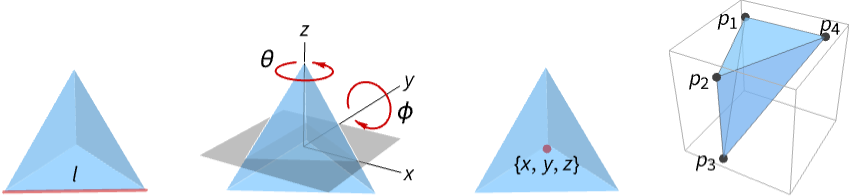
represents a regular tetrahedron centered at the origin with unit edge length.
Tetrahedron[l]
represents a tetrahedron with edge length l.
Tetrahedron[{θ,ϕ},…]
represents a tetrahedron rotated by an angle θ with respect to the z axis and angle ϕ with respect to the y axis.
Tetrahedron[{x,y,z},…]
represents a tetrahedron centered at {x,y,z}.
Tetrahedron[{p1,p2,p3,p4}]
represents a general filled tetrahedron with corners p1, p2, p3 and p4.
Tetrahedron[{{p1,1,p1,2,p1,3,p1,4},{p2,1,…},…}]
represents a collection of tetrahedra.
Details and Options
- Tetrahedron is also known as regular tetrahedron or triangular pyramid.
- Tetrahedron can be used as a geometric region and as a graphics primitive.
- Tetrahedron[] is equivalent to Tetrahedron[{0,0,0},1].
- Tetrahedron[l] is equivalent to Tetrahedron[{0,0,0},l].
- Tetrahedron[{p1,p2,p3,p4}] represents the region consisting of all the convex combinations of corner points pi,
 .
. - CanonicalizePolyhedron can be used to convert a tetrahedron to an explicit Polyhedron object.
- Tetrahedron can be used in Graphics3D.
- In graphics, the points and edge lengths can be Scaled and Dynamic expressions.
- Graphics rendering is affected by directives such as FaceForm, EdgeForm, Opacity, Texture, and color.
- The following options and settings can be used in graphics:
-
VertexColors Automatic vertex colors to be interpolated VertexNormals Automatic effective vertex normals for shading VertexTextureCoordinates None coordinates for textures
Examples
open all close allBasic Examples (3)
Graphics3D[Tetrahedron[]]ℛ = Tetrahedron[{{1, 0, 0}, {1, 0, 1}, {1, 1, 1}, {0, 0, 1}}];{Graphics3D[{Pink, ℛ}], Graphics3D[{EdgeForm[Thick], ℛ}], Graphics3D[{EdgeForm[Dashed], ℛ}], Graphics3D[{EdgeForm[Directive[Thick, Dashed, Blue]], Pink, ℛ}]}ℛ = Tetrahedron[{{1, 0, 0}, {1, 0, 1}, {1, 1, 1}, {0, 0, 1}}];Volume[ℛ]RegionCentroid[ℛ]Scope (22)
Graphics (12)
Specification (6)
Graphics3D[Tetrahedron[]]Graphics3D[Tetrahedron[{{1, 0, 0}, {1, 0, 1}, {1, 1, 1}, {0, 0, 1}}]]v1 = {{1, 0, 0}, {1, 0, 1}, {1, 1, 1}, {0, 0, 1}};
v2 = v1 + 1;Graphics3D[Tetrahedron[{v1, v2}]]A unit tetrahedron with explicitly specified edge length:
Graphics3D[Tetrahedron[1], PlotRange -> 1.5]A tetrahedron with edge length 2:
Graphics3D[Tetrahedron[2], PlotRange -> 1.5]A tetrahedron with edge length 1/2 centered at (1/2, 1/2, 1/2):
Graphics3D[Tetrahedron[{1, 1, 1} / 2, 1 / 2], PlotRange -> 1.1]A unit tetrahedron rotated by 45° around the  axis:
axis:
Graphics3D[Tetrahedron[{45°, 0}], PlotRange -> 2]A unit tetrahedron rotated by 45° around the  axis:
axis:
Graphics3D[Tetrahedron[{0, 45°}], PlotRange -> 2]A tetrahedron of edge length 2 rotated by 45° around the  axis and 45° around the
  axis:
axis:
Graphics3D[Tetrahedron[{45°, 45°}, 2], PlotRange -> 2]A tetrahedron of edge length 1 centered at (1/2, 1/2, 1/2) rotated by 45° around the  axis and 45° around the
  axis:
axis:
Graphics3D[Tetrahedron[{1, 1, 1} / 2, {45°, 45°}, 1], PlotRange -> 2]Styling (3)
FaceForm and EdgeForm can be used to specify the styles of the faces and edges:
ℛ = Tetrahedron[{{0, 0, 0}, {1, 0, 0}, {0, 1, 0}, {0, 0, 1}}];Graphics3D[{EdgeForm[{Thick, Dashed, Blue}], FaceForm[{Pink, Opacity[0.7]}], ℛ}, Boxed -> False]Apply a Texture to the faces:
ℛ = Tetrahedron[{{0, 0, 0}, {1, 0, 0}, {0, 1, 0}, {0, 0, 1}}, VertexTextureCoordinates -> {{0, 0}, {1, 0}, {1, 1}, {0, 1}}];Graphics3D[{Texture[[image]], ℛ}, Lighting -> "Neutral"]Assign VertexColors to vertices:
Graphics3D[Tetrahedron[{{0, 0, 0}, {1, 0, 0}, {0, 1, 0}, {0, 0, 1}}, VertexColors -> {Red, Green, Blue, Opacity[.1, White]}]]Coordinates (3)
Specify coordinates by fractions of the plot range:
Graphics3D[Tetrahedron[{Scaled[{0, 0, 0}], Scaled[{0.5, 0, 0}], Scaled[{0, 0.5, 0}], Scaled[{0, 0, 0.5}]}], PlotRange -> {{0, 10}, {0, 10}, {0, 10}}, Axes -> True]Specify scaled offsets from the ordinary coordinates:
Graphics3D[Tetrahedron[{Scaled[{0, 0, 0.5}, {0, 0, 0}], Scaled[{0, 0, 0.5}, {1, 0, 0}], Scaled[{0, 0, 0.5}, {0, 1, 0}], Scaled[{0, 0, 0.5}, {0, 0, 1}]}], PlotRange -> {{0, 2}, {0, 2}, {0, 2}}, Axes -> True]Points can be Dynamic:
DynamicModule[{x}, {Slider[Dynamic[x], {0, 1}], Graphics3D[Tetrahedron[{Dynamic[{1, 1, 1}x], {1, 0, 0}, {0, 1, 0}, {0, 0, 1}}]]}]Regions (10)
Embedding dimension is the dimension of the space in which the tetrahedron lives:
ℛ = Tetrahedron[{{0, 0, 0}, {1, 0, 0}, {0, 1, 0}, {0, 0, 1}}];RegionEmbeddingDimension[ℛ]Geometric dimension is the dimension of the shape itself:
RegionDimension[ℛ]ℛ = Tetrahedron[{{0, 0, 0}, {1, 0, 0}, {0, 1, 0}, {0, 0, 1}}];{RegionMember[ℛ, {(1/3), (1/3), (1/3)}], RegionMember[ℛ, {1, 1, 1}]}Get conditions for membership:
RegionMember[ℛ, {x, y, z}]ℛ = Tetrahedron[{{0, 0, 0}, {1, 0, 0}, {0, 1, 0}, {0, 0, 1}}];{Volume[ℛ], RegionMeasure[ℛ]}c = RegionCentroid[ℛ]Graphics3D[{{Opacity[0.5], LightBlue, ℛ}, {PointSize[Large], Red, Point[c]}}]ℛ = Tetrahedron[{{1, 0, 0}, {1, 0, 1}, {1, 1, 1}, {0, 0, 1}}];{RegionDistance[ℛ, {1, 1, 1}], RegionDistance[ℛ, {0, 0, 0}]}The equidistance contours for a tetrahedron:
ContourPlot3D[Evaluate@RegionDistance[ℛ, {x, y, z}], {x, -1, 2.5}, {y, -2, 2}, {z, -1, 2.5}, Mesh -> None, Contours -> {0.25, 0.5, 1}, ContourStyle -> ColorData[94, "ColorList"], Lighting -> "Neutral", BaseStyle -> Opacity[0.5], BoxRatios -> Automatic]ℛ = Tetrahedron[{{0, 0, 0}, {1, 0, 0}, {0, 1, 0}, {0, 0, 1}}];{SignedRegionDistance[ℛ, {1, 1, 1}], SignedRegionDistance[ℛ, {(1/3), (1/4), (1/5)}]}ℛ = Tetrahedron[{{0, 0, 0}, {1, 0, 0}, {0, 1, 0}, {0, 0, 1}}];{RegionNearest[ℛ, {1, 1, 1}], RegionNearest[ℛ, {(1/3), (1/4), (1/5)}]}Nearest points to an enclosing sphere:
spherePoints[{n_, m_}, c_, r_] :=
Flatten[Table[c + r{Cos[k 2π / n]Sin[l π / m], Sin[k 2π / n]Sin[l π / m], Cos[l π / m]}, {k, 0., n - 1}, {l, 0., m - 1}], 1];pl = spherePoints[{16, 8}, RegionCentroid[ℛ], 1];
npl = Table[RegionNearest[ℛ, p], {p, pl}];Legended[Graphics3D[{ℛ, {Thin, Gray, Line[Transpose[{pl, npl}]]}, {Red, Point[pl]}, {PointSize[Medium], Blue, Point[npl]}}, Lighting -> "Neutral", Boxed -> False], PointLegend[{Red, Blue}, {"start", "nearest"}]]ℛ = Tetrahedron[{{0, 0, 0}, {1, 0, 0}, {0, 1, 0}, {0, 0, 1}}];BoundedRegionQ[ℛ]r = RegionBounds[ℛ]Graphics3D[{{EdgeForm[White], Opacity[0.2, Yellow], Cuboid@@Transpose[r]}, ℛ}, Boxed -> False]Integrate over a tetrahedron region:
ℛ = Tetrahedron[{{0, 0, 0}, {1, 0, 0}, {0, 1, 0}, {0, 0, 1}}];Integrate[x + y + z, {x, y, z}∈ℛ]Optimize over a tetrahedron region:
ℛ = Tetrahedron[{{0, 0, 0}, {1, 0, 0}, {0, 1, 0}, {0, 0, 1}}];MinValue[{x y z - x y, {x, y, z}∈ℛ}, {x, y, z}]Solve equations in a tetrahedron region:
ℛ = Tetrahedron[{{0, 0, 0}, {2, 0, 0}, {0, 2, 0}, {0, 0, 2}}];Reduce[x^2 + y^2 + z^2 == 1 && x - y - z == -(1/2) && z^2 == x y + (1/4) && {x, y, z}∈ℛ, {x, y, z}]Applications (5)
The standard tetrahedron is given by points  :
:
Graphics3D[Tetrahedron[{{0, 0, 0}, {1, 0, 0}, {0, 1, 0}, {0, 0, 1}}], Axes -> True, AxesLabel -> {x, y, z}]A Kuhn tetrahedron is given by points  :
:
Graphics3D[Tetrahedron[{{0, 0, 0}, {1, 0, 0}, {1, 1, 0}, {1, 1, 1}}], Axes -> True, AxesLabel -> {x, y, z}]Define a regular tetrahedron by a radius from its center to a corner:
RegularTetrahedron[r_] := Tetrahedron[r{{1, 0, -(1/Sqrt[2])}, {-1, 0, -(1/Sqrt[2])}, {0, -1, (1/Sqrt[2])}, {0, 1, (1/Sqrt[2])}}]Volume[RegularTetrahedron[r]]Graphics3D[RegularTetrahedron[3]]Create a compound of two regular tetrahedra:
pts = {{1, 0, -(1/Sqrt[2])}, {-1, 0, -(1/Sqrt[2])}, {0, -1, (1/Sqrt[2])}, {0, 1, (1/Sqrt[2])}};ct = {Tetrahedron[pts], Tetrahedron[-pts]};Graphics3D[ct]If the four faces of a tetrahedron have the same area, then it is an isosceles tetrahedron:
ℛ = Tetrahedron[{{-1, 0, 0}, {1, 0, 0}, {0, 1, 1}, {0, 1, -1}}];faces = MeshPrimitives[BoundaryDiscretizeRegion[ℛ], "Faces"];Compare the area of each face:
SameQ[Area /@ faces]Region[ℛ]A tetrahedron can be subdivided into eight sub-tetrahedra:
SymmetricSubdivision[Tetrahedron[pl_], k_] /; 0 ≤ k < 2 ^ Length[pl] :=
	Module[{n = Length[pl] - 1, i0, bl, pos},
	i0 = DigitCount[k, 2, 1]; bl = IntegerDigits[k, 2, n];
	pos = FoldList[If[#2 == 0, #1 + {0, 1}, #1 + {1, 0}]&, {0, i0}, Reverse[bl]];
	Tetrahedron@Map[Mean, Extract[pl, #]& /@ Map[{#}&, pos + 1, {2}]]
]Graphics3D[SymmetricSubdivision[Tetrahedron[{{0, 0, 0}, {1, 0, 0}, {1, 1, 0}, {1, 1, 1}}], #]& /@ Range[0, 7], BaseStyle -> Opacity[0.5]]NestedSymmetricSubdivision[Tetrahedron[pl_], level_Integer] /; level == 0 := Tetrahedron[pl]
NestedSymmetricSubdivision[Tetrahedron[pl_], level_Integer] /; level > 0 := Flatten[NestedSymmetricSubdivision[SymmetricSubdivision[Tetrahedron[pl], #], level - 1]& /@ Range[0, 7]]Graphics3D[NestedSymmetricSubdivision[Tetrahedron[{{0, 0, 0}, {1, 0, 0}, {1, 1, 0}, {1, 1, 1}}], 3], BaseStyle -> Opacity[0.5]]Properties & Relations (8)
TriangulateMesh can be used to decompose a volume mesh into tetrahedra:
Subscript[ℛ, 1] = DiscretizeGraphics[Cuboid[]]Subscript[ℛ, 2] = TriangulateMesh[Subscript[ℛ, 1]]MeshCells[Subscript[ℛ, 2], 3]//ShortUse options such as MaxCellMeasure to control the number of tetrahedra:
TriangulateMesh[Subscript[ℛ, 1], MaxCellMeasure -> 1]A hexahedron can be represented as the union of five tetrahedra:
pts = {{-1, -1, -1}, {1, -1, -1}, {1, 1, -1}, {-1, 1, -1}, {-1, -1, 1}, {1, -1, 1}, {1, 1, 1}, {-1, 1, 1}};Graphics3D[Hexahedron[pts], Boxed -> False]Point index list of tetrahedra vertices:
ti = {{1, 2, 3, 6}, {1, 3, 8, 6}, {1, 3, 4, 8}, {1, 6, 8, 5}, {3, 8, 6, 7}};Graphics3D[{Opacity@0.4, Table[Tetrahedron[pts[[i]]], {i, ti}]}, Boxed -> False]A hexahedron can also be represented as the union of six tetrahedra:
pts = {{-1, -1, -1}, {1, -1, -1}, {1, 1, -1}, {-1, 1, -1}, {-1, -1, 1}, {1, -1, 1}, {1, 1, 1}, {-1, 1, 1}};ti = {{1, 6, 8, 5}, {1, 2, 8, 6}, {2, 7, 8, 6}, {1, 8, 3, 4}, {1, 8, 2, 3}, {1, 8, 7, 3}};Graphics3D[{Opacity@0.4, Table[Tetrahedron[pts[[i]]], {i, ti}]}, Boxed -> False]Any tetrahedron is an affine transformation of the standard tetrahedron:
{p0, p1, p2, p3} = {{1, 1, 1}, {1, 2, 3}, {2, 1, 3}, {3, 2, 1}};The transformation is given by  , where
 ![A=TemplateBox[{{{, {{{p, _, 1}, -, {p, _, 0}}, ,, ..., ,, {{p, _, 3}, -, {p, _, 0}}}, }}}, Transpose]](Files/Tetrahedron.en/12.png "A=TemplateBox[{{{, {{{p, _, 1}, -, {p, _, 0}}, ,, ..., ,, {{p, _, 3}, -, {p, _, 0}}}, }}}, Transpose]") :
:
A = {p1 - p0, p2 - p0, p3 - p0};t = AffineTransform[{A, p0}];Compare original and transformed unit tetrahedron:
Subscript[ℛ, 1] = Tetrahedron[{p0, p1, p2, p3}];
Subscript[ℛ, 2] = Tetrahedron[{{0, 0, 0}, {1, 0, 0}, {0, 1, 0}, {0, 0, 1}}];{Graphics3D[{Opacity[.35], Blue, Subscript[ℛ, 1]}], Graphics3D[{Opacity[.35], Red, GeometricTransformation[Subscript[ℛ, 2], t]}]}Tetrahedron is a special case of Simplex:
Subscript[ℛ, 1] = Tetrahedron[{{0, 0, 0}, {1, 0, 0}, {0, 1, 0}, {0, 0, 1}}];
Subscript[ℛ, 2] = Simplex[{{0, 0, 0}, {1, 0, 0}, {0, 1, 0}, {0, 0, 1}}];RegionEqual[Subscript[ℛ, 1], Subscript[ℛ, 2]]ImplicitRegion can represent any Tetrahedron region:
Subscript[ℛ, 1] = ImplicitRegion[Subscript[t, 1] ≥ 0 && Subscript[t, 2] ≥ 0 && Subscript[t, 3] ≥ 0 && Subscript[t, 1] + Subscript[t, 2] + Subscript[t, 3] ≤ 1, {Subscript[t, 1], Subscript[t, 2], Subscript[t, 3]}];
Subscript[ℛ, 2] = Tetrahedron[{{0, 0, 0}, {1, 0, 0}, {0, 1, 0}, {0, 0, 1}}];RegionEqual[Subscript[ℛ, 1], Subscript[ℛ, 2]]Tetrahedron is the set of convex combinations of its vertices:
{Subscript[p, 1], Subscript[p, 2], Subscript[p, 3], Subscript[p, 4]} = {{1, 2, 3}, {1, 2, 4}, {1, 3, 4}, {2, 3, 4}};
Subscript[ℛ, 1] = ParametricRegion[{Subscript[t, 1]Subscript[p, 1] + Subscript[t, 2]Subscript[p, 2] + Subscript[t, 3]Subscript[p, 3] + Subscript[t, 4]Subscript[p, 4], Subscript[t, 1] ≥ 0 && Subscript[t, 2] ≥ 0 && Subscript[t, 3] ≥ 0 && Subscript[t, 4] ≥ 0  && Subscript[t, 1] + Subscript[t, 2] + Subscript[t, 3] + Subscript[t, 4] == 1}, {Subscript[t, 1], Subscript[t, 2], Subscript[t, 3], Subscript[t, 4]}];
Subscript[ℛ, 2] = Tetrahedron[{Subscript[p, 1], Subscript[p, 2], Subscript[p, 3], Subscript[p, 4]}];RegionEqual[Subscript[ℛ, 1], Subscript[ℛ, 2]]Vertices of a Tetrahedron can be used to form an enclosing Circumsphere:
pts = {{0, 0, 0}, {1, 0, 0}, {0, 1, 0}, {0, 0, 1}};Graphics3D[{Tetrahedron[pts], Opacity@0.5, Circumsphere[pts]}]Neat Examples (2)
Random collection of tetrahedra:
Graphics3D[Table[{Hue[RandomReal[]], Tetrahedron[RandomReal[1, {4, 3}]]}, {10}]]Sweep a tetrahedron around an axis:
Graphics3D[{Opacity[0.3], EdgeForm[], Table[{ColorData["Rainbow"][Rescale[c, {0, 2Pi}]], GeometricTransformation[Tetrahedron[], RotationTransform[c, {0, 0, 1}, {0.5, 0, 0}]]}, {c, 0, 2Pi, 2Pi / 30}]}]
 An Elementary Introduction to the Wolfram Language
Text
Wolfram Research (2014), Tetrahedron, Wolfram Language function, https://reference.wolfram.com/language/ref/Tetrahedron.html (updated 2019).
CMS
Wolfram Language. 2014. "Tetrahedron." Wolfram Language & System Documentation Center. Wolfram Research. Last Modified 2019. https://reference.wolfram.com/language/ref/Tetrahedron.html.
APA
Wolfram Language. (2014). Tetrahedron. Wolfram Language & System Documentation Center. Retrieved from https://reference.wolfram.com/language/ref/Tetrahedron.html