

DirectionalLight
DirectionalLight[col,pt]
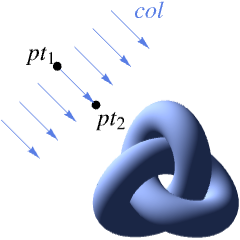
is a three–dimensional graphics directive that specifies the directional light of color col from the point pt to the center of the bounding box to use in coloring 3D surfaces.
DirectionalLight[col,{pt1,pt2}]
uses a directional light along the vector from pt1 to pt2.
Details
- DirectionalLight is also known as free directional light.
- DirectionalLight is typically used to create brighter highlights and darker shadows on objects by casting light rays equally from a given direction.
- DirectionalLight[col,{pt1,pt2}] yields parallel simulated light rays of color col in the direction vector defined by {pt1,pt2}.
- Colors of light sources col can be defined by RGBColor, Hue or any other color specification.
- The setting for DirectionalLight affects only colors associated with diffuse and specular reflection on a 3D surface.
- Light sources with color specifications col of the form {dcol,Specularity[scol]} are effectively taken to have colors dcol for purposes of diffuse reflection, and scol for purposes of specular reflection.
- Diffuse reflection is taken to follow Lambert's law, with light effectively scattered equally in all directions from a surface.
- Specular reflection effectively takes light to be scattered only close to the mirror‐reflection direction, as specified in the notes for Specularity.
- Light source positions and aiming points pti can be specified as follows:
-
{x,y,z} explicit coordinates that move with the graphic Scaled[{x,y,z}] scaled coordinates that move with the graphic ImageScaled[{x,y,z}] coordinates fixed relative to the final displayed image - In ImageScaled[{x,y,z}], the
 and
and  run from 0 to 1 across the width and height of the bounding box of the final displayed image. The
  coordinate runs orthogonal to the plane of the display and is 0 at the back of the 3D region and 1 at the front.
 - Coordinates specified in Scaled and ImageScaled will often not be between 0 and 1.
Examples
open all close allBasic Examples (3)
Directional light on surfaces:
Graphics3D[{DirectionalLight[Orange, {1, 1, 1}], Sphere[], Cuboid[{1, 2, -1}, {2, 3, 1}], Cylinder[{{3, -1, 0}, {3, -1, 1}}]}, Lighting -> None]Plot3D[Sin[x + y ^ 2], {x, -3, 3}, {y, -2, 2}, PlotStyle -> DirectionalLight[RGBColor[1, 0.7, 0.1], {{5, 5, 4}, {5, 5, 0}}]]A directional light from the top of the specular surface:
ListPlot3D[RandomReal[1, {9, 9}], InterpolationOrder -> 2, Mesh -> None, PlotStyle -> {Specularity[50], DirectionalLight[RGBColor[1, 0.7, 0.1], {{5, 5, 4}, {5, 5, 0}}]}]Scope (5)
Lighting Specification (4)
Directional light is specified by a color and a vector defined by two points:
Graphics3D[{DirectionalLight[Green, {{0, 0, 1}, {0, 0, 0}}], White, Sphere[]}, Lighting -> None]Directional lights with different colors:
Table[Graphics3D[{DirectionalLight[c, {{0, 0, 1}, {0, 0, 0}}], White, Sphere[]}, Lighting -> None], {c, {Red, Yellow, Blue}}]Directional lights with different directions:
Table[Graphics3D[{DirectionalLight[Orange, {p, {0, 0, 0}}], Sphere[]}, Lighting -> None], {p, {{1, 0, 0}, {0, -1, 0}, {1, -1, 0}, {0, 0, 1}}}]Directional lights on a specular surface:
Table[Graphics3D[{DirectionalLight[Orange, {p, {0, 0, 0}}], Specularity[White, 50], Sphere[]}, Lighting -> None], {p, {{1, 0, 0}, {0, -1, 0}, {1, -1, 0}, {0, 0, 1}}}]Lighting Positions (1)
Specify the light position in the view coordinate system using ImageScaled:
Graphics3D[{DirectionalLight[Red, ImageScaled[{2, 2, 2}]], DirectionalLight[Green, ImageScaled[{-2, 2, 2}]], DirectionalLight[Blue, ImageScaled[{-2, -2, 2}]], Sphere[]}, Lighting -> None]The light source position is always fixed relative to the view point:
Table[Graphics3D[{DirectionalLight[Red, ImageScaled[{2, 2, 2}]], DirectionalLight[Green, ImageScaled[{-2, 2, 2}]], DirectionalLight[Blue, ImageScaled[{-2, -2, 2}]], Sphere[]}, Lighting -> None, ViewPoint -> v], {v, {{0, -2, 2}, {2, 0, 2}, {2, -2, 0}}}]Generalizations & Extensions (8)
Graphics3D[Sphere[], Lighting -> Automatic]The colored lighting is equivalent to the following explicit setting:
Graphics3D[{Sphere[], AmbientLight[RGBColor[{0.4, 0.2, 0.2}]], DirectionalLight[RGBColor[{0., 0.18, 0.5}], ImageScaled[{2, 0, 2}]], DirectionalLight[RGBColor[{0.18, 0.5, 0.18}], ImageScaled[{2, 2, 3}]], DirectionalLight[RGBColor[{0.5, 0.18, 0.}], ImageScaled[{0, 2, 2}]], DirectionalLight[RGBColor[{0., 0., 0.18}], ImageScaled[{0, 0, 2}]]}]Graphics3D[{Sphere[]}, Lighting -> "Accent"]The accent lighting is equivalent to the following explicit setting:
Graphics3D[{DirectionalLight[RGBColor[{1, 1, 1}], ImageScaled[{1, 1, 4}]], Sphere[]}, Lighting -> None]Graphics3D[{Sphere[]}, Lighting -> "Neutral"]The neutral lighting is equivalent to the following explicit setting:
Graphics3D[{AmbientLight[RGBColor[{.35, .35, .35}]], DirectionalLight[RGBColor[{.37, .37, .37}], ImageScaled[{2, 0, 2}]], DirectionalLight[RGBColor[{.37, .37, .37}], ImageScaled[{2, 2, 2}]], DirectionalLight[RGBColor[{.37, .37, .37}], ImageScaled[{0, 2, 2}]], Sphere[]}, Lighting -> None]Predefined three-point lighting:
Graphics3D[{Sphere[]}, Lighting -> "ThreePoint"]The three-point lighting is equivalent to the following explicit setting:
Graphics3D[{DirectionalLight[GrayLevel[.85], ImageScaled[{1, 1, 2}]], DirectionalLight[GrayLevel[.4], ImageScaled[{-1, -2, 2}]], DirectionalLight[GrayLevel[.1], ImageScaled[{.5, 2, -2}]], Sphere[]}, Lighting -> None]Specify lighting for each object:
o1 = Style[{PointLight[Red, {0, 0, 2}], Sphere[]}];
o2 = Style[{SpotLight[Yellow, {{3, 0, 2}, {3, 0, 0}}, Pi / 8], Sphere[{3, 0, 0}]}];
o3 = Style[{DirectionalLight[Blue, {{0, 3, 2}, {0, 3, 0}}], Sphere[{0, 3, 0}]}];
o4 = Style[{PointLight[White, {3, 3, 2}], Sphere[{3, 3, 0}]}];Graphics3D[{o1, o2, o3, o4}, Lighting -> None]Specify lighting within the graphics:
Graphics3D[{{PointLight[Red, {0, 0, 2}], Sphere[]}, {SpotLight[Yellow, {{3, 0, 2}, {3, 0, 0}}, Pi / 8], Sphere[{3, 0, 0}]}, {DirectionalLight[Blue, {{0, 3, 2}, {0, 3, 0}}], Sphere[{0, 3, 0}]}, {PointLight[White, {3, 3, 2}], Sphere[{3, 3, 0}]}}, Lighting -> None]If not specified, the target direction is given toward the center of the objects:
Graphics3D[{DirectionalLight[LightRed, {0, 0, 4}], Specularity[White, 50], Sphere[], Sphere[{3, 0, 0}], Sphere[{0, 3, 0}], Sphere[{3, 3, 0}]}, Lighting -> None]Specify diffuse and specular colors separately for both objects and lights:
Graphics3D[{DirectionalLight[{Red, Specularity[Yellow]}, {0, 0, 3}], Specularity[White, 20], Sphere[]}, Lighting -> None]Applications (3)
Set up four white spheres on a plane:
obj = Graphics3D[{Specularity[White, 50], Sphere[], Sphere[{4, 0, 0}], Sphere[{0, 4, 0}], Sphere[{4, 4, 0}]}, Lighting -> None];
plane = ParametricPlot3D[{u, v, -1}, {u, -2, 6}, {v, -2, 6}, PlotPoints -> 40, MaxRecursion -> 0, Mesh -> None, PlotRange -> 1, Axes -> False];light = Graphics3D[{DirectionalLight[Yellow, {2, 2, 10}], Glow[Yellow], EdgeForm[Gray], Opacity[.2], Cuboid[{-2, -2, -1}, {6, 6, 3}]}];Show[light, obj, plane, Boxed -> False]Different light instruments at the corner points:
lights = {PointSize[Large], Yellow, Point[Tuples[{-1, 1}, 3]]};Graphics3D[{DirectionalLight[Hue[RandomReal[]], #]& /@ Tuples[{-1, 1}, 3], lights, Sphere[]}]Build a scene with multiple objects and light sources:
col = {Red, Green, Blue};
objs = Graphics3D[{Specularity[White, 2], EdgeForm[], Cylinder[{{2, 2, 0}, {2, 2, 4}}], Cylinder[{{6, 2, 0}, {6, 2, 4}}], Cylinder[{{10, 2, 0}, {10, 2, 4}}]}];
walls = ParametricPlot3D[{{u, v - 2, 0}, {u, 4, 2v}}, {u, -2, 14}, {v, 0, 6}, PlotPoints -> 15, MaxRecursion -> 0, PlotStyle -> Specularity[White, 2], Mesh -> None, Axes -> False];
srcs[pos_] := Graphics3D[MapThread[{DirectionalLight[#1, {{0, -1, 0}, {0, 0, 0}}], Sphere[{#2, 0, 8}, .3]}&, {col, pos}]];
lights[pos_] := Join[{AmbientLight[GrayLevel[.1]]}, Sequence@@MapThread[{SpotLight[#1, {{#2, 0, 8}, {#2, 3, 0}}, {Pi / 2, 20}], {PointLight[#1, {#2, 0, 8}, {0, 8, 0}]}}&, {col, pos}]];Animate[With[{rx = -6Cos[t] + 6, gx = 6Sin[t] + 6, bx = 6Cos[t] + 6}, Show[objs, walls, srcs[{rx, gx, bx}], Lighting -> lights[{rx, gx, bx}], Background -> Black, Boxed -> False, ImageSize -> 300]], {t, 0, 2Pi}, SaveDefinitions -> True, AnimationRunning -> False]Properties & Relations (1)
Possible Issues (1)
Text
Wolfram Research (2021), DirectionalLight, Wolfram Language function, https://reference.wolfram.com/language/ref/DirectionalLight.html.
CMS
Wolfram Language. 2021. "DirectionalLight." Wolfram Language & System Documentation Center. Wolfram Research. https://reference.wolfram.com/language/ref/DirectionalLight.html.
APA
Wolfram Language. (2021). DirectionalLight. Wolfram Language & System Documentation Center. Retrieved from https://reference.wolfram.com/language/ref/DirectionalLight.html