
 dimension in data.

MeanShiftFilter
MeanShiftFilter[data,r,d]
filters data by replacing every value by the mean of the pixels in a range-r neighborhood and whose value is within a distance d.
MeanShiftFilter[data,{r1,r2,…},d]
uses ri for filtering the 
 dimension in data.
Details and Options
- MeanShiftFilter is used to locally smooth data and diminish noise while preserving significant jumps such as edges in images, where the amount of smoothing is dependent on the values of r and d.
- The function applied to each range-r neighborhood is MeanShift.
- The data can be any of the following:
-
list arbitrary-rank numerical array tseries temporal data such as TimeSeries, TemporalData, … image arbitrary Image or Image3D object audio an Audio object video a Video object - For multichannel images and audio signals, the distance is computed between channel vectors.
- MeanShiftFilter[data,{r1,r2,…},d] computes the mean shift value in
 blocks centered on each sample.
 - MeanShiftFilter assumes the index coordinate system for lists and images.
- At the data boundaries, MeanShiftFilter uses smaller neighborhoods.
- The following options can be given:
-
DistanceFunction EuclideanDistance how to compute the distance between values MaxIterations 1 maximum number of iterations to be performed - For a complete list of possible settings for DistanceFunction, see the reference page for MeanShift.
- The possible range for the distance parameter d depends on the distance function as well as the dimension of the color space.

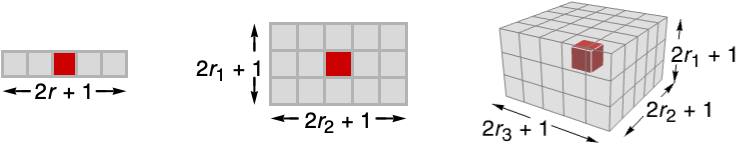
Background & Context
- MeanShiftFilter is a filter for smoothing images to remove local variations typically caused by noise, rough textures, etc. MeanShiftFilter is often used as a preprocessing step before doing other image analysis operations such as segmentation.
- Unlike most other noise-removing filters (e.g. MeanFilter), MeanShiftFilter preserves edges in the image. Other similar functions include PeronaMalikFilter, BilateralFilter, and NonlocalMeansFilter.
Examples
open all close allBasic Examples (3)
Mean-shift filtering of a vector:
MeanShiftFilter[ {1, 0, 1, 4, 4, 5, 2, 1}, 2, 1]Filter a TimeSeries:
ts = TemporalData[TimeSeries, {{{0., -0.054108337548928784, 0.1280211704499059, 0.28162021808461324,
    -0.2057320325139802, -0.4871901025739722, -0.7154387408784426, -0.7399660905024047,
    -0.6981022018441507, -0.7178077145466483, -0.8034462541874 ... 7894984276149, 1.8851123992920942, 1.8341759268762767, 2.0335844117979263}},
  {{0., 10., 0.1}}, 1, {"Continuous", 1}, {"Continuous", 1}, 1,
  {ValueDimensions -> 1, ResamplingMethod -> {"Interpolation", InterpolationOrder -> 1}}}, False,
10.];filtered = MeanShiftFilter[ts, 5, 2]ListLinePlot[{ts, filtered}, PlotLegends -> {"original data", "filtered"}]Mean-shift filtering of a color image:
MeanShiftFilter[[image], 10, .5]Scope (12)
Data (7)
MeanShiftFilter[ {0, 1, 10, 11}, 1, 1]Mean-shift filtering of a 2D array:
MeanShiftFilter[(| | | | |
| - | - | - | - |
| 0 | 3 | 2 | 2 |
| 3 | 9 | 9 | 6 |
| 5 | 8 | 7 | 0 |
| 3 | 1 | 1 | 2 |), 1, 2]//MatrixFormFilter a TimeSeries:
ts = TemporalData[TimeSeries, {{{0., -0.27267267057145633, -0.6672983789995302, -0.5338541947930846,
    -0.6117404489279314, -0.6755527076595494, -0.02125421294486496, -0.10792797291843935,
    -0.6138271235477938, -0.3248568606554575, -0.08843449054 ... 2053424, -0.49980440691873723, -0.5388679788215971,
    -0.4101602764645551}}, {{0, 1., 0.01}}, 1, {"Continuous", 1}, {"Continuous", 1}, 1,
  {ValueDimensions -> 1, ResamplingMethod -> {"Interpolation", InterpolationOrder -> 1}}}, False,
10.1];filtered = MeanShiftFilter[ts, 5, 1, MaxIterations -> 100]ListLinePlot[{ts, filtered}, PlotLegends -> {"original data", "filtered"}]Filter an Audio signal:
a = Import["ExampleData/rule30.wav"];b = MeanShiftFilter[a, 25, 0.5]AudioPlot[{a, b}]Mean-shift filtering of a grayscale image:
MeanShiftFilter[[image], 5, 0.1]MeanShiftFilter[Video["ExampleData/fish.mp4"], 3, .02]Mean-shift filtering of a 3D image:
MeanShiftFilter[[image], 6, 0.1]Parameters (5)
Specify one radius to be used in all directions:
MeanShiftFilter[[image], 5, 1]Mean-shift filtering in just the first direction:
MeanShiftFilter[[image], {5, 0}, 1]Filtering in just the second direction:
MeanShiftFilter[[image], {0, 5}, 1]Mean-shift filtering of a 3D image in the vertical direction only:
MeanShiftFilter[[image], {5, 0, 0}, 1]Mean-shift filtering of a 3D image in the horizontal planes only:
MeanShiftFilter[[image], {0, 5, 5}, 1]Mean-shift filter averages only over pixels that differ in value by less than d:
Labeled[MeanShiftFilter[[image], 5, #], #]& /@ {0.1, 0.3, 0.5}Options (3)
DistanceFunction (2)
By default, EuclideanDistance is used:
MeanShiftFilter[[image], 10, .5]Specify the distance function:
MeanShiftFilter[[image], 10, .5, DistanceFunction -> ManhattanDistance]MaxIterations (1)
By default, only one iteration of mean shift is applied to input:
MeanShiftFilter[[image], 3, .1]Use MaxIterations to specify the number of iterations:
MeanShiftFilter[[image], 3, .1, MaxIterations -> 100]Applications (2)
Use mean-shift filtering to smooth an image while preserving the edges:
MeanShiftFilter[[image], 4, 0.05, MaxIterations -> 30]Use mean-shift filtering as a preprocessing step for image segmentation:
ClusteringComponents[MeanShiftFilter[[image], 3, 0.2], 5]// ColorizeProperties & Relations (1)
MeanShiftFilter is equivalent to MeanFilter for distance d greater than the data dynamic range:
r = 1;
data = RandomReal[{0, r}, 100];MeanShiftFilter[data, 1, r + $MachineEpsilon] == MeanFilter[data, 1]Neat Examples (1)
Show how MeanShiftFilter iteratively shifts values until they converge:
data = Join[RandomReal[NormalDistribution[0, .4], {500, 2}], RandomReal[NormalDistribution[1, .4], {500, 2}]];ListPlot[data]ms = NestList[MeanShiftFilter[#, 1000, {.6, .6}]&, data, 5];ListLinePlot[Transpose[ms]]Text
Wolfram Research (2010), MeanShiftFilter, Wolfram Language function, https://reference.wolfram.com/language/ref/MeanShiftFilter.html (updated 2025).
CMS
Wolfram Language. 2010. "MeanShiftFilter." Wolfram Language & System Documentation Center. Wolfram Research. Last Modified 2025. https://reference.wolfram.com/language/ref/MeanShiftFilter.html.
APA
Wolfram Language. (2010). MeanShiftFilter. Wolfram Language & System Documentation Center. Retrieved from https://reference.wolfram.com/language/ref/MeanShiftFilter.html