

Parallelogram
Parallelogram[p,{v1,v2}]
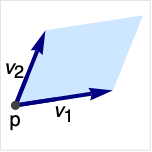
represents a parallelogram with origin p and directions v1 and v2.
Details and Options
- Parallelogram is also known as rhomboid and rhombus.
- Parallelogram represents
 , where the vectors vi have to be linearly independent.
 - Parallelogram[] is equivalent to Parallelogram[{0,0},{{1,0},{1,1}}].
- CanonicalizePolygon can be used to convert a parallelogram to an explicit Polygon object.
- Parallelogram can be used as a geometric region and graphics primitive.
- Parallelogram can be used in Graphics.
- In graphics, the point p and vectors vi can be Scaled and Dynamic expressions.
- Graphics rendering is affected by directives such as FaceForm, EdgeForm, Opacity, and color.
Examples
open all close allBasic Examples (3)
Graphics[Parallelogram[]]Different styles applied to a parallelogram:
ℛ = Parallelogram[{0, 0}, {{1, 0}, {1, 1}}];{Graphics[{Pink, ℛ}], Graphics[{EdgeForm[Thick], Pink, ℛ}], Graphics[{EdgeForm[Dashed], Pink, ℛ}], Graphics[{EdgeForm[Directive[Thick, Dashed, Blue]], Pink, ℛ}]}Compute the Area of a parallelogram:
ℛ = Parallelogram[{0, 0}, {{1, 0}, {1, 1}}];Area[ℛ]RegionCentroid[ℛ]Scope (16)
Graphics (6)
Specification (2)
Graphics[Parallelogram[]]A parallelogram with specified origin and directions:
p = {0, 0};
v1 = {1, 2};
v2 = {1, 0};ill = {PointSize[Large], Point[p], Arrowheads[Medium], Thick, Arrow[{p, v1}], Arrow[{p, v2}]};Graphics[{{StandardGray, Parallelogram[p, {v1, v2}]}, ill}, Frame -> True]Styling (2)
Color directives specify the face color:
Table[Graphics[{c, Parallelogram[]}], {c, {Red, Green, Blue, Yellow}}]FaceForm and EdgeForm can be used to specify the styles of the interior and boundary:
Graphics[{FaceForm[Pink], EdgeForm[Directive[Thick, Dashed, Blue]], Parallelogram[]}]Coordinates (2)
Use Scaled coordinates:
Graphics[Parallelogram[Scaled[{0.1, 0.1}], {Scaled[{0.2, 0.5}], Scaled[{0.6, 0.3}]}], Frame -> True, PlotRange -> {{0, 10}, {0, 10}}]Use Offset coordinates:
Graphics[Triangle[{Offset[{10, 10}, {0, 0}], Offset[{-10, 10}, {1, 0}], Offset[{10, -10}, {0, 1}]}], Frame -> True]Regions (10)
Embedding dimension is the dimension of the space in which the vertices exist:
RegionEmbeddingDimension[Parallelogram[{0, 0}, {{1, 0}, {1, 1}}]]Geometric dimension is the dimensionality of the region itself:
RegionDimension[Parallelogram[{0, 0}, {{1, 0}, {1, 1}}]]ℛ = Parallelogram[{0, 0}, {{1, 0}, {1, 1}}];{RegionMember[ℛ, {1, 1}], RegionMember[ℛ, {-1, -1}]}Get conditions for point membership:
RegionMember[ℛ, {x, y}]ℛ = Parallelogram[{0, 0}, {{1, 0}, {1, 1}}];RegionMeasure[ℛ]RegionCentroid[ℛ]Distance from a point to a parallelogram:
ℛ = Parallelogram[{0, 0}, {{1, 0}, {1, 1}}];RegionDistance[ℛ, {2, 3}]{Plot3D[RegionDistance[ℛ, {x, y}], {x, -1, 3}, {y, -1, 2}, MeshFunctions -> {#3&}, Mesh -> 5], ContourPlot[RegionDistance[ℛ, {x, y}], {x, -2, 4}, {y, -2, 3}, Contours -> {{0.5, Red}, {1, Green}, {1.5, Blue}}]}Signed distance to a parallelogram:
ℛ = Parallelogram[{0, 0}, {{1, 0}, {1, 1}}];SignedRegionDistance[ℛ, {1, 1 / 2}]Plot3D[SignedRegionDistance[ℛ, {x, y}], {x, -1, 3}, {y, -1, 2}, MeshFunctions -> {#3&}, Mesh -> {{0}}, MeshShading -> {Red, Green}]ℛ = Parallelogram[{0, 0}, {{1, 0}, {1, 1}}];RegionNearest[ℛ, {3, 4}]pts = Table[{1, 1 / 2} + 2{Cos[k 2 π / 16], Sin[k 2π / 16]}, {k, 0, 15}];
nst = RegionNearest[ℛ, #]& /@ pts;Legended[Graphics[{{Gray, ℛ}, {Thin, Gray, Line[Transpose[{pts, nst}]]}, {Red, Point[pts]}, {Blue, Point[nst]}}], PointLegend[{Red, Blue}, {"start", "nearest"}]]A parallelogram is bounded and convex:
ℛ = Parallelogram[{0, 0}, {{1, 0}, {1, 1}}];BoundedRegionQ[ℛ]rr = RegionBounds[ℛ]Graphics[{ℛ, {EdgeForm[{Dashed, Red}], Opacity[0.2, Yellow], Cuboid@@Transpose[rr]}}]Integrate over a parallelogram:
ℛ = Parallelogram[{0, 0}, {{1, 0}, {1, 1}}];Integrate[1, {x, y}∈ℛ]Integrate[x y, {x, y}∈ℛ]Optimize over a parallelogram:
ℛ = Parallelogram[{0, 0}, {{1, 0}, {1, 1}}];Minimize[{(x - 1 / 2)^2(y - 1 / 4)^2 + 1, {x, y}∈ℛ}, {x, y}]Solve equations in a parallelogram:
ℛ = Parallelogram[{0, 0}, {{1, 0}, {1, 1}}];Reduce[x^2 + y^2 == 1 && {x, y}∈ℛ, {x, y}]Applications (5)
A rhombus is a parallelogram in which all edges are the same length:
RhombusQ[p_Parallelogram] := Equal@@(Norm[#]& /@ Last[p])p1 = Parallelogram[{0, 0}, {{1, 0}, {2, 1}}];
p2 = Parallelogram[{0, 0}, {{1, 0}, {2 / Sqrt[5], 1 / Sqrt[5]}}];RhombusQ[#]& /@ {p1, p2}{Show[Region[p1], PlotLabel -> "Non ‐ rhombus"], Show[Region[p2], PlotLabel -> "Rhombus"]}A parallelogram with sides that form right angles is a rectangle:
p = {2, 1};
{v1, v2} = {{1, 2}, {4, -2}};
para = Parallelogram[p, {v1, v2}];Dot[v1, v2] == 0Region[para]Any rectangle can easily be converted to a parallelogram:
RectangleToParallelogram[r_Rectangle] := Parallelogram[First[r], (Last[r] - First[r]) * IdentityMatrix[2]]r = Rectangle[{2, 3}, {5, 7}];
p = RectangleToParallelogram[r]{Region[r], Region[p]}The area of a parallelogram can easily be computed from the direction vectors:
point = {Subscript[x, 0], Subscript[y, 0]};
vecs = {{Subscript[x, 1], Subscript[y, 1]}, {Subscript[x, 2], Subscript[y, 2]}};
para = Parallelogram[point, vecs];
Simply treat the vectors as a matrix and take the absolute value of the determinant:
Abs[Det[vecs]]Compare with Area:
Area[para]A Parallelogram can tile the plane:
Graphics[{EdgeForm[Gray], FaceForm[LightBlue], Table[Parallelogram[{1, 0}i + {1, 1}j, {{1, 0}, {1, 1}}], {i, 1, 5}, {j, 1, 5}]}]Properties & Relations (6)
Rectangle is a special case of Parallelogram:
Subscript[ℛ, 1] = Rectangle[{0, 0}, {1, 1}];
Subscript[ℛ, 2] = Parallelogram[{0, 0}, {{0, 1}, {1, 0}}];RegionEqual[Subscript[ℛ, 1], Subscript[ℛ, 2]]Polygon is a generalization of Parallelogram:
Subscript[ℛ, 1] = Polygon[{{0, 0}, {0, 1}, {1, 2}, {1, 1}}];
Subscript[ℛ, 2] = Parallelogram[{0, 0}, {{0, 1}, {1, 1}}];RegionEqual[Subscript[ℛ, 1], Subscript[ℛ, 2]]Parallelepiped generalizes Parallelogram to any dimension:
Subscript[ℛ, 1] = Parallelogram[{0, 0}, {{1, 0}, {1, 1}}];
Subscript[ℛ, 2] = Parallelepiped[{0, 0}, {{1, 0}, {1, 1}}];RegionEqual[Subscript[ℛ, 1], Subscript[ℛ, 2]]ImplicitRegion can represent any parallelogram:
Subscript[ℛ, 1] = ImplicitRegion[0 ≤ y ≤ 1 && x ≥ y && x ≤ y + 1, {x, y}];
Subscript[ℛ, 2] = Parallelogram[{0, 0}, {{1, 0}, {1, 1}}];RegionEqual[Subscript[ℛ, 1], Subscript[ℛ, 2]]ParametricRegion can represent any parallelogram:
p = {1, 2};
{Subscript[v, 1], Subscript[v, 2]} = {{1, 0}, {1, 1}};
Subscript[ℛ, 1] = ParametricRegion[{p + Subscript[t, 1]Subscript[v, 1] + Subscript[t, 2]Subscript[v, 2], 0 ≤ Subscript[t, 1] ≤ 1 && 0 ≤ Subscript[t, 2] ≤ 1}, {Subscript[t, 1], Subscript[t, 2]}];
Subscript[ℛ, 2] = Parallelogram[p, {Subscript[v, 1], Subscript[v, 2]}];RegionEqual[Subscript[ℛ, 1], Subscript[ℛ, 2]]A parallelogram can be represented as the union of two triangles:
Subscript[ℛ, 1] = Parallelogram[{0, 0}, {{1, 0}, {1, 1}}];
Subscript[ℛ, 2] = RegionUnion[Triangle[{{0, 0}, {1, 0}, {2, 1}}], Triangle[{{2, 1}, {1, 1}, {0, 0}}]];RegionEqual[Subscript[ℛ, 1], Subscript[ℛ, 2]]Text
Wolfram Research (2014), Parallelogram, Wolfram Language function, https://reference.wolfram.com/language/ref/Parallelogram.html (updated 2019).
CMS
Wolfram Language. 2014. "Parallelogram." Wolfram Language & System Documentation Center. Wolfram Research. Last Modified 2019. https://reference.wolfram.com/language/ref/Parallelogram.html.
APA
Wolfram Language. (2014). Parallelogram. Wolfram Language & System Documentation Center. Retrieved from https://reference.wolfram.com/language/ref/Parallelogram.html