



Area
Area[reg]
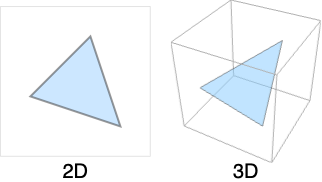
gives the area of the two-dimensional region reg.
Area[{x1,…,xn},{s,smin,smax},{t,tmin,tmax}]
gives the area of the parametrized surface whose Cartesian coordinates xi are functions of s and t.
Area[{x1,…,xn},{s,smin,smax},{t,tmin,tmax},chart]
interprets the xi as coordinates in the specified coordinate chart.
Details and Options
- Area is also known as surface area.
- A two-dimensional region can be embedded in any dimension greater than or equal to two.
- In Area[x,{s,smin,smax},{t,tmin,tmax}], if x is a scalar, Area returns the area of the parametric surface {s,t,x}.
- Coordinate charts in the fourth argument of Area can be specified as triples {coordsys,metric,dim} in the same way as in the first argument of CoordinateChartData. The short form in which dim is omitted may be used.
- The following options can be given:
-
AccuracyGoal Infinity digits of absolute accurary sought Assumptions $Assumptions assumptions to make about parameters GenerateConditions Automatic whether to generate conditions on parameters PerformanceGoal $PerformanceGoal aspects of performance to try to optimize PrecisionGoal Automatic digits of precision sought WorkingPrecision Automatic the precision used in internal computations - Symbolic limits of integration are assumed to be real and ordered. Symbolic coordinate chart parameters are assumed to be in range given by the "ParameterRangeAssumptions" property of CoordinateChartData.
- Area can be used with symbolic regions in GeometricScene.
Examples
open all close allBasic Examples (4)
Area[Disk[]]Area[Sphere[]]The area of an annulus with inner radius 1 and outer radius 2:
Area[{r Sin[θ], r Cos[θ]}, {r, 1, 2}, {θ, 0, 2Pi}]The surface area of the open cylinder  ,
, 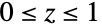 expressed in cylindrical coordinates:
Area[{1, t, z}, {z, 0, 1}, {t, 0, 2Pi}, "Cylindrical"]Scope (23)
Special Regions (5)
Region[Rectangle[{0, 0}, {2, 1}]]Area[Rectangle[{Subscript[l, x], Subscript[l, y]}, {Subscript[u, x], Subscript[u, y]}]]Region[Parallelogram[{0, 0}, {{2, 0}, {1, 2}}]]Area[Parallelogram[{Subscript[p, x], Subscript[p, y]}, {{Subscript[u, x], Subscript[u, y]}, {Subscript[v, x], Subscript[v, y]}}]]Region[Simplex[2]]Area[Simplex[2]]Area is defined for a 2D Simplex embedded in any dimension:
Area[Simplex[{{0, 0, 0, 0}, {0, 1, 1, 0}, {1, 0, 0, 1}}]]The area of a Polygon:
ℛ = Polygon[{{0, 0}, {2, -1}, {1, 0}, {2, 1}}];Region[ℛ]Area[ℛ]ℛ = Polygon[{{0, 0, 0}, {(5/3), (2/3), -(4/3)}, {(2/3), (2/3), -(1/3)}, {1, 2, 0}}];Region[ℛ]Area[ℛ]Disk:
Region[Disk[{0, 0}, 1]]Area[Disk[{Subscript[c, x], Subscript[c, y]}, r]]Disk can be used as an ellipse:
Region[Disk[{0, 0}, {3, 2}]]Area[Disk[{Subscript[c, x], Subscript[c, y]}, {Subscript[r, x], Subscript[r, y]}]]The Area of a Sphere is its surface area:
Region[Sphere[]]Area[Sphere[]]Area[Sphere[{Subscript[c, x], Subscript[c, y], Subscript[c, z]}, r]]Formula Regions (2)
The area of a disk represented as an ImplicitRegion:
Area[ImplicitRegion[x^2 + y^2 ≤ 1, {x, y}]]Area[ImplicitRegion[x^2 + y^2 + z^2 == 1, {x, y, z}]]The area of a disk represented as a ParametricRegion:
Area[ParametricRegion[{r Cos[θ], r Sin[θ]}, {{r, 0, 1}, {θ, 0, 2π}}]]Using a rational parameterization of the disk:
Area[ParametricRegion[{r(1 - t^2/1 + t^2), r(2t/1 + t^2)}, {t, {r, 0, 1}}]]Area[ParametricRegion[{Cos[θ]Cos[ϕ], Sin[θ]Cos[ϕ], Sin[ϕ]}, {{θ, 0, 2π}, {ϕ, -π / 2, π / 2}}]]Mesh Regions (2)
The area of a MeshRegion:
DelaunayMesh[RandomReal[1, {10, 2}]]Area[%]MeshRegion[{{0, 0, 0}, {0, 0, 1}, {0, 1, 0}, {1, 0, 0}}, {Polygon[{{1, 2, 3}, {1, 2, 4}, {1, 3, 4}}]}]Area[%]The area of a BoundaryMeshRegion:
ConvexHullMesh[RandomReal[1, {10, 2}]]Area[%]Derived Regions (3)
The area of a RegionIntersection:
ℛ = RegionIntersection[Disk[{0, 0}, 1], Disk[{1, 0}, 1]];Show[Graphics[{LightBlue, EdgeForm[Gray], Disk[{0, 0}, 1], Disk[{1, 0}, 1]}], HighlightMesh[DiscretizeRegion[ℛ], 2]]Area[ℛ]The measure of a TransformedRegion:
ℛ = TransformedRegion[Disk[], ScalingTransform[{a, b}]];Region[ℛ /. {a -> 3, b -> 2}]Area[ℛ]The surface area of a RegionBoundary:
ℛ = RegionBoundary[Ball[]]Region[ℛ]Area[ℛ]Parametric Formulas (6)
The area of an ellipse with semimajor axes 2 and 1:
Area[{2r Sin[θ], r Cos[θ]}, {r, 0, 1}, {θ, 0, 2Pi}]ParametricPlot[{2r Sin[θ], 1r Cos[θ]}, {r, 0, 1}, {θ, 0, 2Pi}]The area of a half-cone at  in spherical coordinates:
Area[{r, Pi / 4, t}, {r, 0, 1}, {t, 0, Pi} , "Spherical"]ParametricPlot3D[CoordinateTransform[ "Spherical" -> "Cartesian", {r, Pi / 4, t}]//Evaluate, {r, 0, 1}, {t, 0, Pi}]The surface area of a torus of major radius 5 and minor radius 2:
Area[{(5 + 2Sin[p])Cos[t], (5 + 2Sin[p])Sin[t], 2Cos[p]}, {t, 0, 2Pi}, {p, 0, 2Pi} ]ParametricPlot3D[{(5 + 2Sin[p])Cos[t], (5 + 2Sin[p])Sin[t], 2Cos[p]}, {t, 0, 2Pi}, {p, 0, 2Pi} ]The area of a "flat torus" embedded in four-dimensional space:
Area[{5Sin[t], 5Cos[t], 2Sin[p], 2Cos[p]}, {t, 0, 2Pi}, {p, 0, 2Pi}]The area of the paraboloid 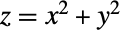 over the rectangle
  :
:
Area[x ^ 2 + y ^ 2, {x, -2, 2}, {y, -3, 3}]Plot3D[x ^ 2 + y ^ 2, {x, -2, 2.}, {y, -3, 3.}]The area of a surface in a three-sphere using stereographic coordinates:
Area[{t, s, s}, {t, 0, ∞}, {s, 0, 1}, {"Stereographic", {"Sphere", 2}}]Geographic Regions (3)
The area of a polygon with GeoPosition:
ℛ = Polygon[GeoPosition[{{{40.083441, -88.235716}, {40.083607, -88.257488}, {40.082603, -88.257149},
   {40.076136999999996, -88.25740499999999}, {40.076178, -88.270888}, {40.076516, -88.271558},
   {40.083686, -88.271512}, {40.083659999999995, -88.267046},  ... 33323}, {40.098112, -88.228687},
   {40.095216, -88.228627}, {40.095179, -88.238547}, {40.094480999999995, -88.238546},
   {40.094508999999995, -88.23267}, {40.094106, -88.232556}, {40.090666999999996, -88.232477},
{40.090741, -88.235745}}}]];Area[ℛ]The area of a polygon with GeoGridPosition:
ℛ = Polygon[GeoGridPosition[{{{-0.9950503945490105, 1.2366760550756015},
   {-0.9952074890903578, 1.2369207053693891}, {-0.9952196732768064, 1.2369073327446167},
   {-0.9953160063787643, 1.236848436956935}, {-0.9954141759436825, 1.2369993898475449},
   {-0. ... 197645333103}, {-0.9949098578570917, 1.2368130881428654},
   {-0.9948663952535768, 1.2367477711687371}, {-0.9948714472169538, 1.2367426500757825},
{-0.9949211061652593, 1.2367089232486177}, {-0.9949439717990124, 1.236746107097628}}}, "Bonne"]];Area[ℛ]Area works on polygons with geographic entities:
ℛ = Polygon[["france"]];Area[ℛ]CSG Regions (1)
The area of a linear CSGRegion:
CSGRegion["Difference", {Rectangle[], Rectangle[{1 / 2, 1 / 2}]}]Area[%]CSGRegion["Difference", {Disk[], Disk[{1 / 2, 1 / 2}]}]Area[%]Subdivision Regions (1)
The area of a SubdivisionRegion in 2D:
SubdivisionRegion[Rectangle[]]Area[%]SubdivisionRegion[RegionBoundary[Cube[]]]Area[%]Options (6)
AccuracyGoal (1)
Consider a region whose area is difficult to compute exactly:
Region[ℛ = ImplicitRegion[x ^ 2 + y ^ 2 <= Cos[x y], {x, y}]]area1 = Area[ℛ]The AccuracyGoal option can be used to change the default absolute tolerance. Here, the area computation stops once the accuracy goal criterion has been exceeded:
area2 = Area[ℛ, AccuracyGoal -> 8]The result with the default settings is different since the default uses only a precision criterion:
area1 - area2Assumptions (1)
The area of an ellipse with arbitrary semimajor axes  and
and  :
:
Area[{r, v}, {r, 0, ArcSech[Sqrt[1 - (b^2/a^2)]]}, {v, 0, 2Pi}, {{"Elliptic", Sqrt[a^2 - b^2]}}]Adding an assumption that the semimajor axes are positive simplifies the answer:
Area[{r, v}, {r, 0, ArcSech[Sqrt[1 - (b^2/a^2)]]}, {v, 0, 2Pi}, {{"Elliptic", Sqrt[a^2 - b^2]}}, Assumptions -> a > 0 && b > 0]PrecisionGoal (1)
The number of effective digits of precision that should be sought can be specified with PrecisionGoal:
Table[Area[ImplicitRegion[x ^ 6 + y ^ 6 - x y <= 1, {x, y}], PrecisionGoal -> prec], {prec, 1, 14}]Plot the areas computed for various precision settings:
ListPlot[%, PlotRange -> All]PerformanceGoal (1)
Consider a region whose area is difficult to compute exactly:
Region[ℛ = ImplicitRegion[x ^ 2 + y ^ 2 <= Cos[x y], {x, y}]]Use PerformanceGoal"Speed" to attempt to compute an area quickly:
(area1 = Area[ℛ, PerformanceGoal -> "Speed"])//TimingUse PerformanceGoal"Performance" to attempt to compute a result with as many correct digits as possible:
(area2 = Area[ℛ, PerformanceGoal -> "Quality"])//TimingWorkingPrecision (2)
Compute the Area using machine arithmetic:
Area[ImplicitRegion[x ^ 6 + y ^ 6 - x y <= 1, {x, y}], WorkingPrecision -> MachinePrecision]In some cases, the exact answer cannot be computed:
Area[ImplicitRegion[x ^ 6 + y ^ 6 - x y <= 1, {x, y}]]Find the Area using 30 digits of precision:
Area[{a Cos[t], a Sin[t], a Sin[t]}, {t, 0, 2Pi}, {a, 0, 1}, WorkingPrecision -> 30]Find the Area using infinite precision:
Area[{a Cos[t], a Sin[t], a Sin[t]}, {t, 0, 2Pi}, {a, 0, 1}, WorkingPrecision -> ∞]Applications (4)
The area of a function surface  :
:
𝒮 = ParametricRegion[{x, y, x y}, {{x, 0, 1}, {y, 0, 1}}];RegionDimension[𝒮]Area[𝒮]Area[x y, {x, 0, 1}, {y, 0, 1}]Find the average density of a region with density given by  :
:
ℛ = Simplex[2];Integrate[x^2y^3, {x, y}∈ℛ] / Area[ℛ]Compute the surface area of a polyhedron:
p = PolyhedronData["SnubDodecahedron"];ℛ = DiscretizeGraphics[p]PolyhedronData gives a surface, not a solid, so Area can be used:
RegionDimension[ℛ]Area[ℛ]Compute the surface area of a Solomon seal knot:
g = Graphics3D[KnotData["SolomonSeal", "ImageData"]];ℛ = DiscretizeGraphics[g]The region is a surface in 3D:
RegionDimension[ℛ]Area[ℛ]Properties & Relations (5)
Area is a non-negative quantity:
Area[{Cos[φ]Sin[θ], Sin[φ]Sin[θ], Cos[θ]}, {θ, 0, π}, {φ, 0, 2Pi}]Area[{Cos[φ]Sin[θ], Sin[φ]Sin[θ], Cos[θ]}, {θ, 0, π}, {φ, 0, -2Pi}]Area[r] is the same as RegionMeasure[r] for 2D regions:
ℛ = Simplex[2];
{Area[ℛ], RegionMeasure[ℛ]}ℛ = Polygon[{{0, 0, 1}, {0, 1, 0}, {1, 0, 0}}];
{Area[ℛ], RegionMeasure[ℛ]}Area[x,s,t,c] is equivalent to RegionMeasure[x,{s,t},c]:
Area[{s t ^ 2, Pi / 2, Pi / 4, s t}, {s, 0, 1}, {t, 0, 2Pi}, "Hyperspherical"]RegionMeasure[{s t ^ 2, Pi / 2, Pi / 4, s t}, {{s, 0, 1}, {t, 0, 2Pi}}, "Hyperspherical"]For a 2D region, Area is the integral of 1 over the region:
ℛ = Disk[];
{Area[ℛ], Integrate[1, x∈ℛ]}ℛ = Sphere[];
{Area[ℛ], Integrate[1, x∈ℛ]}To get the surface area of a 3D region, use RegionBoundary:
ℛ = DelaunayMesh[RandomReal[1, {20, 3}]]Area[RegionBoundary[ℛ]]Possible Issues (2)
The parametric form of Area computes the area of possibly multiple coverings:
Area[{Cos[φ]Sin[θ], Sin[φ]Sin[θ], Cos[θ]}, {θ, 0, π}, {φ, 0, 4Pi}]The region version computes the area of the image:
Area[ParametricRegion[{Cos[φ]Sin[θ], Sin[φ]Sin[θ], Cos[θ]}, {{θ, 0, π}, {φ, 0, 4Pi}}]]Area[Sphere[{0, 0, 0}, 1]]The area of a region of dimension other than two is Undefined:
{Area[Point[{0, 0}]], Area[Line[{{0, 0}, {1, 1}}]], Area[Ball[]]}RegionDimension /@ {Point[{0, 0}], Line[{{0, 0}, {1, 1}}], Ball[]}Text
Wolfram Research (2014), Area, Wolfram Language function, https://reference.wolfram.com/language/ref/Area.html (updated 2019).
CMS
Wolfram Language. 2014. "Area." Wolfram Language & System Documentation Center. Wolfram Research. Last Modified 2019. https://reference.wolfram.com/language/ref/Area.html.
APA
Wolfram Language. (2014). Area. Wolfram Language & System Documentation Center. Retrieved from https://reference.wolfram.com/language/ref/Area.html