

RegionBoundary
RegionBoundary[reg]
represents the boundary of the region reg.
Details
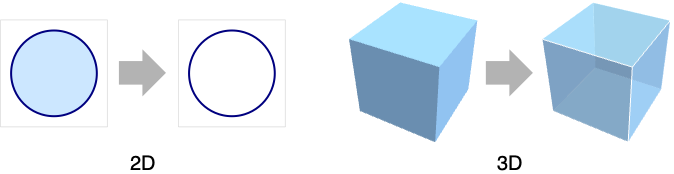
- A point p belongs to RegionBoundary[reg] if any ball centered at p contains points that belong to reg and points that do not belong to reg.
- If RegionDimension[reg]<RegionEmbeddingDimension[reg] then RegionBoundary[reg]==reg.
- RegionBoundary can be used with symbolic regions in GeometricScene.
Examples
open all close allBasic Examples (2)
Subscript[ℛ, 1] = Disk[];
Subscript[ℛ, 2] = RegionBoundary[Subscript[ℛ, 1]]{Region[Subscript[ℛ, 1]], Region[Subscript[ℛ, 2]]}Compute the circumference of the disk:
ArcLength[Subscript[ℛ, 2]]The boundary of a MeshRegion:
mr1 = DelaunayMesh[RandomReal[1, {15, 2}]];
mr2 = RegionBoundary[mr1];Show[mr1, HighlightMesh[mr2, 1]]Compute the arc length of the perimeter:
ArcLength[mr2]Scope (14)
Special Regions (5)
The boundary of a Line in 1D is a set of points:
ℛ = RegionBoundary[Line[{{{0}, {1}}, {{2}, {3}}}]];RegionMeasure[ℛ]Region[ℛ]The boundary of a Polygon in 2D is a Line object:
ℛ = RegionBoundary[Polygon[{{0, 0}, {3, -1}, {2, 0}, {3, 1}}]]Compute the length of the perimeter of the polygon:
ArcLength[ℛ]Region[ℛ]The boundary of a Disk is a Circle:
ℛ = RegionBoundary[Disk[{0, 0}, r]]ArcLength[ℛ]Substitute in a value for  to visualize it:
Region[ℛ /. {r -> 1}]The boundary of a Ball is a Sphere:
ℛ = RegionBoundary[Ball[]]Area[ℛ]Region[ℛ]The boundary of a unit ball in 7D:
ℛ = RegionBoundary[Ball[7]]This cannot be visualized, but can still be computed with:
RegionMeasure[ℛ]Mesh Regions (6)
The boundary of a BoundaryMeshRegion in 1D:
mr = BoundaryMeshRegion[{{0}, {1}, {2}, {3}}, Point[{1, 2, 3, 4}]];
ℛ = RegionBoundary[mr]
Visualize it overlaid on the original region:
Show[mr, HighlightMesh[ℛ, 0]]The boundary of a MeshRegion in 1D:
mr = MeshRegion[{{0}, {1}, {2}}, {Point[{1}], Line[{2, 3}]}];
ℛ = RegionBoundary[mr]
Visualize it overlaid on the original region:
Show[mr, HighlightMesh[ℛ, {Style[0, Red]}]]The boundary of a BoundaryMeshRegion in 2D:
mr = ConvexHullMesh[RandomReal[1, {15, 2}]];
ℛ = RegionBoundary[mr];
Compute the length of the perimeter:
ArcLength[ℛ]Visualize it overlaid on the original region:
Show[mr, HighlightMesh[ℛ, 1]]The boundary of a MeshRegion in 2D:
mr = MeshRegion[{{0, 0}, {1, 0}, {2, 0}, {3, -1 / 2}, {3, 1 / 2}}, {Point[{1}], Line[{2, 3}], Polygon[{3, 4, 5}]}];
ℛ = RegionBoundary[mr]
Compute the length of the boundary:
ArcLength[ℛ]The boundary of a BoundaryMeshRegion in 3D:
mr = ConvexHullMesh[RandomReal[1, {20, 3}]];
ℛ = RegionBoundary[mr]Area[ℛ]The boundary of a MeshRegion in 3D:
mr = MeshRegion[{{0, 0, 0}, {1, 0, 0}, {2, 0, 0}, {3, 0, -1 / 2}, {3, 0, 1 / 2}, {4, -1 / 2, 0}, {4, 1 / 2, 0}}, {Point[1], Line[{2, 3}], Triangle[{3, 4, 5}], Tetrahedron[{4, 6, 5, 7}]}];
ℛ = RegionBoundary[mr]Area[ℛ]Geographic Regions (2)
The boundary of a polygon with GeoPosition:
Subscript[ℛ, 1] = Polygon[GeoPosition[{{{40.083441, -88.235716}, {40.083607, -88.257488}, {40.082603, -88.257149},
   {40.076136999999996, -88.25740499999999}, {40.076178, -88.270888}, {40.076516, -88.271558},
   {40.083686, -88.271512}, {40.083659999999995, -88.267046},  ... 33323}, {40.098112, -88.228687},
   {40.095216, -88.228627}, {40.095179, -88.238547}, {40.094480999999995, -88.238546},
   {40.094508999999995, -88.23267}, {40.094106, -88.232556}, {40.090666999999996, -88.232477},
   {40.090741, -88.235745}}}]];
Subscript[ℛ, 2] = RegionBoundary[Subscript[ℛ, 1]]{Region[Subscript[ℛ, 1]], Region[Subscript[ℛ, 2]]}The boundary of a polygon with GeoGridPosition:
Subscript[ℛ, 1] = Polygon[GeoGridPosition[{{{-0.9950503945490105, 1.2366760550756015},
   {-0.9952074890903578, 1.2369207053693891}, {-0.9952196732768064, 1.2369073327446167},
   {-0.9953160063787643, 1.236848436956935}, {-0.9954141759436825, 1.2369993898475449},
   {-0. ... 197645333103}, {-0.9949098578570917, 1.2368130881428654},
   {-0.9948663952535768, 1.2367477711687371}, {-0.9948714472169538, 1.2367426500757825},
   {-0.9949211061652593, 1.2367089232486177}, {-0.9949439717990124, 1.236746107097628}}}, "Bonne"]];
Subscript[ℛ, 2] = RegionBoundary[Subscript[ℛ, 1]];{Region[Subscript[ℛ, 1]], Region[Subscript[ℛ, 2]]}Subdivision Regions (1)
The boundary of a SubdivisionRegion:
ℛ = RegionBoundary[SubdivisionRegion[Cube[]]]Area[ℛ]Properties & Relations (5)
The dimension of RegionBoundary for a full-dimensional region is one dimension less:
RegionDimension[Ball[]]RegionDimension[RegionBoundary[Ball[]]]The dimension of RegionBoundary for a lower-dimensional region is the same:
RegionDimension[Sphere[]]RegionDimension[RegionBoundary[Sphere[]]]RegionBoundary of a lower-dimensional region is the region itself:
RegionBoundary[Circle[]]RegionBoundary[Sphere[]]The boundary of a boundary is the boundary itself:
RegionBoundary[RegionBoundary[Ball[]]]RegionBoundary[Ball[]]The boundary consists of points for which SignedRegionDistance is zero:
ℛ = Disk[];Reduce[{x, y}∈RegionBoundary[ℛ]⧦SignedRegionDistance[ℛ, {x, y}] == 0, {x, y}, Reals]Text
Wolfram Research (2014), RegionBoundary, Wolfram Language function, https://reference.wolfram.com/language/ref/RegionBoundary.html.
CMS
Wolfram Language. 2014. "RegionBoundary." Wolfram Language & System Documentation Center. Wolfram Research. https://reference.wolfram.com/language/ref/RegionBoundary.html.
APA
Wolfram Language. (2014). RegionBoundary. Wolfram Language & System Documentation Center. Retrieved from https://reference.wolfram.com/language/ref/RegionBoundary.html