 subdivision level of

SubdivisionRegion
SubdivisionRegion[mesh]
represents the limit region of applying a subdivision scheme to the mesh region mesh.
SubdivisionRegion[mesh,n]
gives the n subdivision level of mesh.
SubdivisionRegion[…,proc]
uses the subdivision refinement scheme proc.
Details and Options
- SubdivisionRegion is also known as subdivision surface and subdivision curve.
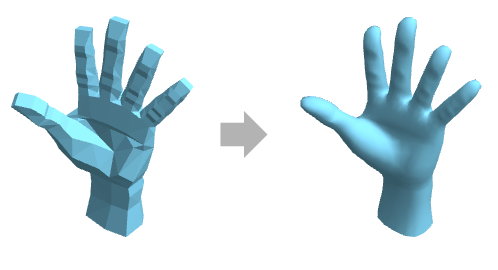
- SubdivisionRegion is typically used to create smoother and more detailed regions by splitting faces and lines of a mesh region into smaller parts.
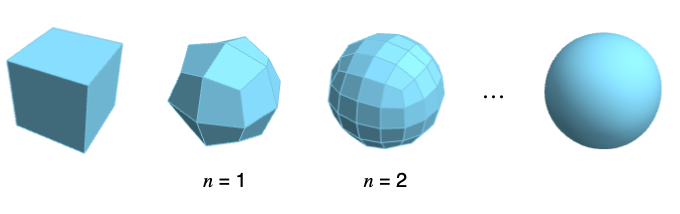
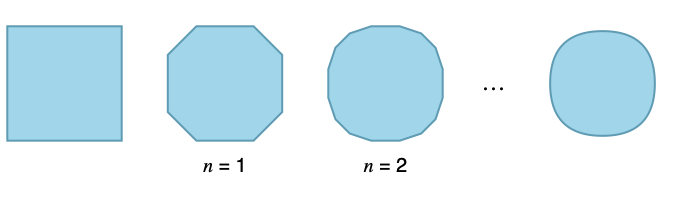
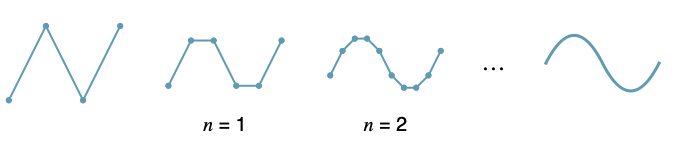
- SubdivisionRegion[mesh] represents the limit of the iterative process of refining the mesh region mesh.
- SubdivisionRegion[mesh,n] gives the mesh region obtained after applying a subdivision n times to mesh.
- SubdivisionRegion works on mesh regions in 2D and 3D, including lines, polygons, surfaces and solids.
- SubdivisionRegion[mesh,n,proc] uses the specified subdivision refinement scheme proc.
- Possible subdivision refinement schemes proc for 3D mesh regions include:
-

"CatmullClark" quadrilateral-based subdivision scheme 
"Loop" triangle-based subdivision scheme 
"QuadTri" hybrid subdivison scheme - Possible subdivision refinement schemes proc for 2D mesh regions include:
-

"Chaikin" corner-cutting scheme - SubdivisionRegion takes the same options as Region.
Examples
open all close allBasic Examples (2)
SubdivisionRegion[[image]]Table[SubdivisionRegion[[image], i], {i, 3}]SubdivisionRegion[Polygon[{{0.23511410091698925, 0.323606797749979}, {0, 1},
{-0.23511410091698923, 0.323606797749979}, {-Sqrt[5/8 + Sqrt[5]/8], (-1 + Sqrt[5])/4},
{-0.3804226065180615, -0.12360679774997892}, {-Sqrt[5/8 - Sqrt[5]/8], (-1 - Sqrt[5])/4},
{-7.347880794884119*^-17, -0.4}, {Sqrt[5/8 - Sqrt[5]/8], (-1 - Sqrt[5])/4},
{0.3804226065180614, -0.12360679774997907}, {Sqrt[5/8 + Sqrt[5]/8], (-1 + Sqrt[5])/4}}]]Area[%]Scope (8)
Basic Uses (2)
SubdivisionRegion works on curves:
SubdivisionRegion[[image]]SubdivisionRegion[[image]]SubdivisionRegion[[image]]SubdivisionRegion works on regions in 2D:
SubdivisionRegion[Rectangle[]]SubdivisionRegion[Cuboid[]]Presentation (3)
Specify the styling of a SubdivisionRegion in 2D:
SubdivisionRegion[Rectangle[], BaseStyle -> {EdgeForm[{Gray, Thick}], FaceForm[LightRed]}]SubdivisionRegion[Cuboid[], BaseStyle -> Hue[0, 0.23, 1.]]Specify graphics options for SubdivisionRegion in 2D:
SubdivisionRegion[Rectangle[], Background -> LightGreen, PlotRangePadding -> 1 / 2]SubdivisionRegion[Cuboid[], Background -> GrayLevel[0.4], Lighting -> "ThreePoint"]Styling applies to finite subdivision levels:
SubdivisionRegion[Cuboid[], 2, Background -> GrayLevel[0.2], Lighting -> "ThreePoint", BaseStyle -> {EdgeForm[], White}]Specification (3)
By default, SubdivisionRegion gives the limit region as the subdivision level approaches infinity:
SubdivisionRegion[Tetrahedron[]]This is equivalent to specifying a level of Infinity:
SubdivisionRegion[Tetrahedron[], Infinity]SubdivisionRegion[Tetrahedron[], 3]Level zero gives the region with no subdivisions applied:
SubdivisionRegion[Tetrahedron[], 0]Subdivide a region using different subdivision schemes in 2D:
SubdivisionRegion[Line[{{0, -1}, {1, 1}, {2, -1}, {3, 1}}], {"Chaikin"}]Table[SubdivisionRegion[Tetrahedron[], scheme], {scheme, {"CatmullClark", "Loop", "QuadTri"}}]Subdivide a region with a specific scheme to a given level:
SubdivisionRegion[Dodecahedron[], 1, "CatmullClark"]Applications (10)
Basic Applications (4)
The "CatmullClark" scheme subdivides each quadrilateral into four quadrilaterals:
SubdivisionRegion[[image], {0, 1}, "CatmullClark", Rule[...]]Other polygons will be subdivided into quadrilaterals, one per side:
SubdivisionRegion[[image], {0, 1}, "CatmullClark", Rule[...]]The "Loop" scheme subdivides each triangle into four triangles:
SubdivisionRegion[[image], {0, 1}, "Loop", Rule[...]]The "QuadTri" scheme subdivides each quadrilateral and triangle into four quadrilaterals and triangles, respectively:
SubdivisionRegion[[image], {0, 1}, "QuadTri", Rule[...]]Other polygons will be subdivided into quadrilaterals:
SubdivisionRegion[[image], {0, 1}, "QuadTri", Rule[...]]The "Chaikin" scheme adds a new edge for each corner:
SubdivisionRegion[[image], {0, 1}, "Chaikin"]Modeling (3)
Use SubdivisionRegion to smooth coarse meshes designed for subdivision:
SubdivisionRegion[[image], 3]Perform minor modifications on the control mesh to affect many faces on the subdivided mesh:
Table[SubdivisionRegion[r, 2], {r, {[image], [image]}}]Efficiently represent a high-fidelity model using a low poly base mesh:
base = [image];
SubdivisionRegion[base, 2]
The base mesh requires far less data to store than the explicitly subdivided result:
BarChart[ByteCount /@ {base, %}]Level of Detail Generation (1)
Create higher-level-of-detail models from a low-fidelity base mesh:
lods = SubdivisionRegion[[image], {0, 1, 2}, PlotTheme -> "SmoothShading"]Lower-level-of-detail meshes can be used when the object takes up less screen space to improve render speeds while preserving visual fidelity:
GraphicsRow[Table[MeshRegion[lods[[i]], ImageSize -> 2 ^ (i + 4)], {i, 3}]]Properties & Relations (2)
GeodesicPolyhedron subdivides a polyhedron to approximate a sphere:
Table[BoundaryDiscretizeRegion[GeodesicPolyhedron["Icosahedron", n]], {n, 1, 3}]Achieve a similar result using SubdivisionRegion:
Table[SubdivisionRegion[Icosahedron[], n, "Loop"], {n, 0, 2}]The limit region of the "Chaikin" subdivision scheme is a composite quadratic BezierCurve:
sreg = SubdivisionRegion[Line[{{0, 1}, {1, -1}, {2, 1}, {3, -1}}]];
bcurve = BezierCurve[{{(1/2), 0}, {1, -1}, {(3/2), 0}, {2, 1}, {(5/2), 0}}, SplineDegree -> 2];
{sreg, Region[bcurve]}
Possible Issues (2)
The "Loop" subdivision scheme will triangulate the mesh before subdividing:
Region[Cube[]]SubdivisionRegion[%, 0, "Loop"]Some subdivision schemes may produce non-planar faces that are not well defined geometrically:
mesh = SubdivisionRegion[Cube[], 1, "CatmullClark"]AllTrue[MeshPrimitives[mesh, 2][[All, 1]], CoplanarPoints]Non-planar faces are triangulated before performing further computations:
CanonicalizeRegion[mesh]AllTrue[MeshPrimitives[%, 2][[All, 1]], CoplanarPoints]Text
Wolfram Research (2025), SubdivisionRegion, Wolfram Language function, https://reference.wolfram.com/language/ref/SubdivisionRegion.html.
CMS
Wolfram Language. 2025. "SubdivisionRegion." Wolfram Language & System Documentation Center. Wolfram Research. https://reference.wolfram.com/language/ref/SubdivisionRegion.html.
APA
Wolfram Language. (2025). SubdivisionRegion. Wolfram Language & System Documentation Center. Retrieved from https://reference.wolfram.com/language/ref/SubdivisionRegion.html