

TabularStructure
TabularStructure[tab]
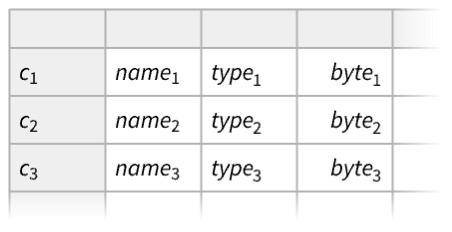
gives structural information about the Tabular tab for each column.
TabularStructure[tab,cols]
gives structural information for the columns cols.
TabularStructure[tab,cols,props]
selects the properties props to report.
Details
- TabularStructure is typically used to get structural information for each column.
- TabularStructure[tab,cols,props] returns another Tabular object in which the properties props are column keys and the columns cols are entries in a key column called "ColumnKey". Each row contains information for one of the original columns.
- Possible forms cols of column specification include:
-
All all columns of the input Tabular data {col1,col2,…} list of columns of the input data spatt string pattern for the column keys of the data crit criterion function to select columns keys - The pattern spatt can be given as a string with metacharacters such as "col*", as a StringExpression object such as "col"~~__ or as RegularExpression["regex"].
- The criterion function crit takes named variables #ColumnKey, providing the column key, and #ElementType, providing the type of the elements of the column.
- Possible properties props include:
-
"ColumnType" type of the column "MissingCount" number of missing elements in the column "NonMissingCount" number of non-missing elements in the column "ByteCount" byte count of the column "DuplicateFreeQ" whether the column has unique entries "CountDistinct" number of unique entries {prop1,prop2,…} list of properties propi above All list of all the properties above Automatic automatic choice of some of the properties above
Examples
open all close allBasic Examples (1)
Build a tabular report about the columns of a Tabular object:
tab = Tabular[{{1.5, "foo", True, Quantity[2, "Seconds"]}, {Missing[], "bar", False, Missing[]}}, {"c1", "c2", "c3", "c4"}]TabularStructure[tab]Include only some columns and report only about some properties:
TabularStructure[tab, {"c1", "c3"}, {"NonMissingCount", "MissingCount"}]Scope (3)
Take tabular data about the Titanic passengers:
tab = ResourceData["Sample Tabular Data: Titanic"]Compute a structural summary of the data:
TabularStructure[tab]Add more properties, including information about possible duplication of entries in each column:
TabularStructure[tab, All, All]Take tabular data about the elements:
tab = EntityValue["Element", {"Group", "AtomicRadius", "Valence", "Color"}, "Tabular"]Find a structural summary for some of the columns:
TabularStructure[tab, {"AtomicRadius", "Valence"}]TabularStructure[tab, "Color"]Report only about the original columns that contain "u" in their name:
TabularStructure[tab, "*u*"]Restrict to the columns of "Integer64" type:
TabularStructure[tab, Function[#ElementType === "Integer64"]]Take tabular data about the Titanic passengers:
tab = ResourceData["Sample Tabular Data: Titanic"]Find a structural report with the default properties:
TabularStructure[tab]Include all available properties, including some reporting about the possible presence of duplicate entries:
TabularStructure[tab, All, All]TabularStructure[tab, All, "ByteCount"]TabularStructure[tab, All, {"ColumnType", "CountDistinct"}]Applications (1)
Find out which columns of a Tabular object could be used as key columns for indexing it:
tab = ResourceData["Sample Tabular Data: Fatal Collisions"]TabularStructure[tab, All, {"DuplicateFreeQ", "CountDistinct"}]Only duplicate-free columns can be key columns, so that rows are uniquely identified by their values:
Select[%, Function[#DuplicateFreeQ]]Use for example the "state" column, after extracting a subset of the columns:
Tabular[tab[[All, {"state", "total", "alcohol"}]], <|"KeyColumns" -> "state"|>]Properties & Relations (3)
TabularStructure[tab] returns a Tabular object whose key column contains the column keys of tab:
tab = ResourceData["Sample Tabular Data: Titanic"];ColumnKeys[tab]TabularStructure[tab]%["KeyColumns"]TabularStructure of an anonymous Tabular object does not have the key column:
Tabular[{{1, 4.3, Quantity[2.1, "Kilograms"], "cat"}, {3, 1.7, Quantity[3.3, "Kilograms"], "fox"}}]TabularStructure[%]Take a Tabular object:
tab = Tabular[{{1.5, "foo", True, Quantity[2, "Seconds"]}, {Missing[], "bar", False, Missing[]}}, {"c1", "c2", "c3", "c4"}]A structural summary about zero columns will contain no rows:
TabularStructure[tab, {}, All]//NormalA structural summary with zero properties will contain no columns other than the key column:
TabularStructure[tab, All, {}]%//NormalText
Wolfram Research (2025), TabularStructure, Wolfram Language function, https://reference.wolfram.com/language/ref/TabularStructure.html.
CMS
Wolfram Language. 2025. "TabularStructure." Wolfram Language & System Documentation Center. Wolfram Research. https://reference.wolfram.com/language/ref/TabularStructure.html.
APA
Wolfram Language. (2025). TabularStructure. Wolfram Language & System Documentation Center. Retrieved from https://reference.wolfram.com/language/ref/TabularStructure.html