

ColumnKeys
ColumnKeys[data]
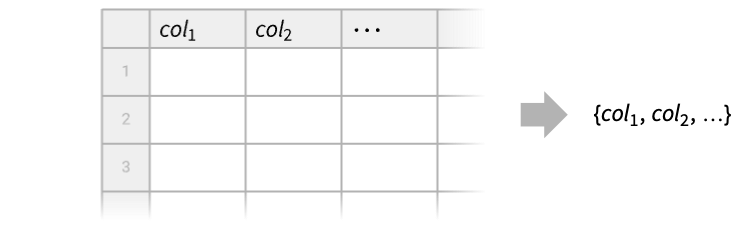
gives a list of the column keys in the tabular data.
ColumnKeys[data,spatt]
gives the column keys of data that match the string pattern spatt.
ColumnKeys[data,crit]
gives the column keys keyi of data for which crit[keyi] is True.
Details
- ColumnKeys is typically used to get a list of column keys or search for specific keys.
- Possible forms of data in ColumnKeys[data,…] include:
-
Tabular[…] tabular data as a list of typed columns Dataset[…] general hierarchical data {assoc1,assoc2,…} list of associations with common keys TimeSeries[…] time series with several components EventSeries[…] event series with several components - ColumnKeys returns column keys in the same order in which they appear in the input tabular data.
- For a Tabular object tab with anonymous columns, ColumnKeys[tab,…] returns None.
- For a TimeSeries or EventSeries object, ColumnKeys also includes the "Timestamp" component key.
- In ColumnKeys[data,spatt], possible string patterns include strings with wild characters such as "col*" and StringExpression objects such as "col"~~__.
- In ColumnKeys[data,crit], the function crit takes named variables #ColumnKey, providing the column key, and #ElementType, providing the type of the elements of the column.
Examples
open all close allBasic Examples (3)
Tabular[{<|"a" -> 1, "b" -> 2, "c" -> 3|>, <|"a" -> 4, "b" -> 5, "c" -> 6|>}]ColumnKeys[%]Select the keys that have names matching a string pattern:
tab = Tabular[{{1, 2, 3}, {4, 5, 6}}, {"ab", "bb", "ac"}]ColumnKeys[tab, "a*"]ColumnKeys[tab, "a" ~~ __]ColumnKeys[tab, "ab" | "ac"]Select the keys obeying a criterion function:
tab = Tabular[{{"cat", 1, "foo", 3.5}, {"dog", 3, "bar", -1.1}}, {"name1", "num1", "name2", "num2"}]ColumnKeys[tab, StringStartsQ[#ColumnKey, "num"]&]ColumnKeys[tab, #ElementType == "String"&]Scope (10)
Get the column keys of a Tabular object:
Tabular[{{"John", 34, Entity["City", {"NewYork", "NewYork", "UnitedStates"}]}, {"Yvonne", 56, Entity["City", {"Paris", "IleDeFrance", "France"}]}}, {"name", "age", "city"}]ColumnKeys[%]Get the column keys of a Dataset object:
ds = Take[ExampleData[{"Dataset", "Titanic"}], 4]ColumnKeys[ds]Get the keys of a list of associations:
assocs = {<|"c" -> 0, "a" -> 1, "b" -> 2|>, <|"b" -> 20, "c" -> "30"|>};ColumnKeys[assocs]ColumnKeys gives the unsorted union of the keys of the associations:
DeleteDuplicates[Join@@Map[Keys, assocs]]The result is also consistent with the corresponding Tabular object:
Tabular[assocs]Get the component keys of a TimeSeries object with several components:
TimeSeries[{{1, "dog"}, {4, "cat"}, {3, "fox"}}, {Today}, ComponentKeys -> {"number", "animal"}]ColumnKeys[%]Those are the column keys of the corresponding Tabular object:
Tabular[%%]The component keys of a simple TimeSeries object are "Timestamp" and "Value":
TimeSeries[{2, 3, 1}, {Today}]ColumnKeys[%]The column keys of a Tabular object can be arbitrary expressions:
Tabular[Table[{x, y} ^ n, {n, 5}], {x ^ n, y ^ n}]ColumnKeys[%]Take a Tabular object:
tab = ToTabular[<|"num1" -> {1, 2, 3}, "list1" -> {{4, 5}, Missing[], {6, 7}}, "num2" -> {1.3, 4.1, 8.}, "q1" -> Quantity[10, "Days"]|>, "Columns"]Use string patterns to select the columns whose key ends in "1":
ColumnKeys[tab, "*1"]ColumnKeys[tab, __ ~~ "1"]ColumnKeys[tab, StringEndsQ[#ColumnKey, "1"]&]Use a criterion function to select the keys of columns with integers:
ColumnKeys[tab, StringStartsQ[#ElementType, "Int"]&]Get the column keys for multilevel column names:
data = {{Today, "fox", 1}, {Tomorrow, "lynx", 2}};
names = {ExtendedKey["obs", "date"], ExtendedKey["obs", "species"], "c"};Tabular[data, names]ColumnKeys[%]Key columns are included in the result of ColumnKeys:
Tabular[{{1, "foo"}, {3, "bar"}}, <|"ColumnKeys" -> {"col1", "col2"}, "KeyColumns" -> {"col1"}|>]ColumnKeys[%]For a Tabular object with unspecified column keys, ColumnKeys returns None:
Tabular[{{1, 2}, {3, 4}, {5, 6}}]ColumnKeys[%]Applications (1)
Take a Tabular object of Palmer penguin data:
penguins = ResourceData["Sample Tabular Data: Palmer Penguins"]pt = PivotTable[penguins, Length[#species]&, {"sex"}, {"species", "island"}]Some of the column keys are ExtendedKey:
ColumnKeys[pt]Find all column keys for "Adelie" penguins:
ColumnKeys[pt, MatchQ[#ColumnKey, ExtendedKey["Adelie", _]]&]Properties & Relations (1)
ColumnKeyExistsQ[tab,key] returns True if key is in the list ColumnKeys[tab]:
tab = Tabular[{{"a1", "b1"}, {"a2", "b2"}}, {"colA", "colB"}]{ColumnKeyExistsQ[tab, "colB"], MemberQ[ColumnKeys[tab], "colB"]}{ColumnKeyExistsQ[tab, "B"], MemberQ[ColumnKeys[tab], "B"]}Text
Wolfram Research (2025), ColumnKeys, Wolfram Language function, https://reference.wolfram.com/language/ref/ColumnKeys.html (updated 2026).
CMS
Wolfram Language. 2025. "ColumnKeys." Wolfram Language & System Documentation Center. Wolfram Research. Last Modified 2026. https://reference.wolfram.com/language/ref/ColumnKeys.html.
APA
Wolfram Language. (2025). ColumnKeys. Wolfram Language & System Documentation Center. Retrieved from https://reference.wolfram.com/language/ref/ColumnKeys.html